O. James Samson - July 10, 2008
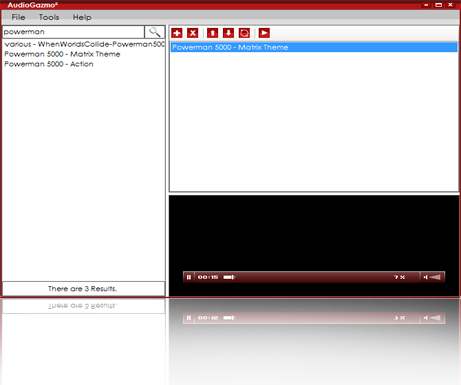 The idea of having an online media library that contains your favorite songs and genres of music is fascinating. AudioGazmo provides a forum where you play all your songs on line without downloading the songs. The idea of having an online media library that contains your favorite songs and genres of music is fascinating. AudioGazmo provides a forum where you play all your songs on line without downloading the songs.
This new version was released on July 1 2008 and contains a couple of changes I noticed from the previous version like an increased speed level in playing loading and searching songs. And a beautifully spiced up user interface and a new media player, oh I love the new look.
To listen to songs, all you need do is specify the song or songs, or specify the genre of music(rock, jazz, hip pop, etc) and then search, so easy.
Visit http://www.audiogazmo.com and get your version.
Rating:  Loading... No Comments »
O. James Samson - July 9, 2008
 Microsoft Remote Desktop Connection Client for Mac 2 features a redesigned user interface, improved customization options, and the ability to connect to multiple Windows-based computers at the same time. Microsoft Remote Desktop Connection Client for Mac 2 features a redesigned user interface, improved customization options, and the ability to connect to multiple Windows-based computers at the same time.
There a couple of improvements which I indeed looked up myself on this version like a universal binary coding structure that enables me work with both Mac and Window based systems, remote desktop protocol eases working with vista systems. One could have multiple sessions i.e. be connected to several computers and be able to manage those connections so none is lost. I found out that even when I sometimes lose my connections, they are automatically reestablished; now that’s so cool.
Just incase your aren’t sure of your connection a Network Level Authentication enables you verify the identity of the windows based computer before establishing Remote Desktop Connection. Network Level Authentication is a lot more reliable and more secure than the authentication options in the previous versions.
There are a lot more improvements on this version that would enhance it workability and I strongly recommend that you look it up right here.
Rating: Loading... No Comments »
O. James Samson - July 9, 2008
 OMG! When I first came across Pidgin for Windows, I thought it was a nice concept for free styling language usage… but the ability to simultaneously chat with users of other IM networks freely without the seeming limitations in sharing files like pictures, music and videos,was what really got me. That is a whole lot of free-styling. OMG! When I first came across Pidgin for Windows, I thought it was a nice concept for free styling language usage… but the ability to simultaneously chat with users of other IM networks freely without the seeming limitations in sharing files like pictures, music and videos,was what really got me. That is a whole lot of free-styling.
Pidgin allows you chat with friends on MSN, MyspaceIM, or Gadu-Gadu or even more while sitting at yahoo messenger all at the same time. Giving you the feel that you are all on the same network. That’s so cool.
Pidgin supports many features of the various networks, such as file transfer, away messages, and typing notification. It also goes beyond that and provides many unique features. send a message, play a sound, or run a program when a specific buddy goes away, signs online, or returns from idle; and plugins, consisting of text replacement, extended message notification, spell checking and more. And works well with Windows, UNIX operating systems and Linux.
I could go on and on but I think its best to check it out and see for yourself. Visit http://www.pidgin.im
Rating: Loading... No Comments »
Ciaran Moore - July 8, 2008
 This is a useful program that lets you make a virtual private network over the internet letting you behave like a network and even play network games across the internet in real time. This is a useful program that lets you make a virtual private network over the internet letting you behave like a network and even play network games across the internet in real time.
Its widely utilized for gaming, so much so that some people have even developed utilities for providing an easy connection for games like Age of Empires 3, making network game connections across the Internet.Several websites exist dedicated to the listing of Hamachi networks for various games which have a multiplayer (networked) option.
Access can be controlled with a password if needed, just to keep it truely private so you’ll be able to password-protect your networks so that only people you permit can join. If you’re concerned with security, they have a page devoted to what they call their “Security Architecture.”
The free version is limited to 64 networks with 16 users in each, doesn’t have user ban or network locking, and only has low bandwidth relays on their server. To connect to a VPN (Virtual Private Network) using Hamachi, both sides must have the Hamachi client installed.
It’s a great idea for making a really uncomplicated and easy to set up network with friends to allow for network gaming across the web.
You can get it, along with further info, from the LogMeIn Hamachi Homepage here
Rating: Loading... No Comments »
O. James Samson - July 4, 2008
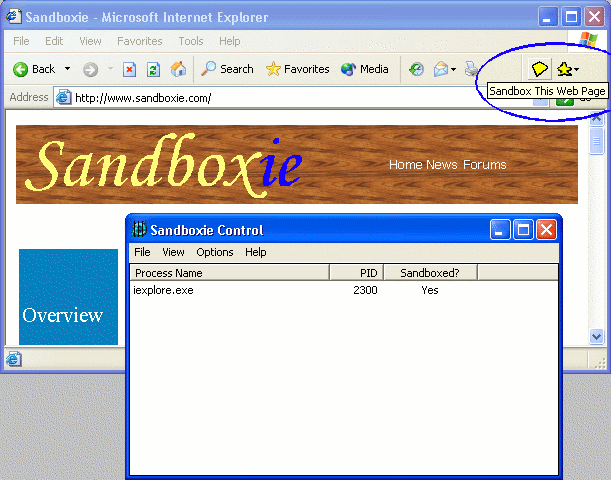 There are many reasons that people use browsers. They use them to download files, visit websites and generally improve their lives in ways that could not be accomplished online. While the internet is an absolutely fantastic resource, at the same time it can be a dangerous place. Files can contain viruses and cookies can launch programs that can ruin your computer at worst and cause you a lot of headache at best. Because of all of these problems, people have avoided places that are likely candidates for spyware, viruses or other harmful pieces of software, even if those places could have helped them in some way. There are many reasons that people use browsers. They use them to download files, visit websites and generally improve their lives in ways that could not be accomplished online. While the internet is an absolutely fantastic resource, at the same time it can be a dangerous place. Files can contain viruses and cookies can launch programs that can ruin your computer at worst and cause you a lot of headache at best. Because of all of these problems, people have avoided places that are likely candidates for spyware, viruses or other harmful pieces of software, even if those places could have helped them in some way.
Well, one way to get around this is to run your browser in a virtual sandbox and that is exactly what Sandboxie allows you to do. The latest version that was released on July 1, 2008, is actually a version that allows you to do this with any program, not just the browser. You keep everything you do within the virtual sandbox and then when you delete the sandbox, everything you did in the session disappears. This allows you to make sure that changes are safe before you actually make them and the peace of mind that results from that ability is so immeasurable that the fact this piece of software is free is almost unbelievable.
More information is available at http://www.sandboxie.com
Rating: Loading... No Comments »
Ciaran Moore - July 4, 2008
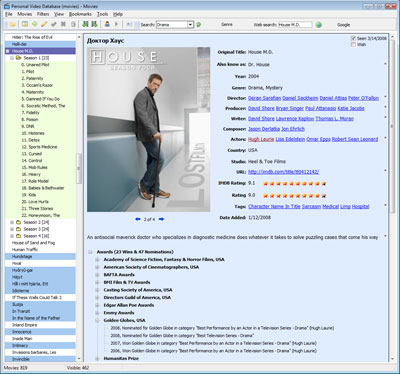 Got a large movie collection you want to keep track of ? With Personal Video Database you’ll be able to do that quickly and easily. The well thought-out user interface and assorted database management functions make it simple to make and manage even large movie databases. Got a large movie collection you want to keep track of ? With Personal Video Database you’ll be able to do that quickly and easily. The well thought-out user interface and assorted database management functions make it simple to make and manage even large movie databases.
It has powerful filtering, grouping and sorting that will assist you in finding your movies in no time. The program is expandable with plugins and there is already a batch of plugins that come with with the program that can help you call up movie info from various Internet movie databases or other database types.
Another noteworthy features is Loan management, handy for keeping track of those movies you loan to friends and sometimes forget about!
All in all, it makes for a powerful and dependable relational database of your movies and the people related with them, such as actors, directors, etc. It seems to be well supported with an active forum, where the developer pays attention to users.
Oh yeah, its free too! You can get it from the homepage here.
Rating: Loading... 1 Comment »
O. James Samson - July 3, 2008
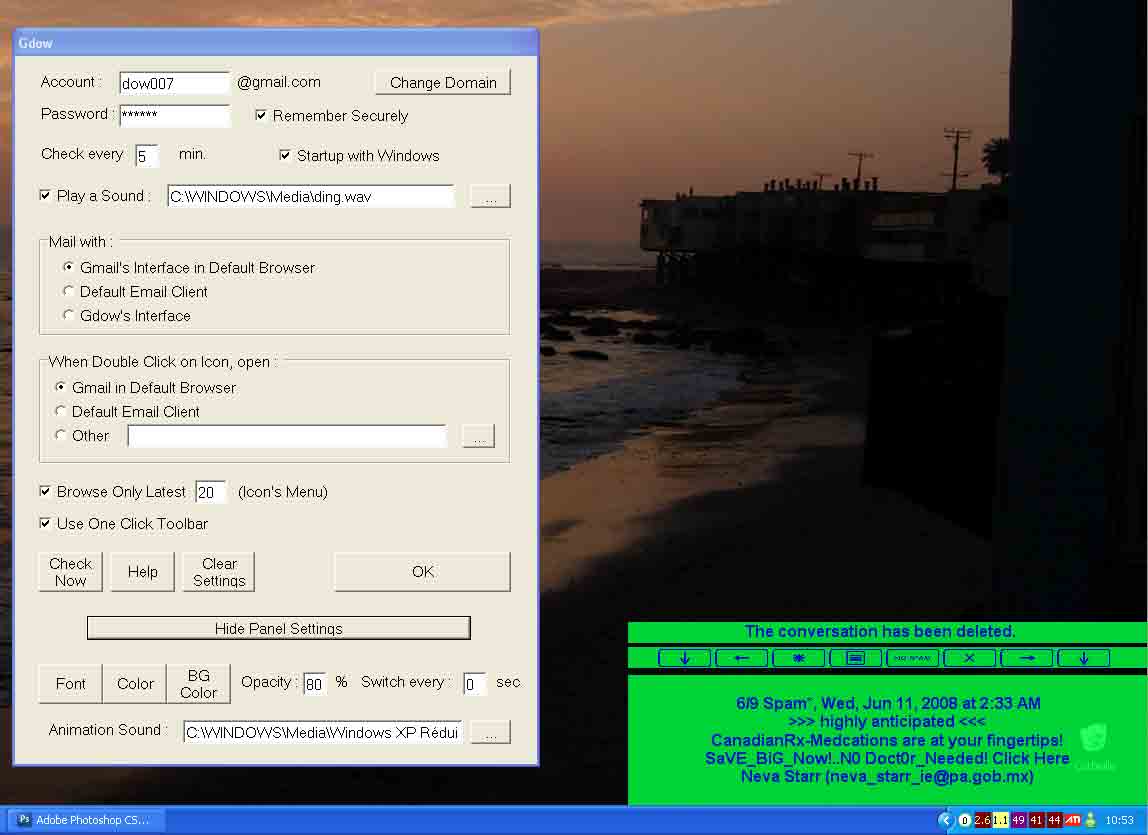 The latest version of Gdow has just been released and with it there are a number of interesting new changes. Many of these changes are minor in fashion, but one particular change of note is that the connection problems with Gdow have been fixed. Where some people had slow connections or even timeouts through the use of the software after the changes that were made to gmail at the end of June, now all of those problems have been fixed so that people can once again go ahead with their business. The latest version of Gdow has just been released and with it there are a number of interesting new changes. Many of these changes are minor in fashion, but one particular change of note is that the connection problems with Gdow have been fixed. Where some people had slow connections or even timeouts through the use of the software after the changes that were made to gmail at the end of June, now all of those problems have been fixed so that people can once again go ahead with their business.
Gdow acts as a piece of software to notify people when they have new mail in their gmail account. All of the capabilities of a gmail account in terms of notification are given on Gdow so that you can know what goes on with your gmail account within a few moments of it actually happening. To make things even better and sweeten the pot a little bit, Gdow can be used through a one-click graphical user interface or through a right click menu from its location on the system tray.
More information about this excellent piece of freeware is available from the publisher’s homepage at http://dowdow.free.fr/gdow2007.php.
Rating: Loading... No Comments »
O. James Samson - July 3, 2008
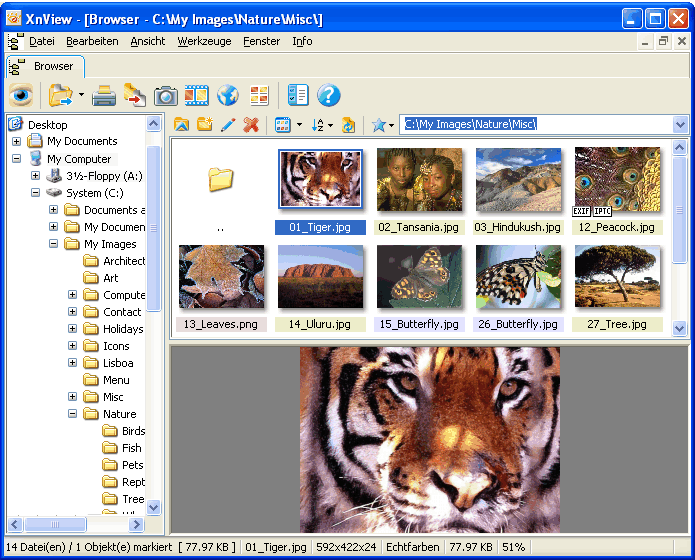 XnView is a piece of software that continues to be mentioned in the highest circles of good online freeware for the simple reason that it continues to amaze. The latest version of XnView was released on July 1 and it contains a number of interesting changes. Perhaps the most important change is the fact that the number of graphics formats that the software contains keeps on growing and in the latest incarnation of the software now standards at over 400. It is very unlikely that there is a graphics format out there that this program does not support and if you find one, be sure to send it to the creator so that he can make it compatible for the next release of XnView. XnView is a piece of software that continues to be mentioned in the highest circles of good online freeware for the simple reason that it continues to amaze. The latest version of XnView was released on July 1 and it contains a number of interesting changes. Perhaps the most important change is the fact that the number of graphics formats that the software contains keeps on growing and in the latest incarnation of the software now standards at over 400. It is very unlikely that there is a graphics format out there that this program does not support and if you find one, be sure to send it to the creator so that he can make it compatible for the next release of XnView.
Why is the support of so many graphics important? It is important because when you find that special image that you want to keep and use, you also want to make sure that you don’t reach a dead end if that image happens to be in a file format that a typical computer program would not be able to read. XnView allows for the changing of file formats as well as their viewing, capturing and editing in terms of the attributes of the electronic file. All of these aspects are important when converting a file from some little used graphical interface to a JPG or GIF and having a high quality program like XnView that is free to download is invaluable in this area.
More information is available at http://www.xnview.com/
Rating: Loading... No Comments »
O. James Samson - July 2, 2008
 Do you have problems backing up your documents and files? Here is something worth checking out. It is called Tame. Tame was designed to perform backup operations on areas you would consider least important, for example your messenger conversation logs,with Tame, are no longer lost when the application is close. Do you have problems backing up your documents and files? Here is something worth checking out. It is called Tame. Tame was designed to perform backup operations on areas you would consider least important, for example your messenger conversation logs,with Tame, are no longer lost when the application is close.
Here is how it works, Tame creates a full conversation folder and saves all your conversations therein. The folder is then saved in a customizable folder (my documents or my computer).Backups can also be set to run at specific system times,(i.e Tame doesn’t have to backup everything you are working on, like those documents you are sure you don’t need) while running silently in the background. Each backup that is made is time and date stamped so that you are fully aware of when each backup was made.
Each backup that is performed is controlled from its own window, which can be easily customised on the main window if you do not wish to see them running. Advanced options are also available to start each backup section on start-up and to start TAME when the Windows session is started. All of these features are available in an easy to understand environment that blends easily with Windows 2000/XP/2003/VISTA.
You can check it out at http://www.troupware.com/software/main/tame.htm
Rating: Loading... No Comments »
Ciaran Moore - July 1, 2008
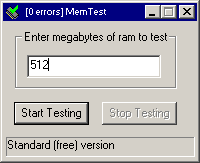 When it comes to computer glitches, assuming the software you’re running is not the cause, there can be other things at fault. It can sometimes be hardware related. One such element to consider is the computers RAM. When it comes to computer glitches, assuming the software you’re running is not the cause, there can be other things at fault. It can sometimes be hardware related. One such element to consider is the computers RAM.
Memtest is a small utility (filesize is a mere 15k!) for testing your computers RAM. A computer that fails these tests, perhaps because of old,poorly set-up,or damaged hardware, will be more likely to crash or become unstable.
By running this program, you can check that your computer’s RAM is working correctly. It’s a good idea to try this when you purchase a new computer, install new RAM, or alter the configuration of your machine (for example, overclocking it, if you’re the kind of person who likes to push the performance of your computer to the edge) Blindly trusting that your machine will still start after your recent BIOS changes or RAM upgrades is a risky way to find out the safety of your new settings.
It’s worth taking this program for a test run if you’ve recently upgraded your RAM or are thinking about changing your RAM configuration or simply just wish to find out your current RAM is running error free.
See the homepage for the download and further info.
Rating: Loading... No Comments »
|
|
|





