Tilgore Kraut - January 25, 2008
 Everyone wants that their important email messages which they send out reaches the recipient securely and in a protected manner. Along with this you would also like to maintain the privacy of yours and the recipients. Now you can do it easily with Email Privacy 2.93 which effectively takes care of all your worries relating to email privacy. It lets you to send the messages directly to your recipient’s mailbox. The software is essentially a local SMTP server program that works for Windows while staying at the system-tray. Everyone wants that their important email messages which they send out reaches the recipient securely and in a protected manner. Along with this you would also like to maintain the privacy of yours and the recipients. Now you can do it easily with Email Privacy 2.93 which effectively takes care of all your worries relating to email privacy. It lets you to send the messages directly to your recipient’s mailbox. The software is essentially a local SMTP server program that works for Windows while staying at the system-tray.
Email Privacy 2.93 software is simple and works by itself without much user intervention once it has been configured. You can see the statistics for the Messages Sent and Sending Errors in the program screen. You can also set the program for DNS Server to Auto detect DNS Server and also set to Use Specific Server. Same goes for the SMTP server that you can enable the Standard SMTP Port or Use Specific Port. You can also enable to accept the connection from same system only. You can also view the log file for the activities that had taken place. Change and configure the program according to your requirements so that you would have the program working according to your requirements. The software is capable of working with email programs such as Outlook, Outlook Express, Eudora, etc. It works with such efficiency that you can send a large number of messages with a minute. Even it software does not leaves any traces at the PC by taking the email messages from the email client that you are using and places them in the mailboxes of the recipient without making temporary files at your PC. The software is good to be used to send the messages with privacy and security.
Email Privacy 2.93 is also capable of being connected to the email program that you are already using to send and receive messages.
{More Info and Download}
Rating:  Loading... No Comments »
Tilgore Kraut - January 25, 2008
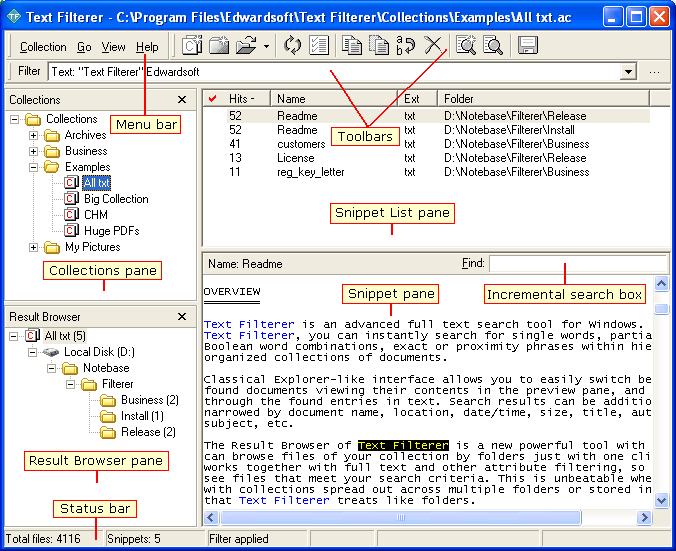 Among the various text search utilities available, Text Filterer 2.7 definitely stands out on account of its inherent capacity to dig out relevant text. It allows you to easily search for the full text, documents, and files with various types of formats. It can instantly search for the single word, exact phrases, partial words, or Boolean word combinations within the organized collection of the documents. It supports various format files plain text files, RTF, Unicode, XLS, PDF, HTML, DOC and also supports image formats like ICO, GIF, BMP, TIFF, JPEG, PNG, PSD, WMF, etc. It can even search and extract the supported files that are stored inside the ZIP, MHT and RAR, etc. Among the various text search utilities available, Text Filterer 2.7 definitely stands out on account of its inherent capacity to dig out relevant text. It allows you to easily search for the full text, documents, and files with various types of formats. It can instantly search for the single word, exact phrases, partial words, or Boolean word combinations within the organized collection of the documents. It supports various format files plain text files, RTF, Unicode, XLS, PDF, HTML, DOC and also supports image formats like ICO, GIF, BMP, TIFF, JPEG, PNG, PSD, WMF, etc. It can even search and extract the supported files that are stored inside the ZIP, MHT and RAR, etc.
Text Filterer 2.7 opens with the decent interface to work with. You can create a new snippet collection that gets listed on the left side panel. You can also add in new collection in the collection pane. Set the name for it, enter and it shows a dialog box that asks you to set the parameters. It has different features that need to be set by you for having the filtration work done. The ‘File Scope’ option is for setting the features for directory, file masks and the snippet form. With the Snippets tab you can choose the snippet separator, identifier, etc. Columns tab has the features for making the search with the excel files. Set the filter criteria and set the features for different given formats. Make the selections for the collection statistics and rebuilding and temporary files, etc. click Ok and the program start building the collection with the set format files. It shows the collected files on the upper half area and the preview of the selected files is shown below. You can delete, edit, rename, copy and save the collection for your work. Working with the software is easy for collecting the snippets.
{More Info and Download}
Rating: Loading... No Comments »
Tilgore Kraut - January 24, 2008
 Now you can control and manage your PC’s basic function even when you’re away from it. It’s easy to shut down, restart, log off and perform such function automatically by settings the things just once with the Supreme Shutdown Scheduler v1.1 that can achieve all this in no time. Now you can control and manage your PC’s basic function even when you’re away from it. It’s easy to shut down, restart, log off and perform such function automatically by settings the things just once with the Supreme Shutdown Scheduler v1.1 that can achieve all this in no time.
Supreme Shutdown Scheduler v1.1 software opens with the medium sized rectangular screen. It shows the features placed on the screen that you need to set for scheduling a task. With the System Statistics you can set the Current Time and Current Date that program also takes from your computer. Then is the option to set the time for the task to take place. Select the count for hours, minutes and seconds by which the program should shut down, restart or perform the other function as set by you. When you set the limit it shows the time by which the function would be performed. Select the day for the shutdown or restart process. Below are given the setting to select the action that has to be taken by the program. It shows four features Force, Log off, Shut down and Restart. You can abort also if you do not want to set the action to be taken by the program. For saving the settings that you had done you need to click ‘Conform’. The program stays at your system tray and work from there. Help features is also there to assist you in the functioning.
Supreme Shutdown Scheduler v1.1 can perform the function while staying at your system tray. You can also be set to launch the program to start minimized at system tray or with the windows start up. It effective functioning combined with its light weight design also comes across as a welcome relief as compared to some heavy and cumbersome software in its class.
{More Info and Download}
Rating: Loading... No Comments »
Tilgore Kraut - January 24, 2008
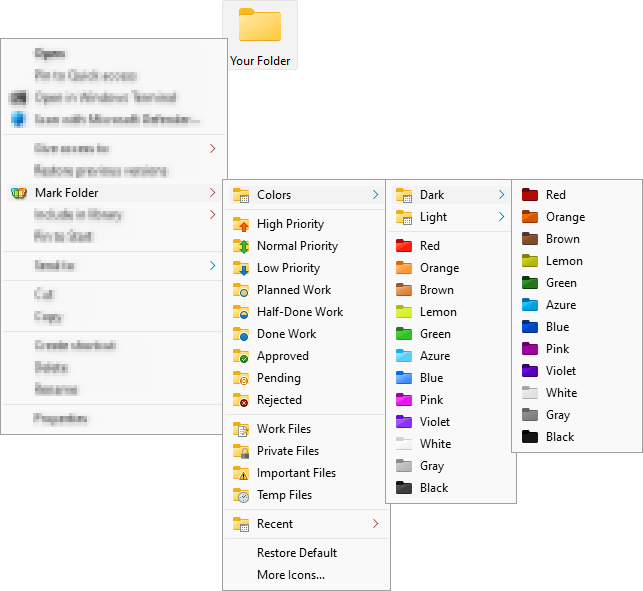 With so many files laying scattered in our systems, one might sometimes get thoroughly lost while searching for the write folder where they placed a particular file. The good news is that now we have a utility that allows with a mark every folder with a special identity icon. With Folder Marker Pro 3.0 software you can assign different folder icons to various folders and sub folders easily. This not only allows you to track your documents easily but also allows you to mark out important data collections. With so many files laying scattered in our systems, one might sometimes get thoroughly lost while searching for the write folder where they placed a particular file. The good news is that now we have a utility that allows with a mark every folder with a special identity icon. With Folder Marker Pro 3.0 software you can assign different folder icons to various folders and sub folders easily. This not only allows you to track your documents easily but also allows you to mark out important data collections.
With the Folder Marker Pro 3.0 has a sleek user interface that anyone would feel comfortable to work with it. For assigning an icon you need to select the folder by browsing it with the given option. Then you can choose the icon that you want from the given categories. You get the categories that contain various icons; these are Additional, ABC…, Colors, and so on. You can set the icons wit red for denoting high priority or choose a music note icon for media files. You can set the alphabetic folders icons for denoting the folders with alphabets. You can set your own icons selecting from the icons at your systems with the ‘User’s Icon’ option. You can also enable the features to make the customized folders distributable and to apply the selected icon to all the subfolders. You can restore the default icon and also rollback all changes altogether. You can set the icon for the single and multiple folders.
Folder Marker Pro 3.0 software is also assisted by a help file that contains all the information that a user may require to operate the program.
{More info and Download}
Rating: Loading... 1 Comment »
O. James Samson - January 23, 2008
As soon as I saw this program, I knew that I was definitely going to download it and take it for a spin!
Why is that, you ask? Well, it’s because now that I am starting to earn more and have more credit and bills to take care of, having a personal piece of software that really helps me keep track of it all is exactly what I need. And that is exactly what Buddi will do for you. Buddi is a free piece of software (open source, to be exact) that will allow you to keep track of all of your personal finances and allow you to set up different accounts and categories while at the same time recording transactions that they happen to do. If you want a program to keep you honest about spending, then Buddi is exactly the program to do that for you.
Oh, and the absolute best thing about Buddi is that it happens to be a program created for people with no financial background and little experience in keeping track of their finances. It is the perfect program for the average Joe that just wants a little help with their financial existence.
More information is available at http://buddi.thecave.homeunix.org/en
Rating: Loading... No Comments »
O. James Samson - January 22, 2008
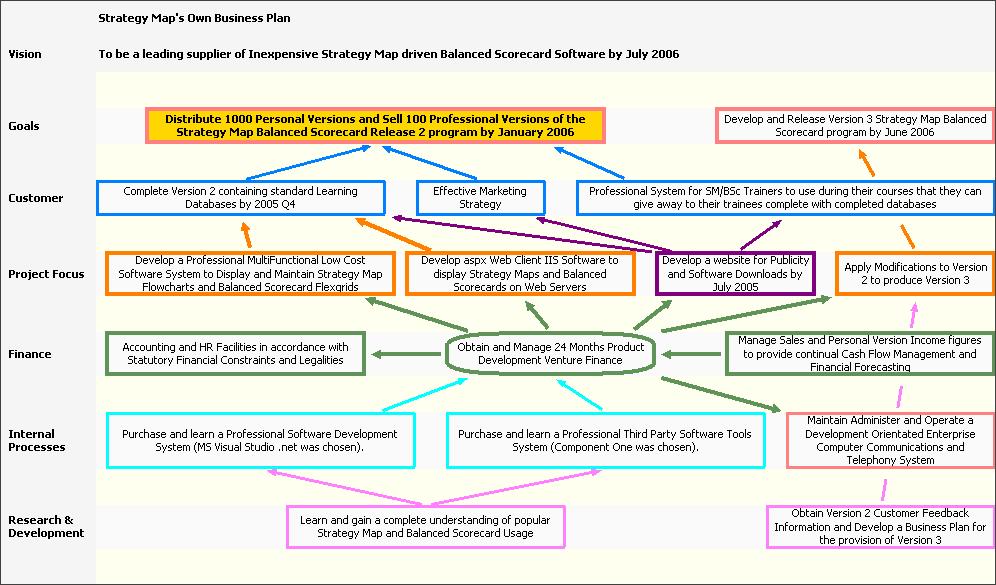
Whenever you tackle something, the best way to ensure success is to make sure that you have a strategy that makes success possible. Without a good strategy, even the best work ethic and the greatest mind will not be able to prevail over circumstances and that is why people that are good strategists have become important parts of some of the most successful businesses in the history of the world.
While there are some people that find it extremely easy to strategize for different things, personally I have never found it that easy and I know a number of people that would agree with that. Tools like mind maps and strategy charts have helped people that don’t strategize well on their own immensely and being able to computerize and use these tools as software programs makes the process much easier.
That is exactly what the Strategy Map does. It is a program that you can use to create mind maps and strategy charts that define the mission, what the goals of the mission are as well as the different objectives along the way along with competing perspectives on how to achieve those objectives. It is a very powerful piece of software that just happens to also be free.
For more information, check out http://www.strategymap.com.au/
Rating: Loading... No Comments »
O. James Samson - January 22, 2008
 DC++ is an interesting tool. It is a direct connect service that actually allows you to connect to a number of other computers on the same network and exchange information with those computers in a way that makes it much faster than downloading a torrent file. The reason that it is perhaps not as popular as torrent downloading is because of the fact that when you download a torrent file, you can do so from websites and quite frankly from any other computer. DC++ on the other hand has limited connectivity that requires a network and therefore if you live in a university campus or other places with large residential networks you are going to be able to use DC++ in a much more effective way than you could currently use torrent software. DC++ is an interesting tool. It is a direct connect service that actually allows you to connect to a number of other computers on the same network and exchange information with those computers in a way that makes it much faster than downloading a torrent file. The reason that it is perhaps not as popular as torrent downloading is because of the fact that when you download a torrent file, you can do so from websites and quite frankly from any other computer. DC++ on the other hand has limited connectivity that requires a network and therefore if you live in a university campus or other places with large residential networks you are going to be able to use DC++ in a much more effective way than you could currently use torrent software.
ApexDC++ is a client that you can use for the DC++ service and it is a rather innovative client that rivals the best in the business. It allows you to use a block list manager to make sure that offenders of the system are not on your list to download from and it allows you a level of control and customization rarely used with these types of things. It also allows for super seeding, which even some torrent clients do not have. Add to that the fact that it has a very user friendly graphical user interface, constant updates and great support and it becomes very easy to see why it is so popular.
More information on it can be found at http://www.apexdc.net/.
Rating: Loading... No Comments »
Ciaran Moore - January 21, 2008
 Do you find yourself working with a lot of files, regularly copying or moving them around? Maybe you just like to have a neat computer with everything neatly filed in the right place. Do you find yourself working with a lot of files, regularly copying or moving them around? Maybe you just like to have a neat computer with everything neatly filed in the right place.
I know that’s what I like, but unfortunately it tends to be easier said than done. It can be very time consuming, so instead, you find yourself with files and folders all over the place, total disorganization! If only there was an easier, almost instant, way to do it! Thats where FileTargets proves very useful.
Its a freeware right-click context menu add-on that couldn’t be much simpler to use and saves you a ton of time in moving or copying files. It adds a sub-menu with all your favorite folder names to the context-menu of all files and folders in your system so you can copy or move chosen files to pre-defined, most used folders with just a mouse click.
Now i have bad news and good news, the bad news is it’s discontinued software (why they did that i can’t understand, its an invaluable,little add-on, i wish things like this came as standard with windows) the good news is it’s still available on the homepage. Neat freaks and the highly organized will really appreciate Filetargets!
Click here to download it from the homepage.
Rating: Loading... No Comments »
O. James Samson - January 21, 2008
 The latest version of the RunScanner software was released recently and it has already been downloaded thousands of times by many adoring fans that loved the previous versions of the program. In the newest version of the program, three major bug fixes have been put in place. The first is a fix of the invalid bitmap error that sometimes appeared for no reason, while the other two bugs deal with problems in analyses that the program carried out on different programs that were available and running on your system. All in all, this release of the software has been made much stronger by the bug fixes and that should come as very good news to people that already liked the previous version. The latest version of the RunScanner software was released recently and it has already been downloaded thousands of times by many adoring fans that loved the previous versions of the program. In the newest version of the program, three major bug fixes have been put in place. The first is a fix of the invalid bitmap error that sometimes appeared for no reason, while the other two bugs deal with problems in analyses that the program carried out on different programs that were available and running on your system. All in all, this release of the software has been made much stronger by the bug fixes and that should come as very good news to people that already liked the previous version.
RunScanner is a freely downloadable Windows utility that will allow you to scan your system at any given point and come up with all of the different programs that are running on it. It is much better than the task manager because unlike the rather unhelpful screens in the processes tab of the task manager, RunScanner gives you extremely detailed information about all of the programs running so that you know exactly what they are. This can help a lot in your quest to remove unwanted spyware, malware, adware and autostart programs from your running programs list and free up a wealth of system resources to be used elsewhere.
More information on this program is available at http://www.runscanner.net/.
Rating: Loading... No Comments »
Ciaran Moore - January 21, 2008
 Threatfire is a behavior based malware detector.It guards against malware such as trojans, spyware, rootkits, keyloggers, and buffer overflows, based on behavior patterns consistent with these threats. This means that it doesn’t just rely on a signature database to compare the files on your computer against, although it has one too. Threatfire is a behavior based malware detector.It guards against malware such as trojans, spyware, rootkits, keyloggers, and buffer overflows, based on behavior patterns consistent with these threats. This means that it doesn’t just rely on a signature database to compare the files on your computer against, although it has one too.
This is always a limitation in signature based scanners (most virus and malware scanners) as they can only find known threats and can be useless against unknown or new threats (so-called ” zero-day” threats). Instead, Threatfire analyzes the activity of everything on your system for any suspicious behavior, which it then warns you about for you to take further action on.
According to test results published at the Threatfire website, it can increase the safety of your computer a great deal compared to just using an antivirus program.
It doesn’t seem to use up much resources and is very easy to use, as no complicated configuration is required. It’s available in a free and a pro version, the only difference being that the on-demand scanner in the free version is partially disabled,so it’ll scan for rootkits only.
The realtime protection is fully functional though, meaning you’re still fully protected against all known threats in the database as well as unknown threats that it may detect.
This is a neat program and good as an extra layer of protection and peace of mind. Click here for more details and download
Rating: Loading... 1 Comment »
|
|
|


 (2 votes, average: 4.00 out of 5)
 (2 votes, average: 4.50 out of 5)

