Ciaran Moore - January 11, 2008

GNU Solfege is a very comprehensive ear training program.
The interface is a little rough and ready, but gets the job done. While it may not be the prettiest piece of software out there, it certainly is thorough at doing what it sets out to do.
It helps you improve your musical ability with an impressively detailed amount of “musical ear” training such as recognizing and identifying chord progressions, intervals, rhythms and scales. It’s sure to be of use to anyone studying music or musical theory. It also has statistics, so you can track your progress, and tests are included so you can see just exactly how much its helping you to improve your musical proficiency and understanding.
It’s a free and open-source program available for Windows and also comes in a Linux version. Go to the website here for more information and the free download.
Rating:  Loading... 2 Comments »
Ciaran Moore - January 10, 2008
 Got a favorite website but you hate the look of it? Now you can make it how you want it to be! Got a favorite website but you hate the look of it? Now you can make it how you want it to be!
Stylish is a Firefox extension that enables you to change the look of websites. For example you could change the default text and background colors to be light colored text on a dark background. You can do this either on a site by site basis or globally effecting all websites you visit.
If you visit http://userstyles.org/stylish/ there is a selection of user made styles for global use or for specific popular sites such as Youtube and Wikipedia. These are easily imported into the extension and can be easily enabled, disabled, or removed according to your own taste.
As well as working with Firefox it also works with Thunderbird, Flock, SeaMonkey, Mozilla Suite, and Songbird and can also change the look of all these programs.
I find this very useful if you spend a lot of time on sites such as Wikipedia and don’t like reading on a glaring white screen. Now you can change to a darker background and your eyes will thank you!
More info and download here.
Rating: Loading... No Comments »
Ciaran Moore - January 10, 2008

If you’ve been a Windows user for any length of time it’s probably come to your attention that its not exactly a perfect system. One issue with Windows is that when you uninstall a program, it leaves behind a lot of leftovers in the registry, which can cause problems in time, like slowing up your computer.
Smarty Uninstaller is a utility for fully uninstalling programs without leaving any traces behind.
As an extra precautionary measure safety features such as registry backup and restore are also available and the ability to protect important system files so they can’t get accidentally deleted while using this program.
This is a useful utility to have for anyone who finds themselves installing and uninstalling programs on a regular basis. As with any programs like this which delete or clean up things, its wise to be careful and I recommend making a system restore point before use.
For further details of features and to download a trial, Click here.
Rating: Loading... No Comments »
O. James Samson - January 9, 2008
 The latest version of SQLyog was released by Webyog just recently and it includes a number of interesting additions that will allow users to get a much better experience when utilizing the software package. Now, the software actually worked great before the updates were put into place and with the fixing of a number of rarely recurring bugging problems, SQLyog is back even better than it was before and that should come as a very pleasant surprise to people everywhere that had grown used to using this program for their MySQL needs. The latest version of SQLyog was released by Webyog just recently and it includes a number of interesting additions that will allow users to get a much better experience when utilizing the software package. Now, the software actually worked great before the updates were put into place and with the fixing of a number of rarely recurring bugging problems, SQLyog is back even better than it was before and that should come as a very pleasant surprise to people everywhere that had grown used to using this program for their MySQL needs.
SQLyog is essentially a front end MySQL program that people can download and use for all of their databases that run on the MySQL setup. They can actually use the program for multiple queries on multiple sources and they can also use the program to export data from their databases into different formats that are widely accepted in many of the data readers of this time. You can even import data from a text file using the SQLyog program and you can also use it to figure out problems that might be happening with your databases and stop those problems from compounding.
All in all this is a fantastic piece of freeware and more information about it can be obtained from http://www.webyog.com/en/.
Rating: Loading... 1 Comment »
O. James Samson - January 9, 2008
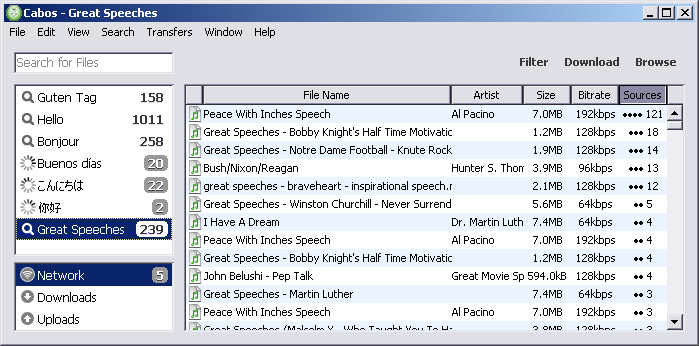 Ever since the advent of programs like Napster and LimeWire, internet file sharing has been exploding. More and more users are accessing networks and are involved in peer-2-peer sharing on a regular basis and more and more users are finding out the great benefits that are involved with this type of activity. This is why it has become very important for users to find the right client to do their activities with and if you are one of these people wandering in a wilderness and looking for a program to see you through then Cabos for Windows might just be that program. Ever since the advent of programs like Napster and LimeWire, internet file sharing has been exploding. More and more users are accessing networks and are involved in peer-2-peer sharing on a regular basis and more and more users are finding out the great benefits that are involved with this type of activity. This is why it has become very important for users to find the right client to do their activities with and if you are one of these people wandering in a wilderness and looking for a program to see you through then Cabos for Windows might just be that program.
Cabos is a file sharing program that is based on the same type of interface and coding that inspired the creation of both the LimeWire and Acquisition software platforms. Its main strength is that it draws on those successful projects heavily, but at the same time has a number of things in place to attempt to combat the negative sides of those programs. A big example of this is in the area of unwanted files, with Cabos being a free program that cracks down on spyware and adware, making sure that they do not find their way onto your system as a consequence of your download.
More information about Cabos can be found at http://cabos.sourceforge.jp/
Rating: Loading... No Comments »
O. James Samson - January 9, 2008
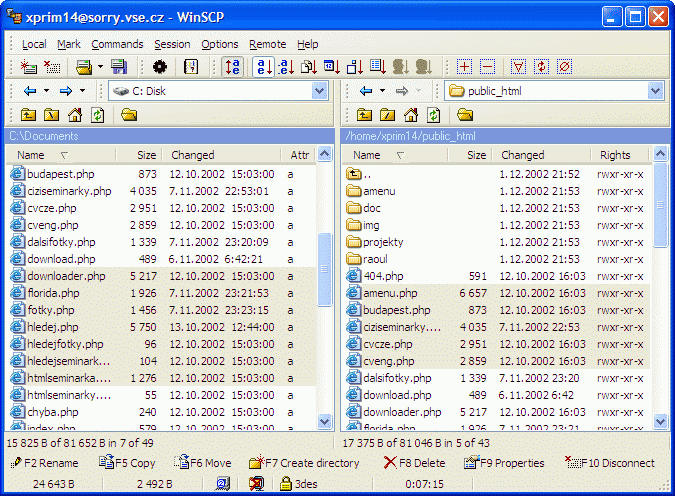 The latest version of WinSCP is now out, having been released on January 3rd by Martin Prikryl. The main changes that have been made to the software are almost entirely fixes of bugs that were either discovered by Martin or else e-mailed to him by users of the program. These include the fixing of bugs such as the lack of allowance for ending a session in some cases, the incorrect listing of authentications in some cases and the poor way in which WinSCP worked externally with other prompts that it received. These are not the only bugs that were fixed but they are amongst some of the more prominent and the result is a much better piece of software for everyone to enjoy. The latest version of WinSCP is now out, having been released on January 3rd by Martin Prikryl. The main changes that have been made to the software are almost entirely fixes of bugs that were either discovered by Martin or else e-mailed to him by users of the program. These include the fixing of bugs such as the lack of allowance for ending a session in some cases, the incorrect listing of authentications in some cases and the poor way in which WinSCP worked externally with other prompts that it received. These are not the only bugs that were fixed but they are amongst some of the more prominent and the result is a much better piece of software for everyone to enjoy.
For people new to the program, WinSCP is a file transfer protocol program that is used within the Windows environment and secure shell handling. The main actual goal of the program is to make it easier to transfer programs and files between the local terminal that a user is currently on and a remote terminal that may exist somewhere else. The goal of the program is to allow users to do these transfers in a way that is not only secure, but also a way that is safe and efficient for all of the computers involved in the file transfer process.
More information about WinSCP and the latest edition of the program can be found at http://winscp.net/eng/index.php.
Rating: Loading... 1 Comment »
Tilgore Kraut - January 6, 2008
 The slow speed of your system gives you the time to catch up with your sleep? Sound funny but surely you would like to avoid such situations when your system becomes unbearably slow. Well trying out the RAM Boost Master Free Version 5.0.0.5 software just may be the answer to your worries as the software effortlessly improves the operation of your system. The software incidentally provides you with features for performing Fast Free or even Deep Compress. Once you run the software you would instantly feel the difference as your computer would start responding much quicker to given commands. The slow speed of your system gives you the time to catch up with your sleep? Sound funny but surely you would like to avoid such situations when your system becomes unbearably slow. Well trying out the RAM Boost Master Free Version 5.0.0.5 software just may be the answer to your worries as the software effortlessly improves the operation of your system. The software incidentally provides you with features for performing Fast Free or even Deep Compress. Once you run the software you would instantly feel the difference as your computer would start responding much quicker to given commands.
RAM Boost Master Free Version 5.0.0.5 software frees up the physical memory of your PC to make it work with faster speed. The interface of the program is uncomplicated and does not require much of your efforts to set the options. Well to begin with you have the Fast Free for rapid clean up and Deep Compress for deep compression. It also provides you with the details about the memory status along with the graphs.
You can have the defragmentation done; just make the selection and the progress is shown on the screen. You can even free the space by cleaning the clipboard content with just a simple click. You can switch to the Advanced feature that help, you to enable the schedule to free the memory and also lets you check the Black and White list. You can also select the auto compression, enable the CPU protection and set the size of the memory to be free.
Settings give you the liberty to set the program to auto run on window startup, automatically clean the clipboard while compressing, and set the Page File Settings, etc. The attached Help Content is useful to have a look at for using the program so that you can set it work at its best.
RAM Boost Master Free Version 5.0.0.5 gives you the details how your system resources are used by Windows and how much memory is being used. You would require set the options once and it would keep working automatically at the background.
{More Info and Download}
Rating: Loading... No Comments »
O. James Samson - January 5, 2008
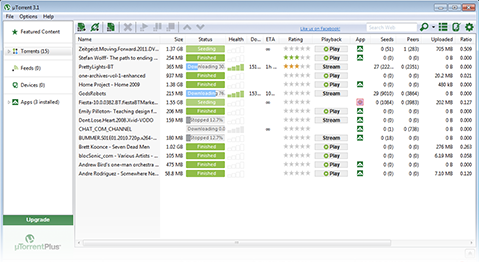 There are a number of different excellent programs available as torrent clients, but the uTorrent software has been acknowledged for a very long time as being one of the best out there. With the latest release of the software coming out on January 3rd, what people are finding is that one of the best in the business just happened to get better. Every piece of freeware is continually working to remove kinks from the software as they develop and a number of minor bugs have been fixed in this latest version of uTorrent whilst keeping the essential core of the software exactly the same as it has been in previous versions. There are a number of different excellent programs available as torrent clients, but the uTorrent software has been acknowledged for a very long time as being one of the best out there. With the latest release of the software coming out on January 3rd, what people are finding is that one of the best in the business just happened to get better. Every piece of freeware is continually working to remove kinks from the software as they develop and a number of minor bugs have been fixed in this latest version of uTorrent whilst keeping the essential core of the software exactly the same as it has been in previous versions.
You can use the uTorrent software to open any of the torrent files that you might want to download from the various websites and then you can also use it to track multiple downloads at the exact same time. Not only can you track the progress of a general download, but you can also track specifics about that download to the point where you know which packets and files within the torrent have been downloaded at which times. This actually allows you to only download specific parts of the torrent file and therefore lessen the size of the download and ultimately speed up the download process.
More information about this program is available at http://utorrent.com/.
Rating: Loading... No Comments »
Tilgore Kraut - January 3, 2008
 Keeping your computer safe and secure is the biggest issue that is experience by every computer user. You always need to be alert for any spywares, adwares or any other malicious program. So to deal with this problem the Malwareguard 1.1.0.1 software would prove to be a worthy ally. The software would protect your PC by removing any content that would harm and spoil it. The software is convenient to use and improves your working experience by making your computer safe. The software uses a reference database that is updated automatically to prevent your PC from all the latest dangers. Keeping your computer safe and secure is the biggest issue that is experience by every computer user. You always need to be alert for any spywares, adwares or any other malicious program. So to deal with this problem the Malwareguard 1.1.0.1 software would prove to be a worthy ally. The software would protect your PC by removing any content that would harm and spoil it. The software is convenient to use and improves your working experience by making your computer safe. The software uses a reference database that is updated automatically to prevent your PC from all the latest dangers.
Malwareguard 1.1.0.1 software is has the features that provide you with Complete Scan and Quick scan. When you have enough time then you can perform the Complete Scan and when you need to check your PC quickly than the Quick Scan is good. When you perform the scanning you can remove automatically the entire infected files. To your convenience and saving of time you can perform the scanning of your full system or even you can scan the particular folders that you are working with, or as desired.
The Malwareguard Startup Manager of the program helps you to remove or clean the programs that are not required so that they do not auto start and also free the CPU. The software protects you from numerous types of adwares, spywares, hijackers, viruses, Trojans, and other threats. Take the guidance with the Help provided so that you can set it to work at the best of its efficiency. It can be configured to be updated automatically and or manually as per your desire.
The fact that the software removes useless stuff and makes your system work faster also contributes to its positive score.
{More Info and Download}
Rating: Loading... No Comments »
Tilgore Kraut - January 3, 2008
 In case you were looking for a card creator that would allow you to make attractive cards with varied styles and via different design tools then you should definitely check out the Easy Card Creator Professional 5.20.51 software. It is loaded with superlative features to make various professional cards that too fully customized as per your desire. You can impress you clients, make a pattern cards for your company and do much more. The software provides you with the tool for the graphic personalization of the cards and supports one click capturing of the Photos. The options are uncomplicated such that you can use them with ease and do not need to be a professional for operating it. In case you were looking for a card creator that would allow you to make attractive cards with varied styles and via different design tools then you should definitely check out the Easy Card Creator Professional 5.20.51 software. It is loaded with superlative features to make various professional cards that too fully customized as per your desire. You can impress you clients, make a pattern cards for your company and do much more. The software provides you with the tool for the graphic personalization of the cards and supports one click capturing of the Photos. The options are uncomplicated such that you can use them with ease and do not need to be a professional for operating it.
Easy Card Creator Professional 5.20.51 software is set with different options to let you make unlimited number of stylish and yet professional cards. With a pleasant outlook the software presents itself in front of you when you launch it. When the program is launched it shows you templates wizard to select for making the cards. You can select the one you want and the template is shown at the left middle of the screen.
You can place text on the card, put the logo of the company and change the picture for the background of the cards. You can set figures like rectangle, ellipse and also set the pictures of the employees if required. You can change the templates settings; you can open, clone, close or even change the orientation of the templates. The properties of each function that you use are shown on the right side for customize them. You can change the name of the font, color, size, alignment, etc of the text. You can customize both the sides of the cards and set the properties according to your requirements.
The program supports batch printings and also set the page before printing. It provides with easy features to record employee information as well as their pictures. The elaborated help file shows all the details relating to the program.
{More Info and Download}
Rating: Loading... No Comments »
|
|
|



 (2 votes, average: 3.50 out of 5)

