O. James Samson - September 4, 2007
 CSS is an acronym that stands for Cascading Style Sheet. It is one of the newer methods of coding available to web developers, but at the same time one that can save a lot of hassle in the sense of allowing you to make changes in one document that serve to affect the rest of your website. CSS has been a revolution because of its time saving properties and now that the use of it is widespread, what you are going to find is that the people interested in CSS are also the people that have come up with ways to make CSS integration and development even faster. CSS is an acronym that stands for Cascading Style Sheet. It is one of the newer methods of coding available to web developers, but at the same time one that can save a lot of hassle in the sense of allowing you to make changes in one document that serve to affect the rest of your website. CSS has been a revolution because of its time saving properties and now that the use of it is widespread, what you are going to find is that the people interested in CSS are also the people that have come up with ways to make CSS integration and development even faster.
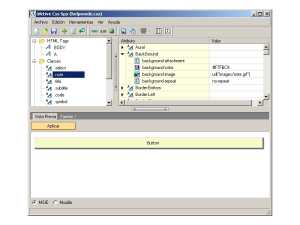
Meet the CSS Spy; an editor that allows you to take a look at and edit any CSS code you might already have. The innovative aspect to this handy little program is that you can actually view the changes that you make and their effects in real time in both internet explorer and firefox should you wish to do so. You can edit any sample you want with the CSS in this manner and of course it is compliant with all of the standards set out by the world wide web consortium; also known as the W3C. This can save you a lot of time because it means that you don’t have to continually save your file, upload it and then refresh your browser to view changes you might have made.
More information can be found at http://www.puntoequis.com.ar/aktive/default.aspx?SC=SOFT&ID=CSSSPY
Rating:  Loading... No Comments »
Ciaran Moore - September 3, 2007
 Like most people, your computer probably has various programs you’ve installed on it over time. In my case, that’s quite a few indeed! If you are anything like how I am, You’ll know that it can become quite a time consuming task in itself just keeping all of these updated to the latest versions. Like most people, your computer probably has various programs you’ve installed on it over time. In my case, that’s quite a few indeed! If you are anything like how I am, You’ll know that it can become quite a time consuming task in itself just keeping all of these updated to the latest versions.
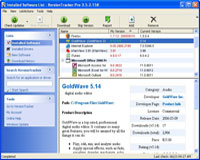
Wouldn’t it be great if there was a program to instantly scan your computer and come back with a list of all your installed programs..and drivers!… listing the version you have on your computer and the current version available? Now wouldnt it be even greater if it had a link to download the latest versions in just a couple of clicks?
Well in short, thats exactly what VersionTracker Pro does. This seems to work pretty good for programs, but be wary with drivers as it doesn’t always show correct recommendations, at least not on my system anyway. You can download the one use trial at the website.
Check out the site for more details and prepare to save yourself a lot of time when updating your stuff in future!
Rating: Loading... 3 Comments »
O. James Samson - August 31, 2007
 If you’ve had issues with duplicate files in the past, taking up precious hard disk space, then Duplicate File Detector should come in handy in putting a stop to that. Duplicate File Detector is a powerful tool to search for file duplicates on your computer. The good thing about it is that it can find duplicates of any file: text, binary, music, video or images. If you’ve had issues with duplicate files in the past, taking up precious hard disk space, then Duplicate File Detector should come in handy in putting a stop to that. Duplicate File Detector is a powerful tool to search for file duplicates on your computer. The good thing about it is that it can find duplicates of any file: text, binary, music, video or images.
Criteria like filename, file size, or file content. For multimedia files (MP3, OGG/Vorbis, WMA), can be used to search for duplicates. The only problem I have with this software is that it is shareware, coughing up $29 for something would have been a great success as a freeware is something I can’t shake off.
But you check it out yourself, who knows it may be just what you need. The trial version is free, go to http://www.al-soft.com/dfd/duplicate-file-finder.shtml to get it.
Rating: Loading... No Comments »
Ciaran Moore - August 31, 2007
 kruptos 2 is a powerful freeware application that enables you to encrypt your sensitive data. It uses 128 bit blowfish encryption to encrypt your files or folders which then can only be accessed with the correct password, so that only you can have access to them. You can even select to disguise the newly encrypted files name for further privacy. kruptos 2 is a powerful freeware application that enables you to encrypt your sensitive data. It uses 128 bit blowfish encryption to encrypt your files or folders which then can only be accessed with the correct password, so that only you can have access to them. You can even select to disguise the newly encrypted files name for further privacy.
One thing it could be used for is USB flash drives and portable storage devices, ensuring that no one can access your private or sensitive data if the drive is lost or stolen. It can also create self decrypting files and includes a file shredding utility.
Check it out at the website here.
Rating: Loading... No Comments »
Ciaran Moore - August 31, 2007
 In case you haven’t heard, there’s a new internet security threat in the last few weeks that is sure to strike fear into any music fan. In case you haven’t heard, there’s a new internet security threat in the last few weeks that is sure to strike fear into any music fan.
An mp3-eating worm/virus has been unleashed recently. It copies itself to all drives on the infected computer and searches for mp3 files which it then proceeds to delete. In fact it’s main aim is to delete all mp3 files from all drives on the compromised computer!
It’s name is W32.Deletemusic. Thankfully, so far, it’s been given a low risk factor by the major antivirus companies, but apparently it’s not the first threat of this kind. Are more such threats on the way? Now you have an even better reason (as if you didn’t already) to make sure you have up to date antivirus protection.
Read the full story from Yahoo here and the Symantec page for it here
Rating: Loading... 1 Comment »
Tilgore Kraut - August 30, 2007
 The office scheduler can keep the record of your business activities in the most detailed manner. The program would remind you of all the tasks. It would prove to be good software to manage everything like the appointments, reminders with alarms, etc. The office scheduler can keep the record of your business activities in the most detailed manner. The program would remind you of all the tasks. It would prove to be good software to manage everything like the appointments, reminders with alarms, etc.
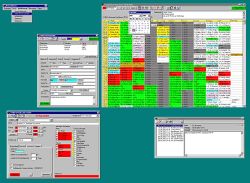
The software do takes a bit of time for downloading but it’s quick with installation. the screen appears with a table like format. The rows and columns show the time, the appointments, and the executives and the room information that you put. You can know about the programs set in different rooms for availability. The weekly schedule can be set so that you don’t miss out anything. You can have the course overview and set the yearly schedule. A bar above the table shows the option to choose the resources or appointment like options. You can set the date and also it also has the calendar tool to make the year month and date settings. You can create a new appointment for a date with the dialog box. Set the customer, resources, make the notes and set the alarm all with specific date and time. The appointments can be edited and the details can be seen, with free times. You can search for customer details and also know all the appointment set with them. Also you can create a duplicate appointment. You can delete the set detail anytime and get the print of it. Also you can insert a new MS Excel sheet. You can easily set the schedule properties and program preferences. You can actualize; show the overlaps and the basic design appointments. Bookmark can be set and the resources can be defined. You can refresh the program and export the data to excel sheet.
The help option provides all the information. The software is good to use as it helps managing the business function easily.
(More info and Download)
Rating: Loading... 1 Comment »
O. James Samson - August 30, 2007
 One of the things that you need to think about when it comes to maintaining your computer is the software that you are going to use to actually maintain your files. It is important because while a lot of people simply use the Windows Explorer software to do so, Windows Explorer can actually be resource intensive as well as break down at the same time that windows itself does. There are a lot of bugs in Windows Explorer that can make life difficult from time to time and that is why the need for third party software is needed; software like the free to use A43. One of the things that you need to think about when it comes to maintaining your computer is the software that you are going to use to actually maintain your files. It is important because while a lot of people simply use the Windows Explorer software to do so, Windows Explorer can actually be resource intensive as well as break down at the same time that windows itself does. There are a lot of bugs in Windows Explorer that can make life difficult from time to time and that is why the need for third party software is needed; software like the free to use A43.
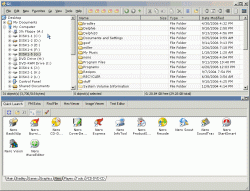
A43 is the freeware file manager that many people use instead of Windows Explorer, including all of the people that are lined up to say wonderful things about it. The one real bug it had, which was the cursor problem from version 2.51, has been completely fixed in version 2.52 and now there are really no downsides to using this program. The upsides are of course lack of resources needed to use it as well as no installer necessary. It is simply a great piece of software and one that you should check out!
More information about it can be found here: http://www.primitus.us/a43/
Rating: Loading... No Comments »
O. James Samson - August 30, 2007
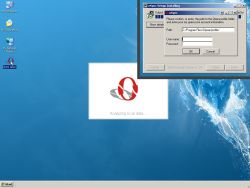 There are so many different problems that occur when you change computers that for the most part people really hate having to do so. There are large things like the transfer of large files and programs as well as the establishing of a similar operating system set of parameters to the one that was on the previous computer and then there are the smaller things like bookmarks. Bookmarks might seem like a very small thing to some people, but when you consider that a lot of people put their web development hopes and dreams in bookmarks, what you are going to find is that the bookmarks must be transferred if the person’s normal online existence can continue. There are so many different problems that occur when you change computers that for the most part people really hate having to do so. There are large things like the transfer of large files and programs as well as the establishing of a similar operating system set of parameters to the one that was on the previous computer and then there are the smaller things like bookmarks. Bookmarks might seem like a very small thing to some people, but when you consider that a lot of people put their web development hopes and dreams in bookmarks, what you are going to find is that the bookmarks must be transferred if the person’s normal online existence can continue.
If you happen to be using Opera, then the oSync 1.0.1 can definitely help you through it. It allows you to automate the sync processes between two different systems and furthermore even sit and watch while the software does all of the work for you. The latest version of the software allows for threaded syncing, which happens to increase sync speed dramatically. In addition to that, a lot of merging work has been done so that a lot of previous errors from merging operations are now non-existent.
Give it a try if you’re on Opera as it is free to use; more information can be found at http://osync.sourceforge.net/
Rating: Loading... No Comments »
O. James Samson - August 30, 2007
 One of the things that can drive people crazy when they are working in Windows is having to scroll through dozens of different programs before they are able to find the one they want on their taskbar. There really for the longest time was no good solution to this problem and of course because Microsoft is brilliant at coming up with ways to make problems worse more than they can make them better, they came up with the idea of actually grouping together similar icons on the taskbar to save space. Of course, while this did save space on the taskbar, the thing that ended up getting worse was the fact that if a person was switching between MSN conversations or browser windows, things just became terrible for them in terms of being able to find the specific window they were looking for. One of the things that can drive people crazy when they are working in Windows is having to scroll through dozens of different programs before they are able to find the one they want on their taskbar. There really for the longest time was no good solution to this problem and of course because Microsoft is brilliant at coming up with ways to make problems worse more than they can make them better, they came up with the idea of actually grouping together similar icons on the taskbar to save space. Of course, while this did save space on the taskbar, the thing that ended up getting worse was the fact that if a person was switching between MSN conversations or browser windows, things just became terrible for them in terms of being able to find the specific window they were looking for.
If this sounds like you and the stress of taskbar space conservation has just become too much, then take a look at TrayIt! This is an innovative program that has been around for awhile, but has recently gotten a whole lot better. It allows you to save all of that taskbar space by using a small icon on the system tray for each application instead of the regular rectangular indication of the minimized window that you commonly see. It is great to use, free and even works with Windows Vista!
More information can be found at http://www.teamcti.com/trayit/trayit.htm
Rating: Loading... No Comments »
O. James Samson - August 29, 2007
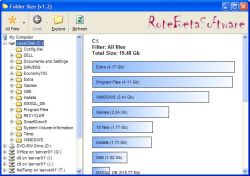 If you’re like, chances are you download a lot of stuff and save a lot of stuff from Microsoft Office programs onto your hard drive. In some cases, you might even have remnants of old folders that were part of an earlier attempt to organize files on your hard drive. I know that at one point I have up to three or four different generations worth of organizational folders on my hard drive and in some cases had the same file saved once in all of them! Redundancy is a bad thing because it can really hamper your ability to save new files onto your hard drive, but if you download Folder Size 1.3, you can figure out where the redundancies might be and cut them down. If you’re like, chances are you download a lot of stuff and save a lot of stuff from Microsoft Office programs onto your hard drive. In some cases, you might even have remnants of old folders that were part of an earlier attempt to organize files on your hard drive. I know that at one point I have up to three or four different generations worth of organizational folders on my hard drive and in some cases had the same file saved once in all of them! Redundancy is a bad thing because it can really hamper your ability to save new files onto your hard drive, but if you download Folder Size 1.3, you can figure out where the redundancies might be and cut them down.
With Folder Size 1.3 installed, what you are going to find is that when you highlight a folder, a bar graph will appear with the sizes of all of the folders contained in that folder clearly highlighted for you to see. You don’t have to go to the properties of each folder any more to figure out what is where and ultimately this will make the process of cleaning up your hard drive much easier to do. In addition to that, there are a number of different tasks that are easier now because you can see the size of each folder right away.
More information can be found at the developer’s home page at http://www.rotebetasoftware.com/foldersize.html
Rating: Loading... No Comments »
|
|
|



 (3 votes, average: 4.33 out of 5)

