Ciaran Moore - February 15, 2007
 Mediamax is another online storage service. But this one is free, yes i know some of them offer a free limited service. But this one offers 25 GB of space for free! Pretty impressive indeed! Some of the features are batch uploading, batch downloading, backup, and file synchronization. Mediamax is another online storage service. But this one is free, yes i know some of them offer a free limited service. But this one offers 25 GB of space for free! Pretty impressive indeed! Some of the features are batch uploading, batch downloading, backup, and file synchronization.
They do also offer a paid service, but you can sign up totally free ( no credit card required or anything) to the free service for your 25GB of space.
Now for the catch! The free space has one catch and that’s that you can only download or share 1GB per month and it has a filesize limit of 25 MB. Still not bad at all, depending on your needs and considering its free. If you want more you’ll have to get your wallet out.
Check it out at the website here.
Rating:  Loading... No Comments »
O. James Samson - February 14, 2007
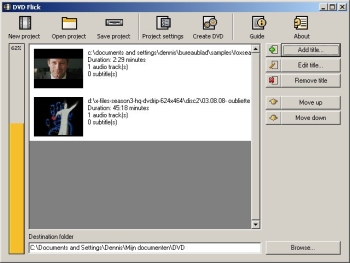 Here is a good open source for you to make DVDs. It’s called DVD Flick. Here is a good open source for you to make DVDs. It’s called DVD Flick.
DVD Flick is a simple tool but don’t mistake it’s simplicity for lack of functionality; it’s a very powerful DVD Authoring tool. With DVD Flick you can take several video files stored on your computer and turn them into a DVD, this DVD will play back on your DVD player, MediaCenter or Home Cinema Set without any hassles.
Like I said earlier it’s Open Source; this means not only is it free for download the program’s source code is also free for modification. That’s not all several external programs are used by DVD Flick to do “the magic” [“the magic” includes encoding and combining of video material]. All of these programs are free, some are also Open Source.
The latest version, DVD Flick 1.2.1.2, which was just released only yesterday, has these changes:
- Added: Custom video bitrate option
- Added: Option to manually set a subtitle’s framerate, so that it will get converted to the movie’s framerate
- Added: Warning to prevent graphical subtitle files from being loaded
- Added: Drag and drop support for video sources, audio tracks and subtitle files to titles
- Added: Minimize to tray button in the progress dialog
- Added: Option to save a subtitle’s settings as default
- Added: Options for more audio encoding control
- Fixed: Subtitle desyncing
- Changed: Rewrote DVD recorder detection. It should detect all SCSI3-capable recorder drives now
- Changed: Tweaked video encoding options a bit more
CLICK HERE for more info and download.
Rating: Loading... No Comments »
O. James Samson - February 14, 2007
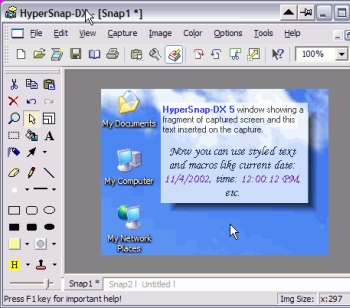 If you’ve been looking for a fast and convenient way to take screen captures from your Windows screen and you’ve not found one yet, you should try using HyperSnap-DX. If you’ve been looking for a fast and convenient way to take screen captures from your Windows screen and you’ve not found one yet, you should try using HyperSnap-DX.
HyperSnap-DX is a screen capture and image editing tool for Windows. What makes this program very useful is the fact that it doesn’t only take screen captures from standard desktop programs; it goes all the way to capture otherwise difficult stuff like DirectX, Direct3D, 3Dfx Voodoo, and Glide mode games easily. It can also capture frames from many software DVD players and other video playing software.
The latest version, HyperSnap-DX 6.13.02 has some very useful features, that makes it better than the previous versions. Some of the top features include:
- New in ver. 6 TextSnap™ feature to capture editable text from almost anywhere on the screen, when running under Windows 2000, XP or newer. Starting from ver. 6.10 can also capture tab-delimited data for easy paste into MS Excel.
- New & powerful image capture, editing, annotation and manipulation tools.
- Snags also those difficult-to-grab screens from DirectX™ and Glide™ games.
- Image stamps, frames, drop shadow, free-hand capture, FTP server uploads, more!
- Automatic color substitution!
- Non-rectangular window capture!
- Button Capture – perfect for professional technical writers who need to snap and document dozens of buttons!
- Fully customizable user interface. Rearrange menus and toolbars any way you want, assign any keyboard shortcuts you like, tear off menus to create instant toolbars, even control HyperSnap with voice commands!
You should check it out. CLICK HERE for more info and trial download.
Rating: Loading... 2 Comments »
Ciaran Moore - February 14, 2007
 If you have an email address (and who doesn’t these days?), sooner or later you might end up entering it in a guestbook or forum, or even having it on your own website so that people can contact you. The problem with this is that programs spammers set loose on the Internet called spambots, will find your email address sooner or later and this will lead to you receiving spam emails. If you have an email address (and who doesn’t these days?), sooner or later you might end up entering it in a guestbook or forum, or even having it on your own website so that people can contact you. The problem with this is that programs spammers set loose on the Internet called spambots, will find your email address sooner or later and this will lead to you receiving spam emails.
Enter the Enkoder! This is a small online tool (or downloadable if you are a Mac user) which converts your email address into special code that those pesky spambots can’t read as being an email address.
The spambots won’t detect your email address, so will completely ignore it. Meanwhile your email address still appears the same as before, but won’t end up in the hands of the spammers. Check it out.
Rating: Loading... No Comments »
Ciaran Moore - February 14, 2007
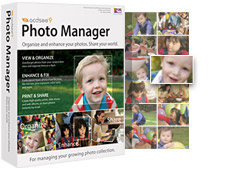 ACDSee has long been known as a very good photo viewing, managing, organizing and enhancing program. This latest version, ACDSee 9, is no exception. ACDSee has long been known as a very good photo viewing, managing, organizing and enhancing program. This latest version, ACDSee 9, is no exception.
New features in this edition include a Shadow/Highlight tool which provides very easy and instant photo correction for poorly exposed photos (photos that are too dark or too bright), without affecting areas of the image that don’t require adjustments, One-click red-eye reduction, private folders, “Auto Categories” to automatically organise your photos when getting them from your camera or storage device, this automatically puts your photos into convenient categories based on EXIF camera information, IPTC data, ACD database information, and file properties. Using that info it becomes easier to search for photos later on, all without having to rename or sort a single photo on your own. Plus some more features were added, mainly to make things categorized easier and easy to find by category and date.
Of course it still includes many other features such as full-screen quick viewing tools, time-saving print layouts for easy photo printing,powerful email options, slide shows, CD/DVD burning, and web album tools for easily creating albums for websites,color cast removal, exposure adjustments, and the Photo Repair tool.
Download the trial here.
Rating: Loading... No Comments »
O. James Samson - February 13, 2007
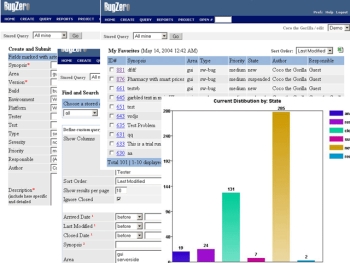 If you need a program that will help track software bugs, you need to check out Bugzero. If you need a program that will help track software bugs, you need to check out Bugzero.
Bugzero is a Web-based bug tracking tool but that is not just what it is used for it’s also a defect tracking, issue tracking, and change management system used in a distributed team environment to track software bugs, hardware defects, test cases, or any other issues.
But there is more to Bugzero than all that; it can also be used equally well as a helpdesk customer support, trouble ticketing, or email management system to collect and manage customer feedbacks, incidents, requests, and issues.
The new version, Bugzero 4.5.2 which just hit the market yesterday has these latest Changes:
- A new virus scan feature was added
- A few minor bugs were fixed
- A project can now be reloaded from database without restarting the application
The only thing you may have an issue with is the price. It looks expensive, but is it really expensive? It’s all a matter what you want to use it for, check out the trial version first and if it is what you need, it will be a worthwhile investment.
CLICK HERE for more info and trial download.
Rating: Loading... No Comments »
Ciaran Moore - February 13, 2007
 PrimoPDF is a totally free PDF convertor. You can also optimize the output for print, screen, ebook, or prepress. This latest version adds some extra features such as 40-/128-bit encryption, ability to add document information (e.g. title, author, subject, keywords) for easier searching, double byte character support, enhanced support for Microsoft Windows 98, ME, and NT, PDF viewing support for non-Windows environments, and full support for 64-bit machines ( be sure to download the separate installer for that). PrimoPDF is a totally free PDF convertor. You can also optimize the output for print, screen, ebook, or prepress. This latest version adds some extra features such as 40-/128-bit encryption, ability to add document information (e.g. title, author, subject, keywords) for easier searching, double byte character support, enhanced support for Microsoft Windows 98, ME, and NT, PDF viewing support for non-Windows environments, and full support for 64-bit machines ( be sure to download the separate installer for that).
Once you’ve installed it, you can convert about any file that can be printed on your PC to a PDF file! Pretty cool little program! Go grab it right here!
Rating: Loading... No Comments »
Ciaran Moore - February 13, 2007
 So you’re wondering what Pamela for Skype is? Well, its a digital personal assistant for Skype. For example when you start a call on Skype it asks if you want to record the call. It then says “this call is not being recorded”, but that message can also be heard by the person you are talking too! So be careful! So you’re wondering what Pamela for Skype is? Well, its a digital personal assistant for Skype. For example when you start a call on Skype it asks if you want to record the call. It then says “this call is not being recorded”, but that message can also be heard by the person you are talking too! So be careful!
It’s relatively easy to navigate, with a simple to understand interface. The message center is great as it allows you to see at a glance how many voicemails, skype voice mails, skype recordings, custom recordings or birthday notifications you have. It’s available in 4 versions, each with its own set of unique features, one version even supports Skype video.
Some of the features it adds to Skype include:
- Call Recording
- Video Recording
- Answering Machine
- VideoMail
- Emotion Sounds
- Auto Chat Reply
- Birthday Reminders
- Skype Status Change
- Chat Recording
- Email Forwarding
- Contact Personalization
- Auto Start Applications
- Skype Blogging
- Skype Podcasting
Compare the free and paid versions and download it.
Rating: Loading... 1 Comment »
Ciaran Moore - February 13, 2007
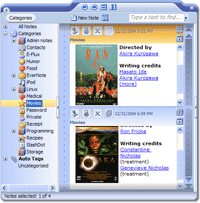 EverNote is note taking software, it’s also capable of recognizing digital ink (handwritten notes on a tablet) and multiple other formats, as well as images, emails, html, and supports custom templates. EverNote is note taking software, it’s also capable of recognizing digital ink (handwritten notes on a tablet) and multiple other formats, as well as images, emails, html, and supports custom templates.
It stores your notes, handwritten memos, ideas, brainstorms, etc. It stores them in chronological order and you can also create categories to help you better organise things. As well as this, it also has a powerful search function.
A cool, useful little feature I like is the ability to download a Firefox extension or Internet Explorer button at the homepage, so you can instantly select webpage text and “add to evernote”. It can also encrypt your notes for added security and peace of mind.
For the full list of features, which is pretty impressive for this neat little program,(spell checker, synchronisation, support for a wide range of pen tablets, drag and drop support, and more) check out the homepage here where it’s available in both free and pro versions.
Rating: Loading... No Comments »
O. James Samson - February 12, 2007
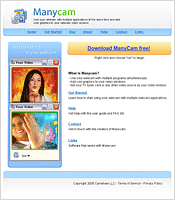 Have you always wanted to use your webcam in more than one application at the same time but you’ve not been able to do so because you can’t find a software that works? I got good news for you, try using ManyCam. Have you always wanted to use your webcam in more than one application at the same time but you’ve not been able to do so because you can’t find a software that works? I got good news for you, try using ManyCam.
How does it work?
ManyCam solves this problem for you by splitting one video stream into several video streams. All you need to do is to choose ManyCam virtual Webcam as the video source in your webcam applications.
One other thing I love about this software is that it lets you add cool features like funny animations, time and text to the video stream. All you have to do is right click the ManyCam icon in your bottom tray to access these features.
It’s so easy to use. Go and try it. CLICK HERE
Rating: Loading... No Comments »
|
|
|





