Archive for November, 2006
Tuesday, November 7th, 2006
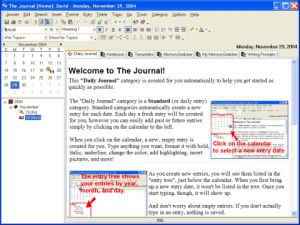 Okay, so “The Journal” is journaling/diary software. The idea of keeping a journal or diary always sounded kinda boring to me, unless you’re into that kinda thing or have an important or interesting time period in your life you’d like to document. So if that isn’t your thing, its also a very useful program for having a private place to store your research,thoughts, ideas, poetry, work notes, etc. Okay, so “The Journal” is journaling/diary software. The idea of keeping a journal or diary always sounded kinda boring to me, unless you’re into that kinda thing or have an important or interesting time period in your life you’d like to document. So if that isn’t your thing, its also a very useful program for having a private place to store your research,thoughts, ideas, poetry, work notes, etc.
What i like about it is that it’s password protected and encrypted, so not just anyone who used your computer can read your stuff! The Journal also provides important options like a hot-key for rapidly “locking” The Journal and a Lock on Minimize feature. In this new version you can also set reminders, so if you have something to do on time or an appointment to keep, you won’t forget about it due to being too involved in typing your life story or your plans to take over the world!
Lots more info and the 45 day trial are available by going here.
Posted in Main | No Comments »
Tuesday, November 7th, 2006
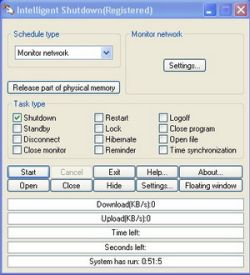 Intelligent Shutdown is a free program for turning off your computer at a specified time, among other things. It can also launch or close programs specified by you at a certain time. It can lock your computer and display a picture at a specified time too, for example when you’re gone to work (or gone home from work). Intelligent Shutdown is a free program for turning off your computer at a specified time, among other things. It can also launch or close programs specified by you at a certain time. It can lock your computer and display a picture at a specified time too, for example when you’re gone to work (or gone home from work).
So no need to remember to lock it or turn it off, as its all automated. All these things can be set to run at at a one off time or at a regular schedule, daily, once a week or month, etc. You can also set reminders for yourself. It also has a memory and CPU monitor so you can set things to happen only when memory or CPU is above or below a certain level, and it also shows idle time and uptime.
This program could be pretty useful for anyone who wants to automate things a little on their computer without having to remember to do it all each time.
It’s fully functioning shareware but you have to register if you wanna get rid of the welcome screen that pops up on start up. Get more info and the download here.
Posted in Main | 5 Comments »
Tuesday, November 7th, 2006
imgv is a unique and feature rich Image Viewer. It is released as free software with full sourcecode.
Features include a GUI that doesn’t get in the way of viewing your images, a file browser, slideshows, zooming, rotating, on-the-fly Exif viewing, histograms, fullscreen support, wallpaper setting, the ability to view 4 images on the screen at once, adjustable thumbnail sizes, playlists, view and download images from Web sites, movie playing, file searching/filtering, multiple directory loading, transitional effects, image hiding and more.
I actually wrote this program myself and have been working on it since the summer of 2001. It’s the only image viewer I use because it’s fast, has features that other image viewers don’t support that I like and it can run on other operating systems besides just Windows.
Here’s a screenshot of imgv I took where I’m using it to view a picture of my old cat with it:
Check out the documentation to quickly learn how to use it.
Posted in Main | No Comments »
Tuesday, November 7th, 2006
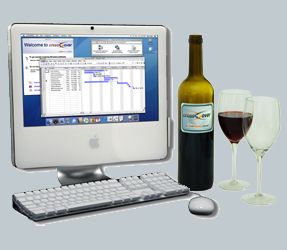 You know quite a lot of the time I am a Mac user. I know, it’s a dirty word in most parts of the blogisphere, but I have an Intel Mac and use it most of the time to run OS X software. BUT, and you will notice that is a big but, I do run a lot of PC software still, even though a lot of my productivity stuff has migrated to Mac. Fortunately using BootCamp I can run Windows XP on the Intel Mac Dual Core hardware, but it necessitates a reboot, which most of the time is okay but can be a royal pain. Solution? You know quite a lot of the time I am a Mac user. I know, it’s a dirty word in most parts of the blogisphere, but I have an Intel Mac and use it most of the time to run OS X software. BUT, and you will notice that is a big but, I do run a lot of PC software still, even though a lot of my productivity stuff has migrated to Mac. Fortunately using BootCamp I can run Windows XP on the Intel Mac Dual Core hardware, but it necessitates a reboot, which most of the time is okay but can be a royal pain. Solution?
Crossover by CodeWeavers is the answer. It allows you to run Windows apps natively on the Intel based Mac and Linux. You can install and run the software without installing Windows as the software sort of reverse engineers what the software needs to run and supplies right there on the Mac or Linux desktop.
Early versions of this software were a little buggy and larger software packages ran a little slow and the interfaces were a little broken, but the release version is much more stable. There are growing lists of compatible software on the website. To download a trial and see for yourself, go to CodeWeavers.
Posted in Main | 1 Comment »
Tuesday, November 7th, 2006
 A new version of Locate 32 has been released! A new version of Locate 32 has been released!
Locate 32 is a program that saves names of all files in your hard drives to file database. After that you can locate your files very fast. It works like updated and locate in Unix systems and Win32 based locating program is also included in this program.
The first version of LOCATE was released July 7 2005 and since then it has undergone 4 upgrades, making it better, faster and easier to use.
The problem with most desktop search suites is that you can either index everything, or not at all. There is no fine control of how often you want to update, for example, just 1 directory. With Locate you can do this very easily.
When you compare it to Windows desktop search and Google Desktop you’ll discover that it is far much better. To get the best of this program, you can set it up to index your locations but you’ll need to use several databases for different locations that see different amount of file update for optimized indexing. To top it all, Locate 32 is free.
Latest changes in the new version include:
- Exclude directories allows * and ?
- Regular expressions are changed to be caseless
- Fixed several bugs
Want to check out this and other related programs? Click HERE!
Posted in Main | 5 Comments »
Tuesday, November 7th, 2006
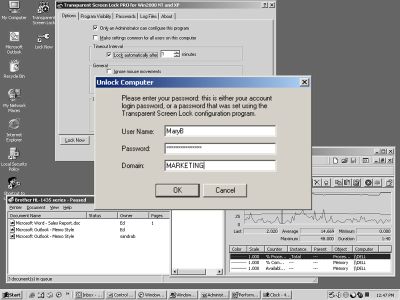 Transparent Screen Lock is a program for locking your computer. Big deal, right? Theres a few programs that already do this,or you could just password protect the screensaver. The difference with this program is that it’ll still display whatever’s running. This just means that no one can interefere with it, so they can look, but can’t mess up the settings. Transparent Screen Lock is a program for locking your computer. Big deal, right? Theres a few programs that already do this,or you could just password protect the screensaver. The difference with this program is that it’ll still display whatever’s running. This just means that no one can interefere with it, so they can look, but can’t mess up the settings.
For home or office users i can’t think of much use, as this idea seems to lack any privacy, since anyone can still see what you’ve been working on, I dunno, maybe that’s not an issue with some people?
Though this does seem like it could be very useful for things such as demo computers on display in computer stores or at trade shows, It could be a tad cheaper but may be worth it to certain people in those circumstances, but the rest of us regular home users can find similiar things for free, or just stick with password protecting the screensaver!
This seems like one of those programs that’s very useful to certain people working in certain conditions like i mentioned, and not very useful to everyone else, althought it has some advanced features such as logging attempts at unlocking the computer.
Theres a standard and a pro version, they seem pretty similiar to me,so if you wanna check it out and get more detailed info on what it can do, go here.
Posted in Main | 1 Comment »
Tuesday, November 7th, 2006
How many ways of using maps do you know? And online based, like Google Maps? Well, you can add one more to ’em, cause that’s what Dropspots is all about!
Of course you’ve heard about popular in our days social games? So that’s one of them: firstly, you have to hide a gift (well, nearly anything will work, that’s not the point) in some real place, than map it on site (which is powered by Google Maps) for someone to find. Well, it also works another way: you can find an interesting to your mind drop spot on the map, try your luck – go and pick it up!
It’s simple, fun with a bit of social interactive activity. So, why don’t you give it a shot?
Posted in Main | No Comments »
Tuesday, November 7th, 2006
 The first edition of the AoA DVD RIPPER was released sometime last year, ever since then it has enjoyed a couple of updates, but now a new updated version is out. The first edition of the AoA DVD RIPPER was released sometime last year, ever since then it has enjoyed a couple of updates, but now a new updated version is out.
AoA DVD RIPPER 5 provides a fast and easy way to convert your DVD movies or just the parts of the movie that you want. It copies in high quality AVI (DivX, XviD…), MPEG, WMV, iPod, PSP, 3GP, MP4, VCD (MPEG-1) and SVCD (MPEG-2) formats. It also extracts audio tracks from DVD movies.
It allows you to back up your DVD in just 3 easy steps. The fact that AoA DVD RIPPER also lets you easily select your favorite DVD clips or chapters to copy makes it a darling. With AoA DVD RIPPER, you can take your DVD’s on the plane, train or automobile; watch them on your computer, laptop or Pocket PC on vacation, at work or at school.
This new version supports direct conversion of DVD movies to MP4/3GP format that your portable device (Sony PSP, Apple iPod Video, 3G cell phone, MP4 player…) can play. Compared to Nero and the others and I prefer AoA because of its simplicity and its ability to do a lot of things due to its wide array of features.
Supported Formats
- Convert recorded DVD to Windows Media Player compatible;
- Convert DVD to MPEG1/VCD PAL/NTSC;
- Convert DVD to MPEG2/SVCD PAL/NTSC;
- Convert DVD to DivX, AVI, XviD;
- Convert DVD to WMV;
- Convert DVD to iPod;
- Convert DVD to PSP;
- Convert DVD to MP4;
- Convert DVD to 3GP;
- Convert DVD to WAV (extract audio track from a DVD)
SYSTEM REQUIREMENTS:
– Windows 98SE/ME/2000/NT/XP/2003
– 128MB of RAM (128MB recommended)
NOTE: If in trying to rip a DVD with this program you are told that it is locked, try and run the DVD one time and then try ripping it again. You should encounter no more problems after that.
More info and free trial download available here!
Posted in Main | No Comments »
Monday, November 6th, 2006
 It’s high time you got the best out of your PC. Fresh UI is supposed to help you do just that. Though this software has been out for a while now, it has been recently updated with hidden network settings to get dial-up (modem connection) optimization. It’s high time you got the best out of your PC. Fresh UI is supposed to help you do just that. Though this software has been out for a while now, it has been recently updated with hidden network settings to get dial-up (modem connection) optimization.
Loaded with hundreds of useful hidden settings, this software covers the customizing and optimizing technique that you’ll be glad to know: Customizing Windows User Interface, Optimizing system settings, Optimizing hardware settings, Customizing Windows application settings, and Control user environment with policies.
There is a slight hitch. Though it is good it is too bulky. Having to load all languages when you only need one and loading modules not even valid for your OS all contributes to that. I think they need to work on that part of the program, and give it a level of specificity that lets you take what you need and not all you can.
All in all it’s still a great program. It is compatible with Windows 95/98/2000/ME/NT 4.0 and XP. Want to give it a shot? Click HERE for free download and more info
Posted in Main | No Comments »
Monday, November 6th, 2006
Ok. so you take precautions online. You know to a-l-w-a-y-s use protection, because all it takes is one time!! You don’t download strange files from even stranger people! You have a virus scanner, you have an antispyware scanner, and you’re not afraid to use ’em!
But then suddenly the worst happens, your beloved computer screws up, is it spyware? Is it a virus? Get it out! Get it out! aaaahhh!! You’ve tried your scanners but it just isn’t helping!! Well, don’t panic and remain calm. There is a last resort, and it’s name is HijackThis!!
HijackThis is a small free program that scans the inner workings of your computer such as the registry. It outputs its findings to a text file, which you can then show to many computer knowledgable people in various forums online, such as such as SpywareInfo or Computer Cops.
Then they can hopefully tell you exactly whats wrong with your computer and how you can get things back to normal again! HijackThis is a serious yet simple tool for anyone who needs to sort out a spyware problem that seems too much for scanners, and you can get it here and information on using it is here
Posted in Main | No Comments »
|
|
|






