Author Archive
Monday, September 19th, 2011
 PicturesToExe Deluxe is an application that creates self-running slide shows of images as an EXE file. The program has a simple and intuitive interface, which makes creating a presentation very easy. All you have to do is choose some pictures and the program will produce single EXE file which contains all images inside. No additional programs are needed to run resulting presentation – only that stand-alone EXE file. You can also make a much more attractive presentations, than simply changing slides in case you have a higher demand. PicturesToExe Deluxe is an application that creates self-running slide shows of images as an EXE file. The program has a simple and intuitive interface, which makes creating a presentation very easy. All you have to do is choose some pictures and the program will produce single EXE file which contains all images inside. No additional programs are needed to run resulting presentation – only that stand-alone EXE file. You can also make a much more attractive presentations, than simply changing slides in case you have a higher demand.
You can customize Pictures ToExe Deluxe with each slide by specifying background color or picture, adding comments, sounds, objects. As a matter of fact, it is also possible to use different cinematographic transition effects between slides, add background music. The application also Includes the ability to exactly synchronize show of slides to music, placing points on the time-line. However, when it becomes necessary, you are able to protect your presentation by password and assign expiration date. Presentations can be automatic (by timer) or controlled manually, run once or continuously. If you prefer, you can create SCR files, and use your presentations as a standard Windows screen savers. The application runs on Windows 2000, 2003, 9x as well as XP.
Want to check it out? Visit Wnsoft.
Posted in Main | No Comments »
Monday, September 19th, 2011
 IcoFX is a freeware icon editor that works as an all-in-one solution for icon creation, extraction and editing. The program is designed to work with Windows XP, Windows Vista and Macintosh icons supporting transparency. IcoFX includes a lot of tools and more than 40 effects at your fingertips; and there is virtually no limit to the icons you can create. You can easily convert your favourite images into icons, or icons into images. IcoFX gives you the possibility to create icon libraries or change icons inside exe files, create a favicon for your website or blog, convert your Macintosh icons to Windows icons and vice versa. Using IcoFX enables you to extract icons from other files, including Windows Vista and Macintosh files, and you can easily work with multiple files using the batch processing capability of IcoFX. IcoFX is a freeware icon editor that works as an all-in-one solution for icon creation, extraction and editing. The program is designed to work with Windows XP, Windows Vista and Macintosh icons supporting transparency. IcoFX includes a lot of tools and more than 40 effects at your fingertips; and there is virtually no limit to the icons you can create. You can easily convert your favourite images into icons, or icons into images. IcoFX gives you the possibility to create icon libraries or change icons inside exe files, create a favicon for your website or blog, convert your Macintosh icons to Windows icons and vice versa. Using IcoFX enables you to extract icons from other files, including Windows Vista and Macintosh files, and you can easily work with multiple files using the batch processing capability of IcoFX.
IcoFX comes with lots of features that include the following; create icons for Windows and Macintosh, support for Windows Vista icons with PNG compression, convert your favourite images into icons or cursors, or icons into images, easily work with multiple files using the batch processing capability of IcoFX, possibility to create icon libraries or change icons inside exe files, quickly create layer based images using IcoFX, and many more.
Want to check it out? Visit Icofx.
Posted in Main | 1 Comment »
Sunday, September 18th, 2011
 OSForensics is one of those applications that will allow you extract forensic data from computers, quicker and easier than ever. You can also uncover everything hidden inside a PC, discover relevant forensic data faster with high performance file searches and indexing, restore deleted files, identify suspicious files and activity with hash matching, drive signature comparisons, and look into e-mails, memory, and binary data. Other options include; manage your digital investigation, organize information and create reports about collected forensic data. Current version include a couple of additions and updates such as; added registry password retrieval dialog to password recovery tab and support code to get windows logins and password hashes from SAM hives, undeleted files, disk Preparation for NTFS formatted disks, deleted files that are older than the directories they are in are now also shown, and a few others. OSForensics is one of those applications that will allow you extract forensic data from computers, quicker and easier than ever. You can also uncover everything hidden inside a PC, discover relevant forensic data faster with high performance file searches and indexing, restore deleted files, identify suspicious files and activity with hash matching, drive signature comparisons, and look into e-mails, memory, and binary data. Other options include; manage your digital investigation, organize information and create reports about collected forensic data. Current version include a couple of additions and updates such as; added registry password retrieval dialog to password recovery tab and support code to get windows logins and password hashes from SAM hives, undeleted files, disk Preparation for NTFS formatted disks, deleted files that are older than the directories they are in are now also shown, and a few others.
OSForensics gives you the opportunity to discover relevant forensic data transfer with high performance file searches and indexing. You can also identify files and activity with hash matching, drive signature comparisons, and look into emails, memory, and binary data. OSForensics also allows you to manage your digital investigation, organize information and create reports about collected forensic data. You will be amazed to find out that OSForensics is a freeware program with lots of easy-to-use interface and features.
Want to check it out? Visit OSForensics.
Posted in Main | 1 Comment »
Saturday, September 17th, 2011
 Microsoft Internet Information Services Express is basically designed to enhance your ability to develop and test web applications on Windows by combining the power of IIS 7.5 with the convenience of a lightweight web server like the ASP.NET Development Server (also known as Cassini). The program is included with Microsoft WebMatrix, which is an integrated suite of tools designed to make developing web applications on Windows simple and seamless. IIS Express 7.5.1 Beta can also be used with Visual Studio 2010 as a powerful alternative to Cassini. Microsoft Internet Information Services Express is basically designed to enhance your ability to develop and test web applications on Windows by combining the power of IIS 7.5 with the convenience of a lightweight web server like the ASP.NET Development Server (also known as Cassini). The program is included with Microsoft WebMatrix, which is an integrated suite of tools designed to make developing web applications on Windows simple and seamless. IIS Express 7.5.1 Beta can also be used with Visual Studio 2010 as a powerful alternative to Cassini.
The Microsoft IIS Express has a couple of key benefits or features that include the following; the same web server that runs on your production server is now available on your development computer, most tasks can be done without the need for administrative privileges, a lot of users can work independently on the same computer, and IIS Express runs on Windows XP and all later visions of Windows.
Users require the Microsoft .NET Framework 4.0 to be installed on their systems before they can run Microsoft IIS Express 7.5.1 Beta on their systems. The program also supports the following operating systems; Windows 7, Windows Server 2003, Windows Server 2008, Windows Server 2008 R2, Windows Vista, and Windows XP.
Want to check it out? Visit Microsoft.
Posted in Main | No Comments »
Saturday, September 17th, 2011
 Easy Timer is an easy-to-use alarm clock that has a simple and minimalistic interface. All you need to do is simply set in how many minutes or at what exact time it should alert and press activate. You will find Easy Timer fully customizable; and set up can be really easy. You can choose alarm sound by choosing from over 35 pre-installed or selecting your own audio file and change the appearance like colors, position or size. The alarm type can be set to alert for a specified number of times or until deactivated. Additionally, there is an option to repeat it in certain minutes. Easy Timer also includes a couple of other great features that make it a great program worth checking out. Easy Timer is an easy-to-use alarm clock that has a simple and minimalistic interface. All you need to do is simply set in how many minutes or at what exact time it should alert and press activate. You will find Easy Timer fully customizable; and set up can be really easy. You can choose alarm sound by choosing from over 35 pre-installed or selecting your own audio file and change the appearance like colors, position or size. The alarm type can be set to alert for a specified number of times or until deactivated. Additionally, there is an option to repeat it in certain minutes. Easy Timer also includes a couple of other great features that make it a great program worth checking out.
Easy Timer also include a very helpful separate analogue desktop clock, which displays all information needed such as the current time, alarm time and alarm progress. The program is designed as a quick and easy solution to remind you for an upcoming event or just to serve as a nice desktop clock.
Some of its key features include the following; set up an alarm timer with just a few clicks, over 35 pre-installed alarm sounds, easy and intuitive interface, separate analogue desktop clock, etc.
Want to check it out? Visit Easy-Timer.
Posted in Main | No Comments »
Friday, September 16th, 2011
 Reimage is a program created to help you remove the guesswork in PC repair; thereby eliminating the need for diagnostic decisions based on superficial symptoms. The program simultaneously studies every single application object and interlinked dependency, and compares this with a huge repository containing over 8 million objects. The technology then surgically pinpoints only faulty objects and dependencies. Throughout the process, user data and preferences remain just as they were; untouched. The repository automatically corrects any malfunctions, with no need for prior preparation. Users may however, require a bit of experience when it comes to using Reimage in order not to lose some important applications or files. Reimage is a program created to help you remove the guesswork in PC repair; thereby eliminating the need for diagnostic decisions based on superficial symptoms. The program simultaneously studies every single application object and interlinked dependency, and compares this with a huge repository containing over 8 million objects. The technology then surgically pinpoints only faulty objects and dependencies. Throughout the process, user data and preferences remain just as they were; untouched. The repository automatically corrects any malfunctions, with no need for prior preparation. Users may however, require a bit of experience when it comes to using Reimage in order not to lose some important applications or files.
During scan, problems can be divided into three different categories that include the following; hardware, security, and stability. In order to fix any of these problems, Reimage will have to deactivate then quarantine all Malware found then remove virus damage, and all system files, DLLs, and registry keys that have been corrupted or damaged will be replaced with new healthy files from our continuously updated online database.
Reimage online database comprises of over 25,000,000 updated essential components that will replace any damaged or missing file on a Windows operating system with a healthy version of the file so that your PC’s performance, stability and security will be restored with the possibility of an improvement.
Want to check it out? Visit Reimage.
Posted in Main | No Comments »
Friday, September 16th, 2011
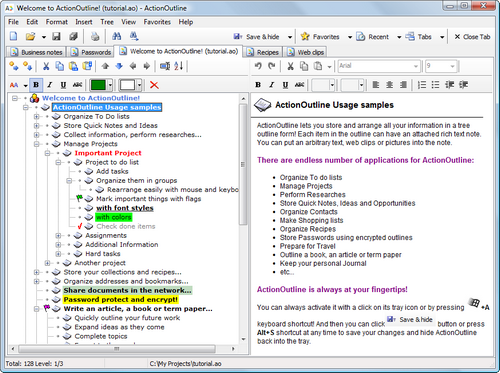 ActionOutline is an application designed to help you organize your bits of info into the intuitive outline form. The program enables you to do a lot of things you simply wouldn’t have thought you could do before downloading it. It’s use are practically endless; with lots of to-do lists, recipes, project notes, personal contacts, bookmark lists, reports, term papers etc. Arrange items using keyboard or mouse, cut and paste branches, place checks or tags next to listed items, search and replace information, print data, export to RTF and HTML, link to web or local files and a host of others. Using ActionOutline Lite means only seven sub-items per outline item, no export and no copy outline items as text to clipboard, and no network support. ActionOutline is an application designed to help you organize your bits of info into the intuitive outline form. The program enables you to do a lot of things you simply wouldn’t have thought you could do before downloading it. It’s use are practically endless; with lots of to-do lists, recipes, project notes, personal contacts, bookmark lists, reports, term papers etc. Arrange items using keyboard or mouse, cut and paste branches, place checks or tags next to listed items, search and replace information, print data, export to RTF and HTML, link to web or local files and a host of others. Using ActionOutline Lite means only seven sub-items per outline item, no export and no copy outline items as text to clipboard, and no network support.
ActionOutline Lite has a lot of features that include the following; organize your bits of info in a tree outline form using an Explorer-like interface, arrange items using keyboard or drag & drop them with a mouse, apply rich text formatting to outline items, cut and paste branches, p lace checks or tags next to important items, search and replace information, link to web or local files, access your favourite data files using menu and keyboard shortcuts, and a host of others.
Want to check it out? Visit Actionoutline.
Posted in Main | No Comments »
Friday, September 16th, 2011
 Connectivity Fixer is an application designed with features to monitor your Internet connection whenever you are connected to the Internet. Connectivity Fixer is able to fix any problem or issues affecting your internet connection, and subsequently puts it in order. The good thing about this program is that it has built-in features that allows for easy monitoring of your internet connection; thereby making all necessary corrections when things go wrong. Connectivity Fixer is an application designed with features to monitor your Internet connection whenever you are connected to the Internet. Connectivity Fixer is able to fix any problem or issues affecting your internet connection, and subsequently puts it in order. The good thing about this program is that it has built-in features that allows for easy monitoring of your internet connection; thereby making all necessary corrections when things go wrong.
Most internet users these days are usually plagued by issues bothering on Viruses, Worms, Trojans, Malware, Spyware and Adware; and they are aggressively spreading like hell. Issues like these affect the connection your internet connection; thereby slowing or completely disconnecting you. Some of these problems may not be immediately visible to the eyes; thereby leading to a lot of frustrations and waste of time that should have been spent on other important issues. Interestingly, Connectivity Fixer can work alongside your antivirus program or any other security program without creating any conflict or slowing down your system.
Some of the key features included in this version include the following; supports Windows XP, Windows Vista, as well as Windows 7, internet connection monitoring, connectivity fixer tool, free updates, as well as ticket support.
Want to check it out? Visit Badosoft.
Posted in Main | No Comments »
Thursday, September 15th, 2011
 ClamAV is an open source (GPL) antivirus engine designed for detecting Trojans, viruses, malware and other malicious threats. The program is the de-facto standard for mail gateway scanning, providing a high performance mutli-threaded scanning daemon, command line utilities for on demand file scanning, and an intelligent tool for automatic signature updates. The core ClamAV library also provides numerous file format detection mechanisms, file unpacking support, archive support, and multiple signature languages for detecting threats. ClamAV is an open source (GPL) antivirus engine designed for detecting Trojans, viruses, malware and other malicious threats. The program is the de-facto standard for mail gateway scanning, providing a high performance mutli-threaded scanning daemon, command line utilities for on demand file scanning, and an intelligent tool for automatic signature updates. The core ClamAV library also provides numerous file format detection mechanisms, file unpacking support, archive support, and multiple signature languages for detecting threats.
The publisher has been able to create ClamAV Optimized Builds from its original sources in order to make the optimized compilation free available. The original code has not been tampered with; but this version has witnessed a different build chain in order to gather a better executables in terms of native x64 support as well as regular x86, faster execution speed, smaller executable size, and lower memory.
Some of the key features you will readily find useful in ClamAV include the following; Omit frame pointers, enable fiber safe optimizations, compiled with /GF to pool common strings making executable smaller, ZIP package created with KZIP 14/04/2007 to reduce distribution size, based on latest ClamAV 0.97-133-gde8d667 (2011-08-02) sources, executables compressed with MPRESS 2.18, using Profile Guided Optimizations (PGO) for all builds builds making libclamav.dll about 17% smaller and marginally faster, and a few others.
Want to check it out? Visit ClamAVOpt.
Posted in Main | No Comments »
Thursday, September 15th, 2011
 POS Point of sale EPOS store software for retail stores shops outlets includes a free live web site inventory utility, and is the ideal solution for any small or medium size business that needs to do retail sales. The application provides a database for stock and customers and an intuitive EPOS interface for sales staff. Includes free live website inventory utility. Full user security and barcode printing. POS Point of sale EPOS store software for retail stores shops outlets includes a free live web site inventory utility, and is the ideal solution for any small or medium size business that needs to do retail sales. The application provides a database for stock and customers and an intuitive EPOS interface for sales staff. Includes free live website inventory utility. Full user security and barcode printing.
The application enables your computer to be used as a point of sale terminal, just add your stock and use it to process sales, track inventory, print receipts, invoices and barcodes. The program features some of the most advanced and lkatest Microsoft tools basically designed for inventory and customer databases with a staff friendly, easy to use sales interface; and requires Windows XP or later versions. 4POS Retail does not require additional hardware, but has facilities for receipt printers, barcode readers, touch screens and pole displays. Items sold may be tracked by unique transaction reference and are allocated to specific staff via secure log on.
4POS Retails has an array of takings and category reports. The F12 key for instance pulls up an overview of the most useful information. The application can be used to produce daily item sales, restock lists and also export in CSV or XML for further analysis.
Want to check it out? Visit 4pos.
Posted in Main | 1 Comment »
|
|
|




