Author Archive
Tuesday, June 14th, 2011
 SiSoftware Sandra is an information & diagnostic application that provides most of the information (including undocumented) you need to know about your hardware, software, and other devices whether hardware or software. SiSoftware Sandra provides similar level of information to Norton SI, Quarterdeck WinProbe/Manifest, etc. Win32 version is 32-bit and comes in both ANSI and native Unicode formats. The Win64 version is 64-bit and comes in native Unicode format. SiSoftware Sandra is an information & diagnostic application that provides most of the information (including undocumented) you need to know about your hardware, software, and other devices whether hardware or software. SiSoftware Sandra provides similar level of information to Norton SI, Quarterdeck WinProbe/Manifest, etc. Win32 version is 32-bit and comes in both ANSI and native Unicode formats. The Win64 version is 64-bit and comes in native Unicode format.
SiSoftware Sandra is a shareware with a couple of useful features that provide you a lot of information. However, there are a couple of free programs on the internet with equally good features, and can perform virtually similar tasks as this one. Nevertheless, SiSoftware Sandra is not a bad program. It runs on operating systems such as; Windows 2000, Windows 2003, Windows Vista, and Windows XP.
The publishers have been out with a couple of SiSoftware Sandra versions in the past, and hopefully things will improve. Definitely not a bad program to install on your system; and it doesn’t matter if it’s a shareware or freeware program. You may download SiSoftware Sandra 2011.17.64 for $34.99 per download. It is always advisable to have knowledge of what is going on within your system.
Want to check it out? Visit Sisoftware.
Posted in Main | No Comments »
Saturday, June 11th, 2011
 DEKSI Network Monitor is a network tool that can be used to monitor servers located on your local network and the Internet. As soon as problems are found on the monitored servers, DEKSI Network Monitor will first try to correct the problems. However, If DNM cannot correct the problems it notifies the administrator about the problem via email, SMS or a network messaging service. Deski Network Monitor periodically polls and sends them in ICMP packet and tries to connect to the requested TCP Port over your network. However, a successful check will enable a display of color green. If on the contrary the check fails, the tool will display red color. DEKSI Network Monitor is a network tool that can be used to monitor servers located on your local network and the Internet. As soon as problems are found on the monitored servers, DEKSI Network Monitor will first try to correct the problems. However, If DNM cannot correct the problems it notifies the administrator about the problem via email, SMS or a network messaging service. Deski Network Monitor periodically polls and sends them in ICMP packet and tries to connect to the requested TCP Port over your network. However, a successful check will enable a display of color green. If on the contrary the check fails, the tool will display red color.
Deski Network Monitor 8.8 comes with advance features that include the following: addition of sending SMS messages directly via a connected GSM phone; addition of ability to monitor software installed on computers (software audit), you can track new and deleted programs on remote computers; addition of ability to perform arbitrary SQL requests in the database monitoring check; addition of ability to monitor printers (local and networked); addition of WMI monitoring (ability to monitor different parameters on remote computers via WMI); fixed the dependent checks and issues with their alerts; fixed the ping sending error and packets larger than 250 bytes; and many more updates.
Users can download and try Deski Network Monitor for 30 days.
Want to check it out? Visit DekSoftware.
Posted in Main | No Comments »
Saturday, June 11th, 2011
 Taskbar Classic Start Menu is one simple application that adds to the system notification area an icon. By clicking this icon, you can bring up the pop-up menu, which is similar to the Programs menu of the Start button from the versions of Windows released before Windows 7. Taskbar Classic Start Menu is intended for users who want to launch their programs using classic Start menu, which in Windows 7 is missing. Though, the previous version is a bit stable, users can still look forward to a lot of features that include the following; the menu now contains all the items present in the classic start menu in Windows, ability to change additional icons that items may have if they are displayed, the top-level menu now shows a vertical banner that can be replaced by any custom picture, and many more. Taskbar Classic Start Menu is one simple application that adds to the system notification area an icon. By clicking this icon, you can bring up the pop-up menu, which is similar to the Programs menu of the Start button from the versions of Windows released before Windows 7. Taskbar Classic Start Menu is intended for users who want to launch their programs using classic Start menu, which in Windows 7 is missing. Though, the previous version is a bit stable, users can still look forward to a lot of features that include the following; the menu now contains all the items present in the classic start menu in Windows, ability to change additional icons that items may have if they are displayed, the top-level menu now shows a vertical banner that can be replaced by any custom picture, and many more.
Taskbar Classic Start Menu can automatically hide unused items (in the same manner as Windows 2000 and Me Start Menu did), show only the common or only the personal items, or they both together (separately or merged), or display a number of items with the user-specified second additional icon. It is possible for users to separately specify the size of icons, both for top-level items and sub-folders, choose to display in multiple columns of a given height or one, with or without separators.
Want to check it out? Visit SoftwareDistribution.
Posted in Main | No Comments »
Friday, June 10th, 2011
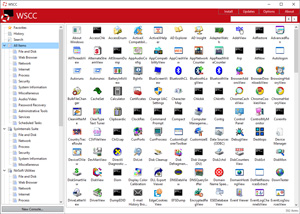 WSCC is a free, portable application that allows you to install, update, execute and organize the utilities from various system utility suites. WSCC also includes Update Manager that can check for newer versions of the utilities already installed and can download and install the missing items. Alternatively, WSCC can use the http protocol to download and run the programs. WSCC is one of the best Windows program with easy-to-use features and very attractive user-interface. This particular version contains new updates and features that every user will find wonderful. WSCC is a free, portable application that allows you to install, update, execute and organize the utilities from various system utility suites. WSCC also includes Update Manager that can check for newer versions of the utilities already installed and can download and install the missing items. Alternatively, WSCC can use the http protocol to download and run the programs. WSCC is one of the best Windows program with easy-to-use features and very attractive user-interface. This particular version contains new updates and features that every user will find wonderful.
Some of the features that have been carefully included by the publishers of this software include the following; simple and intuitive user-interface, inclusion of an Update Manager that allows the program to check for newer versions of the utilities already installed and can download and install the missing items, a console that can be used to execute command line applications, WSCC is also portable, and users do not have to install it (all they are required to do is extract the content of the downloaded zip archive to any directory on your computer).
WSCC runs on Windows 7, Windows 2003, Windows 2000, Windows 2008, Home Server, Vista, as well as XP. The program is a freeware, and users have the option of using it both for private and commercial use.
Want to check it out? Visit Kls-soft.
Posted in Main | No Comments »
Friday, June 10th, 2011
 Facebook Password Extractor reveals Facebook passwords stored in popular Web browsers in just a click. This extractor works no matter the browser used, and how many Facebook accounts you have, Facebook Password Extractor will show them all. You can view your Facebook password free of charge and as quickly as possible. As a user, you can use Facebook Password Extractor to access as many of your passwords as possible. All you need to do is launch Facebook Password Extractor, and it will display all Facebook logins and passwords cached or stored in IE, Firefox, Safari, Chrome, and Opera browsers. Facebook Password Extractor reveals Facebook passwords stored in popular Web browsers in just a click. This extractor works no matter the browser used, and how many Facebook accounts you have, Facebook Password Extractor will show them all. You can view your Facebook password free of charge and as quickly as possible. As a user, you can use Facebook Password Extractor to access as many of your passwords as possible. All you need to do is launch Facebook Password Extractor, and it will display all Facebook logins and passwords cached or stored in IE, Firefox, Safari, Chrome, and Opera browsers.
Once you launch this program, it automatically detects Web browsers installed in your system and analyzes their password cache and stored auto-login forms. If Facebook was ever accessed from that computer, the chances the correct password can be recovered are pretty high.
Users can find a lot of highly-useful features that include the following; shows Facebook passwords cached or stored in a variety of browsers, reveals stored login and password information instantly in a single click, supports all versions of Microsoft Internet Explorer, supports all versions of Opera, supports all versions of Mozilla Firefox, reveals Facbook logins and passwords for all supported browsers, and many more.
Want to check it out? Visit Elcomsoft.
Posted in Main | No Comments »
Friday, June 10th, 2011
 TortoiseSVN is a program that provides a nice and easy user interface for Subversion, and as a Subversion client. The program comes with all the features of Subversion itself, including: most current CVS features; directories, renames, and file meta-data are versioned; commits are truly atomic; branching and tagging are cheap (constant time) operations; efficient handling of binary files. TortoiseSVN is a program that provides a nice and easy user interface for Subversion, and as a Subversion client. The program comes with all the features of Subversion itself, including: most current CVS features; directories, renames, and file meta-data are versioned; commits are truly atomic; branching and tagging are cheap (constant time) operations; efficient handling of binary files.
TortoiseSVN is an easy-to-use SCM / source control software for Microsoft Windows and possibly the best standalone Apache Subversion Apache client there is. It is implemented as a Windows shell extension, which makes it integrate seamlessly into the Windows explorer. Since it is not integration for a specific IDE you can use it with whatever development tools you like.
This latest version enables you to repair a couple of problems noticed during the last version; and that is can be done during upgrade. Among its key features include the following; most current CSV features, directories, renames, and file meta-data are versioned, commits are truly atomic, branching and tagging are cheap (constant time) operation, and efficient handling of binary files.
TortoiseSVN comes with an uninstaller, and runs on the following operating systems; Windows 2000, Windows XP, Windows 2008, Windows Vista, and Windows 2003.
Want to check it out? Visit TortoiseSVN.
Posted in Main | No Comments »
Thursday, June 9th, 2011
 Immunet Protect is a fine security program, and is perhaps the first known AntiVirus application focused on protecting your community. Immunet Protect uses cutting edge technology in leveraging the collective knowledge of the users in the Immunet Cloud; Immunet Protect defends you in real time against thousands of new threats generated every day. Immunet Protect is lightweight, and weighs less than 5 megabytes and utilizes minimal system resources. The free version of this program, which is the product under review, has a lot of advanced features that make it very reliable. Immunet Protect is a fine security program, and is perhaps the first known AntiVirus application focused on protecting your community. Immunet Protect uses cutting edge technology in leveraging the collective knowledge of the users in the Immunet Cloud; Immunet Protect defends you in real time against thousands of new threats generated every day. Immunet Protect is lightweight, and weighs less than 5 megabytes and utilizes minimal system resources. The free version of this program, which is the product under review, has a lot of advanced features that make it very reliable.
Some of its many advanced features include the following: fast standalone antivirus program, and leverages on the speed of cloud computing to deliver real-time protection to your computer; Immunet is 35 times lighter than traditional antivirus program; provides cloud-based protection that is always up-to-date against viruses, spyware, bots, worms, Trojans, and Keyloggers without affecting the speed of your computer; there is no need to download any virus signature file; Immune free antivirus is compatible with existing antivirus programs, and helps to protect your computer better; it protects all users as soon as a virus or threat is detected on one computer; etc.
Immune Protect is a fine security program, and users can look forward to a program that is easy to use.
Want to check it out? Visit Immunet.
Posted in Main | No Comments »
Thursday, June 9th, 2011
 SIW is a Read-Only / Display-Only System Information application that gathers detailed information about your system properties and settings. SIW 2011 also includes detailed specs for Motherboard, BIOS, CPU, Devices, Memory, Video, Drivers, Ports, Printers. It displays information about Operating Systems, Installed Programs, Processes, Services, Serial Numbers, Users, Open Files, System uptime, Users, Network, Network Shares, and more, as well as real-time monitors for CPU, Memory, Page File usage and network traffic. The publishers have also included features that enable SIW to display currently active network connections, Passwords hidden behind asterisks, installed codecs, and many more. SIW is a Read-Only / Display-Only System Information application that gathers detailed information about your system properties and settings. SIW 2011 also includes detailed specs for Motherboard, BIOS, CPU, Devices, Memory, Video, Drivers, Ports, Printers. It displays information about Operating Systems, Installed Programs, Processes, Services, Serial Numbers, Users, Open Files, System uptime, Users, Network, Network Shares, and more, as well as real-time monitors for CPU, Memory, Page File usage and network traffic. The publishers have also included features that enable SIW to display currently active network connections, Passwords hidden behind asterisks, installed codecs, and many more.
System information is basically divided into a few major categories that include the following: software inventory (installed software, and hot fixes, processes, services, users, open files, system uptime, installed codecs, software licenses, and password recovery); hardware inventory (motherboard, CPU sensors, BIOS, Chipset, PCI/AGP, USB, and ISA/PnP devices, memory, video card, monitor, disk drives, CD/DVD Devices, SCSI Devices, S.M.A.R.T, Ports, and printers); Network information (network cards, network shares, currently active network connections, and open ports); network tools; miscellaneous tools; and real-time monitors.
SIW is a standalone utility that does not require any installation; and that means no extra space is taken on your system.
Want to check it out? Visit Gtopala.
Posted in Main | No Comments »
Thursday, June 9th, 2011
 Recover My Files data recovery software has built-in features that will quickly and easily recover deleted files emptied from the Windows Recycle Bin, or lost due to the format or corruption of a hard drive, virus or Trojan infection, unexpected system shutdown or software failure. The new Recover My File version 4 has a lot of advanced features that can easily help you recover those files you never thought could be recovered. Sometimes, it does happen that we have problems recovering some files that have been accidentally deleted or lost as a result of some system problems; this Recover My Files makes it truly easier to get those files back. Recover My Files data recovery software has built-in features that will quickly and easily recover deleted files emptied from the Windows Recycle Bin, or lost due to the format or corruption of a hard drive, virus or Trojan infection, unexpected system shutdown or software failure. The new Recover My File version 4 has a lot of advanced features that can easily help you recover those files you never thought could be recovered. Sometimes, it does happen that we have problems recovering some files that have been accidentally deleted or lost as a result of some system problems; this Recover My Files makes it truly easier to get those files back.
With Recover My Files, you can enjoy a long list of advance features, which include the following; recover files even if emptied from the recycle bin, file recovery after accidental format, even if you have reinstalled Windows, disk recovery after a hard disk crash, get back files after a partitioning error, get data back from RAW hard drives, recover documents, photos, video music and email, recover from hard drive, camera card, USB Zip, floppy disk and other media.
Recover My Files is a shareware program, but is available for all users for a limited trial period for free. This latest version is great, and has a lot more features than the previous versions.
Want to check it out? Visit Recovermyfiles.
Posted in Main | No Comments »
Wednesday, June 8th, 2011
 iTunes for Windows lets you to create your own personal digital music library, manage and play your music collection with drag-and-drop simplicity. iTunes, is the software part of the equation that lets you pack 7,500 songs in your pocket, automatically synchronizing with the sensational new iPod at high speeds over FireWire. The application gives you the ability to generate dynamic Smart Playlists that reflect your preferences and listening habits. With iTunes it is easy to create CDs that play back on in your car, your home stereo, Macs and on Windows-based PCs. iTunes adds the ability to share music among your Macs, play and encode AAC files, and view album art. However, this version is a bit bloated, and the publishers need to take a look at this critically. iTunes for Windows lets you to create your own personal digital music library, manage and play your music collection with drag-and-drop simplicity. iTunes, is the software part of the equation that lets you pack 7,500 songs in your pocket, automatically synchronizing with the sensational new iPod at high speeds over FireWire. The application gives you the ability to generate dynamic Smart Playlists that reflect your preferences and listening habits. With iTunes it is easy to create CDs that play back on in your car, your home stereo, Macs and on Windows-based PCs. iTunes adds the ability to share music among your Macs, play and encode AAC files, and view album art. However, this version is a bit bloated, and the publishers need to take a look at this critically.
With iTunes for Windows, you can automatically download new music, app, and book purchases to all your devices. As a matter of fact, you can download only the stuff you want to just the devices you want; this one unique feature of the new iTunes 10.3.
iTunes for Windows is free for download, and is compatible with systems such as Windows Vista, and Windows XP.
Want to check it out? Visit Apple.
Posted in Main | No Comments »
|
|
|




