Author Archive
Wednesday, November 17th, 2010
 SABnzbd is a binary application that is written in Python; it is uses a web-interface, which makes it server oriented. Users who install this program on their systems can download from Usenet easily without any problem. With this program, every download can be automatically verified automatically, extract and clean up posts downloaded from Usenet. The user interface is fully customizable, and offers a complete API for third-party applications to hook into. SABnzbd is a binary application that is written in Python; it is uses a web-interface, which makes it server oriented. Users who install this program on their systems can download from Usenet easily without any problem. With this program, every download can be automatically verified automatically, extract and clean up posts downloaded from Usenet. The user interface is fully customizable, and offers a complete API for third-party applications to hook into.
This is definitely one of the best open source programs I have seen on the internet in recent times; it deserves a lot of kudos. It actually makes downloading of newsgroup files; combining wonderful user features as a part of its attraction. SABnzbd is actually gives much more than most shareware or premium applications around.
SABnzbd 0.5.5 actually works or runs on systems like; Windows, OSX, Linux, UNIX, BSD, and many more. The fact that it is written in Python makes it a program that can work practically anywhere and everywhere. The publishers have also included Web UI, which lets users check their queue status wherever they are.
Virtually everyone can use this program without any difficulty; which makes it one of the best open source programs around. Since it is an open source program, users are also welcome to report and fix bugs too.
Want to check it out? Visit Sabnzbd.
Posted in Main | No Comments »
Wednesday, November 17th, 2010
 RAMDisk 3.5.130 RC14 an application that is designed for those who have a disk I/O bound application that is small enough to fit in main memory. This program is also good for storing data that are frequently accessed; including temperature files, and database index. The program is kernel-level driver that presents a standard disk to the operating system. RAMDisk stores and retrieves data from the system RAM on your computer otherboard rather than actual physical disk. Users can also set various options with the Kernel Driver which comes with the GUI. RAMDisk 3.5.130 RC14 an application that is designed for those who have a disk I/O bound application that is small enough to fit in main memory. This program is also good for storing data that are frequently accessed; including temperature files, and database index. The program is kernel-level driver that presents a standard disk to the operating system. RAMDisk stores and retrieves data from the system RAM on your computer otherboard rather than actual physical disk. Users can also set various options with the Kernel Driver which comes with the GUI.
With this program, you can also do the following: your internet page load page; control what files and programs are stored into the memory (loaded at boot time); create temporary disks for added security; reduce compile times; accelerate databases; and speed up disk-to-disk activities such as video encryption and audio ripping.
RAMDisk is very useful for application developers, especially when they want to check how fast their programs can be and possibly if your disk access has suddenly become a major headache. The program is a shareware, and users can download or purchase it at $9.99 per one. However, for up to 4GB disk size, users can have it for free; and pay $9.99 if they want something higher.
Want to check it out? Visit Dataram.
Posted in Main | 1 Comment »
Wednesday, November 17th, 2010
 One major benefit of LibreOffice is the fact that it is compatible with major office suites, and available on a variety of platforms. The program is free for use, and users are also not restricted when it comes to distribution of this program. This productivity software is has a lot of quality extensions that can be compared to the OpenOffice. Really, users are not going to find much difference between this program and the original OpenOffice program. As a matter of fact, there are users who would prefer to stick with LibreOffice because of its wonderful extensions, which like I already said is not too different from OpenOffice. One major benefit of LibreOffice is the fact that it is compatible with major office suites, and available on a variety of platforms. The program is free for use, and users are also not restricted when it comes to distribution of this program. This productivity software is has a lot of quality extensions that can be compared to the OpenOffice. Really, users are not going to find much difference between this program and the original OpenOffice program. As a matter of fact, there are users who would prefer to stick with LibreOffice because of its wonderful extensions, which like I already said is not too different from OpenOffice.
LibreOffice 3.3.0 is still being developed and there are a few issues reported that are still being fixed by the publishers. These issues include the following: the user interface is still in the English translation, even though it is an international program; for Linux and MacOSX, there is a need to download other language packs aside from English language; the LibreOffice 3.3.0 is still in branding and renaming, which means users may still see old graphics, icon or websites; filters for the legacy and StarOffice binary formats are missing; and others.
Want to check it out? Visit DocumentFoundation.
Posted in Main | No Comments »
Wednesday, November 17th, 2010
 Epic is the first ever Indian web browser launched by Indian startup company Hidden Reflex. It comes with a lot of features that enhances your browsing experience. Epic also has a built-in antivirus and antivirus programs powered by ESET. The sidebar has a lot widgets already installed such as skins, maps, jobs, news, Gmail, Yahoo, and many more. Also, the publishers have included some major social networking sites such as: Facebook; Twitter; and Orkut, which are alls included in the browser’s sidebar. The publishers have also included over 1500 other free applications that have been included in the browser; which means, users can enjoy more additions to the already existing ones that originally came with it. Epic is the first ever Indian web browser launched by Indian startup company Hidden Reflex. It comes with a lot of features that enhances your browsing experience. Epic also has a built-in antivirus and antivirus programs powered by ESET. The sidebar has a lot widgets already installed such as skins, maps, jobs, news, Gmail, Yahoo, and many more. Also, the publishers have included some major social networking sites such as: Facebook; Twitter; and Orkut, which are alls included in the browser’s sidebar. The publishers have also included over 1500 other free applications that have been included in the browser; which means, users can enjoy more additions to the already existing ones that originally came with it.
Epic allows you to files and folder directly from the sidebar; giving you a lot of options. Users can also type in or enter words in as many as twelve Indian languages; which makes it a bit different from some other browsers around. Interestingly too, users can watch videos from a site like YouTube in a small window; making it possible to browse other website while watching videos. Of great importance is the feature that allows you to change to different skins to give your browser that unique look that you love.
Some of the features may not be top-notch, but things will certainly get better in the near future.
Want to check it out? Visit EpicBrowser.
Posted in Main | No Comments »
Friday, November 12th, 2010
 Sumatra PDF is a freeware application, and an open-source PDF reader for Windows. The design and user interface are quite simple to understand by any user. The publishers took the issues of simplicity as a priority when putting this software together; and that is probably one of the reasons it can be run from an external USB drive. Sumatra PDF is a freeware application, and an open-source PDF reader for Windows. The design and user interface are quite simple to understand by any user. The publishers took the issues of simplicity as a priority when putting this software together; and that is probably one of the reasons it can be run from an external USB drive.
The software also has a high degree of responsiveness, combined with a native x64 build, which makes it even a great program to install or use on your computer. The features include: addition of x64 compile for native x64 systems; compiled with visual C++2010 rather than Visual C++2008 in order to achieve higher quality; compiled with /Zp16 to get faster code when accessing data structures, especially on newer CPU; linked with /LARGEADDRESSAWARE to aid addresses close to 3GB in x86 processors; compiled with /favour: blend to get execution speed in both AMD and Intel x64 CPUs; compiled with /fp: fast to increase floating-point operations performance at the cost of some precision loss not noticeable on SumatraPDFOpt; and many more. On the other hand, users cannot go to pages anymore by selecting a page number; this is perhaps, a little minus for this program.
Want to check it out? Visit SumatraPDFOpt.
Posted in Main | No Comments »
Friday, November 12th, 2010
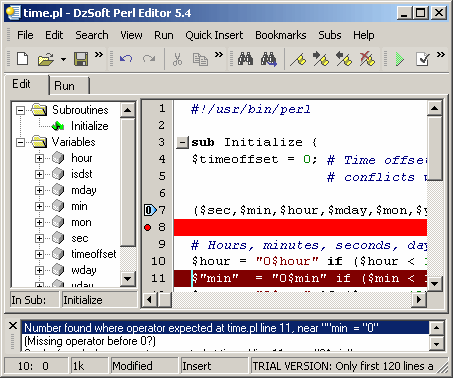 For those who like writing and are also looking for a program that can be used for debugging Perl CGI scripts; DzSoft Perl Editor is one of such programs. The program comes with comfortable and intuitive interface that works perfectly both for the beginner and the professional alike. Although, it looks much simple, this program really has a lot of powerful features that will stun you once you start using it. Some of the highly efficient features of DzSoft Perl Editor 5.8.7.5 include; syntax check feature that lets you find errors in your script, a comfortable editor with syntax highlighting, and many other features good for Perl development. For those who like writing and are also looking for a program that can be used for debugging Perl CGI scripts; DzSoft Perl Editor is one of such programs. The program comes with comfortable and intuitive interface that works perfectly both for the beginner and the professional alike. Although, it looks much simple, this program really has a lot of powerful features that will stun you once you start using it. Some of the highly efficient features of DzSoft Perl Editor 5.8.7.5 include; syntax check feature that lets you find errors in your script, a comfortable editor with syntax highlighting, and many other features good for Perl development.
Some other quality features of this powerful shareware program include the following: built-in POD viewer with automatic detection; SDI interface that supports multiple instances; full control of the environment variables and input data; code explorer; full server simulation; syntax check; collapsible subroutines; customizable code snippets; super comfortable editor with savable bookmarks; HTML export and print with syntax highlighting; officeXP-styled menus and toolbars; and many more.
DzSoft Perl Editor is a shareware program; that means users can download for $49.00. Those who are also interested in finding out more about this program before purchasing it can download a trial version for a limited period.
Want to check it out? Visit DZSoft.com.
Posted in Main | No Comments »
Friday, November 12th, 2010
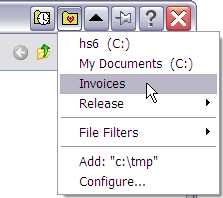 FileBox eXtender enhances Windows by simply adding a lot of advanced functions to the standard Open File and the Save dialog boxes. However, users should understand that FileBox eXtender 2.00.04 buttons will not be displayed if a program uses its own private dialog boxes for these functions. FileBox eXtender enhances Windows by simply adding a lot of advanced functions to the standard Open File and the Save dialog boxes. However, users should understand that FileBox eXtender 2.00.04 buttons will not be displayed if a program uses its own private dialog boxes for these functions.
The program adds two handy buttons to these standard dialogs; and these can be noticed at the right side of the Windows dialog box title bars. They are also noticeable or seen besides the minimize, restore, and maximize buttons.
The application also has the ability to forcibly resize the standard Windows file management dialog boxes in order to make them bigger. This makes it easier for those who have a lot of files in a folder to look. This a must have application for most users who love to enhance the beauty and performance of their computer desktop.
A user can easily navigate across his hard disk to where he needs to go by a single click. The publisher also created a “File Filters” sub-menu, which lists the file types frequently opened; these include the *.zip and *.doc, which are normally attached to email messages. Some of the latest changes include; removal of “do not use XP style buttons” option on “setting” tab, and addition of “when rolled up, keep the window bar on top” option to “settings” tab.
Want to check it out? Visit Hyperionics.
Posted in Main | No Comments »
Thursday, November 11th, 2010
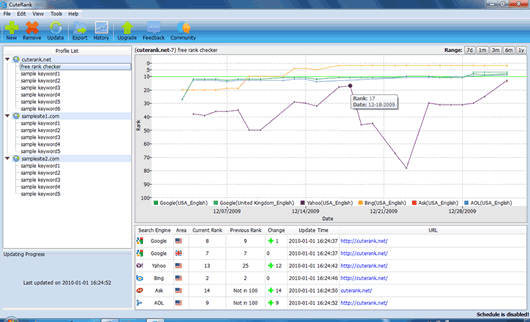 CuteRank is a free rank checker application or tool that can be used to monitor and track multiple keyword ranking performance on multiple search engines like; Google, Yahoo, AOL, Ask, and Bing. Many webmasters, internet marketers and search engine optimization experts are definitely going to love this SEO tool. CuteRank is a free rank checker application or tool that can be used to monitor and track multiple keyword ranking performance on multiple search engines like; Google, Yahoo, AOL, Ask, and Bing. Many webmasters, internet marketers and search engine optimization experts are definitely going to love this SEO tool.
Some of the latest features and updates that users can find in version 3.1.0 include: addition of sort keyword groups alphabetically; addition of show keywords update status flag in summary table; addition of Google.me, and Google.hr support; addition of possible to update keywords which are in a group; and addition of open to display rank number in chart. Users may however, find other quality additions in the commercial version of CuteRank if they want something more advanced.
Being a freeware is not enough reason for the publishers to keep displaying nagging reminders or messages about their commercial version. However, users who feel bad about this free version can go for the paid version, and avoid all the nagging messages and reminders about the commercial version of CuteRank.
In this version, users can enjoy features like; check keyword positions in an instant, track keyword ranking performance, automatically update keyword ranking on schedule, view keyword ranking history, export keyword ranking results, and a lot more.
Want to check it out? Visit CuteRank.net.
Posted in Main | No Comments »
Thursday, November 11th, 2010
 CorelDRAW Graphics Suite is one application that allows you tackle creative graphics and also design projects with so much ease and confidence. The program comes with a lot of precision tools and market-leading file compatibility and high-quality content that help you turn your creative ideas into professional results. As a user of this program, you will be able to design unique logos, signs, striking marketing materials and eye-popping web graphics, among many others. CorelDRAW Graphics Suite is one application that allows you tackle creative graphics and also design projects with so much ease and confidence. The program comes with a lot of precision tools and market-leading file compatibility and high-quality content that help you turn your creative ideas into professional results. As a user of this program, you will be able to design unique logos, signs, striking marketing materials and eye-popping web graphics, among many others.
This is a program that brings those great ideas of yours into reality; giving you a bold statement across the media. Some of the unique features in this version include the following: vector illustration; page layout; photo editing; tracing; web graphic and animation in one tightly integrated suite; and many more. However, this program is designed and specifically created for professional and aspiring designers. CorelDRAW Graphics Suite also offers a quick, intuitive workflow, high-value digital content, market-leading file compatibility and graphic design tools that gives you the edge.
Now, you can benefit from extra features like; more speed with new multi-core support, more rich content and professional templates, more output options for print, web digital signs, more color control and consistency, more compatibility, with support for over 100 file formats, and many more.
Want to check it out? Visit Corel.
Posted in Main | No Comments »
Thursday, November 11th, 2010
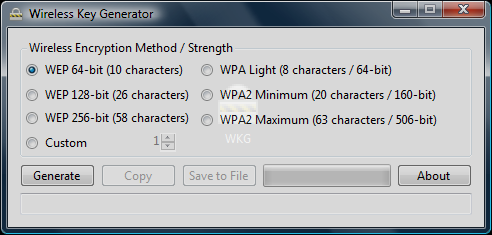 Wireless Key Generator is an application that enables easy generation of passwords for securing your wireless network. It is an application that has the ability to generate valid WEP, WPA, and WPA2 keys, and of course, well known custom length random strings. Wireless Key Generator 2.0 is also able to use valid characters, including uppercase, lowercase, numbers, and characters. The string generated by the program can be optionally copied to the clipboard or saved to a file. Wireless Key Generator 2.0 however, requires Microsoft .NET Framework 3.5 for installation. Also required to run this program include; windows XP/2003/2008/Vista, and runs natively on both x86 (32-bit) and x64 (64-bit). Wireless Key Generator is an application that enables easy generation of passwords for securing your wireless network. It is an application that has the ability to generate valid WEP, WPA, and WPA2 keys, and of course, well known custom length random strings. Wireless Key Generator 2.0 is also able to use valid characters, including uppercase, lowercase, numbers, and characters. The string generated by the program can be optionally copied to the clipboard or saved to a file. Wireless Key Generator 2.0 however, requires Microsoft .NET Framework 3.5 for installation. Also required to run this program include; windows XP/2003/2008/Vista, and runs natively on both x86 (32-bit) and x64 (64-bit).
Wireless Key Generator 2.0 is a freeware program, and users are welcome to use it without any payment. This may not actually be among the very best users are able to find on the internet, but for the fact that it is a freeware program makes it a bit commendable. Wireless Key Generator may not work perfectly with some routers out there, but it looks like it can work with the Linksys router very well. You can generate a Hex key with the WEP code; and of course you also need to have a bit of experience to be able to use this program as well.
Want to check it out? Visit Perceptionreality.
Posted in Main | 2 Comments »
|
|
|




