Author Archive
Friday, July 10th, 2009
 ImgBoard Cloner is a very simple application with very unique features. This photo editing tool will allow the user clone any part of the image and transfer the cloned image to projectors and additional monitors. This application is intended for those who wanted to edit a photo or select a particular portion of the image before they are loaded in another screen. This photo will allow the presenter to screen and manipulate the images that needs to be displayed in remote monitors or projectors. Because it creates a clone, the application will allow photo manipulation without any permanent changes on the original image. ImgBoard Cloner is a very simple application with very unique features. This photo editing tool will allow the user clone any part of the image and transfer the cloned image to projectors and additional monitors. This application is intended for those who wanted to edit a photo or select a particular portion of the image before they are loaded in another screen. This photo will allow the presenter to screen and manipulate the images that needs to be displayed in remote monitors or projectors. Because it creates a clone, the application will allow photo manipulation without any permanent changes on the original image.
The application offers two ways of copying an image. The “image” mode will allow the user to capture the entire image and manipulate the photo in terms of resizing, zooming on a particular part of the photo or cut a specific portion of the photo. The “capture” mode is a lot more interesting since it will allow users to capture the activities on the screen in real time. Users can allow the application to display the entire window or select a portion of the window for others to see. The captured image can be resized and tilted depending on the preference of the user.
Last but not the least; the application can also be set to be on top with transparency options. This will help the presenter access to background image or work on other applications while the image is displayed. All these features can be enjoyed for free and the application is less than 1mb in size.
Check it out at dedicateddj.com
Posted in Main | No Comments »
Thursday, July 9th, 2009
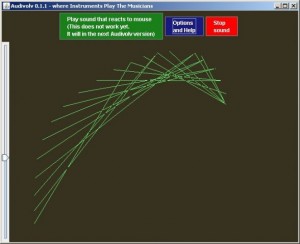 Audivolv is very interesting software simply because its purpose is to allow users to have more interaction with music. This Java-based application is practically a sample of artificial intelligence (AI) wherein constant interaction with the application will eventually help the application to fully comprehend your musical preferences. Audivolv is very interesting software simply because its purpose is to allow users to have more interaction with music. This Java-based application is practically a sample of artificial intelligence (AI) wherein constant interaction with the application will eventually help the application to fully comprehend your musical preferences.
The application has limited commands which will be ignored when the application picks up the user preferences. The most prominent commands are “Sounds Good” and “Sounds Bad”. When the user reacts to the music by clicking any of the commands, the application reacts accordingly through colorful lines. After a few songs, the application will practically run by itself. Your previous commands will be taken as a sample of your preferences.
Since the application needs to learn your preferences first before it can be automated, the application will first use the electricity used in each speaker. As the music plays, you choose which part “Sounds good” and “Sounds bad”. The application will eventually learn your preferences and react accordingly on other songs.
An impressive function of Audivolv is the mouse interaction. Users can start the audio with simple mouse movements within the application. As the application continues to interpret the music, your mouse can be used to further control the reaction.
The obvious downside of the application is its practicality. While it’s impressive that you’ll be able to teach an application to interpret music, the application has no additional usability. Although it will require JRE (Java Runtime Environment) the possibility of an AI in Java-based application is a very impressive feat and a great way to interact with an application.
Check it out at codesimian.com
Posted in Main | 1 Comment »
Thursday, July 9th, 2009
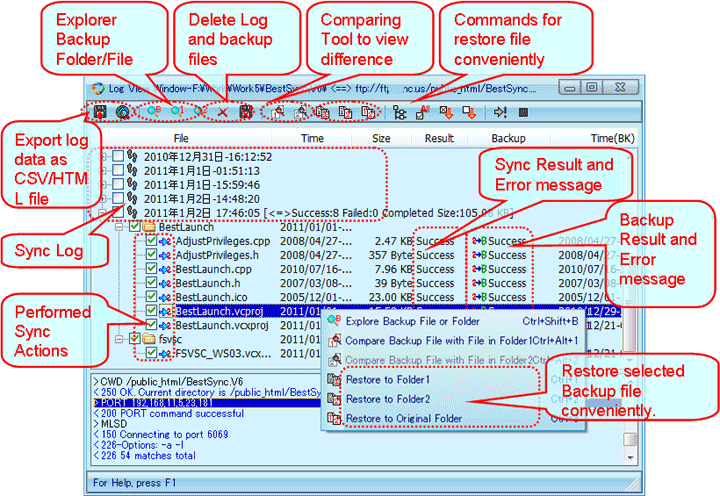 BestSynch is an easy to use file synching tool for various devices and destinations. The application is used to synch files in portable storage devices, MS Outlook, hard drive and even in FTP. Except for the FTP which requires online configuration, the other destinations do not need configuration for simple file synch. Users should be able to back-up their data without any trouble. The application will help the user to effectively target specific folders. The application also has the ability to pause and resume file transfer. It can even resume file transfer when the source or the target becomes unreadable. BestSynch is an easy to use file synching tool for various devices and destinations. The application is used to synch files in portable storage devices, MS Outlook, hard drive and even in FTP. Except for the FTP which requires online configuration, the other destinations do not need configuration for simple file synch. Users should be able to back-up their data without any trouble. The application will help the user to effectively target specific folders. The application also has the ability to pause and resume file transfer. It can even resume file transfer when the source or the target becomes unreadable.
The interface of the application is relatively confusing because of the various commands the user can initiate at any given moment. But just like most applications, the user just needs to work with BestSynch a few times before the application can be used without any problem.
One of the notable features in the application is the “Preview” function. Before the file transfer could initiate, users will be able to take a look at the transaction before they are implemented. Users will also be able to create reports of the file transfer. The data gathered could be exported as HTML (that could be shared online) or CSV.
In case of error in synching files, the application will also provide a report with an option of continuing the synching process. Users can also allow continuous synching even though there are errors on some files.
Working with the basic operations of BestSynch could be challenging. But the reporting system, preview function and real time data of the transfer definitely helps in understanding and effectively use the application.
Check it out at http://www.risefly.com/
Posted in Main | No Comments »
Thursday, July 9th, 2009
 The name of the application may sound like a bad imitation of iPod, but iPad is a simple but very smart application. Users who are looking for alternatives to their current word processing application can consider iPad as an option. The application is very light for a word processing application(less than 2mb in size) and doesn’t require a lot of processing power from the user. But even with this limitation, the application is an impressive word processing application due to its additional features. The name of the application may sound like a bad imitation of iPod, but iPad is a simple but very smart application. Users who are looking for alternatives to their current word processing application can consider iPad as an option. The application is very light for a word processing application(less than 2mb in size) and doesn’t require a lot of processing power from the user. But even with this limitation, the application is an impressive word processing application due to its additional features.
The interface of the application is very simple. The text area is surrounded by a large border where the shortcut buttons for various functions of the application is located. One unique feature of the application is on its focus on image editing. Various shortcuts that allow image editing in the application are provided by default.
Unfortunately, the application has limitations. Users will have to test the application a few times first before they can be at ease with the software. iPad may offer shortcuts to popular functions but the icons used for shortcuts can be confusing for first time users since the tags or description of the shortcuts are not indicated. The text area is also a little bit limited because the large border added for icon shortcuts.
But aside from these small limitations, users will be able to launch the application without any trouble. It’s efficient enough for basic functions which means personal use of the application will never be disappointing. The addition of image editing tool within the document has made the application very interesting and better compared to other lightweight word processing applications.
Check it out at http://crdevelopment.webs.com/ipad.htm
Posted in Main | No Comments »
Wednesday, July 8th, 2009
 Windows XP is one of the most popular operating systems today. Its ease of use and adaptability to various applications and hardware updates has made Windows XP the preferred operating system for many users worldwide. Windows XP is one of the most popular operating systems today. Its ease of use and adaptability to various applications and hardware updates has made Windows XP the preferred operating system for many users worldwide.
But XP’s popularity doesn’t mean perfection. In fact, there are a lot of things that users will not like in the operating system and would like to have them removed promptly.
That’s where the application named xpy becomes useful. This XP-specific application was made to tweak the present setting of your Windows XP. The application will remove some of the unwanted components in XP which will free up some memory as well as processing power.
Some of the notable features of xpy are the following:
- Uninstall Windows Messenger;
- Customize IE and Media Player;
- Remove unknown services in your computer;
- Increase privacy in your computer;
- Increase the speed of your computer.
The interface of the application is very simple. After running the application, you should be able to see the components running in your application. These applications come with tick boxes where you can select which applications will run in your computer. A restore point can also be created prior to the removal of services so that computer could be restored to its original configuration in case of system problems.
Even though the application looks very simple, this application is not for the inexperienced. Make sure that the components you are removing are the non-essential components. Even with the restore point, getting the original configuration could be difficult to retrieve if you remove the wrong components.
Check it out at http://xpy.whyeye.org/about/
Posted in Main | No Comments »
Wednesday, July 8th, 2009
 Expand your desktop experience with this small yet very powerful application. xNeat enhances your desktop experience with a variety of tools that could be launched anytime the user chooses. Installation is very fast and footprint is relatively smaller compared to other desktop enhancement tools since the application is less than 1mb in size. Expand your desktop experience with this small yet very powerful application. xNeat enhances your desktop experience with a variety of tools that could be launched anytime the user chooses. Installation is very fast and footprint is relatively smaller compared to other desktop enhancement tools since the application is less than 1mb in size.
After installation, the application will automatically work with other tools in your computer. One of its main features is to hide the specific application without crowding the taskbar. The application can be retrieved through “Start Launcher” and “Space” keyboard commands. Hiding windows can be done by right clicking the application for additional menu. The application can also be minimized in systems taskbar so that users can access the application faster instead of completely hiding the software.
Another notable feature in the application is the hotkeys setup. Virtually any application, file and command could be specified by users with this tool. Users just need to specify the actions, files and applications that should run when the specific hotkey is used. Additional features from xNeat are application arrangement in the taskbar, easy cloning of files, quick addition of time in file names and even change the launching priority of the applications.
The only downside of xNeat is that some of the notable features such as file cloning, keyboard shortcuts and date appendage are part of their paid for version. However, the “free lite version” of xNeat should be more than enough to help users enhance their desktop experience. As expected, the “free lite version” is even smaller in file size and footprint compared to its licensed version.
Check it out at xneat.com
Posted in Main | No Comments »
Tuesday, July 7th, 2009
 Portable applications are getting very popular today because these applications offer the same desktop experience without any real installation. You just have to place the program folder in the portable memory device and you should be able to run the application in any computer with your preferences intact. Portable applications are getting very popular today because these applications offer the same desktop experience without any real installation. You just have to place the program folder in the portable memory device and you should be able to run the application in any computer with your preferences intact.
OperaTor is one of the small portable applications that continuously increase in popularity. This application is a portable version of Opera browser with a few but very notable features. This type of browser is combed with Tor which offers anonymity while browsing and Polipo which allow ease of caching of data. These three applications have been combined to create a highly secured application. The user will be able to connect online without any records on the computer being used.
Even though OperaTor is an application heavy on security measures, customization is still possible. Users can change the security settings in the application as well as the proxy used to shield your surfing. Of course, this will require a little bit of familiarity but the application will launch with standard security features. With a decent Internet connection, you should be able to access websites fast even with an intensive screening from the browser.
But OperaTor will not completely cover your Internet activities or to be more specific, the special activities you would like to do your computer. The application will only shield your HTTP and HTTPS transactions. Other connections such as P2P connections, IRC chats will not be covered by OperaTor. Other operating systems such as Mac and Linux are also not supported.
Check it out at archetwist.com
Posted in Main | No Comments »
Tuesday, July 7th, 2009
 Use your mobile phone to control your computer with this small and free application. TextOn9 transforms your mobile phone to become your virtual keyboard as the application uses the Bluetooth connection for mobile control. As a virtual keyboard, you can use the application to actually compose texts from your mobile phone. Use your mobile phone to control your computer with this small and free application. TextOn9 transforms your mobile phone to become your virtual keyboard as the application uses the Bluetooth connection for mobile control. As a virtual keyboard, you can use the application to actually compose texts from your mobile phone.
The interface of TextOn9 resembles the standard alphanumeric keypad of mobile phones. As soon as the application is launched along with Bluetooth connectivity, the user can transmit input from their mobile phones to computers. However, the application does not allow real time messaging from mobile phones. Users would have to compose a message and send them via Bluetooth.
Aside from simple text, the application can also send special characters. By tapping the number “1” four times, the application opens a new window where the user can use the alphanumeric keyboard to select the right symbol.
TextOn9 is actually remarkable as it expands the usability of Bluetooth. However, it still lacks additional features for full remote control such as support for native “Send” since the users have to rely on “1”. Full remote control can’t be easily achieved with the application since there is no way that the application can control the pointers in computers. The application is basically limited to remote text entry while allowing additional symbols to be posted. Setting the system up could also take time especially when the user wishes to implement hotkeys from their mobile phones.
But with the limitations, TextOn9 is an innovative application. The application combines the portability of mobile phones to the efficiency of Bluetooth-enabled computers.
Check it out at zebware.tk
Posted in Main | No Comments »
Tuesday, July 7th, 2009
 The right click function in your computer enables users to access certain applications instantly with the file selected. Users can also automatically send files, delete, rename, copy, create shortcuts and know the file’s properties through the right click function. The right click has become a powerful tool for many users because it offers a wide variety of functions without any use of keyboards. The right click function in your computer enables users to access certain applications instantly with the file selected. Users can also automatically send files, delete, rename, copy, create shortcuts and know the file’s properties through the right click function. The right click has become a powerful tool for many users because it offers a wide variety of functions without any use of keyboards.
But your right click function could be further expanded with a simple application called FileMenu Tools. Simply put, the application will allow users add or remove the commands in the right click function. Customization on what the users can do when they right click a file or an application is possible and the options are very impressive.
Some of the actions that could be added in right click function include:
- Specific “send to” function;
- Synchronization with a separate folder;
- Deleting specific files formats in a folder;
- Run specific programs;
- Additional rename functions;
- Automatically create and copy files in a folder;
- Permanently delete the file name (no transfer to recycle bin).
If there’s any downside to this application, it should be on the number of choices. There are too many tools to select from the application and a novice might select all functions. When this happens, the right click tools might crowd the window and even slow down the computer. But even though this might happen anytime, users can still go back to the application and remove the shortcuts for better desktop and file interaction.
Check it out at lopesoft.com
Posted in Main | No Comments »
Monday, July 6th, 2009
 Windows Live Writer is an all-in-one tool created by Microsoft, specifically intended for bloggers. This free application from the software giant can easily become your standard platform for posting notes or blogs online. Although the application highly recommends Windows Live Spaces as its platform, the application can help you connect with your various blog sites which will allow you to update anytime. Windows Live Writer is an all-in-one tool created by Microsoft, specifically intended for bloggers. This free application from the software giant can easily become your standard platform for posting notes or blogs online. Although the application highly recommends Windows Live Spaces as its platform, the application can help you connect with your various blog sites which will allow you to update anytime.
The application’s interface emulates MS Word application. You’ll feel like you’re working with a simple document with few additional buttons that will allow you to post to your blogs automatically. Additional links are placed on the right side of the application which serves as tools for better looking blog posts.
Photos and video uploads are also possible through Windows Live Writer. The application will allow you to upload videos to YouTube and SoapBox. This is actually a small trick to post videos. After uploading the videos to these sites, you’ll be notified with the embedding code. Photo editing tools that will allow Photo streaming and the “scattered photo” mode are the notable effects that you can immediately implement in your application. You can also customize your photos not only in its size but also in its position such as tilt or some creative borders for your photos.
Because the standard Windows Live Writer only offers full support to Microsoft’s blogging platform, plug-ins were created to accommodate more blog platforms. The recently updated Windows Live Writer now has optional plug-ins for Flickr, Digg badge for your post and Twitter support which basically creates a Tiny URL to inform your users about your new blog posts.
Check it out http://windowslivewriter.spaces.live.com/
Posted in Main | No Comments »
|
|
|




