Author Archive
Monday, July 6th, 2009
Microsoft may not be a recognized name when it comes to security and system control, but it’s undeniable that Microsoft is in the best position to help users control their Windows-based operating systems. This has been made possible with Sysinternals Suite which is a download version of the popular web-based system tools offered by Microsoft.
Sysinternals Suite is one of the most extensive tools that you can download and use. The application comes with no less than 60 tools – all geared towards security, system maintenance, restoration and other process utilities you can think of. This is actually the small downside of the Suite since Microsoft does not allow customization of the suite. But the suite is surprisingly small. Even with the variety of tools, the entire suite is less than 10mb in size.
Using the tools after installation is very straightforward. The application will provide you with shortcuts to various tools that you want to use. Most of them will run in an instant but expect other system utilities and security tools might slow down your computer a little bit. This is actually expected since you’ll be tweaking your application. Just make sure you select the right tools to avoid system crash which could happen if you tweak the wrong component in your system.
Another challenge for users when using the application is actually on familiarity with some of the tools. An experienced user or a computer technician will easily recognize of the tools and their functions but beginners will have a hard time understanding the functions since the application only provides limited details of its use.
Check it out technet.microsoft.com
Posted in Main | No Comments »
Monday, July 6th, 2009
 Sending voicemails via email can be simplified through Speak-a-Message. This application allows users to record their voice and immediately send them as an attachment. The recorded audio files are in standard format which means the recipient of the email will be able to listen to the recorded message without the Speak-a-Message software. The audio files created are smaller than the standard audio recording applications in windows so attachment and playback is faster. Sending voicemails via email can be simplified through Speak-a-Message. This application allows users to record their voice and immediately send them as an attachment. The recorded audio files are in standard format which means the recipient of the email will be able to listen to the recorded message without the Speak-a-Message software. The audio files created are smaller than the standard audio recording applications in windows so attachment and playback is faster.
Speak-a-Message is fully compatible with MS Outlook, MS Word or MS PowerPoint. Users can simply record their message and click on the email shortcut to launch the MS Outlook application. The application is also automatically integrated with MS Word and PowerPoint which enable users to add audio in the documents instantly. This is very useful for adding comments to documents or additional data during presentations.
 The application can also create photo slideshows with audio commentaries. The audio is simply attached to the specific photo and the audio will automatically launch when the slideshow is focused on the specified photo. Through Speak-a-Message, the user can virtually create an audio and video presentation. The application can also create photo slideshows with audio commentaries. The audio is simply attached to the specific photo and the audio will automatically launch when the slideshow is focused on the specified photo. Through Speak-a-Message, the user can virtually create an audio and video presentation.
Special effects form Speak-a-message is also available. Users simply pause the recorded message and select the sound effect they want to be part of the recording. Skins are also interchangeable and they can be downloaded from the developer’s website free of charge (for personal use).
Speak-a-Message may not have a lot of functionalities in terms of audio recording but it’s very efficient in creating small audio files that could be used as comments or voice messages.
Check it out at speak-a-message.com
Posted in Main | No Comments »
Friday, July 3rd, 2009
 Angry IP Scanner is one of the highly recommended tools for network administrators. The tool is a free and open source application that could be implemented in various operating systems. As an open source application, it can be tweaked according to the developers’ preferences for full customization of experience. Angry IP Scanner is one of the highly recommended tools for network administrators. The tool is a free and open source application that could be implemented in various operating systems. As an open source application, it can be tweaked according to the developers’ preferences for full customization of experience.
Angry IP Scanner basically pings every gadget that connects to the network. The application can quickly scan the entire environment and returns with important data. Computers, printers and mobile gadgets that connect to your network could be identified by the application. But aside from simple network mapping, administrators can also extract detailed information from the application such as the current users, the web server the computer uses and the IP address attached to a specific computer. The data extracted could be exported to popular document formats.
The fast scan implement by Angry IP Scanner was made possible by the application’s multi-threading feature. Instead of simply single connection to scan the network; separate threads are created to quickly scan the entire network including the necessary information needed by the application.
While tweaking the application is possible, the developers of Angry IP Scanner recommend creating plug-ins instead of removing its components. Developers can create Java based plug-in so that they can extract additional information or implement additional commands through Angry IP Scanner.
The best feature of Angry IP Scanner is its simplicity. The application can be used by network administrators as well as those interested in checking their network connections. Casual use of Angry IP Scanner was made possible because of its easy to understand interface.
Check it out at angryziber.com
Posted in Main | No Comments »
Thursday, July 2nd, 2009
 Classic games never grow old and you can relive the classics with this Nintendo Entertainment System (NES) console emulator. VirtuaNes is a lightweight application and could run most NES Roms without any trouble. While it will require some configuration and additional downloads, VirtuaNes could easily become a primary emulator for classic NES games. Classic games never grow old and you can relive the classics with this Nintendo Entertainment System (NES) console emulator. VirtuaNes is a lightweight application and could run most NES Roms without any trouble. While it will require some configuration and additional downloads, VirtuaNes could easily become a primary emulator for classic NES games.
The main feature of VirtuaNes is on its USB Joystick support. Although the application and the games can be controlled directly from keyboard, USB support allows users to use joysticks for a better gaming experience. Configuration for USB joystick is very easy as long as the hardware has been detected. User’s can also save their game status with up to nine slots. Graphics and sound could also be configured with very little effort on the user’s end.
Another special feature of VirtuaNes is the launcher. The user will just point the specific location of the ROM files. After loading the file, the application will determine which ROM could run in the application. This eases gaming experience because some ROM files cannot be read by VirtuaNes. The launcher prevents that frustration by informing the user beforehand which games could run in the application.
Windowed and full screen mode is available in the application. The special TV frame version will add a TV-like border for a more classic experience.
The official website and developers of VirtuaNes uses Japanese as their official language. However, links for downloads of applications with English language support could be easily found in the application’s homepage.
check it out at http://virtuanes.s1.xrea.com:8080/
Posted in Main | No Comments »
Wednesday, July 1st, 2009
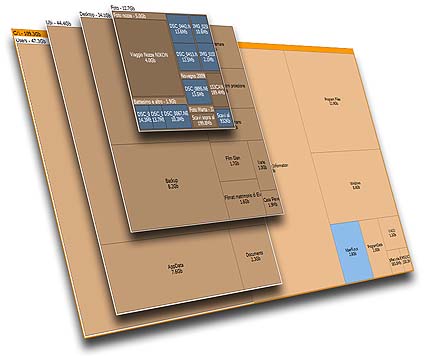 Free up space by analyzing which file or folder by a simple application called Space Sniffer. The application allows users to analyze each folder and file to give the user an idea which files are actually hogging up the system. It offers a very detailed analysis of each file and folder including the files in every application installed in your device. Free up space by analyzing which file or folder by a simple application called Space Sniffer. The application allows users to analyze each folder and file to give the user an idea which files are actually hogging up the system. It offers a very detailed analysis of each file and folder including the files in every application installed in your device.
The application doesn’t just provide mere simple data about the specific files. The application also provides a visual representation of each file and folder. Large files and folders will look bigger so that users will easily understand which files should be deleted to free up disk space.
The interface of the application is nothing less of amazing. For a very small application, (less than 1mb) the application renders each file in different colors depending on the size. You can configure the color so that you can create a personal experience and better understanding which files and applications should be uninstalled or deleted.
Because Space Sniffer will have to scan every file in your computer, it might take some time before every file is indexed. However, users can still use the application with ease as the application scans the entire system. The application can even launch a secondary scan in case the user wants to use the system to search for a separate file within the system.
All this features could be enjoyed from Space Sniffer without any installation. The application could even be launched from a portable storage device allowing users to scan various computers from a single storage device.
More info and download available at uderzo.it
Posted in Main | No Comments »
Tuesday, June 30th, 2009
 Virtual Dimension is a unique application because it offers a different way of desktop virtualization. This free, open source application allows users create unlimited virtual desktops in their application. Each desktop will have unique environment since you can customize each desktop with different a wallpaper, icons, running applications and shortcuts for applications. All of these advantages could be experienced even though the application is less than 500kb in size. Virtual Dimension is a unique application because it offers a different way of desktop virtualization. This free, open source application allows users create unlimited virtual desktops in their application. Each desktop will have unique environment since you can customize each desktop with different a wallpaper, icons, running applications and shortcuts for applications. All of these advantages could be experienced even though the application is less than 500kb in size.
Transferring from one desktop to another is very easy. Shortcuts to virtual desktops are provided in the system tray or a shortcut could be added on the desktop. Each shortcut could be always on top so that users will not have click on the system tray. Previews on other desktops is also added which means you do not have to transfer from one desktop to another just to know the running applications. Hotkeys can even be assigned per desktop for easier access. A single key could even become a shortcut to another desktop.
An impressive feature of Virtual Dimension is its ability to place icons on each window shortcut. The icons signify the number of applications currently running in various desktops. Each virtual desktop will also be saved and could be retrieved when the desktop restarts.
While the number of virtual desktop is unlimited, it will still depend on the capability of the local gadget. If you’re computer is relatively weak, then the number of virtual desktops it can hold without slowing down is also smaller. But for a powerful desktop computer, the possibilities are almost endless.
Check it out virt-dimension.sourceforge.net
Posted in Main | 2 Comments »
Monday, June 29th, 2009
 Free the resources in your computer or laptop with this small, mobile but highly important application. LiberKey is an application launcher for other lightweight and equally useful application. Users can customize the application they needed and pack them in LiberKey for easier access. Free the resources in your computer or laptop with this small, mobile but highly important application. LiberKey is an application launcher for other lightweight and equally useful application. Users can customize the application they needed and pack them in LiberKey for easier access.
The interface used in LiberKey emulates the startup menu. The application will automatically display the applications pre-installed and ready to be used. Because LiberKey is lightweight, launching the application will not require a lot of resources. Users can even uninstall some of their applications to have a lighter but equally efficient application offered by LiberKey.
Users have three options on configuration of LiberKey. The Ultimate version contains more than 200 applications, the Standard has 106 applications and Basic contains 28 applications. The applications added in these versions are all essential applications that will allow you to be very productive and entertained.
The Ultimate version could still be expanded. The applications offered by LiberKey are not the only applications that could be added in the launcher. Other applications can also be added in LiberKey with little to no problem as long as they can be launched in portable devices. Because of this feature, there could be hundreds more of small applications that could be launched in LiberKey. Customization is practically endless.
There are two versions of LiberKey: the installed version and the portable version. The installed version requires a single installation that will allow access to various applications. LiberKey also has a portable version which means your portable hard drive or memory storage device could transform any computer or laptop to your preferred configuration of applications.
Check it out http://www.liberkey.com/en/
Posted in Main | 2 Comments »
Monday, June 29th, 2009
 Most media players take time before they are completely launched in computers. Since the application needs to interact with other applications in the computer, it will require time before it is completely usable. The resources required for these applications are also high which could slow down other applications especially on low powered gadgets. Most media players take time before they are completely launched in computers. Since the application needs to interact with other applications in the computer, it will require time before it is completely usable. The resources required for these applications are also high which could slow down other applications especially on low powered gadgets.
Evil Player tries to be different from the crowd. One of the lightest media player applications today, Evil Player is less than 1mb which means the application could run in your system in less than a minute. Because it’s very light, the footprint or the required resources to run the application at an optimal level is very small.
But even though the application is lightweight, the features are never lacking. Its audio support is very impressive as it can play most popular audio formats such as OGG, WAV and MP3. Visualization and playlists could also be implemented which gives additional experience of the audio being played.
Aside from being an audio player, the application is also an efficient radio streaming tool. Shoutcast and Last.fm could be easily streamed through this simple application. The application also has a recorder function in case you want to record the audio coming out from Last.fm and Shoutcast.
The only downside of Evil Player is the lack of video support. While additional plug-ins are available, they are only for audio enhancement. On the other hand, this is a highly recommended application if you are looking for a simple but very efficient audio player.
Check it out at http://www.hakeem.gigahost.dk/download.php
Posted in Main | 1 Comment »
Monday, June 29th, 2009
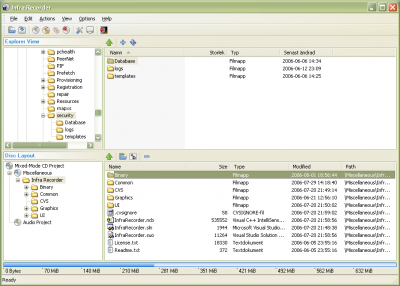 Simplify your CD and DVD burning process with Infrarecorder. This easy to use application offers a straight forward process on burning data and applications on CD or DVD. It’s also highly configurable which means advanced features in the application are also available for users who needs more than just the simple burning process in their application. Simplify your CD and DVD burning process with Infrarecorder. This easy to use application offers a straight forward process on burning data and applications on CD or DVD. It’s also highly configurable which means advanced features in the application are also available for users who needs more than just the simple burning process in their application.
The application can burn files as data, create audio CDs or even combine these types of files depending on the preferences of the user. ISO images as well as BIN and CUE installation file formats can also be burned in the CD or DVD as installers with the help of the application. The application also has the ability to delete or rewrite files in rewritable CDs with up to 4 erasure options.
The impressive feature of the application is on its ability to optimize the application based on the local hardware. The application has the ability to monitor the type of hardware used to burn the CDs and DVDs. Because of this feature, users will be able to access information about their CD burning hardware anytime.
The application also prevents from other data to be burned by fixating the disc which greatly complements the auto-eject function right after the burning process.
The only limitation of the application is that it doesn’t seem to have controls for videos. While it can add video files on CDs and DVDs, the application does not offer autorun for videos. But even with this limitation, it’s still a highly recommended application because of its efficient burning process of files, audio and ISOs.
Check it out at http://infrarecorder.org/
Posted in Main | No Comments »
Sunday, June 28th, 2009
 There are many Twitter clients that are free for download and most of them are highly efficient in this specific function. However, a few of this type of application could match the capability of Spaz – a very simple Twitter client with very impressive functions. There are many Twitter clients that are free for download and most of them are highly efficient in this specific function. However, a few of this type of application could match the capability of Spaz – a very simple Twitter client with very impressive functions.
Spaz is multi-platform client. That means the application has versions for desktop as well as mobile gadgets. The application can also work in any form of operating system including various versions of Linux. The only requirement is Adobe-AIR in order for real time streaming of information in the client. Even though AIR is proprietary, the source code for the client is open source which means variations could be created for personal or business use without any licensing required from the original developers of Spaz.
Popular tools associated with Twitter are also available in Spaz. Real-time search for previous posts is available. Users can also connect their short URL creation account in Spaz to automate the process. Almost every Short URL tools are applicable in Spaz. While users can shorten the URL, Spaz can also decrypt the shortened URL for better understanding of the post. Spaz also offers various themes and as an open source application, users can also create their themes for more personalization.

The downside of Spaz is the same with other Twitter clients. Because the application uses Adobe AIR, the application will require a relatively powerful gadget. Make sure that your computer can handle AIR or else the Twitter client may work but with the cost of slowing down everything else.
Check it out at http://funkatron.com/spaz/
Posted in Main | No Comments »
|
|
|





