Author Archive
Thursday, January 30th, 2014
 Are you looking for an application that will enable you to view information on your hard drive and some external drives? Well, you might as well want to try out CrystalDiskInfo since it is primarily designed to supply internal information on your computer. Are you looking for an application that will enable you to view information on your hard drive and some external drives? Well, you might as well want to try out CrystalDiskInfo since it is primarily designed to supply internal information on your computer.
What is CrystalDiskInfo?
CrystalDiskInfo is a HDD health monitoring utility that is able to displays basic HDD information, monitors S.M.A.R.T. values and disk temperature. Once the program is initiated, it automatically displays a list of details on your hard drive. The user interface of CrystalDiskInfo is standard, but inexperienced users would probably have a hard time understanding the information displayed here.
As a user, you can view the health status and temperature of the drive, as well as S.M.A.R.T. information (e.g. “Read Error Rate”, “Spin-Up Time”, “Start/Stop Count”, “Seek Error Rate”, “End-to-End Error”), such as current, worst, threshold and raw values. Also, you can access “Disk Management” to create a simple partition (basic, spanned or stripped), configure disk conversion options, as well as extend and shrink partitions. You can also open the Windows Device Manager, set CrystalDiskInfo to run at startup, enable advanced disk search, select your preferred language, change the font, and many more.
Any downside?
CrystalDiskInfo offers to download or install software or components that the program does not require to fully function.
Want to check it out? Visit CrystalMark.info.
Posted in Main | No Comments »
Thursday, January 30th, 2014
 Have you always thought how things would be different if you could just save a lot of hours of looking for tutorials trying to achieve a certain stylized look? Some of us also spend hours going round and round in Photoshop; but did you know you can put an end to that just by using a simple program like CameraBag? Have you always thought how things would be different if you could just save a lot of hours of looking for tutorials trying to achieve a certain stylized look? Some of us also spend hours going round and round in Photoshop; but did you know you can put an end to that just by using a simple program like CameraBag?
What’s the big deal about CameraBag?
CameraBag handles all photo tasks, from basic adjustments and cropping to powerful high-end controls, and it features the modern and vintage styles we’re known for. But it’s also more than that: we’ve rethought what modern photo editing should be. The result is something completely new.
With CameraBag, you can find the following features: 150+ built-in high-quality adjustable filters; full suite of 30+ photographic tools, including advanced curve editors; build your own entirely new filters from scratch or from existing filters; elegant, modern interface; innovative tools not found anywhere else, such as CameraBag’s curve-based colour corrector; fast image processing via the revolutionary analogue Engine; 32-bits-per-component colour depth; Watermarking and custom image-based borders; Quicklooks and previews for fast visual decision-making; large, precise controls – works great on a laptop; and many more.
Want to check it out? Visit NeverCenter.com.
Posted in Main | No Comments »
Wednesday, January 29th, 2014
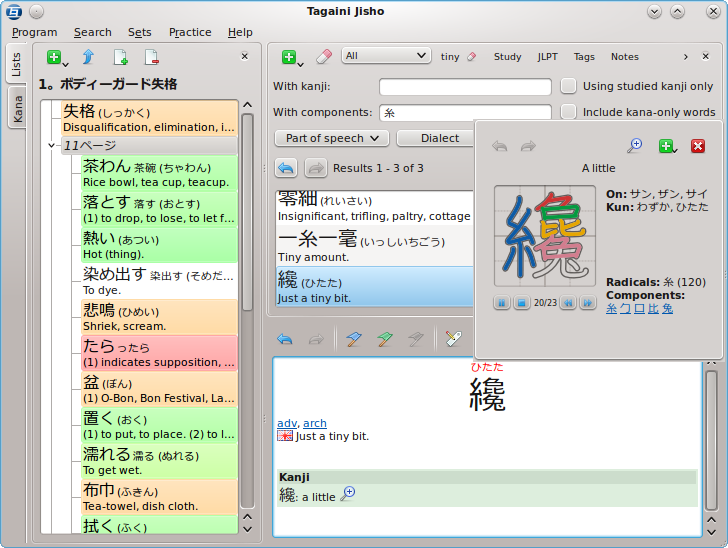 Japanese may not be as popular as say English or French for example; but it is no doubt one of those languages people also love to learn. The good news for all those who may wish to improve or learn this language, Tagaini Jisho offers them an excellent opportunity to do so. Let’s find out more about what Tagaini Jisho is all about, and what you can benefit from it. Japanese may not be as popular as say English or French for example; but it is no doubt one of those languages people also love to learn. The good news for all those who may wish to improve or learn this language, Tagaini Jisho offers them an excellent opportunity to do so. Let’s find out more about what Tagaini Jisho is all about, and what you can benefit from it.
What is the big deal about Tagaini Jisho?
Tagaini Jisho is a free, open-source Japanese dictionary and kanji lookup tool that aims at becoming your Japanese study assistant. It allows you to quickly search for entries and mark those that you wish to study, along with tags and personal notes. It also let you train entries you are studying and follows your progression in remembering them. Finally, it makes it easy to review entries you did not remember by listing them on screen or printing them on a small booklet.
Version 1.0.1 of Tagaini Jisho, which is the version in review, now has two new updates that include: an option to copy the main writing or reading of an entry to the clipboard directly from its right-click contextual menu; and ability to search for untagged entry.
Want to check it out? Tagaini.net.
Posted in Main | No Comments »
Wednesday, January 29th, 2014
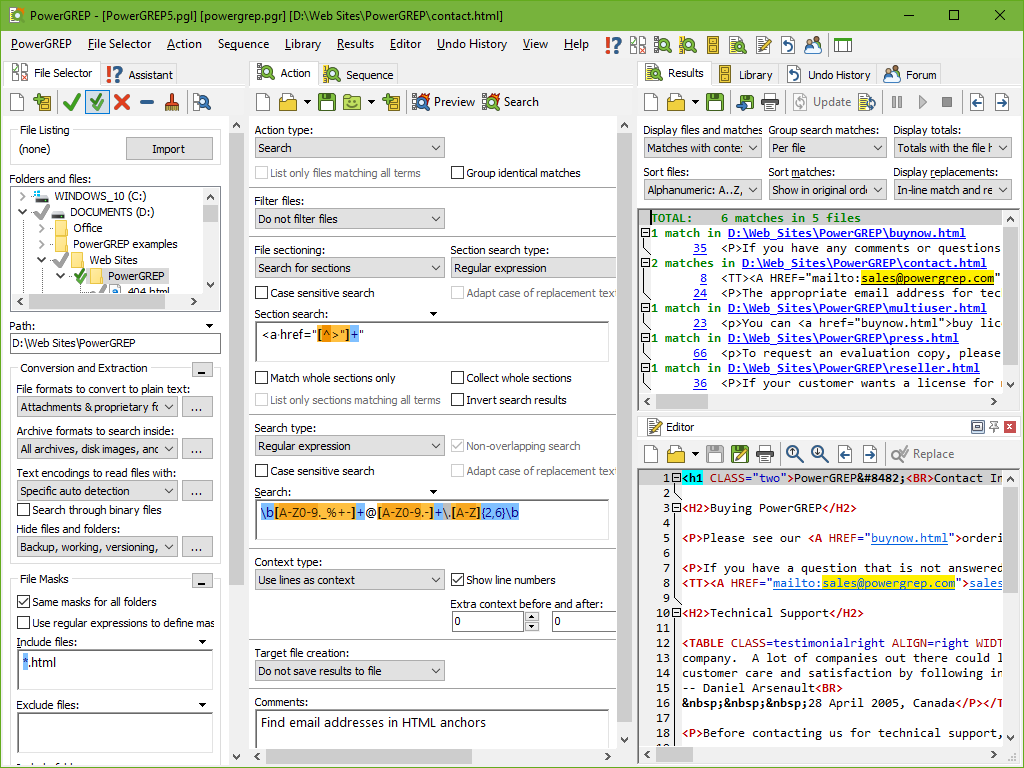 Searching your computer for information may be a bit difficult without certain tools to carry it out. However, the good thing is that there are several tools to make that very easy these days. This review offers you an opportunity to read about a program called PowerGREP. What is this tool all about, and what kinds of features does it offer you? Find out by reading the review below. Searching your computer for information may be a bit difficult without certain tools to carry it out. However, the good thing is that there are several tools to make that very easy these days. This review offers you an opportunity to read about a program called PowerGREP. What is this tool all about, and what kinds of features does it offer you? Find out by reading the review below.
What is PowerGREP?
PowerGREP is a powerful GREP tool for quickly searching for a piece of information through files and folders on your computer, such as software source code, letters and correspondence, server or system logs, reference texts, historic archives, etc. Even if you do not know in advance exactly what you are looking for. In that situation, its rich Perl-compatible regular expression support allows you to search for virtually anything by specifying the form of what you want, and let it find the actual text matching that form.
PowerGREP gives you excellent opportunities to achieve or do the following: extensive encoding support Windows and DOS code pages, Unicode, ISO-8859, ECBDIC, KOI8, etc; split files into records before searching; collect information and statistics from log files or archives; easily search or find files anywhere on your computer or network; etc.
Any downside?
PowerGREP is a very useful tool; but the price is incredibly high.
Want to check it out? Visit PowerGrep.
Posted in Main | No Comments »
Wednesday, January 29th, 2014
 Typing or writing error-free letters or articles can sometimes be very difficult if you don’t or cannot find the right word to express your thoughts. When you write or type, you want to send error-free messages to people in very simple, and readable manner; and that is why you need a program like TheSage. Typing or writing error-free letters or articles can sometimes be very difficult if you don’t or cannot find the right word to express your thoughts. When you write or type, you want to send error-free messages to people in very simple, and readable manner; and that is why you need a program like TheSage.
What is TheSage?
TheSage is a comprehensive English dictionary and thesaurus that provides a number of useful and in some cases unusual search tools. It runs locally, and does not use your Internet connection. The essential functionality includes the following: tabbed interface allowing multiple definitions and searches to be readily available, quick cross-referencing; standard and advanced wildcard search functionality; anagram search; history and session record keeping; options that allow customization of the appearance of TheSage; copy to clipboard of all or part of the information displayed.
TheSage can be installed as a portable product, which also means that its English Dictionary and Thesaurus can be on a USB flash drive or any other storage device where you can save it to any computer and directly run its executable file. That means you can carry it on a flash to anywhere you want to go to.
Want to check it out? Visit SequencePublishing.com.
Posted in Main | No Comments »
Wednesday, January 29th, 2014
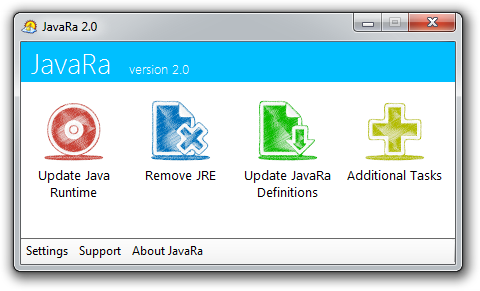 Are you looking for a program that will enable you to easily update and remove older versions of Java Runtime Environment (JRE) with just a single click? Well, you are lucky because JavaRa offers you a great opportunity to do just that without any complication. You can read and find out more about the program in this review. Are you looking for a program that will enable you to easily update and remove older versions of Java Runtime Environment (JRE) with just a single click? Well, you are lucky because JavaRa offers you a great opportunity to do just that without any complication. You can read and find out more about the program in this review.
What’s the big deal about JavaRa?
JavaRa will check if your computer has the latest version of Java Runtime Environment (JRE). If the version you have installed has been superseded by a newer version the program will download and install this newer version for you, by running Java’s update program. It then allows you to remove all possible older versions of this program. This will ensure that the security of your computer is enhanced and extra space on your hard disk is created.
JavaRa provides you with two different options when it comes to updating JRE; and these are he built-in jucheck.exe system or to do it using Sun Java’s website. You can also remove unwanted JRE files that take up space on your system, remove the start up entry that may slow down your system, remove the Sun download manager, open JavaRa log file to check for errors, remove Java Console Extention and delete Java IE BHO.
A couple of known issues have been fixed in the latest release which makes it more stable.
Want to check it out? Visit SingularLabs.com.
Posted in Main | No Comments »
Tuesday, January 28th, 2014
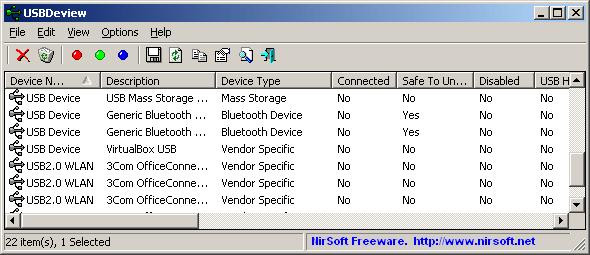 Do you want to know more about some or all the utilities installed on your system? Do you also want extended information on each of the USB device that has been previously used on your system? Then keep reading this review for more on USBDeview. Do you want to know more about some or all the utilities installed on your system? Do you also want extended information on each of the USB device that has been previously used on your system? Then keep reading this review for more on USBDeview.
What is USBDeview?
USBDeview is a small utility that lists all USB devices that currently connected to your computer, as well as all USB devices that you previously used. For each USB device, extended information is displayed: Device name/description, device type, serial number (for mass storage devices), the date/time that device was added, VendorID, ProductID, and more. USBDeview also allows you to uninstall USB devices that you previously used, and disconnect USB devices that are currently connected to your computer. You can also use USBDeview on a remote computer, as long as you login to that computer with admin user.
The publisher has been able to fix to display the correct Power value of USB 3.0 devices. What this means is that the program is now more stable and easier to use than previous versions.
Want to check it out? Visit NirSoft.net.
Posted in Main | No Comments »
Tuesday, January 28th, 2014
 Looking for a client server that can help you to secure network access, system, administration, and file transfer? Do you also want an application that can provide secure access to Windows servers based on the Secure Shell client/server protocol? Then you should consider a program like VShell server. Looking for a client server that can help you to secure network access, system, administration, and file transfer? Do you also want an application that can provide secure access to Windows servers based on the Secure Shell client/server protocol? Then you should consider a program like VShell server.
What is VShell server?
VShell server for SSH2 provides secure access to Windows servers based on the Secure Shell client/server protocol. It can be used for secure network access, system administration, and file transfer. It provides access through an encrypted tunnel to e-mail, databases and other TCP/IP applications. Files can be transferred securely using SSH2 client SFTP and SCP commands.
VShell server has a lot of key features that include the following: Secure Shell protocol delivers proven, open-standard authentication, encryption, and data integrity that let you provide a wide range of services to your organization with confidence; it gives you extensive controls to manage privileges for shell, file transfer and other services; it installs and runs right “out of the box”. Windows setup and configuration is made easy by the graphical control panel; VShell triggers help you track and respond to events like failed logon attempts and uploaded files; and VShell Administrator, Workgroup and Enterprise editions allow cost-effective licensing from one user to thousands.
Want to check it out? Visit Vandyke.com.
Posted in Main | No Comments »
Monday, January 27th, 2014
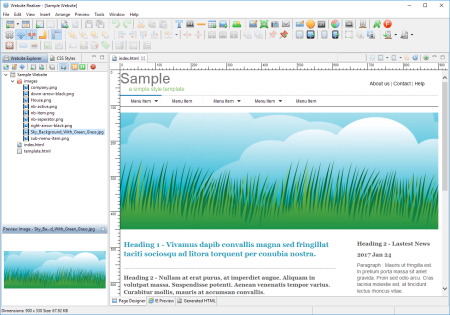 Are you looking for software that provides CSS Style Editor that also allows you to style your website to make it look exactly the way you want? Then you should look no further because that is what Website Realizer is all about; and you can read more about it in this review. Are you looking for software that provides CSS Style Editor that also allows you to style your website to make it look exactly the way you want? Then you should look no further because that is what Website Realizer is all about; and you can read more about it in this review.
What’s Website Realizer?
Website Realizer, a website builder, lets you build websites just by dragging and dropping images, media, and effects, then adding your own text, all in the comfort of an intuitive WYSIWYG editor. There’s no programming knowledge needed, since Website Realizer automatically creates all of the HTML code for you.
Website Realizer has a lot of new updates and fixes that include the following: starting from this version, generated websites will no longer support Internet Explorer 6 (IE6); support touch events on navigation bar so that drop down menus can be opened by tap action on mobile devices; addition of two new website templates; addition of Honeypot Captcha to “PHP – Send Form Data to Email” which is a simple captcha to stop spambots; improve the way to get the dimensions of video files when they are inserted on a page; and a couple of others.
Any downside?
Website Realizer has a 15 day trial limitation. Full version is a pricey one – $59.95.
Want to check it out? Visit WebsiteRealizer.com.
Posted in Main | No Comments »
Monday, January 27th, 2014
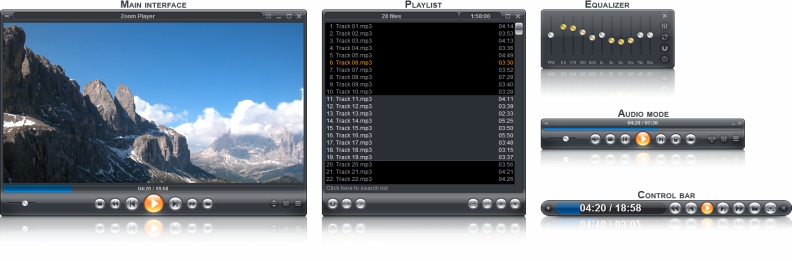 Are you looking for a great media player with some of the easiest features you can think of? Have you tried Zoom Player? In case you haven’t; here is an opportunity to find out more about what the program is all about, and what it has to offer you. Are you looking for a great media player with some of the easiest features you can think of? Have you tried Zoom Player? In case you haven’t; here is an opportunity to find out more about what the program is all about, and what it has to offer you.
What is the deal with Zoom Player?
Zoom Player is a robust media and DVD front-end player. It was designed to be simple at first glance while being remarkably dynamic and flexible when used to its full potential. It works in two modes: a Media mode which can play any file supported by DirectShow (any file which plays in MediaPlayer) and a DVD mode which uses pre-installed DirectShow DVD filters to play DVD content.
Zoom Player supersedes media player in all its functions and provides several important functions that media player lacks. It provides special zooming functions to improve TV-output quality by eliminating overscan.
Some of its latest changes include the following: enhancements to the full screen navigation interface; enhancements to the API; remember previously selected subtitle and audio tracks for each media file; support for H.265 (HEVC) and VP9 playback; and several bug fixes.
Any downside?
Zoom Player might just be a bit complicated for a couple of people; but that doesn’t take anything away from it.
Want to check it out? Visit Inmatrix.com.
Posted in Main | No Comments »
|
|
|





