Author Archive
Monday, April 8th, 2013
 What is Notepad++? What is Notepad++?
Are you a programmer or editor looking for a lightweight program to make your editing jobs easier? Then you might want to check out Notepad++.
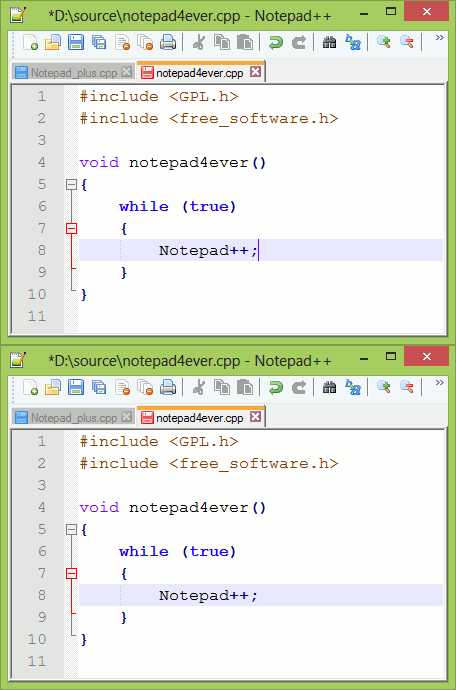
Notepad++ is a free source editor with the syntax highlighting and syntax folding. The program also gives the extra functionality to define a user’s own language for the syntax folding and syntax highlighting, and you can print your source code in color.
Notepad++ also enables you to edit different documents almost the same time, and to edit the same document synchronize in two different views. The application supports full drag and drop. Version 6.3.2 features a number of updates including the following; fixing a regression (performance issue), and recognize wscript and Rakefile respectively as python and ruby file.
Notepad++ uses pure Win32 API and STL, which ensures a higher execution speed and smaller program size. Some of the key features of this version of Notepad++ include the following: syntax highlighting and syntax folding; user defined syntax highlighting and folding; Perl Compatible Regular Expression; GUI entirely customizable; Auto-completion (Word completion, Function completion, and Function parameters hint); Multi-Document (Tab interface); Multi-View; WYSIWYG; Zoom in and Zoom out; Multi-Language environment supported; Macro recording and playback, Launch with different language arguments, and Bookmark.
Any Downsides?
Notepad++ is a great application that makes the job of a programmer and other users very easy. The program has no known issues; and does not take up lots of space on your system.
Want to check it out? Visit: Notepad-plus-plus.
Posted in Main | No Comments »
Sunday, April 7th, 2013
 Do you wish to download large number of files over the internet simultaneously? Then you might want to take a look at BitTorrent for Windows. Do you wish to download large number of files over the internet simultaneously? Then you might want to take a look at BitTorrent for Windows.
BitTorrent is a protocol for file distribution. It is designed to basically identify content by URL and also designed to integrate seamlessly with the World Wide Web. One of the advantages it has over plain HTTP is that when multiple downloads of similar files occur the same time concurrently, the downloaders upload to each other; and this makes it possible for the file source to support very large numbers of downloaders with only a modest increase in its load.
BitTorrent, you can download top-quality digital contents including video, music, and games. The software is available in more than twenty different languages including English, French, German, and Italian. The application is able to securely deliver files over the internet to your PC faster than anything else.
BitTorrent also includes a lot of quality features including the following; detailed graphs and stats on the health of digital media files that provide you safer, more controlled downloading experience, local peer discovery and automatic port mapping increase file transfer speed without the need for router reconfiguration, dynamic bandwidth management allows you to download content without disrupting web browsing, email or other applications.
Downsides:
BitTorrent is a fine application; but users need to be careful especially when it comes to malware.
Want to check it out? Visit Bittorrent.
Posted in Main | No Comments »
Monday, April 1st, 2013
 Are you a big fan of solitaire? What if you were to get all your favorite games – over 500 of them-in one application? Here is what you get when you install the SolSuite. Are you a big fan of solitaire? What if you were to get all your favorite games – over 500 of them-in one application? Here is what you get when you install the SolSuite.
What is SolSuite?
It is a collection of about 500 high quality solitaire games that you may not get elsewhere – Spider, Klondike, FreeCell, Pyramid, Golf, Busy Aces, Canfield, Gaps, Forty Thieves, Four Seasons, Carpet, Flower Garden, Rouge et Noir, Yukon, La Belle Lucie, Monte Carlo Foxtrot, and many others! Because the authors have you in mind, they have also created several other solitaires that are fun such as King of Scotland, Foxtrot, Mayflower and many others!
This application gives its users an exciting gaming experience with several hundreds of games to choose from, an amazing selection of card faces & backs, large card sets for ease of viewing, ribbon interface for enhanced game play, skins to customize your playing area and fast, courteous support. SolSuite: it’s addictively fun!
Some of the features of this exciting program include: over 500 of the world’s best solitaire games, over 80 awesome cards, more than 300 beautiful card backs, more than 100 backgrounds and lots of advanced features, options and stats.
Downsides?
One of the best solitaire suite around, be sure to check it out at Solsuite.
Posted in Games, Main | No Comments »
Monday, April 1st, 2013
 If you want a small and fast plain text editor, then you should check out AkelPad. If you want a small and fast plain text editor, then you should check out AkelPad.
What is Akelpad?
AkelPad is designed to be a fast, lightweight, open-source alternative to Notepad as the default text editor in Windows or as an integrated text editor in a third-party app like Total Commander. It was designed to correct some of the lapses of Notepad. It is a small and fast plain text editor for towards users who prefer a straightforward application. It has an easy to use interface and comes with the usual standard function like undo, redo, cut, copy, paste, select all, search and replace.
AkelPad’s installer gave us three options: Standard installation, integration with Total Commander, and replacing WordPad. AkelPad uses a very small amount of CPU and system memory, is pretty responsive to keyboard and mouse commands, has a good response time, and includes user documentation.
Some of the main features of this program are: Single window (SDI), multi-window (MDI) and pseudo multi-window modes (PMDI), Full support of Unicode strings on Unicode systems (NT/2000/XP/2003/Vista/Seven), Support of Unicode codepages, Support of any codepage installed in the system, Support of DOS/Windows, Unix and Mac newline formats, Preview file open and Correct pseudographics displaying. Other features include: Column text selection, Multi-level undo, Fast search/replace text strings, Remember file codepage and caret position, Printing of a document and print preview and Support of language modules,
Downsides?
None. Obviously one of the best text editors around.
To find out more about this program, please go to SourceForge.
Posted in Main | No Comments »
Sunday, March 31st, 2013
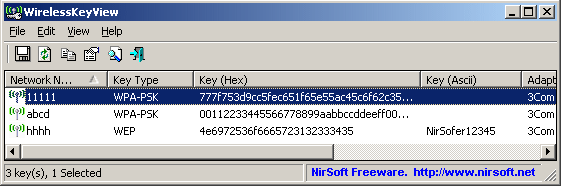 If you’re trying to retrieve all your wireless network keys (WEP/WPA) stored in your computer on your Windows XP or Vista and really don’t know how to go about it, no need to worry. WirelessKeyView to the rescue! If you’re trying to retrieve all your wireless network keys (WEP/WPA) stored in your computer on your Windows XP or Vista and really don’t know how to go about it, no need to worry. WirelessKeyView to the rescue!
What is WirelessKyeView?
This program allows you to recover wireless network keys (WEP/WPA) stored in your computer by the ‘Wireless Zero Configuration’ service of Windows XP and by the ‘WLAN AutoConfig’ service of Windows Vista. You can easily save all keys to text/html/xml file, or copy a single key to the clipboard.
It has a beautiful interface. Its spreadsheet format allows you to see all the properties on any stored network name. It allows users to view not just the ASCII password, but also the Hex key, the adapter type, and the adapter GUID. Apart from its copy and search function, it also has an HTML report feature for either selected networks or the entire database.
Nirsoft, the author of this program has added a new change to this version. In order to avoid from deletion by mistake, the delete menu item is now separated from the others.
Any downsides?
Some Antivirus programs detect WirelessKeyView utility as infected with Trojan/Virus. A piece of useful utility though.
To find out more about this application, please visit Nirsoft.
Posted in Main | No Comments »
Friday, March 29th, 2013
 Did you know it takes only a few seconds for some potentially dangerous program to wreck havoc on your PC? I am sure not many people know that; and that is why most people lose their valuable data to malware and Trojans everyday on the internet. With Malwarebytes’ Anti-Malware, you can restrict unauthorized invasion of your private data. Did you know it takes only a few seconds for some potentially dangerous program to wreck havoc on your PC? I am sure not many people know that; and that is why most people lose their valuable data to malware and Trojans everyday on the internet. With Malwarebytes’ Anti-Malware, you can restrict unauthorized invasion of your private data.
What’s the deal with this program?
Malwarebytes’ Anti-Malware is a high performance anti-malware application that is being used by several people to remove malware and spyware. The program has one of the fastest, and most effective quick scans and malware removal capabilities on the market. The full version of the product includes a number of key features, including the ability to schedule updates and scans and most importantly, a real-time malware protection module that blocks malicious processes before they even start.
Malwarebytes’ Anti-Malware has a tabbed interface that provides a simple way to browse among the main features. This top security software enables you to perform three types of scan, ‘Quick”, ”Full” and ”Flash”, with the last one specifically designed to analyze memory and autorun objects. The ‘Settings’ tab allows you to pick the objects you want to scan, including memory, startup items, registry, file system and others. The latest version in the market is Malwarebytes’ Anti-Malware (Beta) 1.75.0.1100 Beta
Downsides:
Free version is limited, and Pro version will cost you $24.95.
Want to check it out? Visit MalwareBytes.
Posted in Main | No Comments »
Friday, March 29th, 2013
 Are you searching for how to get rid of those annoying ads and popup? Adguard is a utility that is specifically designed to do exactly that and more. Are you searching for how to get rid of those annoying ads and popup? Adguard is a utility that is specifically designed to do exactly that and more.
What is Adguard?
Adguard is a powerful ads and popup blocking utility. It removes annoying ads, reduces the page loading time and saves your traffic. It blocks video ads, rich media and other non-standard types of ads and prevents tracking by ad networks and counters. It supports all major browsers: Internet Explorer, Opera, Firefox, Chrome, Safari. This program goes to work immediately after installation, it does not require any reconfiguration and is regularly updated.
Some of the major features of this program include: it saves you time, it significantly speeds up page loading so no more snail pace browsing. It also saves you bandwidth that you could use to view more web pages and it helps to keep viruses off your computer. This one program does it all, so there is no need to install separate add-ons for each browser.
Downsides?
Depending on the number of browsers opened, it can take up a lot of RAM.
To know more about this program, please visit Adguard.
Posted in Main | No Comments »
Thursday, March 28th, 2013
 Need an application that allows you to connect your LAN users to the internet with just a single IP address? Then get UserGate. Need an application that allows you to connect your LAN users to the internet with just a single IP address? Then get UserGate.
What is UserGate?
This software is designed to help LAN users connect to the internet using a single external IP address. It offers a centralized management of Internet connections, carries out network resource caching, conducts an exact traffic calculation, it comes with a built-in billing system, firewall, and also a statistics module.
Some of the basic functionalities of this program are: complex LAN security that consisits of two antivirus modules Kaspersky Lab and Panda Security, it allows you to enforce strict internet access policy, it optimizes internet traffic and works as a point of entry to the Internet for a local network and its server support allows you to dynamically assign IP addresses to users in your local network.
The major features of this program are: Dual Antivirus, Internet application firewall, Intrusion Prevention System, IP Telephony support, Internet sharing, flexible management of restrictions for each user, convenient tools for all network process monitoring and a number of useful services for network administrators.
The publisher of this program, Entensys, has added a few changes to this version. They are: VPN-server: client-to-server and server-to-server support, Intrusion Detection and Prevention System (IDPS), New content filtering technology Entensys URL Filtering 2.0, Total control over traffic and user accounts, High-quality support for Internet telephony and Improved billing system.
Downsides?
It a promising app with lots of possibilities for further improvement. It has a nice interface and dual antivirus.
To find out more about this program, please visit Entensys.
Posted in Main | No Comments »
Thursday, March 28th, 2013
 Want to talk to your friends and family over the internet with good voice quality? Then what you should probably go for is the TeamSpeak. Want to talk to your friends and family over the internet with good voice quality? Then what you should probably go for is the TeamSpeak.
What is the big deal about TeamSpeak?
This program allows users to talk to each other over the Internet with very good voice quality. It offers a client-server architecture where client and server software is clearly separated. This means it is not a peer-peer server but this application runs on a dedicated server. You can configure the voice quality and bandwidth and can be low for modem users or as good as normal phone calls for better connections.
Because it uses very little latency as possible, it is thus one of the best online gaming communication applications available. TeamSpeak server can handle several thousands of simultaneous users. This application can be used for teleconferencing, it can serve as a good alternative to conference calls, can help to significantly cut down the cost of long distance calls or just as a means of communicating with friends and family. Best still, it is free.
Downsides?
I’m yet to have any negative experience with this application. It uses low resources, does not cause conflicts with any program.
To learn more about this program, visit Teamspeak.
Posted in Main | No Comments »
Thursday, March 28th, 2013
 Want to edit that animated GIF images and add special effects to your animation in no time? Then you should check out Easy GIF Animator. Want to edit that animated GIF images and add special effects to your animation in no time? Then you should check out Easy GIF Animator.
What is Easy GIF Animator?
It is a very easy to use application for creating and editing animated GIF images. You could use it to easily create animated pictures, banners and buttons in no time and use its special features to add catchy visual effects and design your animation for publishing on your web site. It supports all types of GIF animation and provides high compression and great quality for your animated GIF images. It allows you to create animated GIF images in a flash.
This program allows its users to easily create animated banners, pictures and button, Create animated GIF images from scratch, Edit and modify animated GIF images, Add visual effects to your GIF animation, Create moving text effects and Optimize animated GIF images so they take less space and load faster. So, you can use basic editing tools, such as select, fill, gradient, line, brush, rectangle, round, text, color replace, eraser, airbrush and zoom. Plus, you can adjust the intensity, blur and distance of the shadow, invert, flip images, as well as set the hue, saturation and brightness levels.
Others include Preview GIF animation in web browser, Manage animation frames, Extract separate animation frames, Add sound to your animation among several other functionalities.
Downsides?
A bit pricey but it is worth every dime you invest in it.
To know more about this program, please visit Blumentals.net.
Posted in Main | No Comments »
|
|
|





