Author Archive
Thursday, May 22nd, 2008
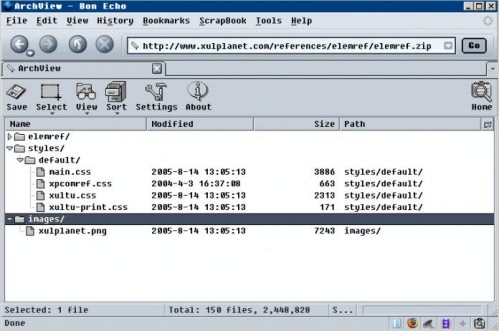 Have you ever asked yourself if a certain file is inside an archive on a website ? Did you download the archive from that website only to find out that the file was not included ? Worry no more; The Firefox add-on ArchView adds a function to Firefox that makes that process a tad easier. Have you ever asked yourself if a certain file is inside an archive on a website ? Did you download the archive from that website only to find out that the file was not included ? Worry no more; The Firefox add-on ArchView adds a function to Firefox that makes that process a tad easier.
With ArchView it is possible to take a look at the contents of an archive without downloading the archive completely. Supported are the archive formates rar and zip which should cover most of the archives out there. One interesting feature of ArchView is that it can download files from within an archive which means that you can download the 10K file that you need from that 100 Megabyte archive without downloading the 100 Megabyte.
Archview adds itself to the stats bar and becomes active when the user clicks on a zip or rar link. It displays the contents almost instantly and presents the files of the archive in an XUL or HTML interface.
The author plans to improve the Firefox add-on by supporting additional formats (iso and 7z) in the future. (more…)
Posted in FireFox, Freeware | No Comments »
Wednesday, May 21st, 2008
 IE7Pro is a plugin for Internet Explorer 7 and 8 that brings some of the best features of Firefox and other web browsers to Microsoft’s browser. Yes, we know many folks would suggest just using Firefox or Opera, but if you need to use IE for one reason or another (perhaps there are some web sites you visit regularly which aren’t rendered properly by other browsers), IE7Pro can make your browsing experience much more pleasant. IE7Pro is a plugin for Internet Explorer 7 and 8 that brings some of the best features of Firefox and other web browsers to Microsoft’s browser. Yes, we know many folks would suggest just using Firefox or Opera, but if you need to use IE for one reason or another (perhaps there are some web sites you visit regularly which aren’t rendered properly by other browsers), IE7Pro can make your browsing experience much more pleasant.
IE7Pro 2.3 was released today, with a handful of bug fixes and new features, including:
- FasterIE module with support for prefetching, which should speed up your browsing experience
- Session Manager which allows you to save open tabs when closing your browser and reopen those tabs next time you login.
- The MiniDM download manager now supports drag & drop and multiple links
(more…)
Posted in Internet, Windows | No Comments »
Wednesday, May 21st, 2008
 Managing your MP3 files invariably includes renaming and tagging them. Even while playing the files at times you do not get the proper title of the song in the playlist. It shows the tracks number and not the song title because of which you cannot select any specific songs easily from the playlist that you want to listen. To avoid such time taking activity and the resulting chaos you can try Autumn MP3 Tagger 2.10. It enables you to place tags on your MP3 collection, on single or multiple files altogether. One can have the file renamed instantly according to the existing tag information. The pattern manager shows the customization feature that enables the user to carry the function in batch mode. It also provides you with other features like case format, diacritics formatting, automatic track number, and others. Managing your MP3 files invariably includes renaming and tagging them. Even while playing the files at times you do not get the proper title of the song in the playlist. It shows the tracks number and not the song title because of which you cannot select any specific songs easily from the playlist that you want to listen. To avoid such time taking activity and the resulting chaos you can try Autumn MP3 Tagger 2.10. It enables you to place tags on your MP3 collection, on single or multiple files altogether. One can have the file renamed instantly according to the existing tag information. The pattern manager shows the customization feature that enables the user to carry the function in batch mode. It also provides you with other features like case format, diacritics formatting, automatic track number, and others.
Autumn MP3 Tagger 2.10 has a neat interface and comes loaded with convenient features that are intuitive to use. So to begin with, just add the files to the program that you want to get renamed or change the tags. You can make the selection to have the tags edited and MP3 files renamed manually that is also made as you need not to surf along the properties. The program presents the fields consisting of the tag data present with the MP3 files. You can set the Title, Genre, Album, Date, etc and even get the tags from the file. Even you can Rename the file easily and have it moved to the desired folder. Change the Settings for the General, Tagging, Renaming and Dialog options. Make the selections of the different features to have the work done accordingly. You can have the characters merged, use trim diacritical marks, and even add and remove the substitutions. Have the editing done with Pattern manager in the Tag Mode.
Autumn MP3 Tagger 2.10 enables the user to effortlessly get the MP3 files renamed and tagged in quick time.
{More Info and Download}
Posted in Main | No Comments »
Wednesday, May 21st, 2008
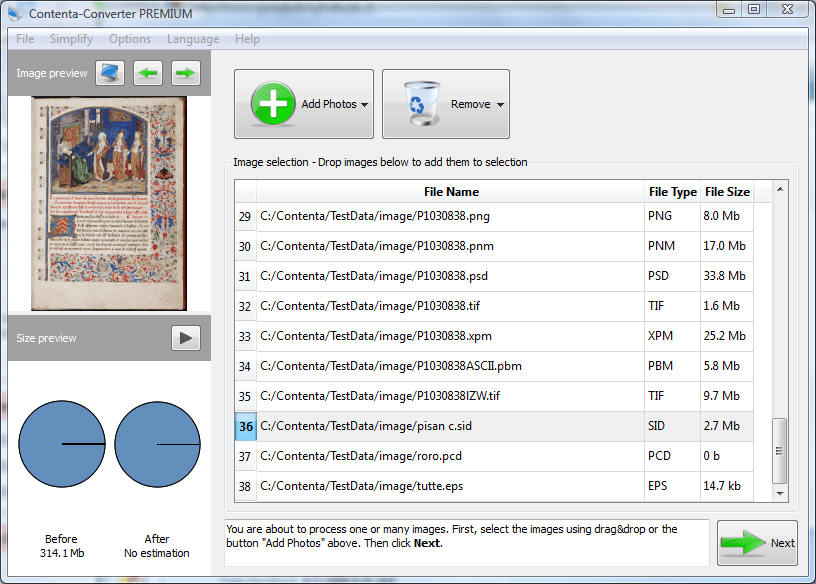 Contenta-Converter is a simple tool to convert and resize your photos. You wish to send pictures by email, but your photos are too big. Resize them and convert them in JPEG to reduce the size of your attachment. Contenta-Converter is a simple tool to convert and resize your photos. You wish to send pictures by email, but your photos are too big. Resize them and convert them in JPEG to reduce the size of your attachment.
Pros: Contenta-Converter is a simple and powerful tool to convert and resize your photos. You wish to send pictures by email, but your photos are too big. Resize them and convert them in JPEG to reduce the size of your attachment. You want to archive your photos on a disk but you have so many photos. Try JPEG 2000 compression to store more on a single CD or DVD. Convert the raw files of your Canon or Nikon camera to a more compact format.
The user interface is very simple, wizard like interface that lets the actions be done with one click. Initial step consists of dragging& dropping or specifying a folder that contains the pictures to be processed. The folder may contain subfolders and one can browse through the windows explorer. The application loads all the pictures in the target folder and its sub folders. In the example tried a compression of 41% was achieved; 500 odd pictures with a total size of 100.5 MB data were reduced to 46.2 MB. One can manipulate the photo size parameter manipulations to further reduce the data.
As the conversion/compression proceeds you get to see a graphical estimate of the output folder size and the amount of compression achieved. The selection of the output folder is also through the windows explorer. Compressions that can be chosen are the JPEG, JPEG2000, PNG, BMP, TIFF, PPM, XB mans XPM etc.
{More Info and Download}
Posted in Main | No Comments »
Wednesday, May 21st, 2008
 Convert video to 3gp, flv flash video, iPod, PSP , DIVX, AVI, WMV from input formats like MPEG2, QuickTime MOV, Mp4 with aac, 3gp with amr , MPEG1, VOB, WMV, AVI, ASF DIVX file. Convert video to 3gp, flv flash video, iPod, PSP , DIVX, AVI, WMV from input formats like MPEG2, QuickTime MOV, Mp4 with aac, 3gp with amr , MPEG1, VOB, WMV, AVI, ASF DIVX file.
Pros: With increasing use of mobile devices that can play video and differences in video formats that they play, it is necessary to have a converter that can take care of the conversions necessary. This package provides the tools necessary to ease the conversions required. C#, VB and VB.Net code samples demonstrate the features available with the code package. To build a suitable application one just needs to integrate the features the way the developers want.
Each of the code sample package illustrate the feature through sample that include applying effects, exporting to audio, exporting to Pic, converting files with an overlay, merge files and transitions. These are just some examples from a long list of features that can be implemented.
The feature set includes the following. Convert video to 3gp, flv flash video, iPod, PSP, DIVX, AVI, WMV formats. Support MPEG4, H.263 3gp video with AAC or AMR audio. Allow Input MPEG2, QuickTime MOV, Mp4 with aac, 3gp with AMR , MPEG1, VOB, WMV, AVI, ASF DIVX files. Draw Multi-line Text, Image at specific time on video, adjust transparent color, alpha value of Image. Preview Multi-line Text, Image before saving to video. Add 3D transitions (70 transitions available) between any combinations of video clips, pictures. Over 50 effects can be applied between any combination of video clips and pictures. Parts of video can be extracted to separate images and resized at will. Parts of the same video can be extracted to different video formats. Audio can be extracted to MP3 or WAV files and the user can have the choice to select number of channels, sample rate and bits per sample. Support input VOB file format (DVD decoder needed).
The package is compatible with any programming language that supports ActiveX (Access, Visual C++ , Visual Basic , Visual Foxpro, Delphi, .Net, etc.) Include VB.Net, Access, Visual C++ , Visual Basic , Visual Foxpro, Delphi, .Net Sample Code. The OCX can be distributed royalty free.
{More Info and Download}
Posted in Main | 1 Comment »
Monday, May 19th, 2008
 Presentations to Video Converter allows you to convert PowerPoint presentations into Video, Flash, GIF, DVD. The converting process allows human interaction on PowerPoint content during conversion. PowerPoint is not required! Presentations to Video Converter allows you to convert PowerPoint presentations into Video, Flash, GIF, DVD. The converting process allows human interaction on PowerPoint content during conversion. PowerPoint is not required!
Pros: Presentations to Video Converter lets you easily transform your Microsoft PowerPoint (PPT, PPTX, PPS and PPSX) presentations to be converted into any video format supported by your system. That implies that this application can handle the latest Office 2007 outputs too. Formats supported are AVI, ASF, WMV, MPEG, VOB, MP4, a flash files in SWF format, Animated GIF. The application completes the final step of burning a DVD with a built in burner. This way you can put your presentation, for example, to a Web site for streamed viewing or Web casting. Presentation to Video Converter can convert a presentation with just a few mouse clicks and is quite easy to use. The videos Flash videos created include sound tracks.
Settings include the size in pixels, aspect ratio, auto click interval etc. Audio and video settings as demanded by the format requirements could be set. There are defaults available but should you need to tune the parameters, that’s possible too. You will get an effective training film from a bunch of slides that you can use in any sales promotion shows, broadcasting it on a screen or streaming online. Students and teachers also can enjoy video presentations in their work or studies. Just turn PowerPoint slides into lessons, lectures, homework assignments or researching presentations. Videos are easier to present and presents a familiar effect to the audience. Easily rewind or go forward to make a point, as required.
Cons: With these many formats in video and audio being handled it’d possible some combinations, formats gives rise to problems. Only way the problems, if any, can be tracked are through the combined experience of users. It id worthwhile to look for actual user feedback.
{More Info and Download}
Posted in Main | No Comments »
Monday, May 19th, 2008
 Lebendig is a Windows enhancement that will animate your windows, making them twist around as they open, recede into the horizon when closed, or perform any of 15 different actions when opening or closing. Works on programs, windows, and dialogs. Lebendig is a Windows enhancement that will animate your windows, making them twist around as they open, recede into the horizon when closed, or perform any of 15 different actions when opening or closing. Works on programs, windows, and dialogs.
The world is split into two kinds of people: those who like to customize their desktop and like a lot of eye candy, and those who like to strip their OSs from any software that is not 100% necessary. Those in the former category will like this program. Here are more notes on this one:
- Lebendig screenshot – optionsThe animation: what’s interesting about the animation is that it is mostly illusionary; your window doesn’t actually, say, spin around, but rather an animated frame precedes the window right at the point of display, creating a very effective illusion.
- Launching and ending actions: Expand/Shrink Rectangles, Spin 180 or 360 right/left, Windows Zoom, Expand/Collapse inward or outward, Slide:top/down, bottom/up, right/left, left/right, Roll: top/down, bottom/up, right/left, left/right, Fade in and Fade out.
- Starting and ending points: can be defined, either from the location of the mouse or another set point on the screen.
- Windows affected: you can select from a number of Window types (e.g. Apps, explorer windows, dialogs, etc.) Make sure you check the types you are interested in.
- Other controls: include the resolution (number of steps used), delay, etc.
- Memory use: just over 5 megs. Not bad at all for a program like this one.
- Stability/performance: quite good. I usually expect problems with this sort of program, but encountered none whatever.
- User interface: options accessible through an icon in the start menu, including the ability to quickly enable/disable and/or shut down. It would have been good if it allowed you to not display the Lebendig icon in the start menu.
(more…)
Posted in Freeware, Main, Utilities | 1 Comment »
Monday, May 19th, 2008
 Rationale is the first high-quality “argument processing” software. Use Rationale to create “argument maps”, diagrams of reasoning and argument. Rationale is the first high-quality “argument processing” software. Use Rationale to create “argument maps”, diagrams of reasoning and argument.
Pros: This application helps create arguments map. Creating a visual structure of the reasoning being developed. Rationale is the first high-quality “argument processing” software. Use Rationale to create “argument maps”, diagrams of reasoning and argument. Rationale will help students learn the fundamentals of good reasoning, critical thinking, and argumentative essay writing.
There are three mapping modes. Use Grouping, Reasoning, or Analysis maps depending on the thinking task and level of sophistication. Rationale enables you to create hierarchically structured maps quickly and easily. Each of these three modes supports a different kind of activity. “Grouping” helps organize information by ordering and grouping items or ideas hierarchically. “Reasoning” is a simple and accessible form of arguments mapping that enables you to map out reasons for and against an issue and to evaluate their strengths and weaknesses. “Analysis” provides a more detailed and precise form of arguments that enable one to identify individual premises, including unstated assumptions and to distinguish between the acceptability of premises and the validity or strength of inferences. One can have multiple maps open at the workspace at the same time.
Quality visual design and tools along with templates make mapping easy. Attractive and intuitive user workspace with its drag & drop facilities let you create and manipulate maps quite easily. Levels of undo/redo can always go back to a known good point.
A wizard guides users in constructing argumentative essays. Output to vector and bitmap graphics and text outline formats. Powerful map viewing is available. Re-organize complex maps to aid comprehension. Maps can be built from pieces in a scratchpad and then dragged into the work area.
Rational exercises, 12 of them and mapping tutorials, 6 of them help learn the package and using it well. Comprehensive guides for educators and professionals are also supplied.
{More Info and Download}
Posted in Main | No Comments »
Friday, May 16th, 2008
 Recovery for PowerPoint software fixes corrupted Microsoft PowerPoint presentations (.PPT). Recovers text, graphics and images. It is able to restore master-slides too. The application is Windows 95/98/NT/2000/ME/XP/2003 Server/Vista compatible. Recovery for PowerPoint software fixes corrupted Microsoft PowerPoint presentations (.PPT). Recovers text, graphics and images. It is able to restore master-slides too. The application is Windows 95/98/NT/2000/ME/XP/2003 Server/Vista compatible.
Pros: Recovery for PowerPoint is able to fix corrupted Microsoft PowerPoint presentation files (.PPT).If Murphy was right or not, corruption of files do occur at worst possible moment. PowerPoint file are usually associated with sales or other such important presentations and can cause severe inconvenience. When such occasions do happen, an application like the Recovery for PowerPoint can save the day. This simple program is easy to set up and easy to access. The application is easy to use and does not need any special skills. It can be used either as a stand alone application or integrated with PowerPoint application.
In either format it is a good practice to back up the corrupted file before starting the recovery process and to use a non-local drive on the network to write the recovered file on. When, in either mode, the recover option is selected a file selection dialog opens with the file browser. Recover button is clicked when file has been selected. After file processing is completed the program queries for a file name for the recovered file. Default is a file with “Recovered” suffix added to the corrupted file name.
It is possible to use the application at the command line prompt by specifying the corrupted file name and the recovery filename along with the command. One could use this facility to run a batch of files to be recovered.
Cons: Depending on the methodology used inside the program not all possible corruptions can be recovered. One needs to run test cases to find out what can and cannot be recovered.
{More Info and Download}
Posted in Main | No Comments »
Friday, May 16th, 2008
 This Professional Edition of Easy Tracker 2007 is a full-featured time and expense tracking suite designed specifically for schedule notification, project management, expense management, work measurement and timesheet entry, with powerful reporting. This Professional Edition of Easy Tracker 2007 is a full-featured time and expense tracking suite designed specifically for schedule notification, project management, expense management, work measurement and timesheet entry, with powerful reporting.
Pros: This application tracks time and expenses on project activities and thereby helps schedule notifications, expense management, work completion measurements, time sheet entry, detailed reporting facilities so that overall project management gets to be easy. The Pro version under discussion is the management center of project, task, client, resource and other related items. It is based on the Access database.
Easy Tracker is capable of easy task assignment method. This is supported by reporting and approval processes. It also provides analysis and charting for the supervisor to manage the process.
Time reporting is quite robust. Time tracking as well as analysis by supervisors is quite flexible. All work-related or billable time can be tracked and are easy to reference in reports. With valuable history data, you can make accurate evaluation of past projects, and better plans for the similar projects in future. It is easy to get accurate performance data and compare between estimates and historical data.
By creating reminders, a notification will pop up when the time is due, There are several tools for setting up reminders play music, send Email, pop up a talking agent etc. Data from this application can be exported for further work and integration with enterprise processes if necessary. Export project data to MS Project and expense data to QuickBooks easily for further processing. Whole interface is built on the Outlook style and thus familiar for programmers to use.
Cons: Many menu items on the interface need polishing up. Several charts have annotations cluttered up. For professional use these will need to be polished up.
{More Info and Download}
Posted in Main | No Comments »
|
|
|




