Author Archive
Tuesday, March 18th, 2008
While working with your team you might have faced difficulty in sharing the documents, files, ideas, schedules if the members are far away. Also we quite often realize that whether our team members are at one office or at a far off place, we cannot be possible holding meetings for each and everything. To solve this problem and reduce the chaotic situation one can try using ProjectForum 6.0.3. It allows you to stay in touch with your team members easily and share the required files, etc with much ease, no matter where they are. You would not require disturbing them from their work and every time to leave their work stations. It helps you to share ideas, schedules, documents, and know the status of each member. It’s a private and secure way to work online. It supports wide range of passwords and provides tracking, locking, and various other features.
ProjectForum 6.0.3 comes loaded with different features and also has elegant interface to boot. Leave messages for your team members that they would get and even be online and get the messages, exchange the files, and do much more. Easily post your comment and even it’s simple to go for a new page or edit the page as per your choices. Have the images and files attached to share them with the required person. The messages and the conversations appear on the screen. It also helps in maintaining the list of the group members to stay in touch with them and to share the required information. Have the projects set in the key pages and even conduct the search for finding the required pages. You can have the schedule set for the meetings and set the hints To-Do and Meetings. It can help you to keep the track of all the work being done. Every one would find it easy to contribute the work that they had done.
ProjectForum 6.0.3 helps in managing the projects better and thus saves your time with efficient tracking of the work going on.
{More info and Download}
Posted in Main | No Comments »
Friday, March 14th, 2008
 SetPay is a very simple utility to manage recurring online payments. SetPay is a very simple utility to manage recurring online payments.
Pros: SetPay Bill Manager utility helps manage on line payments. Keeping track of payments, particularly those of a recurring due date is a problem. One tends to forget such dates and then payments get missed. One way to avoid such problems is to have a complete table of such payment with all relevant details displayed whenever required. Relevant details would be the amount due, what card might have been used for payment, type of payment-single or recurring and the website at which payment is to be made. Having all these details readily available is a big help in not forgetting a due payment.
The users interface is a spreadsheet like table where the payment details can be added by a add a record button. When clicked on it brings up a form with fields for the required details. There’s a calendar to help with setting a date. Removing a record also is as easy through remove a record button.
Cons: Biggest issue is this program does not have a reminder/alert associated with the payment dates. Without these alerts the listing or the schedules is meaningless as, for various reasons one can forget to even look at the schedule and then one would miss a payment.
Second problem is you cannot set recurrence schedule. One cannot just say that the payment repeats every month or every year or whatever there can only be a note saying this is a recurring payment type.
Overall it is really just a table maintenance program. Without reminders facility having these details in front of you is not much help.
{More info and Download}
Posted in Information Management, Shareware, Windows | No Comments »
Thursday, March 13th, 2008
Batch It! Pro is an automated Batch Imaging Editor which allows photo operations such as resize, rename, rotate, create thumbnail galleries and add captions. It supports image of 22 image formats including PSP, PCD, PSD, JPG, JPEG 2000, PNG, GIF, TIFF, PCX and more.
Pros: With the digital cameras of today it is easy to shoot a pile of large photographs. Cameras assign them names in a mechanically determined series. Trying to lodge them in a web album or to send the batch to someone for their viewing usually requires resizing these as a minimum. There could be a need for some editing too. Batch It! Pro is an automated Batch Imaging Editor which allows you to resize, rename, rotate, create thumbnail galleries, add captions and more for this kind of a photo batch.
BatchIt! handles a lot of formats it can load or store in. It can load JPEG,JPEG 2000, BMP, TIFF, PCX, PNG, TGA, PBM, PGM, PPM, GIF, VDA, ICB, VST, PIX, WMF, FAX, PSD, PDD, PSP, CUT and PCD formats and Save in JPEG, JPEG 2000, BMP, TIFF, PCX, PNG, TGA, PBM, PGM, PPM and GIF formats.
Batch up/down sizing of photos with aspect ration locking or without is possible. Adding watermark or copyright notices and text captions are equally easy too. Transparency of the watermark can be controlled. HTML based file directory listing, thumbnail listing, slide show for local or web display are part of the features the application has. A auto run CD of the slide show can be created with equal ease.
Individual photos in a batch can have specific rotation, flip and or crop specified. Individual edit in terms of contrast, brightness, hue and saturation also is possible. Renaming them is another feature available. The parameter settings can be saved as a profile and used again with a similar batch process when required.
{More Info and Download}
Posted in Image Editor, Shareware, Windows | No Comments »
Tuesday, March 11th, 2008
 WinUtilities is a collection of tools to optimize and speedup several aspects of the Windows OS performance. WinUtilities is a collection of tools to optimize and speedup several aspects of the Windows OS performance.
Pros: WinUtilities is a collection of utilities that can be classified into the following categories. System cleaners that help clean disks of junk files accumulated over time, invalid entries and references from the registry, temporary files, cookies, history and other traces of Internet browsing and a task scheduler for tasks that need to start up automatically at pre-specified times.
A set of system optimizers that include duplicate file finder that traces duplicates and helps remove them if not required. Shortcut fixer that finds and helps remove broken shortcuts. The memory management optimizer helps optimize the memory management parameters of windows. System control group has system control optimization, cleaning up of start up program set and arranging auto shut down. Process manager group has management currently running programs, uninstall manager helps uninstall to be done cleanly, system information gathering tool and easy launch of tools.
Registry tools help with back up and restore and cleaning of registry entries. Undelete and shredder as well as file splitter functionalities are also included. Includes a EXE protector through password making it impossible for any unauthorized people to run these programs.
These functionalities being so close to the system internals may prove to be a little overwhelming for newbies and would need some learning. But that is not a short-coming of the application. The interface nicely groups the functionalities into logical groups thereby making it easier to use. When invoked these functionalities wok in a wizards like mode. This utilities set is good for maintaining a machine at top performance levels efficiently and reliably.
{More Info and Download}
Posted in Shareware, Utilities, Windows | No Comments »
Tuesday, March 11th, 2008
 Magic Lens Max is a real-time, intuitive and advanced screen magnifier and desktop viewer to zoom, rotate, enhance, view and capture any area of the screen display. It also lets you view in different color modes or through separated color channels. Magic Lens Max is a real-time, intuitive and advanced screen magnifier and desktop viewer to zoom, rotate, enhance, view and capture any area of the screen display. It also lets you view in different color modes or through separated color channels.
Pros: Magic Lens Max is a real-time, intuitive and advanced screen magnifier and desktop viewer to zoom, rotate, enhance, view and capture any area of the screen display. Magic Lens max generates high quality lens view with the help of built in re-sampling and filtering or various situations. Views can be generated for different color modes and separated color channels, red only, blue only and so on. Color modes include normal, grayscale, invert and sepia.
Because gamma adjustments and sharpening processing are built in the lens enhances the capability to view graphic details up close and in more details. Even if the graphics are in shaded, blurred or dark areas of the screen where it would normally be difficult to view.
Magic Lens Max works transparently with the system, follows the mouse cursor and system caret synchronously. Mouse keys or the corresponding hot keys make it easy to resize, hide/show lens view or capture a snapshot or magnify/rotate or lighten the lens view. Three different shape of the lens could be used; as an ellipse, rounded rectangle and a rectangle with a range of magnification up to 32x. The real time re-sampling filters included are nearest, linear, cosine, spline, cubic or the Mitchell along with real time filters sharpen, sharpen more and edge enhance. The settings are intuitive and well arranged.
{More Info and Download}
Posted in Shareware, Utilities | No Comments »
Tuesday, March 11th, 2008
Easy Time Logs is a time tracking, timesheet, and project management software product. It offers a web-based interface with timesheets and a variety of other features and reports.
Pros: Easy Time Logs is a time tracking, timesheet, and project management software product. While it is easy for the individual team members to enter time spent on tasks and the corresponding project, it is equally easy for supervisors to track time usage and monitor the progress of a specific project. As these projects/activities are based on time rates, the customer billing amounts based on the overall billing rate agreed with the customer is easily calculated. Customer invoicing becomes that much easier because the application keeps track of these. All members of your team can record their working hours per client and projects, use a web-based timesheet, and track their time throughout the day. The information is stored in a shared hosted or native database which is accessible to employees, managers and executives of the company. The program has many customizing options to suit the need for a particular organization, the developers recognize that everybody’s need is different.
The user interface is built on the styles of MS Outlook so that adds to the familiarity and ease of use. Consolidated reports can be generated quite easily by the supervisors from this interface. These can be summary reports or detailed ones including all clients, all tasks, all projects.
Cons: Some system messages are a little ambiguous which may due to unfamiliarity of developers with the language. The icons/buttons do not have labels that are shown on mouse over. Not enough system messages either to guide a user. On some combinations of inputs program debug system messages came on, meaning that they are not handled properly, some system messages should handle such exceptions.
On the billing front there are no ways to keep track of expenses chargeable to a customer as well as any traveling expenses that may be due.
{More Info and Download}
Posted in Information Management, Project Management, Shareware, Utilities, Windows | No Comments »
Thursday, March 6th, 2008
 Today almost everyone has the collection of their favorite videos and wants to have them loaded on their phones, iPod, etc. For one reason or the other, you may be required to have the video in different format other than the one you have. For the purpose if you’re looking for a tool that can help you in such video conversion then you might find the DigitalVideo Converter 1.5.0.20 worth using. The software supports variety of formats, and supports conversion from one format to another with easy steps. You can have the videos converted to the required format and you can play them in your car, phone, PC, etc. the software can be used by normal PC users and can prove to be a good assistant to the professionals. Today almost everyone has the collection of their favorite videos and wants to have them loaded on their phones, iPod, etc. For one reason or the other, you may be required to have the video in different format other than the one you have. For the purpose if you’re looking for a tool that can help you in such video conversion then you might find the DigitalVideo Converter 1.5.0.20 worth using. The software supports variety of formats, and supports conversion from one format to another with easy steps. You can have the videos converted to the required format and you can play them in your car, phone, PC, etc. the software can be used by normal PC users and can prove to be a good assistant to the professionals.
To start working with DigitalVideo Converter 1.5.0.20 you need to ‘Add’ video to the program and make the necessary selections. Following the simple process you can have not one but videos converted in batch mode. Add the videos by exploring from the folders and they would get listed on the screen of the program from where you can have the final selection made. When you’re done with the video selections, you need to select the aspects for the video conversion. While selecting the features for the Output file you need to select the Output format for the file to be AVI, WMV, MPEG, etc. Set the File Width and Height and the frame rate for the video. You can enable using the audio and video compressor, and select the codec. For having the surety that you have selected the right file you can have the file highlighted and played in the built in player of the program. After making the required selection you need to click on Convert Video for having the process to be started.
The DigitalVideo Converter 1.5.0.20 supports various input file such as MOV, ASF, AVI, MP4, DIVX, XVID, WMV, etc and turn them into different output format like MPEG-4, H264, MPEG-1, SVCD, VCD, DVD, WMV, QuickTime, iPod, PSP, 3GP, WAV, MP3 and so on. Rated with 4 points the software for its expansive range of options also, it also supports batch conversion and does the conversion with best performance.
{More Info and Download}
Posted in Converter, Developer, Multimedia, Shareware, Windows | No Comments »
Thursday, March 6th, 2008
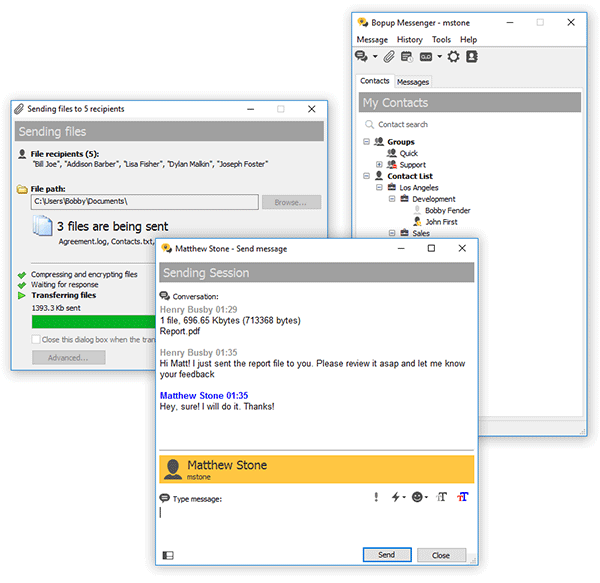 This clear, easy to use and light-weight IM client offers a set of corporate features. Based on a client/server architecture the messenger is fully managed from server-side software which provides IM logging, user grouping, offline messaging. This clear, easy to use and light-weight IM client offers a set of corporate features. Based on a client/server architecture the messenger is fully managed from server-side software which provides IM logging, user grouping, offline messaging.
Pros: Bopup Messenger is a secure instant messenger designed to communicate over LAN and enterprise-size networks. This clear, easy to use and light-weight IM client offers corporate features and answers many business needs.
Users can easily connect to others from different locations of the organizations to a common IM workspace and allows users the facility of instant message on urgent issues with full formatting, text fonts, color and emoticons. Contact lists can be organized to be accessible from anywhere on the corporate network and communicate with people who are online at a given moment.
The messenger encrypts messages with strong algorithms and thus the messages exchanged are quite safe even over the Internet. Messages are delivered even if the recipient is offline at the time of sending them. Server stores them and delivers when the user is ready. The application is simple to use and does not require any learning or previous experience to start using it. Notifications pop up and lets users to join in, in a few clicks. The messenger architecture allows even multiple users operating from the same machine even.
The centralized architecture makes some administrative options attractive for organizations. The central server can record all conversations and log user activities both of which are fully searchable and can be printed out. That includes reporting functions as well. Managing messaging groups and permissions related to sending and receiving messages and ability to view others are included. User accounts can be imported from active directories.
{More info and Download}
Posted in Developer, IM, Internet, Shareware, Windows | No Comments »
Thursday, March 6th, 2008
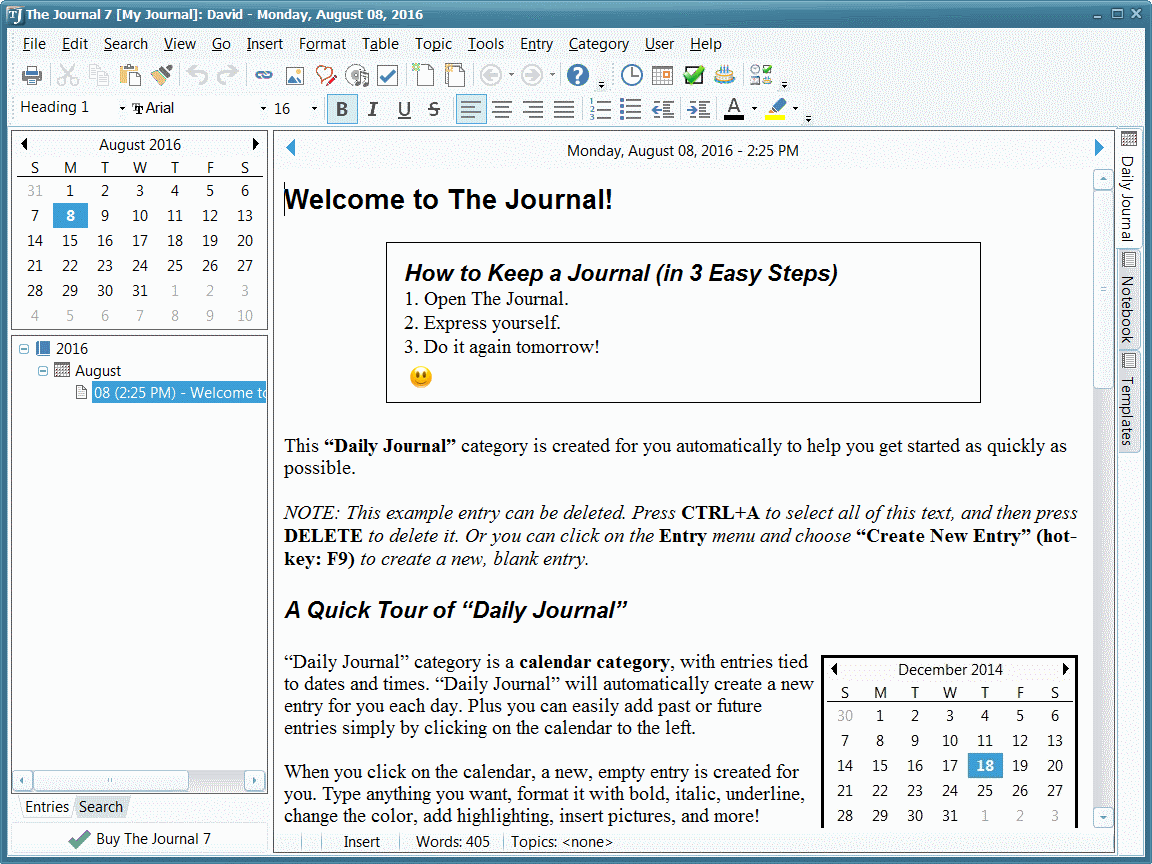 The Journal provides an easy-to-use mix of convenience, flexibility, and security to write, organize, remember, find things from a journal, whatever may be the journaling and writing needs. The Journal provides an easy-to-use mix of convenience, flexibility, and security to write, organize, remember, find things from a journal, whatever may be the journaling and writing needs.
Pros: The Journal application makes it easy to keep a daily journal, for both personal and professional use. Writing about thoughts and dreams or work notes and ideas or simply planning notes and decision details this application lets the user write & keep notes about just about anything. The Journal provides an easy-to-use mix of convenience, flexibility, and security.
One can create as many entries as he feels like. Dates get updated, then it is up to the user to add entries, sub entries or loose leaf entries as needed. Categorize the entries to completely custom categories, create them as you go. Helps search them later. Besides text, images could be added to the entries along with date, time, timer count or even a calendar charm. Calendar charms are small graphic icons to liven things up a little bit. The journal can sit in the system tray, always ready, always available and can be totally secure by password protection and encryption.
The interface is an augmented Word like interface. The interface additionally shows the hierarchical structure of the notes, the current calendar and a timer at option if needed. The timer could be set to be a count down one or a stop watch to indicate total elapsed time. These can be helpful with time based work. .Main work area is a tabbed area that shows, besides the journal work area, a notebook, templates, an address book etc. Reminder setting services are available for tasks set up, important dates and such items.
Cons: Notes, tasks and address book functionality are features available with Outlook too. So their duplication here could be questioned. In particularly since you have to maintain an address book anyway with the mail application anyway. But then viewed as an application that is open on the desktop all the time, these do have a place in the journal too.
{More Info and Download}
Posted in Blog, Developer, Information Management, Internet, Shareware, Social Software, Web 2.0, Windows | No Comments »
Thursday, March 6th, 2008
 ASP.NET app for editing photos through the web which includes such features as crop, red-eye removal, rotate, auto fix, borders, etc. This can be integrated easily into user applications, source code is provided. ASP.NET app for editing photos through the web which includes such features as crop, red-eye removal, rotate, auto fix, borders, etc. This can be integrated easily into user applications, source code is provided.
Pros: PhotoEditor is a web based software meant for integration in web sites by users for easy work with photos over the web. A sample application is provided to illustrate the workings of the application.
When integrated with a site, it allows visitors to edit a photo stored there – rotate, crop, remove red eye effect, apply most common artistic effects, etc. It does not require anything other than a regular browser.
Companies providing photo printing or online photo galleries/albums can easily utilize the edit features of this application by simply integrating the code with their own application.
Edit features include crop, red eye removal, rotation and flips. Color adjustments have automatic fix as well as user control of brightness, contrast and color saturation on a continuous basis. Tinting, borders and artistic effects add to edit options. While you can save the changes, it is equally possible the user wants to start over. One can simply revert to the original image.
As is necessary with anything that needs to integrate with other software, this package comes with easy tips on integration, customizable look and feel. The developers have kept the text strings/messages separated so that they can easily be localized. Source code in VB.NET is provided. Built on AJAX technology the package works with most browsers IE, Firefox, Safari etc.
Cons: Even though the sample application works locally the effects are quite slow. As you apply edits, effects, frames or whatever, it takes several seconds to update the sample image. The range of effects and number of frames, the amount of edits one can do on the photos are quite limited.
Overall a good jumping point for anybody implementing a photo based service over the web. Photo printing services is a good example. People would want to do some editing on the photos uploaded for prints and this editor is a very good starting point for that. Since over the web the operation speed is likely to get worse, one needs to worry about that.
{More Info and Download}
Posted in Developer, Photo, Shareware, Windows | No Comments »
|
|
|




