Author Archive
Tuesday, March 4th, 2008
 You might have seen the pages that are password protected and require entering the required password for access to that page. Now if you have ever felt the need for creating such pages on your website then you will be glad to know that such pages can be made few simple step and selection with the CoffeeCup Password Wizard 5.0. For enabling the protection for the WebPages you need not to have any special knowledge of HTML or Flash. It supports you with the customization features to work, maintaining the look of your page. While you set the password protection, you can have the preview with the program or browser as you want. It also supports working in multiple framesets, and provides redirection for the incorrect logins. You might have seen the pages that are password protected and require entering the required password for access to that page. Now if you have ever felt the need for creating such pages on your website then you will be glad to know that such pages can be made few simple step and selection with the CoffeeCup Password Wizard 5.0. For enabling the protection for the WebPages you need not to have any special knowledge of HTML or Flash. It supports you with the customization features to work, maintaining the look of your page. While you set the password protection, you can have the preview with the program or browser as you want. It also supports working in multiple framesets, and provides redirection for the incorrect logins.
The CoffeeCup Password Wizard 5.0 has a neat user interface with clean contours to work with. You can open the New Project and select the features for enabling the password protection. You can make the selections for the Appearance option. Select the background color and enable the transparent feature. Enter the required Caption like Username and Password and set the image or text for the Submit feature. You can make the selections for the Users by defining the URL and adding or deleting the users. You can also set the features with My Sites. When you have made the required selections then you can have the Preview and Get the Code. You can even save the project for further use. The password protection function is easy to upload to the website with the built in FTP Uploader in the program.
The CoffeeCup Password Wizard 5.0 lets you protect the WebPages so that only authorized people can access it. It ensures safety of the content and helps you to apply the password protection to the pages with your desired customizations.
{More info and Download}
Posted in Developer, Password Manager, Security, Shareware, Windows | No Comments »
Tuesday, March 4th, 2008
 Do you wish to have all the music and the videos that you ever wanted in your hard disk downloaded from different Internet radio stations? With the Audials One Music & Videos 2 software you can do just that by finding your favorite music and video by specifying the artists, albums, etc. The program just requires you to make some selections for searching for the music and videos of your choice. It also supports you with the search engine features that help you to search and get the required Mp3 file downloaded. You can also have the formats of the files converted to the one compatible to your mobile phone, MP4 player, etc. Do you wish to have all the music and the videos that you ever wanted in your hard disk downloaded from different Internet radio stations? With the Audials One Music & Videos 2 software you can do just that by finding your favorite music and video by specifying the artists, albums, etc. The program just requires you to make some selections for searching for the music and videos of your choice. It also supports you with the search engine features that help you to search and get the required Mp3 file downloaded. You can also have the formats of the files converted to the one compatible to your mobile phone, MP4 player, etc.
Audials One Music & Videos 2 launches with a screen that is pleasing on the eye and contains the features placed well on the screen. It provides you with the radio tracker from where you can record the music of your choice. With the videoraptor you can search for the music, download Mp3 and video clips, and even you can record the web videos. The “Tunebite” feature with the program is for the conversion of the files, removing the DRM protection and capture streams. You can search the music by entering the required text for carrying out the search. You would be shown on the search result on the main screen in the form of the list and even have the selected converted to the selected format. Search for the Web Videos easily and download them to your PC for enjoying anytime. You would see the files on downloading on the right side of the screen. You can open the folder and get them played for having check for the correct files.
Audials One Music & Videos 2 also helps you to Burn CD, Create Ringtones and Organize the MP3 files.
{More Info and Download}
Posted in Audio, Audio Editor, Developer, Multimedia, Shareware | No Comments »
Tuesday, March 4th, 2008
 Have you been looking for a tool that can help you easily create and publish your website, forms or even web albums? Well if that’s your case try using the Actual Drawing 7.1 which will help you make stylish WebPages even if you do not know anything about the HTML codes. It supports the simple function of dragging and dropping the content. The software provides you with the features to put different effects to the images and the pages. You can have the beautiful navigation buttons attached to the webpage. The program also helps you to check for the broken links and it can even have the pages submitted to the search engines. You just need to get the software and start working with it. Have you been looking for a tool that can help you easily create and publish your website, forms or even web albums? Well if that’s your case try using the Actual Drawing 7.1 which will help you make stylish WebPages even if you do not know anything about the HTML codes. It supports the simple function of dragging and dropping the content. The software provides you with the features to put different effects to the images and the pages. You can have the beautiful navigation buttons attached to the webpage. The program also helps you to check for the broken links and it can even have the pages submitted to the search engines. You just need to get the software and start working with it.
Actual Drawing 7.1 main screen neatly displays the features that can be used for creating the site, forms with much of ease. You also get all the properties that are require to set the content like setting color, text, position, style, alignment, etc. You can put the various effects to the text like shadow, color, and glow, etc to make it look more amazing. There’s an image optimization tool that help you to convert the images that best suit the website and takes lesser time to get loaded. You can make the changes in the vector images and set the properties accordingly. Add the gradients and patterns that are linear, velvet, radial, conical, and square and help you create animations. You can even create the forms and web albums with the software. It has wide range of features that you can use to customize according to the requirement. You can publish these easy with the FTP protocol. You can upload the pages easily to the website.
{More Info and Download}
Posted in HTML Editors, Programming, Web Authoring, Windows | No Comments »
Wednesday, February 27th, 2008
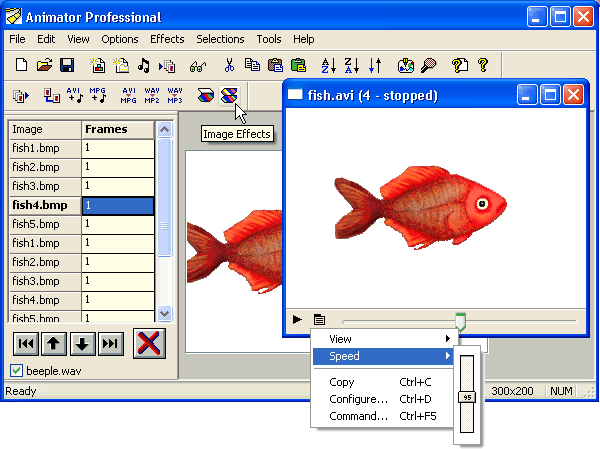 The application helps create & edit animations, videos, images, and sounds in 40+ formats, music slideshows 35+ effects and web-optimize by 60+%. The application helps create & edit animations, videos, images, and sounds in 40+ formats, music slideshows 35+ effects and web-optimize by 60+%.
Pros: Animator Pro helps create and edit animations, videos, images, and sound files, in over 40 formats that are supported. Animations can be created quickly, effect of changes in options can be viewed in real time in the preview area. Creating musical slide shows of digital photo collections is an additional feature. There’s a range of 30 odd effects or filters and effects to make the show effective and interesting. Image visual appeal can be increased by adding drop shadows, embossing and blending.
Animator Pro helps save time by doing things automatically by doing multiple operations together or in a batch process. It’s possible to do these operations from a different program or through the command line prompt. Common animation or imaging tasks can be undertaken easily. Merging sound files with animations, extracting images and sounds from videos or for merging videos or sound files and so on.
One of the major issues with web related animations is that these naturally fat files need to be reduced in size to make webpage loading fast enough. This package helps make the load times significantly fast and compress files by 40 to 65% with a set of tools available. The preview shows if there’s any change in the overall quality and also let the user calculate download speeds depending on his connection speed.
And finally capturing of text, images and anything else is very flexible via precision polygon and freehand capture. Scanner/camera inputs are also available.
Cons: User interactions could have been a little simpler possibly.
{More Info and Download}
Posted in Animation, Commercial, Multimedia, Shareware | No Comments »
Wednesday, February 27th, 2008
 Maintenance Pro helps keep track of preventive and repair maintenance for equipment inventory of an organization. It could be for tracking facility maintenance, machinery, or office equipment. Maintenance Pro helps keep track of preventive and repair maintenance for equipment inventory of an organization. It could be for tracking facility maintenance, machinery, or office equipment.
Pros: Whether tracking facility equipment, office equipment, machinery, or any type of object that requires maintenance, this application helps keep track of the maintenance schedule and also the regular repair work. An unlimited number of asset items could be tracked through the program, a category structure is created to group equipment in a proper order. Color coded entries on the spreadsheet like track sheet shows what needs attention right away. Preventive maintenance schedule of each category can be created, this can be by date or meter.
Meter being a equivalent value for each type of equipment. This can be number of hours of operation for an air-conditioner or straight mileage for a vehicle. One can define periods or ‘season” of inactivity when such tracking need not be maintained. The warning period can be defined too, the period of days prior to actual schedule one wants an alert. Color coding adds value to the alert system further. Red coded entries could be for immediate maintenance items while yellow coded items could mean equipment due for maintenance due in a week, for example.
Repair work is triggered by initiating a work order by populating maintenance items & parts automatically and creating a itemized detail of parts & labor too. As details about an asset could be maintained, define fields required for assets of the organization. !00 odd reports can be generated by the program, filtering the data to be compiled into a report is flexible and can be defined by the user. Parts inventory, purchase orders and invoicing data can be maintained easily. An employee database also could be linked to the main data table.
Cons: Like most data based applications, data needs to be updated religiously else the value diminishes very fast.
{More info and Download}
Posted in Backup, Developer, Shareware | No Comments »
Tuesday, February 26th, 2008
 This is an application that has the flash tools to create a slideshow or an album that can be displayed on a website easily. This is an application that has the flash tools to create a slideshow or an album that can be displayed on a website easily.
Pros: SlideshowZilla has the necessary tools to create web albums and flash slideshows making it easy to display a collection of photographs to be shared on a website. There are a dozen plus themes that make generating the XML to display photo gallery on a site very easy. SlideshowZilla is a template based Flash authoring tool that does not need the user to know any bit of XML and/or Flash coding.
Templates can be customized. Essentially several parameters can be set in various groups. These include basic and title properties, background music and photo properties and description properties. Movie size in pixels, loop play etc are defined in the basic property group while title properties lets one customize the show title, title color, background color and transparency etc. Background music can be streamed and looping can be set.
Photo properties take care of the video getting cut off on TV. One needs to add padding to avoid this cutoff effect. Amount of padding needs to be set to avoid the cut offs. Description properties lets you set some overall parameters such as if music should be added, if there’s going to be a background and its transparency.
Overall it is a 3 step fairly automated process. Select photos, choose a theme & customize it and then publish that about all it takes to get the job done.
Cons: While the process is meant for a quick creation of a photo gallery and/or a slide show and thus most things are automatic, some more intervention features would have been useful. If the transitions can be defined individually the effect could be more creative.
{More Info and Download}
Posted in Catalogue, Design, Developer, Shareware, Windows | 1 Comment »
Tuesday, February 26th, 2008
 Acoustic Labs Multitrack Recorder is a easy-to-use multitrack audio recorder, editor and mixer. Acoustic Labs Multitrack Recorder is a easy-to-use multitrack audio recorder, editor and mixer.
Pros: The Acoustic Labs Multitrack Recorder is an easy-to-use eight track digital audio recorder, editor and mixer allowing users to create professional quality audio productions. Each of the tracks is kept independent so that various editing operations can be performed on one track without affecting any of the other tracks. The Acoustic Labs Multitrack Recorder plays audio back and records audio at CD quality (44.1 KHz, 16 Bit, Stereo). During playback, all of the tracks play mixed together as one sound. When recording new tracks all existing tracks playback simultaneously so that you can record in perfect time with the existing audio. While it is easy to use features have not been compromised. The Multitrack Recorder can also be used as a very versatile, MP3 and wave audio file editor which allows users to easily mix different MP3 and wave files.
Editing of each track can be done independent of the other channels. While editing one can zoom into and edit at the sample level for absolutely precision editing. Besides volume adjustments tools that can be used in this context are cut, copy and paste at the waveform level. The effects that can be applied are fade, reverse, echo, reverb and so on. The independent edit of each channel makes correcting problems very easy. Even when a track or parts of a track are to be re-recorded it the instrument/vocal used in that track only. To ensure the replacement of the exact part of the track punch in/punch out recording is possible and that can be marked down to millisecond. One can playback the already recorded part while recording these new parts so that one can ensure things are in perfect sync.
Once all the tracks recorded are satisfactory the final track is produced by mixing down these multiple tracks and then recording the output in WAV or MP3 as desired to create a CD master.
{More Info and Download}
Posted in Multimedia, Music, Shareware | No Comments »
Tuesday, February 26th, 2008
 Do you feel the need to know about the visitors of your site, what pages they visit or the pages that are often visited, how much did they look, etc? Nearly all this information is required to know about the visitor’s likes and what needs improvement on the site. With the All Website Visitors 1.2 software you can know about all these things and get the answers to all your questions. It also helps you to get the html reports generated, accompanied by tables and charts also. You can get the count of the hits and keep the record of the periodical activity, statistics, time range activity etc. Do you feel the need to know about the visitors of your site, what pages they visit or the pages that are often visited, how much did they look, etc? Nearly all this information is required to know about the visitor’s likes and what needs improvement on the site. With the All Website Visitors 1.2 software you can know about all these things and get the answers to all your questions. It also helps you to get the html reports generated, accompanied by tables and charts also. You can get the count of the hits and keep the record of the periodical activity, statistics, time range activity etc.
All Website Visitors 1.2 software proves to be worthy assistant that helps you to know the pages or websites that are being most visited. You can know about the factors that contribute to its popularity and you can know about the details of the visitor’s count, hits, and the content that is sought for the most by the visitors. You need to enter the URL of the website for the analysis. The list is shown on the screen from which you can have the Include and Exclude URLs chosen. You can easily add the filters according to your requirement by checking or uncheck them. It shows the feature for Log File through which you can have the details of the activities. It also shows the features like Time Range, Filter and Reports. You can get the reports of the activities that consist of the chart and tables with all the details shown systematically. You can get the summary of the activities by hours, day of week and months. You get the access statistics for files, entry pages, browsers, operating systems, etc. With the search engine you can get the phrases and keywords and you can also get the details relating to the outgoing and incoming traffic. You get to now so much that could help you to improve the ranking of the websites on the search engine.
All Website Visitors 1.2 software provides you with features like Summary page, Periodical activity, Time range activity, Access statistic, operating systems, popular countries, browsers, Robots/Bots/Spiders, Search engines and traffic.
{More info and Download}
Posted in Internet, Shareware, Utilities, Web 2.0 | No Comments »
Friday, February 22nd, 2008
 Imagine this; you require the file that you just deleted thinking that it won’t be required again, or maybe you did it by mistake. Now you in dire need of that file and can only regret your actions. However regrets and excuses won’t make such files comeback and it would be prudent upon you to be aware of a remarkable utility that can UndeleteMyFiles 2.1. This software recovers all your files that had been deleted from any type of source like USB flash drives, hard disks, CF and SD cards, etc. It features different options for rescuing the various types of files, folders and so on. Imagine this; you require the file that you just deleted thinking that it won’t be required again, or maybe you did it by mistake. Now you in dire need of that file and can only regret your actions. However regrets and excuses won’t make such files comeback and it would be prudent upon you to be aware of a remarkable utility that can UndeleteMyFiles 2.1. This software recovers all your files that had been deleted from any type of source like USB flash drives, hard disks, CF and SD cards, etc. It features different options for rescuing the various types of files, folders and so on.
The screen of the UndeleteMyFiles 2.1 software is appealing with all options neatly placed for quick access. The File Rescue feature provided helps you to find and recover the deleted files from your PC. The media files can be recovered with the help of the Media Recover Wizard from your PC and other digital devices. The ‘Delete File Search’ feature provides you with the wide variety of filters that supports finding and work with the deleted files. It enables you to have the item previewed and the content of the deleted file can be arranged in different ways. You also get the option for the recovering the deleted files and folders of disk partitions. If you want some files to be deleted permanently you can use the ‘Files Wiper’. Then comes the features of ‘Emergency Disk Image’ it allows you to save the data on a device or file. ‘Mail Rescue’ recovers the deleted mails and supports the program like Outlook, Netscape, or Quallcom Eudora. The files that are recovered by the program are shown on the screen and choose the ones required by you and save them to any destination.
UndeleteMyFiles 2.1 has the features that make it easy for you to recover various types file with effortless ease.
{More info and Download}
Posted in Backup, Copy Utilities, Freeware, Utilities, Windows | 2 Comments »
Wednesday, February 20th, 2008
Xara 3D adds impact to web pages with top quality still and animated 3D headings, buttons and logos. With Xara3D an endless variety of 3D graphics can be created from TrueType fonts or imported 2D shapes.
Pros: 3D still and animated headings, buttons, logos really add value to graphics used on a website. Xara 3D appears to be a sophisticated tool bag to create such effects quite easily. True type fonts and imported 2D shapes could be used to create a range of sophisticated effects easily. Tools are available to manipulate the extrude depth, lighting, bevel, color and texture, shadow, font size and type. Then there’s a whole range of animation possibilities including multi-page sequences and even animated 3D screensavers. Graphics created go through anti-aliasing to make sure they have the smoothest appearance on screen. Optimization for web use also is possible. The application handles a range of formats such as WMF/EMF, CorelXARA and Webster files for imports and exports GIF, Flash, JPEG, PNG, AVI or BMP.
Most impressive part of the user interaction interface is the real time view possible of effects being applied on the 3D text, banner and animations being created. 3D extrusion, bevels, fonts, colors and textures are some of the things one can control. You keep the changes or discard depending on what you see as you create things. Colors, shadows, lighting adds to the effect one is able to create with the text item one is trying to create.
Bordering/ framing effects controls provide another dimension to the effect being created. Once again the “what you see is what you get” kind of display really helps. The sophistication of the controls adds a lot of value to the application, one does not really expect this level on a package that costs less than $50.
{More Info and Download}
Posted in Main | No Comments »
|
|
|




