Author Archive
Wednesday, December 19th, 2007
 The application Catalogs CD automatically, no typing needed. On inserting a CD in the CD-ROM drive or scanning its barcode or typing the artist and title will download all the data from the internet, including artist, title, year, track titles and the cover image The application Catalogs CD automatically, no typing needed. On inserting a CD in the CD-ROM drive or scanning its barcode or typing the artist and title will download all the data from the internet, including artist, title, year, track titles and the cover image
Pros: The package provides extensive set of features to get your music collection really organized. The application is able to download data from on-line databases given the artist and the album name. The CD can simply be inserted in the drive for the application to read the unique id and find the information from these databases. A third option is to simply read the bar code on the CD package. A scanner interface lets you scan in cover images if available on paper.
Navigating through the information collected is easy. Overall directory structure, album and artist name and then track details of specific albums could be browsed through. Organizing is flexible, group by artist names/genre or whatever way you feel most comfortable with. Browsing of information, whether a specific track or cover art, is simplified. Edit features are available, as is update of older information by newer data available in on-line databases. Search facilities are ok too. Print out of the collection related data can be organized several ways.
Information can be exported in HTML, CSV or the most generalized way of XML, to other devices. It is easy to export to iPod. So that while buying a CD you could make sure you are not purchasing a second copy or a quick check on any other information.
A generally useful information management feature provided is managing loan information. One can keep track of what CD has been borrowed by whom and when they are due back.
Cons: While collecting the information as you buy a CD is easy, getting the information entered for a sizeable existing collection could be a pain even with the simple way they can be collected with this package. But that’s a one time hassle only.
Overall 4 stars.
{More Info and Download}
Posted in Catalogue, Developer, Information Management, Shareware, Windows | No Comments »
Wednesday, December 19th, 2007
 Wondershare Photo Collage Studio is a easy-to-use application that enables you to make high-quality collages and scrapbooks featuring your own family photos. Wondershare Photo Collage Studio is a easy-to-use application that enables you to make high-quality collages and scrapbooks featuring your own family photos.
Pros: The application not only makes photo collages and scrapbooks but also greeting cards, calendar, posters and letter pages. What makes all this easy is the wonderful visual interface. For adding photos the full document structure in the windows directory ids visible. Photos can be just dragged into the work area. Some amount of polishing of the photos can be done. Usual crop, brightness and contrast adjustment, rotation/flip etc functions are available. Photos can be framed/masked/filtered too at this stage. A large selection, theme based is available.
Next step is to choose a template and layout and the drag photos into the template. Text, clipart, stamps can be added. A wide selection of pre-designed stuff of each category is available. Text editing, choice of fonts and font colors et add to the power one can use for manipulating text that goes onto the collage. Further decoration is added via a doodling tool. You create your own clip art/designs to be added to the collage. All these items are added in layers and these layer manipulations are possible too. That is a lot of creative options that are available.
The easy and intuitive visual interface and the simple workflows the program guides you through makes these artwork making very easy. Templates are arranged as wedding, birthday and such other themes, making it easy to choose from.
Cons: Did not find anything adverse, nothing that detracts from the value addition.
Overall: A highly visual, easy to use, intuitive package that makes creating collages, calendars, posters, greetings or writing stationary so much enjoyable. Positively a 5 star effort by the developers.
{More Info and Download}
Posted in Design, Developer, Fun, Multimedia, Photo, Shareware, Web services | 1 Comment »
Tuesday, December 18th, 2007
 WaveMax 3 is audio editing tool. Recording, analysis and editing tools that include a range of effects on the one hand and spectrum analysis tool like FFT analysis. WaveMax 3 is audio editing tool. Recording, analysis and editing tools that include a range of effects on the one hand and spectrum analysis tool like FFT analysis.
Pros: The User interface is well arranged around the central area where the file being processed is displayed. First set of icons are for file manipulation. This is followed by a set of icons that initiate various effects. Effects include echo, amplification, noise reduction, reverb, chorus and flanger, as well as time stretching/pitch control combination. Series of undo/redo is really useful as it is always could to be able to go back to a known point when the effects applied do not sound right. Standard edit operations like cut, copy, paste and mixing are available. Noise reduction, equalizing of channels etc are part of the edit tools.
Often needed functionalities like CD ripping, recording from LP records or cassettes is made easier with this tool. CD ripping includes looking up of CDDB database. Tag editing is possible
Text to speech function allows documents to be converted to synthetic speech so that one could listen to important documents while on the move. It’s possible to process multiple documents through the batch processing functionality. As could be any other set of editing steps that can be used on a set of recordings, for example in cleaning up stacks of old recordings that needs same processing.
WaveMax works as a wav/mp3 editor but supports a number of other file formats including wma, wav, mp3, mp2, vox, gsm, dsp, cda, aiff, au, raw etc.
Cons: The package is well designed and easy to use but looks a lot like the interface of the CyberPower Audio Editing Lab 12.01. There are differences but there are striking similarities too.
Overall: By itself I’d have possibly rated it at level 5 but because of the doubts expressed in the earlier section the rating cannot be more than 4 starts.
{More Info and Download}
Posted in Developer, Multimedia, Shareware, Utilities, Windows | No Comments »
Monday, December 17th, 2007
 Get the dictionaries of numerous languages stored at your system and make your study easier than ever. You can have so many things arranged with the help of iLanguage 2.2 such as the multilingual dictionary along with the editor working for you. Remember and learn a lot for improving your vocabulary with the help of the software. You can even evaluate your skills by having the test conducted with the program itself. The program has numerous other innovative learning features that make your activity truly engaging. Get the dictionaries of numerous languages stored at your system and make your study easier than ever. You can have so many things arranged with the help of iLanguage 2.2 such as the multilingual dictionary along with the editor working for you. Remember and learn a lot for improving your vocabulary with the help of the software. You can even evaluate your skills by having the test conducted with the program itself. The program has numerous other innovative learning features that make your activity truly engaging.
iLanguage 2.2 does take some time to get downloaded because of it’s size. The appearance of the program is decent with pleasing blue and gray shades. You can manage the wordbooks by setting various dictionaries and also you can change the Basic settings for it. You can have the word book password protected to have your work safe. It also provides you with the search option for searching the new lessons that you can copy to the wordlist and also remove if not required. Customizing the virtual keys is also easy as you just need to paste or drag and drop the character, and you can have the hotkeys set with the character to enter it easily into the text. The program also allows connecting to the online dictionaries and also importing the vocabulary from them. You can record the word pronunciation to make it easier to understand the words. Import, export the Wordbook easily and get the ‘Points’ when required. You can conduct tests in various ways to check how much you have learnt. The software has so many features that it becomes difficult to enumerate. The thing that may become a drawback is that it has a large variety of features that may create confusion while using.
To increase efficiency and improve your studying pattern and for generating perfection in your linguistic endeavor you can use iLanguage.
{More Info and Download}
Posted in Business, Developer, Dictionary, Information Management, Internet, Shareware, Windows | No Comments »
Monday, December 17th, 2007
 Now you can make your calculation more easily and customize your calculator as per your wish by getting various calculations done with your own customized calculator. You can make it possible with the Windows Mobile Pocket PC Calculator 1.0 that gives you the liberty of making the calculations in your own way. The features attached to the program would not bother you as they are rather easy to use. Now you can make your calculation more easily and customize your calculator as per your wish by getting various calculations done with your own customized calculator. You can make it possible with the Windows Mobile Pocket PC Calculator 1.0 that gives you the liberty of making the calculations in your own way. The features attached to the program would not bother you as they are rather easy to use.
Windows Mobile Pocket PC Calculator 1.0 can be downloaded with ease and installation takes place without any trouble. The screen of the software is small in size and pleasant in appearance. Go to the ‘Menu’ option for having the calculator according to the requirement. Then it would show the list of the calculators that are already prepared or you can create your own calculator. You can use the standard calculator where you just need to enter the expression and the results are shown below. The key board is available and shown on the screen with the various keys also. You can add or edit the fields of the calculator with the given option and make it on your own. You can make the calculators to be based on specialized calculators like for the Conversions, Mortgage Calculator, Financial, Body Mass Index, etc. For example you’re making the calculator for Body Mass Index. It shows with the screen having the options, you can set the male/female status, set the weight, height, BMI, and the software would tell you whether you overweight or you’re perfect according to your details. You can have the calculations done while playing along with the calculator. So have the software to make your calculations easy and better.
Windows Mobile Pocket PC Calculator 1.0, you would make your calculating experience a lot different than your usual calculators.
{More info and Download}
Posted in Business, Calculator, Developer, Mobile, Shareware, Utilities | 1 Comment »
Monday, December 17th, 2007
 Have different email accounts for different people and purposes such as one for work, another for family, the third for college friends, fourth for dating, and so on? Tired of opening, closing, and reopening these accounts time and again during the day to check for new email or to send an email to a specific person or group? Keep getting the passwords mixed — there are just too many of them to remember! Or, do you keep all these accounts open in different browser windows throughout the day? Now, that could cause a lot of confusion. Want an easier, faster, and perhaps more efficient way to deal with your multiple email accounts? Try the Multi-Mail Notifier. Have different email accounts for different people and purposes such as one for work, another for family, the third for college friends, fourth for dating, and so on? Tired of opening, closing, and reopening these accounts time and again during the day to check for new email or to send an email to a specific person or group? Keep getting the passwords mixed — there are just too many of them to remember! Or, do you keep all these accounts open in different browser windows throughout the day? Now, that could cause a lot of confusion. Want an easier, faster, and perhaps more efficient way to deal with your multiple email accounts? Try the Multi-Mail Notifier.
This software application is your assistant whose only job is to keep an eye on all your email accounts and notify you each time a new email comes in. The Multi-Mail Notifier runs in your computers tray and displays visual and sound messages to alert you of new incoming mail to one or more of your email addresses. Once you set all the email addresses you want monitored by the software, a table is created which primarily lists out the email id and the status of incoming mail (number of unread messages in the inbox). You can also quickly access a specific email account of yours by clicking on the Read E-mail button to read the incoming mail. No need to open a browser window yourself and then logging on to the specific mail server, entering the Username and Password and so on. All this is done for you automatically by the Multi-Mail Notifier.
Further, the Multi-Mail Notifier supports a variety of email account types, including Gmail, Hotmail, POP3, and Yahoo.
{More info and Download}
Posted in Developer, E-mail, Information Management, Internet, Shareware, Utilities, Windows | No Comments »
Monday, December 17th, 2007
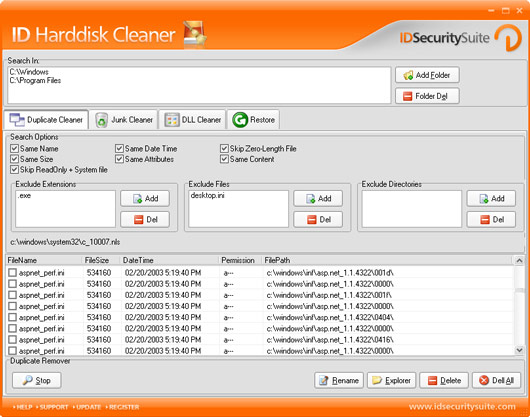 Are you fed up of the low space warning and the slow processing of your system? Are you looking for a good solution that would save you from this chaotic situation? Now you can get rid of these entire problems with few simple clicks and easy selections with the help of ID Harddisk Cleaner 1.2. It can easily search your computer for unwanted files that obstruct the working of your PC from giving the best performance. The software is competent enough to make your PC faster and make a great deal of space available on the disk. Are you fed up of the low space warning and the slow processing of your system? Are you looking for a good solution that would save you from this chaotic situation? Now you can get rid of these entire problems with few simple clicks and easy selections with the help of ID Harddisk Cleaner 1.2. It can easily search your computer for unwanted files that obstruct the working of your PC from giving the best performance. The software is competent enough to make your PC faster and make a great deal of space available on the disk.
ID Harddisk Cleaner 1.2 proves its efficiency by giving the best results through its optimum performance. It would save your important files and deals with the garbage files that are not required by the system. It also provides you with the features to customize the program settings as per your choices. This ensures specification that which files are to be deleted and which are needed to be kept at the system. The appearance of the program is flashy but pleasing and all set with different options on it. You can add or delete the folders to detect the unwanted garbage files to remove. It provides you with the option like Duplicate Cleaner, Junk Cleaner, and DLL Cleaner along with the restoring option. You can choose to exclude particular type of extensions, files and directories so that they do not get deleted in the process. The search results are shown listed on the screen of the program. Set the search option to have specific search carried out for various types of cleaning modes. The program has the help provided through online support regarding any problem if you face any. By setting the preferences it would every time recognize the files to be taken as garbage for deleting.
ID Harddisk Cleaner 1.2 proves to be a worth to have disk cleaning utility so once you’ve got it – no more PC hang outs, no more low space for your PC.
{More Info and Download}
Posted in Developer, Security, Shareware, Utilities, Windows | No Comments »
Friday, December 14th, 2007
 Remember the last time when you forgot your daughter’s birthday and even you could not wish her on phone because of so much work load. Also remember the presentation that you had to prepare by Thursday and but could not because the work was not complete as you thought that the day was Wednesday. So many times it happens that you face a situation like this as it becomes hard to remember all the important things. Now you can leave all the reminding tasks on eReminder Sp1 – Easy Calendar & Reminder 3.7 software. It would prove to be a perfect assistant and would let you remember all the things by just entering them once. Remember the last time when you forgot your daughter’s birthday and even you could not wish her on phone because of so much work load. Also remember the presentation that you had to prepare by Thursday and but could not because the work was not complete as you thought that the day was Wednesday. So many times it happens that you face a situation like this as it becomes hard to remember all the important things. Now you can leave all the reminding tasks on eReminder Sp1 – Easy Calendar & Reminder 3.7 software. It would prove to be a perfect assistant and would let you remember all the things by just entering them once.
eReminder Sp1 – Easy Calendar & Reminder 3.7 software is effortless during downloading and installation. Even after launching the program you would find it rather easy to be used by you. The first interesting feature is that you can select an animation that comes up for reminding of the things with speech feature. You get a calendar for setting the dates not only off course with your beloved but also the official ones. You can set different tasks with reminders so that you can have the work done by time. Make the notes for important things or even your day to day work. For the alternative use you can have your diary written with dates on the note pages. Quite odd suggestion but think about it!! You also get other options and tools to get on to the work with. Get the reminder emails sent to you so that wherever you are, you do not forget anything. It becomes real easy as you can have the Microsoft Outlook and the eReminder Special Edition integrated so that you can share the data between them. It would not let you forget anything and help you complete the work with the best of your efficiency.
eReminder Sp1 – Easy Calendar & Reminder 3.7 is a software that would remember all the things well that you will never forget the important works whether they are official or personal.
{More info and Download}
Posted in Main | No Comments »
Friday, December 14th, 2007
 Now you can check for why and how much you get those mood swings. You can know why you’re feeling so low and also you can get some tips for how to get over from it with the help of Advanced Biorhythms 2008.2.2 software that gives you an idea for why you’re having a particular type of mood. You can even test your compatibility relating to emotion, intellectual state, etc with your partner on a particular day. The software is easy to use as it does not needs much to be done except for simple profile selection. Now you can check for why and how much you get those mood swings. You can know why you’re feeling so low and also you can get some tips for how to get over from it with the help of Advanced Biorhythms 2008.2.2 software that gives you an idea for why you’re having a particular type of mood. You can even test your compatibility relating to emotion, intellectual state, etc with your partner on a particular day. The software is easy to use as it does not needs much to be done except for simple profile selection.
Advanced Biorhythms 2008.2.2 software is comfortable to download due to its relatively light file size and easy to be installed in a few seconds. Before launching the screen the software ask you to enter the name and the birth date for making a profile to shows the state that day. The colorful screen of the program catches your eye and it would almost become fun for you to operate the program. You can set a new profile for which you just need to enter the name and the birth date for the program to prepare the biorhythms levels for the days. Won’t it be interesting to know what the state was and why you felt extremely happy yesterday? Not only the present day but you can get energy levels for your physical, emotional, and intellectual aspects for the past days and even for the upcoming days. Set the profile of your partner and check for the compatibility for the day, it may be that you can make a great ‘Date’ that day. Make the selection of the profile and see the percentage for the various energy levels. You can even have a check on the critical, favorable or other conditions for the days with the colorful options given below. The Help Guide would assist you to know about your biorhythms for various days.
Advanced Biorhythms 2008.2.2 software gives you an idea of what has been the reason for your various feelings. The software is a great help but the major part depends on how you keep yourself balance any day.
{More info and download}
Posted in Main | No Comments »
Monday, December 10th, 2007
 Compact audio editor for professionals, music lover’s and home users to create, edit and add effects to audio. Editing functions such as Cut, Copy, Paste, Adjust Volume, Insert File/Silence etc. Effects like Equalization, Echo and Modulate. Compact audio editor for professionals, music lover’s and home users to create, edit and add effects to audio. Editing functions such as Cut, Copy, Paste, Adjust Volume, Insert File/Silence etc. Effects like Equalization, Echo and Modulate.
Pros: With the range of features available with the package one can not only record audio through the PC+ Window environment but apply effects, adjustments of different channels of a stereo recording too. That’s almost like a professional recording studio.
Large audio files of up to 2 GB can be used to create and save audio files in a range of formats. Play, pause, stop and play reverse supports fast editing such as cut, copy, delete, silence, paste, undo and so on.
Many effects are supported such as equalizer, band pass/stop filters, noise reduction, echo, reverb, modulate, stretch/shrink, change speed etc. Use cursor to mark up the points between which these effects are to be applied and then play the track. Noise or silence too can be introduced. Batch processing is available. Audio formats supported are Wav, WMA, MP3, AU, RAW, SND and so on.
Choice of a set of skins also is a nice touch to the concept. As are the readouts related to the cursor placements and the graphic representation of the signal being played.
Cons: There are a lot of icons related to the extensive range of functions supported by the package. They appear at the top and bottom of the screen. They look crowded and the widths of the icons are smallish. The tool bars can do with a little larger set of icons.
Overall: The package has an awesome array of features. Except for the size of the icons, no other issues were noticed. Surely rates 4 stars.
{More Info and Download}
Posted in Developer, Multimedia, Music, Shareware, Windows | 2 Comments »
|
|
|




