Archive for the 'Main' Category
Sunday, October 30th, 2011
 WeatherSig is a fun tool that allows you to display your city weather conditions in your email signature for many popular mail programs. Users’ signatures can be inserted manually or automatically into outgoing messages for Outlook Express, Mozilla Thunderbird and more. This current version also includes a couple of changes that include addition of online web help Weather Signature Online Help, and a few bug fixes. The Windows Live Mail html signature setup has also been automated by the publishers. The program also allows you to add fun and exciting signatures to your email messages, create the best email signatures, for play, work, marketing or whatever, anything is possible. WeatherSig is a fun tool that allows you to display your city weather conditions in your email signature for many popular mail programs. Users’ signatures can be inserted manually or automatically into outgoing messages for Outlook Express, Mozilla Thunderbird and more. This current version also includes a couple of changes that include addition of online web help Weather Signature Online Help, and a few bug fixes. The Windows Live Mail html signature setup has also been automated by the publishers. The program also allows you to add fun and exciting signatures to your email messages, create the best email signatures, for play, work, marketing or whatever, anything is possible.
WeatherSig has thousands of popular fortune cookies too; which is basically an one line joke, proverb, quote of the day that’s inserted into each email you create. This application also comes with thousands of Fortune Cookies which include thousands of jokes, quotes, deep thoughts and more.
Some of its key features include the following; works with Windows 7 as well as Vista, easy navigation with intuitive design, operates with all email clients, integrated signature creator with no special skill required, insert images into your signatures automatically, support for animated pictures, automatically inserts random one line jokes, quotes, and many more.
Want to check it out? Visit Weathersig.com.
Posted in Main | No Comments »
Sunday, October 30th, 2011
 Beyluxe is a free Internet voice and video Chat program used by millions of people, and thousands of organizations, to communicate, share, play and work with each other on the internet around the world. The program simply lets you enjoy easy communication with those you love wherever they are located, and as long as they have internet connection. You can watch videos, meet new people and keep in touch with your friends in our thousands of chat rooms from the entire world. Beyluxe Messenger also lets you share presentations with friends and family with our stream video conferencing and much more. Beyluxe is a free Internet voice and video Chat program used by millions of people, and thousands of organizations, to communicate, share, play and work with each other on the internet around the world. The program simply lets you enjoy easy communication with those you love wherever they are located, and as long as they have internet connection. You can watch videos, meet new people and keep in touch with your friends in our thousands of chat rooms from the entire world. Beyluxe Messenger also lets you share presentations with friends and family with our stream video conferencing and much more.
Since we live in a world where communication is key to the strength and survival of most relationships; it is therefore necessary to keep in touch as much as we can. With Beyluxe Messenger, you can start to chat online in different categories and languages, meet more people and have fun in various chat rooms. The program also allows you to use a microphone as well as a webcam whenever you feel like in order to make communication livelier and richer.
The program is free, but users need to create their unique usernames to start enjoying communicating with their friends.
Want to check it out? Visit Beyluxe.
Posted in Main | 1 Comment »
Saturday, October 29th, 2011
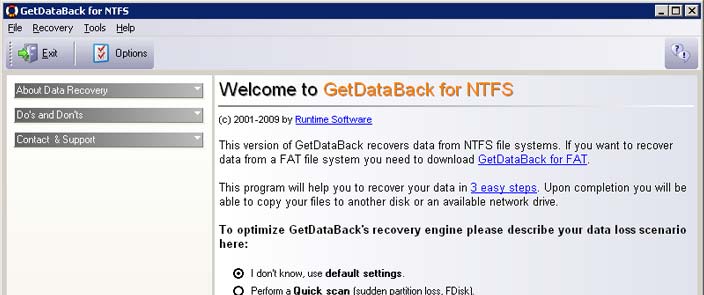 GetDataBack is an application built with features to help you retrieve your files if the hard drive’s partition table, boot record, FAT, or root directory have been damaged by a virus, formatting, fdisk or power failure. The application can even recover your data when the drive is no longer recognized by Windows. GetDataBack is one of those shareware programs with lots of impressive features; and is capable of helping you recovering files even when there is a system crash or power failure. GetDataBack is an application built with features to help you retrieve your files if the hard drive’s partition table, boot record, FAT, or root directory have been damaged by a virus, formatting, fdisk or power failure. The application can even recover your data when the drive is no longer recognized by Windows. GetDataBack is one of those shareware programs with lots of impressive features; and is capable of helping you recovering files even when there is a system crash or power failure.
GetDataBack for FAT has really improved over the years, and is even more popular than most programs because of the quality features included by the publishers. The advanced algorithms make sure that all directories and sub directories are put together as they were, and that long file names are reconstructed correctly. The program is read-only, meaning the program will never attempt to write to the drive you are about to recover. Users who are not experienced can also conduct their own data recovery through the program. The program also guides them through three easy to understand steps. However, if you are an advanced user, there are options to adjust the recovery process and improve the results.
Want to check it out? Visit Data Recovery Software.
Posted in Main | No Comments »
Friday, October 28th, 2011
 BurnInTest is a tool that simultaneously exercises all of the major components of a computer, to test for endurance and reliability. As a user, you can select the hardware components to test and individually adjust the load placed on each one via slide bars. Each test reports results to its own window and results are summarized along with any errors detected in the main program window. BurnInTest is a tool that simultaneously exercises all of the major components of a computer, to test for endurance and reliability. As a user, you can select the hardware components to test and individually adjust the load placed on each one via slide bars. Each test reports results to its own window and results are summarized along with any errors detected in the main program window.
The professional version of PassMark BurnInTest includes Serial port loop back testing, Parallel port loop back testing, USB port testing using the PassMark USB Loop back plug or the PassMark USB 2.0 Loop back plug, Tape drive testing, CPU affinity selection, Advanced RAM testing with page locking and testing beyond the 4GB barrier, Scrolling ‘H’s for Electromagnetic Compliance (EMC) testing to ANSI standard C63.4-1992, and Additional options for video card testing.
Some of the other key features you can find in this program include the following; native 64bit hardware and O/S support, online help and PDF manual, support for printing results, ability to save your results to disk as log file, counters that count the total number of operations performed, video RAM testing, testing the playback of videos, and many more.
Want to check it out? Visit Passmark.
Posted in Main | No Comments »
Thursday, October 27th, 2011
 RemotelyAnywhere is a small HTTP daemon that must be installed on a Windows NT computer. Once installed, you can then access that computer over the network via TCP/IP from any other machine capable of running a browser. The program enables you to manage services, processes, users, files. RemotelyAnywhere Workstation Edition empowers you with remote control, remote booting, etc. One of the best parts of this program is that you don’t need any sort of special client software, apart from a javascript-enabled browser. RemotelyAnywhere is a small HTTP daemon that must be installed on a Windows NT computer. Once installed, you can then access that computer over the network via TCP/IP from any other machine capable of running a browser. The program enables you to manage services, processes, users, files. RemotelyAnywhere Workstation Edition empowers you with remote control, remote booting, etc. One of the best parts of this program is that you don’t need any sort of special client software, apart from a javascript-enabled browser.
RemotelyAnywhere Workstation Edition helps system administrators keep IT systems up and computer users happy by offering the industry’s richest remote-support toolkit. Support staff can often detect, diagnose, and solve problems faster than local support using built-in operating system functions. Background access means the user need not be interrupted during the implementation of solutions. Some of its key features include the following; provides a snapshot view of a remote computer’s system activity, lets you share a PC’s desktop for enhanced collaboration, training, and support, fast, secure remote control of your host computers desktop and system resources, secure and easy file transfer between your local and host computers, valuable set of server tools, direct, rapid access a server’s diagnostic toolset, and many more.
Want to check it out? Visit Remotelyanywhere.
Posted in Main | No Comments »
Thursday, October 27th, 2011
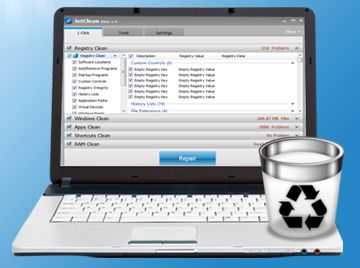 JetClean is a lightweight yet powerful system utility. That is capable of eliminating debris that bogs down your system. The program is very easy to use and customizable; with automatic clean and sweep feature that allows you to schedule cleanings for idle times while “Ignore List” allows you to keep cookies for specific sites. JetClean automatically backs-up all changes and allows you to undo them. JetClean is a lightweight yet powerful system utility. That is capable of eliminating debris that bogs down your system. The program is very easy to use and customizable; with automatic clean and sweep feature that allows you to schedule cleanings for idle times while “Ignore List” allows you to keep cookies for specific sites. JetClean automatically backs-up all changes and allows you to undo them.
JetClean offers a variety of features that include the following; removes unused and old entries as well as empty registry values, compacts your registry by reducing fragment, repairing structural errors and recovering unused memory space, cleans recycle bin, recent documents, temp files, log files, clipboard, memory dumps, DNS cache, run history, scans and displays all the programs installed on your PC based on categories, identifies start-up programs running in the background and provides memory usage, cleans temp files, history and cookies from major browsers as well as other third party programs such as Office, Multimedia Player, Adobe Acrobat, WinZip and more, optimizes memory usage to increase available physical memory, boosts and optimizes the speed of your internet connection by optimizing browser performance, preventing data fragmentation and improving the data throughput. Delivers faster browsing, files transfer, downloads, email and overall connection, etc.
Want to check it out? Visit Bluesprig.
Posted in Main | No Comments »
Thursday, October 27th, 2011
 Ctrax is an opensource machine vision program for estimating the positions and orientations of many walking flies; maintaining their individual identities over long periods of time. Ctrax was designed to allow high-throughput, quantitative analysis of behavior in freely moving flies. Basically, the primary goal of the publishers in this project is to provide quantitative behavior analysis tools to the neuroethology community, thereby endeavoring to make the system adaptable to other lab’s setups. The publishers of Ctrax have assessed the quality of the tracking results for their setup, and found that it can maintain fly identities indefinitely with minimal supervision and on average for 1.5 fly-hours automatically. Ctrax is an opensource machine vision program for estimating the positions and orientations of many walking flies; maintaining their individual identities over long periods of time. Ctrax was designed to allow high-throughput, quantitative analysis of behavior in freely moving flies. Basically, the primary goal of the publishers in this project is to provide quantitative behavior analysis tools to the neuroethology community, thereby endeavoring to make the system adaptable to other lab’s setups. The publishers of Ctrax have assessed the quality of the tracking results for their setup, and found that it can maintain fly identities indefinitely with minimal supervision and on average for 1.5 fly-hours automatically.
Ctrax has been installed and tested on 32-bit Windows and 32- and 64-bit Linux systems. As it is written in Python and Python is a platform-independent language, it conceivably can be run on other platforms as well. You can view or go straight to the homepage to find out more about installation instructions. However, you must ensure your system has enough memory to store the ellipse required for each fly in each frame. The faster your system, the faster and more effective Ctrax is going to be.
Ctrax is an open source and requires Windows 7, 2000, XP 2003, as well as Vista operating systems.
Want to check it out? Visit Ctrax.
Posted in Main | No Comments »
Wednesday, October 26th, 2011
 Microsoft “Roselyn” project works by opening up the VB and C# compilers. The compilers provide APIs to allow tools and end-users to share in the wealth of information the compilers have about code. The program’s CTP previews the new language object models for code generation, analysis, and refactoring, and the upcoming support for scripting and interactive use of C# and Visual Basic. Microsoft “Roslyn” CTP installs as an extension to Visual Studio 2010 SP1. “Roslyn” is a long lead project which the publishers have been considering for the post-Visual Studio 11 timeframe. The CTP includes an early preview of the APIs exposed by the C# and Visual Basic compilers, and the Interactive window experience. Microsoft “Roselyn” project works by opening up the VB and C# compilers. The compilers provide APIs to allow tools and end-users to share in the wealth of information the compilers have about code. The program’s CTP previews the new language object models for code generation, analysis, and refactoring, and the upcoming support for scripting and interactive use of C# and Visual Basic. Microsoft “Roslyn” CTP installs as an extension to Visual Studio 2010 SP1. “Roslyn” is a long lead project which the publishers have been considering for the post-Visual Studio 11 timeframe. The CTP includes an early preview of the APIs exposed by the C# and Visual Basic compilers, and the Interactive window experience.
Users may have to endure some limitations as this is just a technology preview. While the shape of the public API surface is complete, only a subset of the C# and Visual Basic languages have been implemented at this time in the current CTP. Microsoft “Roslyn” is a light program and may not take up to much space on your system. The program supports the following operating systems; Windows 7, as well as Windows Server 2008 R2.
Want to check it out? Visit Microsoft.
Posted in Main | No Comments »
Tuesday, October 25th, 2011
 Iron is a free Internet browser from SRWare. This is based on Google’s Chromium core, which is the basis of several internet browsers, which includes Google’s own Chrome. Just like Chrome as well as the others, Iron is certainly super-fast and also will take extensions, themes, and developer tools. Iron is a free Internet browser from SRWare. This is based on Google’s Chromium core, which is the basis of several internet browsers, which includes Google’s own Chrome. Just like Chrome as well as the others, Iron is certainly super-fast and also will take extensions, themes, and developer tools.
Exactly what sets it apart is an absence of the Google-centric features which quite a few have criticized with regard to violating users’ privacy, for example reporting your browsing behavior and recommending content (and advertising) based on the results. Iron’s start page offers quick Web and Image searching and a Quick Access section that let us upload pictures, access Chrome-compatible extensions and themes, rate our home page at a ratings site, view info about our IP address, and even watch funny videos at Epic Fail. Of course, you can personalize the view, including the Quick Access links, using the usual Chrome-style options.
The user is able to import or export bookmarks, create application shortcuts, and manage search engines, to name a few. Iron is loading the web sites as fast as other Chromium-based browsers, which is to say about as fast as browsers get nowadays. There are no functionality issues that seem to be because of Iron’s breaking the connection to Google HQ, or any functionality issue at all, for that matter.
The program installs conventionally and leaves some user data behind in its program folder when you uninstall it. That is not necessarily a bad thing since many users may prefer to delete such data securely. It appears the homepage has not been updated in some time, although it may be a case of, “if its not broke, don’t fix it” as this browser still seems to work perfectly.
Check it out at Srware.net.
Posted in Main | No Comments »
Tuesday, October 25th, 2011
 Do you use more than one Skype account? One developer wasn’t too happy about the problem of attempting to use his multiple Skype accounts on a single system in a single session, so he has written Skype Launcher, a simple bit of freeware which automatically signs in to multiple Skype accounts with a single click. Do you use more than one Skype account? One developer wasn’t too happy about the problem of attempting to use his multiple Skype accounts on a single system in a single session, so he has written Skype Launcher, a simple bit of freeware which automatically signs in to multiple Skype accounts with a single click.
It automatically detects accounts that are currently signed in to Skype and only launches offline accounts. Skype Launcher will open with the Skype Launcher Configuration utility, to which you add your Skype accounts by entering each account’s name and password inside a pop-up window. A check box enables you to decide on whether or not to start Skype Launcher whenever you log in. Clicking More expands the interface with a panel full of Advanced Configurations, the majority of which govern exactly how Skype Launcher behaves. You can even click USB to send your data to an external storage device.
Once you finish adding accounts and choosing the options click Save and it will close the configuration tool. However, it is possible to reopen it whenever you want through Skype Launcher’s Start Menu folder. After setting up Skype Launcher with your accounts, it automatically opens them so you can enter your password and log in (our preferences) when clicking Skype Launcher’s icon. Skype Launcher automatically checks for updates. The program is able to handle as many accounts as you have and is freeware.
Check it out at SkypeLauncher.net.
Posted in Main | No Comments »
|
|
|




