Archive for the 'Main' Category
Thursday, August 13th, 2009
 Soundbase 2009 is a basic, yet reliable MP3 player tool. It functions as an editor, player, and organizer of your music files; a good tool to help you manage your MP3 files more efficiently. Soundbase 2009 is a basic, yet reliable MP3 player tool. It functions as an editor, player, and organizer of your music files; a good tool to help you manage your MP3 files more efficiently.
While there are many similar programs available, Soundbase 2009 is probably one of the fastest ever made for this category, and what is even more appealing is that it can be customized easily. It features a hi-speed processing system that can smoothly run huge music libraries. This is great news for people who have no patience for lags when managing music files. Locating music files has never been so straightforward, and it also allows you to edit without a fuss.
Soundbase 2009 utilizes Microsoft DirectShow which enables it to capture and replay multi-media streams of the best quality and most common formats are supported, such as mpeg, OGG, APE, as well as FLAC.
If you are unfamiliar with such programs, don’t worry; Soundbase 2009 has a very user-friendly interface and the Help feature truly serves its purpose. It provides you with direct links to information on installation and other details you need.
One other aspect that makes Soundbase 2009 really attractive is the BASS Audio installer which can sure help in giving you better sound quality.
Soundbase 2009, as mentioned earlier, is flexible and customizable, which means you can add designs, organize music files to preferred locations, add tags, set up play lists, enable filters, and even create a history display. Moreover, you can simply drag selected songs from various databases and set them up to any location you like.
Since Soundbase 2009 is a freeware; it does not provide any warranty which is probably the only downside to this application.
For more information, you can check it out at dajukebox.com.
Posted in Main | No Comments »
Thursday, August 13th, 2009
 The Aimersoft iPhone Ringtone Maker is designed specifically to create and convert ringtones for the iPhone. It is a versatile tool and is compatible with various sound and video formats including WMV, MPEG, AVCHD, WMA, MP3, MP4, and possibly with every commonly used multimedia format today. This means you can convert your favorite video and audio music into a ringtone and transfer it straight to iTunes or your iPhone. The Aimersoft iPhone Ringtone Maker is designed specifically to create and convert ringtones for the iPhone. It is a versatile tool and is compatible with various sound and video formats including WMV, MPEG, AVCHD, WMA, MP3, MP4, and possibly with every commonly used multimedia format today. This means you can convert your favorite video and audio music into a ringtone and transfer it straight to iTunes or your iPhone.
What will you get from the Aimersoft iPhone Ringtone Maker? Below are the 5 basic and rather important features of this application.
- It supports common audio and video formats so you will not have a hard time converting files. There is no need for you to download some kind of converter software for this purpose.
- It works for the iPhone 3G as well as the iPhone 3Gs.
- It is fully adjustable, which means that you can specify which part of the video or audio clip you want to use as a ringtone. All you need to do is to set the start and end time, and adjust the settings.
- It enables ease of management for the ringtones. You can simply add and remove ringtones without a problem.
- Transfer of ringtones can be done directly to your iPhone.
Overall, the Aimersoft iPhone Ringtone Maker is a fun tool to use when you want to customize your phone. With just a few clicks, you can already create and transfer your very own ringtones, or personalize your favorite audio or video clips and make these your ringtones.
This nice application is tagged at $14.95, which is relatively cheap. Even better – you get a free trial download so you can experience it before deciding to purchase. For more information, check it out at aimersoft.com.
Posted in Main | No Comments »
Wednesday, August 12th, 2009
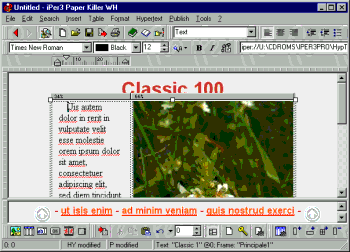 Paper Killer is an application used to edit, create, and even publish hypertexts. It is a smooth virtual editor that basically does the function of a word processor minus the coding. It enables you to make web pages, CDs, manuals, HTML help, Online Help, as well as WinHelp. Paper Killer is an application used to edit, create, and even publish hypertexts. It is a smooth virtual editor that basically does the function of a word processor minus the coding. It enables you to make web pages, CDs, manuals, HTML help, Online Help, as well as WinHelp.
With the Paper Killer, you get to choose from ready-to-use templates which you can opt to customize. Moreover, it features setting up font sizes and styles, image maps, and links, and it also allows you to create clip-arts and set up a photo gallery.
When you use the Paper Killer, you can easily create technical and training manuals, user guides, hand outs, format for minutes, and most documents you use for home, school, and office. You can also add audio and video options.
When utilizing this application for the first time, you do not need to be technically inclined as it is fairly simple to use. It aims to reduce the time and effort needed to create documents. Its editor feature allows easy revisions, search, and browsing; its organizer feature makes updating and archiving of documents very quick and efficient.
A feature that differentiates the Paper Killer from other similar applications is that it can set a single hypertext file from one whole manual which keeps you from having to load pages every now and then, and save each one thereafter. Additionally, you can edit and browse at the same time and allows for visual linking. You also get to edit one file and once done, you can have the HTML, CHM, or RTF formats with just a click of a mouse- made possible through the WYSIWYG feature.
The Paper Killer is a very efficient tool for regular people who want to make use of a better word processor utility. You can check it out at paperkiller.com.
Posted in Main | No Comments »
Wednesday, August 12th, 2009
 A tool designed to take images from your webcam and directly upload them to your site, the ConquerCam proves to be very handy, especially if you are one to prefer setting up effects on images. It is compatible with all Windows OS, and gives nothing but the best quality to ensure user satisfaction. A tool designed to take images from your webcam and directly upload them to your site, the ConquerCam proves to be very handy, especially if you are one to prefer setting up effects on images. It is compatible with all Windows OS, and gives nothing but the best quality to ensure user satisfaction.
What makes ConquerCam even more appealing is that it can be customized according to user preferences. You can set it up in terms of frequency of grabbing and uploading images, which basically allows you to upload these at any time you set it to; you can also choose from a wide variety of overlay effects such as those found in Adobe Photoshop; and you can also utilize tags for as many as you like.
Other special features that we love about ConquerCam are:
- It has the ability to upload an offline image
- It is equipped with motion-detection.
- It warns the user of any upcoming grabs.
- It is able to connect to proxy servers.
- It allows you to view thumbnails of the images you have uploaded.
- It utilizes timestamp details.
- It has a list of several FTP websites.
The ConquerCam is perfect for use as a security camera. It is user-friendly, and easy to set up. In fact, you could have it working in as quickly as 3 minutes. A very effective surveillance tool that does not disappoint, ConquerCam even offers a 30-day trial period for people who are not convinced with what this tool can do.
Overall, the ConquerCam is a nifty package that every webcam user should have. For more information, check it out at theill.com.
Posted in Main | No Comments »
Wednesday, August 12th, 2009
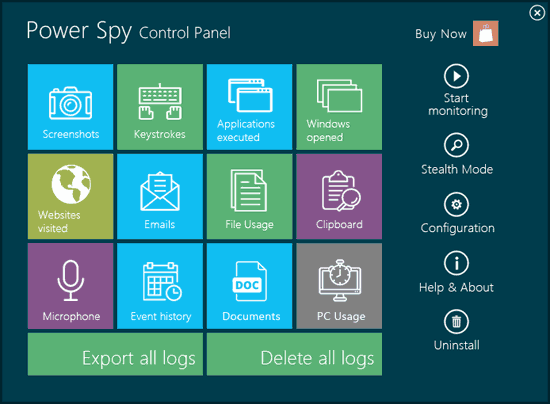 Power Spy 2009 is an excellent tool that lets you know what activities are being done on your PC without your knowledge. What it does is to log keystrokes, and save chat and instant messages from various IM programs like Windows Live, AOL, ICQ, and Yahoo! It also logs emails opened and read, visited websites, passwords, and basically everything that a person can do on a computer. Power Spy 2009 is an excellent tool that lets you know what activities are being done on your PC without your knowledge. What it does is to log keystrokes, and save chat and instant messages from various IM programs like Windows Live, AOL, ICQ, and Yahoo! It also logs emails opened and read, visited websites, passwords, and basically everything that a person can do on a computer.
What is even more amazing about the Power Spy 2009 is that it has the ability to take screenshots so it also works like a surveillance camera. Simply put, you get to see the activities via images.
The Power Spy 2009 can be made invisible to anyone except you when it is set up in Stealth Mode. It is great for spying on cheaters, keeping an eye on employees, and it also works well to monitor children’s computer activities. No one else will have to know other than you because the program has a hot key feature that allows you to be the only person to unhide it from the Control Panel window. You can view reports of activities through the PC or via email, which you can customize to send reports as often as you wish. You can set it up to send reports hourly, daily, or weekly- it is entirely up to you. Other people will likewise be unable to remove the program or stop it unless they know the hot key or the password. What’s more, you can get a trial version of the Power Spy 2009, if you are not ready to purchase it just yet.
A helpful tool that can surely give you the peace of mind you need. Check out ematrixsoft.com for more information.
Posted in Main | No Comments »
Tuesday, August 11th, 2009
 Plato DVD to MP3 Ripper is probably one of the most convenient ways of converting all of DVD audio files into a more portable and more organized mp3 audio file. As the world of technology evolves, portability is one of the better developed features and has become a necessity. That is why Plato DVD to MP3 Ripper will play a big role especially for those who want to extract audio files, convert files to mp3 files, and save it to their portable multimedia storage devices. Plato DVD to MP3 Ripper is probably one of the most convenient ways of converting all of DVD audio files into a more portable and more organized mp3 audio file. As the world of technology evolves, portability is one of the better developed features and has become a necessity. That is why Plato DVD to MP3 Ripper will play a big role especially for those who want to extract audio files, convert files to mp3 files, and save it to their portable multimedia storage devices.
Plato DVD to MP3 Ripper is one of the best DVD audio ripper today. The vast options of custom settings that the user can choose is just one of the proof that Plato DVD to MP3 Ripper can easily rip all of the other DVD audio converters in the market. By purchasing and installing Plato DVD to MP3 Ripper, the user will be assured of glitch-free and hassle-free operation. The user can even set parameters like on which specific point of the DVD movie exactly he or she wants Plato DVD to MP3 Ripper to extract the audio files. In this manner, unwanted audio clips will be mitigated for better management of the computer’s storage capacity and for easier post editing of the clips.
Extracting DVD audio files is one of the wisest innovations in today’s modern world and Plato DVD to MP3 Ripper should be the only option of today’s multimedia users. Plato DVD to MP3 Ripper can fully handle all the extracting and concerting tasks that users demand, with all DVD regions covered by Plato DVD to MP3 Ripper, it is clearly the all-in-one solution when it comes to DVD audio to mp3 conversion!
Visit dvdtompegx.com for more details.
Posted in Main | No Comments »
Tuesday, August 11th, 2009
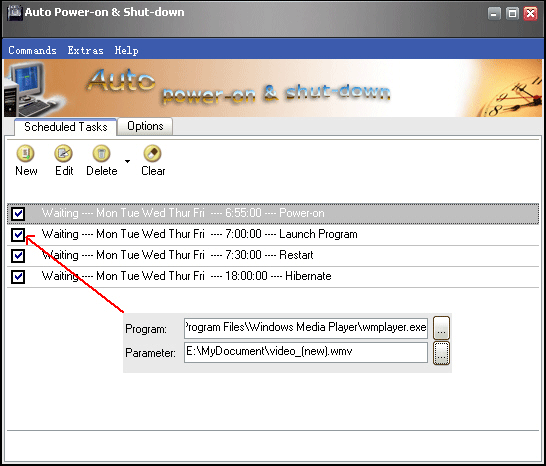 Auto Power-on Shut-down is a breakthrough utility that enables the computer user or administrator to assign or define a specific time when to shut down, hibernate, or close the computer system. It also allows the user to set predefined time and day when to turn on, wake up from hibernation, and open the computer or network of computers automatically. Auto Power-on Shut-down is a breakthrough utility that enables the computer user or administrator to assign or define a specific time when to shut down, hibernate, or close the computer system. It also allows the user to set predefined time and day when to turn on, wake up from hibernation, and open the computer or network of computers automatically.
Auto Power-on Shut-down allows the user to better manage and maintain the computer or network of computers because of its predefined scheduling of whatever action the user wishes to execute. Also, Auto Power-on Shut-down allows the user to automatically execute actions like open a certain program, suspend, or terminate an action or launch a website on a specific schedule without having to physically turn on or turn off the computers. Users can enjoy the luxury of having their computer units automatically powered on even before they sit down or they can just leave the computer and it will automatically shut down or finish a certain application once the task is done.
Auto Power-on Shut-down allows energy efficiency which in turn will benefit not only the pockets of individuals but big companies too, especially those who rely heavily on computer technology. Using Auto Power-on Shut-down 2.30 will definitely help prevent errors due to mismanagement of computer use and will promote efficiency in the workflow.
Auto Power-on Shut-down is the way to go to fully maximize computer operations and the best way to manage one’s work and professional lifestyle.
For more product information, visit lifsoft.com
Posted in Main | 3 Comments »
Monday, August 10th, 2009
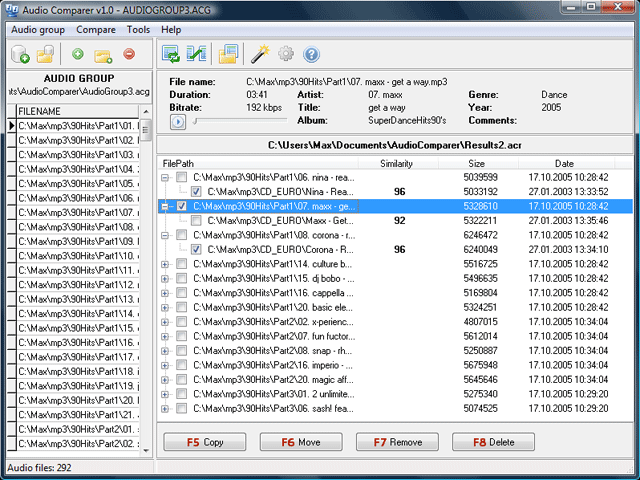 With your music collection soaring up with new music files, there is a possibility of the existence of several duplicate files existing within. Now, if you’re planning to find and remove them manually, you surely would end up wasting lots of your time and efforts in doing so. Nonetheless, now you don’t require confronting these hassles as you can take the services of a competent tool for performing the task efficiently. One such utility that supports comparing audios and remove the unwanted ones from your collection is Audio Comparer 1.4. The utility is a great audio comparing tool that facilitates all audio formats, whether they’re with or without tags. One of the amazing features of the program is that it listens to the audio files similar to humans and remembers each one of them, after which it locates the duplicate files accordingly. With your music collection soaring up with new music files, there is a possibility of the existence of several duplicate files existing within. Now, if you’re planning to find and remove them manually, you surely would end up wasting lots of your time and efforts in doing so. Nonetheless, now you don’t require confronting these hassles as you can take the services of a competent tool for performing the task efficiently. One such utility that supports comparing audios and remove the unwanted ones from your collection is Audio Comparer 1.4. The utility is a great audio comparing tool that facilitates all audio formats, whether they’re with or without tags. One of the amazing features of the program is that it listens to the audio files similar to humans and remembers each one of them, after which it locates the duplicate files accordingly.
Using the Audio Comparer 1.4 application helps you in locating audio file duplicates so that you can save your disk space and manage you music collection well. With simple program console, it provides you with navigable feature-set to carry out the process with. It comprises of a wizard that takes you through a sequential process for comparing audio files according to user-set preferences. The prompt firstly prompts you to select what you want to locate from similar audio files or exact duplicates. When you’ve selected the action, the program begins playing each of your audio files and simultaneously presents the resulting duplicate files that it found. It even suggests you to keep a duplicate or remove it, or else even you can decide to copy, move, or delete the chosen file. The audio files are displayed along with their details to help you decide a suitable action.
Audio Comparer 1.4 carries out the duplicate audio file search within your collection, and helps you in moving or deleting them, as required.
{More Info and Download}
Posted in Main | 1 Comment »
Monday, August 10th, 2009
 After grabbing a new iPod or iPhone device, you must be excited and all set to fill it with all your favorite tracks. But, while doing so, you may have to give away considerable laborious hours for manually downloading MP3s and ripping songs from your audio CDs. Nevertheless, an effective and simpler solution is available for you that surely would eliminate the entire hassles and simplify the process. The solution, tagged as iGetMusic 1.0 assists you in creating music collection for your iPhone, iPod, and other MP3 player applications. It supports recording songs from famous Yahoo Shoutcast, AOL Music, and Play. iGetMusic is a music service that offers large number of songs, which are automatically tagged with Artist, Title, and Album info. It stores the music files in m4a format with good audio quality, which are compatible to be played with iPhone, iPod, and MP3 players. After grabbing a new iPod or iPhone device, you must be excited and all set to fill it with all your favorite tracks. But, while doing so, you may have to give away considerable laborious hours for manually downloading MP3s and ripping songs from your audio CDs. Nevertheless, an effective and simpler solution is available for you that surely would eliminate the entire hassles and simplify the process. The solution, tagged as iGetMusic 1.0 assists you in creating music collection for your iPhone, iPod, and other MP3 player applications. It supports recording songs from famous Yahoo Shoutcast, AOL Music, and Play. iGetMusic is a music service that offers large number of songs, which are automatically tagged with Artist, Title, and Album info. It stores the music files in m4a format with good audio quality, which are compatible to be played with iPhone, iPod, and MP3 players.
iGetMusic requires to be configured with your web browser such as internet explorer, firefox, opera, and netscape navigator. You can easily configure the browser settings and can test the settings before actually using the service. Now for using iGetMusic, launch it and begin with setting the target folder for storing the songs. You can even specify separate folders for different music categories such as pop, R & B, Jazz, etc, which helps in easier organization. Now enter the music category that you’re planning to record like Pop, Jazz, Country, etc, which helps iGetMusic in tagging the entire recorded songs with specified category, making it simpler to organize the music files. In addition, it even allows you to save the album covers as images with JPEG format, as many player applications display them during playback. Next, click on Start Service and the program gives confirmation of settings you defined. Further, when you browse through the AOL, Play, or Yahoo Shoutcast websites, the program would start recording and storing the songs shortly after playback.
Using iGetMusic 1.0 you can get a wide music collection stored right at your PC, without requiring you putting in much effort.
{More Info and Download}
Posted in Main | No Comments »
Friday, August 7th, 2009
 Do you often find your PC performance sagging, or confront memory leaks, system crashes, etc? The low performance of your PC not only obstructs your work, but ultimately lowers down your productivity level substantially. Although a variety of solutions are available for such problem, but if you’re still confused about what to choose then try out RAMRush Portable 1.0.2.712. It’s a proficient memory management plus optimization tool that effectively free up the physical memory and optimize memory usage of your Windows PC to enhance its performance. The program efficiently analyzes and displays the real-time usage statistics of RAM and CPU that lets you decide upon beginning the optimization task. It enhances memory, defragments system’s physical memory, and functions from system-tray, recovers memory from applications, and supports command line mode. Do you often find your PC performance sagging, or confront memory leaks, system crashes, etc? The low performance of your PC not only obstructs your work, but ultimately lowers down your productivity level substantially. Although a variety of solutions are available for such problem, but if you’re still confused about what to choose then try out RAMRush Portable 1.0.2.712. It’s a proficient memory management plus optimization tool that effectively free up the physical memory and optimize memory usage of your Windows PC to enhance its performance. The program efficiently analyzes and displays the real-time usage statistics of RAM and CPU that lets you decide upon beginning the optimization task. It enhances memory, defragments system’s physical memory, and functions from system-tray, recovers memory from applications, and supports command line mode.
The RAMRush Portable executes directly from the setup and doesn’t engage much of your PC memory. The program sets its icon within system tray and begins to function immediately. You can anytime view the memory usage graphical statistics by placing the mouse over the system tray icon. The small program screen has been divided in two sections: CPU and RAM to present data relating percentage memory used, separately. Further, you’re provided with Options that gives you access to general and color configurations, where you can define program execution at startup, message display when optimizing RAM, AutoOptimize memory when lower then 8%, set Optimize Hotkey, along with altering color to help interpret the graphical presentation of CPU and RAM performance. When you want the program to optimize memory, simply press ‘Start Optimize’ for beginning the process.
RAMRush Portable 1.0.2.712 aids you in enhancing the PC performance by optimizing CPU and RAM memory usage.
{More Info and Download}
Posted in Main | No Comments »
|
|
|




