Archive for the 'Main' Category
Wednesday, August 27th, 2014
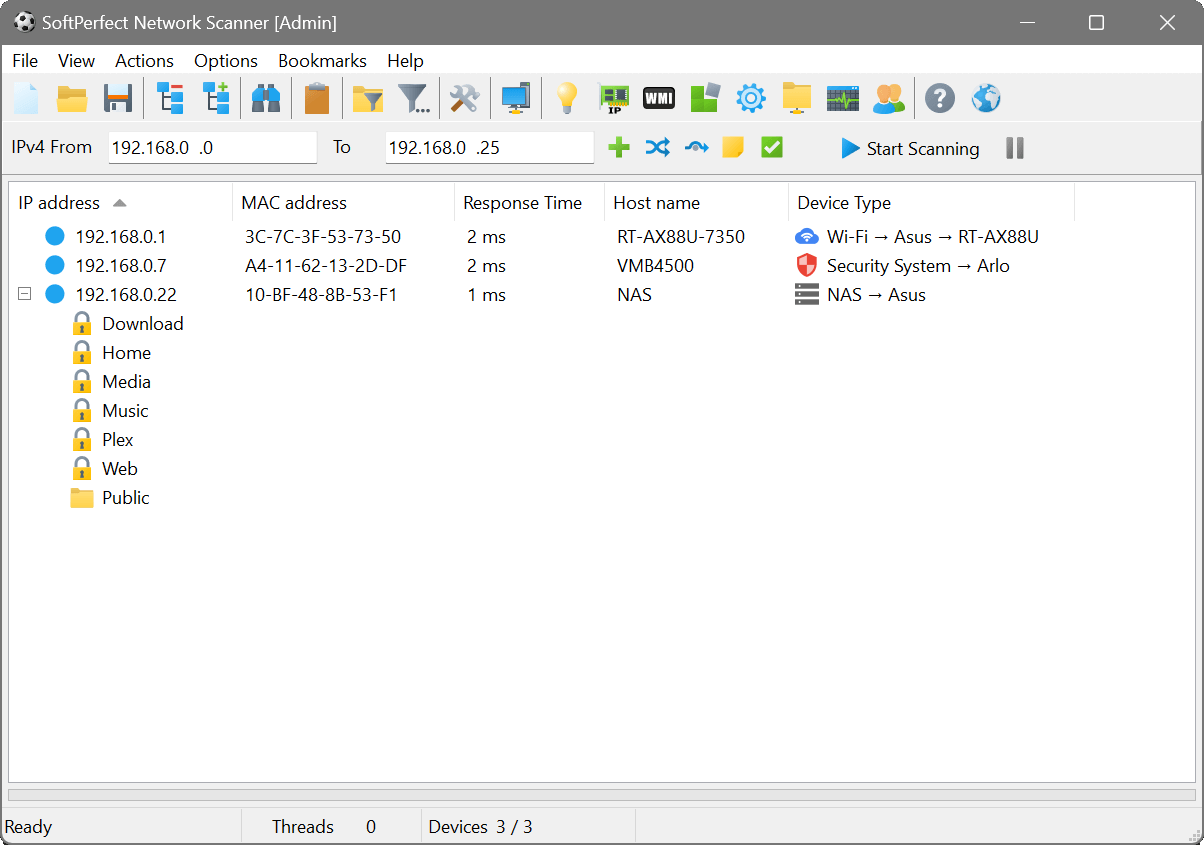 There is no reason why anyone should not be interested in the security of a computer. It doesn’t really matter whether you are a system administrator or just a user; the security of your computer should be a matter of priority to you. That is why you might want to take a look at SoftPerfect Network Scanner. There is no reason why anyone should not be interested in the security of a computer. It doesn’t really matter whether you are a system administrator or just a user; the security of your computer should be a matter of priority to you. That is why you might want to take a look at SoftPerfect Network Scanner.
What’s the big deal about SoftPerfect Network Scanner?
SoftPerfect Network Scanner is a free multi-threaded IP and NetBIOS scanner. Both system administrators and users who are interested in computer security can use this. The scanner pings computers, scans for listening TCP ports and shows what types of resources are shared on a network (including system and hidden). It allows you to mount shared resources that are found by the program as network drives, simply browse them using Windows Explorer, and many more.
A lot of additions and fixes have been made to this version in review. Some of these changes include the following: added automatic OUI.txt downloading and updating for NIC vendor lookup; added domain names displayed with user names in local group membership query; fixed reading EDID monitor info via the Remote Registry service; and a few others.
Want to check it out? Visit SoftPerfect.com.
Posted in Main | No Comments »
Tuesday, August 26th, 2014
 Perhaps the most irritating elements on the web are auto-playing contents. This is often a video that abruptly begins actively playing with or without audio, a colorful flashy advert which makes you dizzy merely by glancing it, or audio-only content. Perhaps the most irritating elements on the web are auto-playing contents. This is often a video that abruptly begins actively playing with or without audio, a colorful flashy advert which makes you dizzy merely by glancing it, or audio-only content.
Not only will this end up being very annoying given that it’s not at all times obvious exactly where audio might be originating from especially if you have multiple tabs open, but it’s also simply distracting and may even effect the load of your system too.
Whilst the click-to-play setting in Firefox might be an answer for it, because it prevents all Flash contents automatically, so therefore, it might not be the perfect option. For example, it doesn’t block HTML5 video contents from getting played on websites like YouTube. Additionally, it might not reveal information regarding the actual content that the particular website wants to play.
That’s where Flashstopper comes in… (more…)
Posted in Browsers, Main | No Comments »
Tuesday, August 26th, 2014
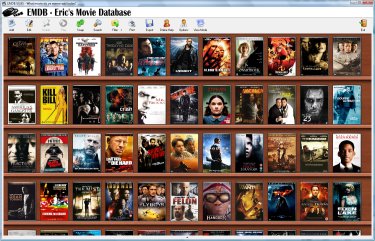 Keeping tracks of all your DVD collections can be a great thing if you don’t want thing to be left untidy. One of the measures to take to ensure your collections are intact is install a program like EMDB, which has a lot of useful features including an automatic import from the database of IMDB, export to csv, etc. Keeping tracks of all your DVD collections can be a great thing if you don’t want thing to be left untidy. One of the measures to take to ensure your collections are intact is install a program like EMDB, which has a lot of useful features including an automatic import from the database of IMDB, export to csv, etc.
What’s the EMDB?
EMDB is a small utility to keep track of your DVD collection. With an automatic import from the database of IMDB, export to csv, text or complete website, thumbnail cover preview, a loan tracker, search function and multi-language user interface. EMDB is written in C++ using Microsoft Visual Studio 2008 and doesn’t need a .NET framework or any other external libraries.
Some of the latest changes made to this software include the following: added an option to search movies by their version; added an option to re-generate the thumbnails (to match the movie numbers as a lot of people seem to want this); added Indonesian as possible language / subtitle;importing the original title as alternative title did not work (now fixed); add from HDD: a single NFO-file in a folder with multiple movies was used for all movies in that folder; and many more.
This is one of the best available. It has a lot of useful features, and is easy to use.
Want to check it out? Visit: EMDB.tk.
Posted in Main | No Comments »
Tuesday, August 26th, 2014
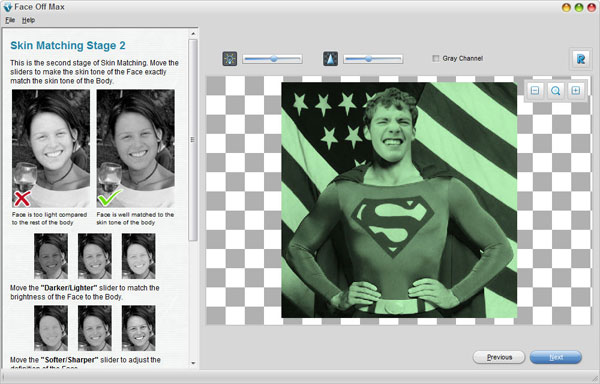 Do you want to make fun photos by putting your face on another body using any photo or template? Do you want a program that enables you to do a lot of beautiful things with pictures with a step-by-step instruction and hundreds of fantastic templates? Then you need to find out more about an easy to use application known as Face Off Max. Do you want to make fun photos by putting your face on another body using any photo or template? Do you want a program that enables you to do a lot of beautiful things with pictures with a step-by-step instruction and hundreds of fantastic templates? Then you need to find out more about an easy to use application known as Face Off Max.
What’s Face Off Max?
Face Off Max lets you make fun photos by putting your face on another body using any photo or template. It enables you to embarrass your co-workers, make yourself look cool and make your friends look like dweebs all with a few clicks of the mouse. This amazingly simple and easy interface, step-by-step instruction and hundreds of fantastic templates allow anyone to be a professional artist. Share your creations with your friends. It’s perfect with Facebook, MySpace, email, blogs, spaces, ecards, fakes, jokes and many more.
Face Off Max has a lot of beautiful features that will simply wow you. The features too are easy to use, and you can get used to them within a matter of minutes of installing the program on your system.
Face Off Max has a 30 day trial limitation. Full version would cost you $49.95 (so you might want to wait till it goes for a sale).
Want to check it out? Visit: Faceoffmax.com.
Posted in Main | No Comments »
Wednesday, August 20th, 2014
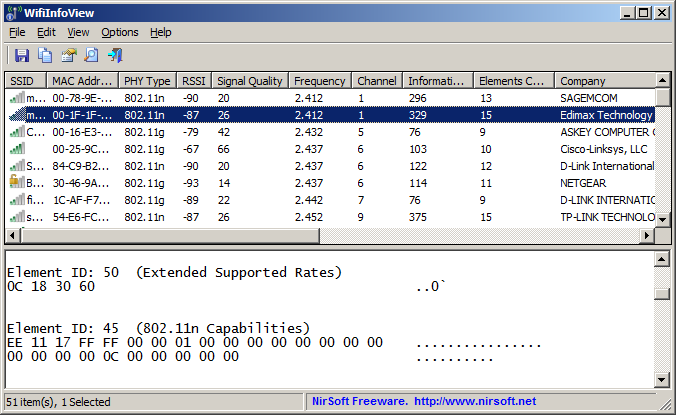 Do you want to find out about wireless networks in your area? Do you want a program that can scan all the wireless networks in your area and displays extensive information about them? Maybe you should check out WifiInfoView. Do you want to find out about wireless networks in your area? Do you want a program that can scan all the wireless networks in your area and displays extensive information about them? Maybe you should check out WifiInfoView.
What’s WifiInfoView?
WifiInfoView scans the wireless networks in your area and displays extensive information about them, including: Network Name (SSID), MAC Address, PHY Type (802.11g or 802.11n), RSSI, Signal Quality, Frequency, Channel Number, Maximum Speed, Company Name, Router Model and Router Name (Only for routers that provides this information), and a host of others.
When you select a wireless network in the upper pane of this tool, the lower pane displays the Wi-Fi information elements received from this device, in hexadecimal format. WifiInfoView also has a summary mode, which displays a summary of all detected wireless networks, grouped by channel number, company that manufactured the router, PHY type, or the maximum speed.
However, systems with Windows XP won’t be able to use it since the program is based on Wi-Fi API that is entirely new and may not work on it.
Want to check it out? Visit Nirsoft.net.
Posted in Main | No Comments »
Tuesday, August 19th, 2014
 For improved security measures, a lot of applications and files are distributed in archives in order to prevent malicious software infiltrations. There are several utilities that can be used for this task. One of those programs that can be used is PeaZip. It manages to come equipped with a set of tools that offer a lot more than just the possibility to compress files. For improved security measures, a lot of applications and files are distributed in archives in order to prevent malicious software infiltrations. There are several utilities that can be used for this task. One of those programs that can be used is PeaZip. It manages to come equipped with a set of tools that offer a lot more than just the possibility to compress files.
What’s the big deal about PeaZip?
PeaZip is a free, open source, cross platform, portable archiving and compression utility, with encryption and volume split features. It has full for support: 7Z, 7Z-sfx, ARC/WRC, BZ2/TBZ2, GZ/TGZ, PAQ/LPAQ, PEA, QUAD/BALZ, split, TAR, UPX, ZIP. You can open, browse, extract, test: ACE, ARJ, CAB, CHM, COMPOUND (MSI, DOC, XLS, PPT), CPIO, ISO, Java (JAR, EAR, WAR), Linux (DEB, PET/PUP, RPM, SLP), LHA/LZH, NSIS, OOo, PAK/PK3/PK4, RAR, WIM, XPI, Z/TZ, ZIPX files. Other features include split/join files, wipe files (secure deletion), byte to byte compare files, checksum/hash files, system benchmark, bookmark files and folders.
The program comes with an interface that is beautifully designed, which includes nearly all archiving tools you find in most common dedicated such utilities. The upper toolbar is fitted with intuitive buttons that let you add, extract, convert, test and several other options.
Want to check it out? Visit PeaZip at SourceForge.net.
Posted in Main | No Comments »
Tuesday, August 19th, 2014
 Do you want a backup and recovery tool that includes all the diagnostic utilities you will ever require? Do you need a tool to create a bootable CD in case disaster strikes and your computer breaks down? Then you need a tool known as Ultimate Boot CD. Do you want a backup and recovery tool that includes all the diagnostic utilities you will ever require? Do you need a tool to create a bootable CD in case disaster strikes and your computer breaks down? Then you need a tool known as Ultimate Boot CD.
What’s the big deal about Ultimate Boot CD Full?
Ultimate Boot CD is exactly what you need if you want to Run floppy-based diagnostic tools from CDROM drives, free yourself from the slow loading speed of the floppy drive, or Consolidate as many diagnostic tools as possible into one bootable CD.
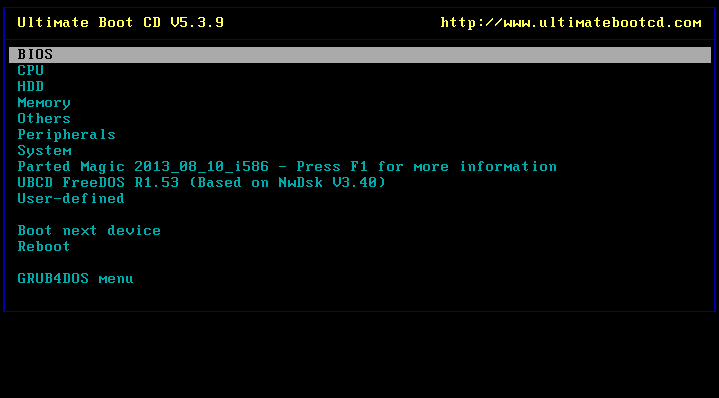
Ultimate Boot CD features an interface that’s quite similar to the one of BIOS, so users accustomed to this approach won’t face significant problems. After you create your bootable CD and insert it in the computer, a text-based menu will appear and from here you can select the utility you want to run. It creates a virtual instance of the floppy (very much similar to virtual CD/DVD drives), so that the computer reads it as a floppy drive instead of a CD drive.
Does it have a downside?
It is a very useful tool that has a lot of features.
Want to check it out? Visit UBCD at SourceForge.net.
Posted in Main | No Comments »
Monday, August 18th, 2014
 Do you want to keep yourself abreast of any happenings around you? Do you also want to be warned ahead of any natural disaster before it could happen? Do you want to receive alert notification, reports, and imagery as they become available? Then you need Earth Alerts. Do you want to keep yourself abreast of any happenings around you? Do you also want to be warned ahead of any natural disaster before it could happen? Do you want to receive alert notification, reports, and imagery as they become available? Then you need Earth Alerts.
What’s Earth Alerts all about?
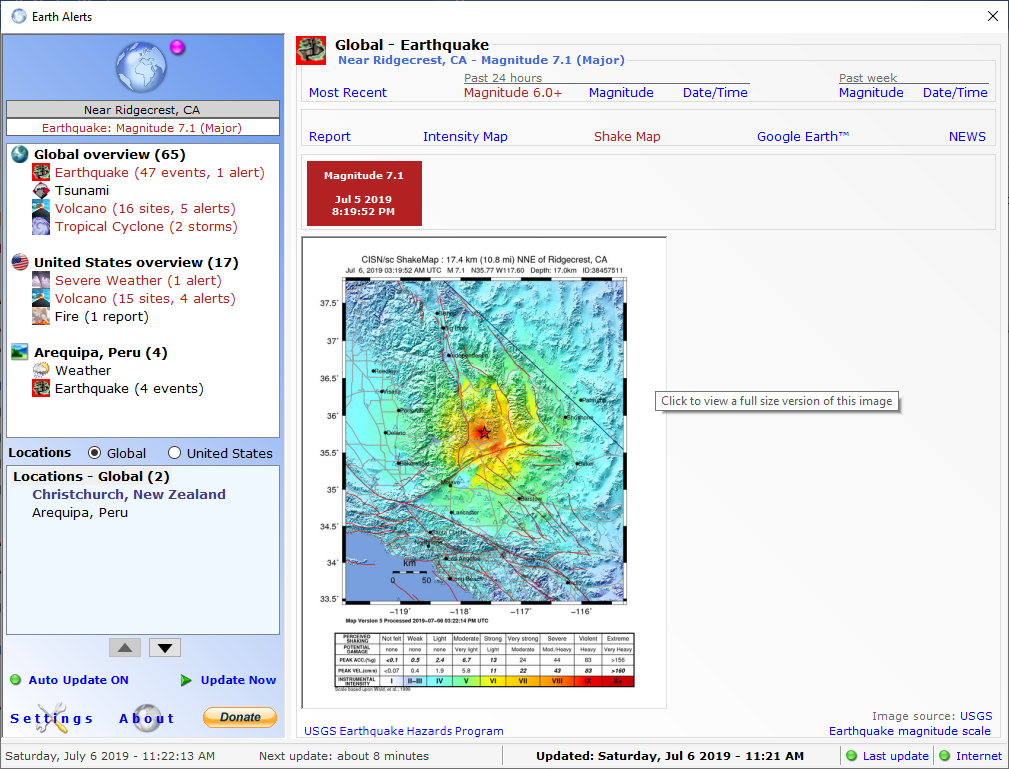
Earth Alerts allows you to monitor in near real-time a variety of natural hazard events that are occurring anywhere around the world. Alert notifications, reports, and imagery provide the user with a convenient way to view natural phenomenon as they occur, whether close to home or some far-flung corner of the globe.
Earth Alerts uses a variety of online resources provided by organizations such as the National Weather Service, U.S. Geological Survey and Smithsonian Institution (just to name a few), to identify what sort of activities “Mother Earth” is currently dishing out on the planet.
Latest updates and changes made to the software include the following: bug fixes that were preventing display of active storms in the Central/Western Pacific regions; coding changes to reference the new Google Maps API links; and various minor bug fixes.
Does it have any downside?
The program takes a little more time to start after installation.
Want to check it out? Visit EarthAlerts.
Posted in Main | No Comments »
Monday, August 18th, 2014
 Looking for a video and audio player that also supports TV channels, subtitles and skins? Daum PotPlayer has a lot of great features that you will find very interesting. Looking for a video and audio player that also supports TV channels, subtitles and skins? Daum PotPlayer has a lot of great features that you will find very interesting.
What’s Daum PotPlayer?
Daum PotPlayer is a video and audio player that also supports TV channels, subtitles and skins. It is a much improved/faster version of KMP, including ffdshow and some other stuff to connect to a Korean-only video/chat network. It supports seamless playback, auto-resume on the last 200 opened files, has fully configurable XML skin files, and D3D exclusive mode.
Lots of features and updates have been made to this version in review. These updates include the following: added the ability to specify external audio directories (F5 > Playback > Advanced > Audio Directory); fixed an issue where subtitles doesn’t show up with Haali and Madshi Video Renderers; fixed a problem that subtitle word searching function did not work in certain systems; fixed an issue that cannot play some MP4 files ;changed usage method of audio normalizer to be used with/without broadcasting; and fixed forced exit problem of chat in certain systems.
Daum Player does not have any downsides, and is in fact one of the best programs with a lot of features.
Want to check it out? Visit DvbSupport.net.
Posted in Main | No Comments »
Thursday, August 14th, 2014
 Looking for an application that can verify existing checksums or create new checksum for your important data? Are you also looking for a program that is published for the integrity examination of files on the standard formats SFV and MD5? Have you heard of EF CheckSum Manager? Looking for an application that can verify existing checksums or create new checksum for your important data? Are you also looking for a program that is published for the integrity examination of files on the standard formats SFV and MD5? Have you heard of EF CheckSum Manager?
What’s EF CheckSum Manager?
EF CheckSum Manager is a program designed for the integrity examination of files on the standard formats SFV and MD5. They can verify existing checksums or create new checksum for your important data. It is easy to use and very fast, supports the recursive processing of file structures, works up to whole drives. You have the choice to let only one checksum file for all files, one per folder or to produce for each file separate checksums.
Furthermore, one of the important application fields for checksums is the transmission of data over the Internet. If you send files by E-Mail to friends, nobody can guarantee to 100% that arrived files are unchanged, also correctly. If you send also a checksum file additionally, the receiver can determine on the basis the checksum whether the received files are alright or not.
EF CheckSum Manager full license would cost you $10.
Want to check it out? Visit Efsoftware.com.
Posted in Main | No Comments »
|
|
|




