Archive for the 'Main' Category
Thursday, January 22nd, 2009
 Calculate Mileage Charts and Tables with MS MapPoint. You can calculate tables for customers and suppliers including “closest only”, or to create “road atlas” tables. You can distances, travel times and/or estimated costs to Excel. Calculate Mileage Charts and Tables with MS MapPoint. You can calculate tables for customers and suppliers including “closest only”, or to create “road atlas” tables. You can distances, travel times and/or estimated costs to Excel.
Pros: You can use the application for calculating mileage charts for locations of interest. These can be customer locations, supplier location and so on. If you are already using Microsoft MapPoint, you know how much trouble it is to calculate various distances and travel times to reach your customers in time. Use MileCharter to take the pain out of these calculations. Process hundreds of source and destination locations accurately in minutes with a few mouse clicks. If you need, create “road atlas” tables. These mileage charts and tables are created using MS MapPoint maps as the basis. You can output route distances, travel times, estimated costs etc can be output to Excel sheet. These can be very large spread sheets and thus no real limitation as to how many points you use to calculate the tables. The options available in MapPoint of finding routes based on fastest route, straight line routes, road speeds, road preferences etc available in MapPoint. It uses 2002, 2004, 2006, 2009 versions of both the European and American editions. The application can calculate very large batches of thousands of routes quite easily. Windows 2000, XP or the Vista is the platform on which this application works.
“Closest only” option lets you sort and find the closest destination easily. If you need to find the closet service location for a specific customer this will be the approach. For deriving a cost table you could assign a per mile cost or a fixed cost for a distance interval. Pause/restart function allows very large processing runs to be stopped and restarted. So calculating a cost schedule for hundreds or even thousands of your customers is not a problem at all. It works as a plug-in and MapPoint MileCharter has a simple, easy-to-use interface allowing easy selection of start and finish locations, as well as formatting and other options.
{More Info and Download}
Posted in Main | No Comments »
Wednesday, January 21st, 2009
 Rohos Welcome 1.1 is a dynamic Login Screen that could replace your default Windows 2000/XPLogin dialog box. The password that you set for logging into your PC can be easily hacked, and thus the safety of your data and computer may get compromised. But the application offers a competent protection measure, by allowing you to use a hardware key as a replacement of Windows password. It supports storing the username and password info on USB drive for using it to access your Windows. Further, it also consists of configurations that support locking your workstation by removing the USB drive. Using the application you would not require remembering the login and password details, as they get safely stored with the flash drive. Moreover, the application by replacing the default security panel, helps preventing unwanted access to network users to your PC data. Rohos Welcome 1.1 is a dynamic Login Screen that could replace your default Windows 2000/XPLogin dialog box. The password that you set for logging into your PC can be easily hacked, and thus the safety of your data and computer may get compromised. But the application offers a competent protection measure, by allowing you to use a hardware key as a replacement of Windows password. It supports storing the username and password info on USB drive for using it to access your Windows. Further, it also consists of configurations that support locking your workstation by removing the USB drive. Using the application you would not require remembering the login and password details, as they get safely stored with the flash drive. Moreover, the application by replacing the default security panel, helps preventing unwanted access to network users to your PC data.
Rohos Welcome 1.1 is rather easy to use and its interface comprises of small window with uncomplicated features. At the top of the program window is displayed the info relating to Admin’s USB key configurations. With the first option, Setup USB Key, you can configure a USB device as Windows accessing key. Connecting to the USB device, enter Windows password and click ‘Setup USB Key’. Also a ‘Setup Emergency Logon’ can be set by entering few questions and answers, and you can easily disable/enable key as desired. If you want to set a new password for Windows, then the ‘Change Password’ option is provided to you. With this option, enter the current and then new password, confirm the new one, and type the password tip if you wish to. You can even restrict the usage time for specific users through ‘Setup users’ feature. Using ‘Options’ you can select Windows logon model, USB key device type, and the action to be performed when you remove the USB key, from the option’s dropdown menu. Further, you can customize the images and text of the Logon screen. Finally apply the settings and enjoy working with effective protection applied to your Windows.
The Rohos Welcome 1.1 offers users the flexibility to configure various attributes relating the protection applied to Windows with the help of a hardware key device.
{More Info and Download}
Posted in Main | No Comments »
Wednesday, January 21st, 2009
 Moonfall, a legendary village, is renowned for its totally dark seasons of eleven months. The people of Moonfall live with dreams as their reality, but now the land of beautiful dreams has turned out to be the place of nightmares and utmost fear. It’s because of Malus, a demon, who wants Moonfall to be a dark place where no one would ever awake. The twist comes in when a young farmer having control over his dreams comes forward to fight Malus. But on his journey to find and confront Malus, he needs your help to guide through different levels of ‘Moonfall Land of Dreams Demo’ game. During this journey, you would have to pass 11 distinct chapters with increasing difficulty. Moonfall, a legendary village, is renowned for its totally dark seasons of eleven months. The people of Moonfall live with dreams as their reality, but now the land of beautiful dreams has turned out to be the place of nightmares and utmost fear. It’s because of Malus, a demon, who wants Moonfall to be a dark place where no one would ever awake. The twist comes in when a young farmer having control over his dreams comes forward to fight Malus. But on his journey to find and confront Malus, he needs your help to guide through different levels of ‘Moonfall Land of Dreams Demo’ game. During this journey, you would have to pass 11 distinct chapters with increasing difficulty.
After installing the Moonfall Land of Dreams Demo, you can immediately begin playing the game. With the Setup feature you can modify Input, Audio, and Video relating settings. Input helps you to change the game controls like jump, fly, attack, run, etc. Beginning to play the game, you would meet Pixie, a fairy, who would guide you throughout the journey. You have to find the four pieces of sunstone that are scattered across the Moonfall’s land to restore the peace. While moving on you would have to jump over the platforms and other hurdles, deal with various vile creatures, collect the weapons, and fight your enemies. The game includes hero health bar, inventory box, number of lives, stars, golden star, brain, keys, potions, gauntlet, lantern, boots, wings, hidden traps, and weapons like mace, magic-shot, cannon, etc. These are set for different purposes to help to further progress with the game.
Moonfall Land of Dreams Demo is an exciting game that presents a catchy graphical work, sound effects, and various challenges offered with each level.
{More Info and Download}
Posted in Main | No Comments »
Wednesday, January 21st, 2009
 A free PHP script, converts RSS feeds to HTML. Users can create web pages that will always display the most current information from the RSS feed, and because the resulting page is pure HTML, it will be in a format friendly to search engine robots. A free PHP script, converts RSS feeds to HTML. Users can create web pages that will always display the most current information from the RSS feed, and because the resulting page is pure HTML, it will be in a format friendly to search engine robots.
Pros: This really is a PHP script. A script that allows conversion of RSS feeds to HTML. Normally a RSS feed is available at any website for a visitor to subscribe to and read via his RSS reader. What a webmaster can do with this script package is to offer content from the RSS feed to be displayed. With this script you could arrange things so that the content is updated as the RSS feed contents that you are using changes. Usually search engines love frequently updated content. The spiders also like the fact that the content is in HTML via the visitor’s browser. A free PHP script, converts RSS feeds to HTML. The rss2html.php script allows webmasters to display RSS feeds on their website. RSS or Really Simple Syndication, as it is commonly known, is a technology that gives webmasters the ability to easily distribute and publish syndicated content on the Internet. Most webmasters understand the potential benefits of making RSS feeds available for viewing in a web browser. When used, this script will allow you to create web pages that will always display the most current information from your RSS feed.
Using rss2html.php webmasters can customize the format and look of the web page created from the feed. Customizing the look and feel of the pages would be easy. The necessary information gets parsed and then the page is created in HTML using the information items thus parsed. The script package will run on any server that can run PHP and supports RSS versions 1.0, 92, 93 and 2.0. There are several ways to achieve this. One would be to run the script on the web server and pass the feed URL and webpage template file. Alternatively run the script on the web server and edit its feed and template variables. You can also pass the feed to RSS2HTML server which will display your feed in HTML format.
Cons: This is strictly for the programmers, developers and webmasters.
{More Info and Download}
Posted in Main | No Comments »
Wednesday, January 21st, 2009
 Store Manager for Zen Cart is a Windows application to quickly and effectively manage your Zen Cart online store. Manage Zen Cart products, Zen Cart product attributes, categories, manufacturers, orders and other things. Store Manager for Zen Cart is a Windows application to quickly and effectively manage your Zen Cart online store. Manage Zen Cart products, Zen Cart product attributes, categories, manufacturers, orders and other things.
Pros: Store Manager for Zen Cart is a Windows application that lets you manage a Zen Cart online store. You can do that very effectively with the manager. Zen Cart is one of the most popular shopping carts available. Unlimited categories, products and product-options, registered and unregistered shopping cart, customizable tax options, multiple shipping and payment modules, special prices, banner management are some of the major features available with the shopping cart implementation. It is licensed as open-source. Manage Zen Cart products, Zen Cart product attributes, categories, manufacturers, orders and lot of other things. Suppliers can provide you the data and then it is an easy up load to the Zen Cart.
Product attributes can be uploaded in a batch. Edit of the attributes are easy too. Data upload can also be through clipboard copy & paste. Category data can be dragged & dropped into the category tree and the tree reorganized in a few mouse clicks. Some other top level features are export of Zen Cart products into Excel file, edit it and then import products into Zen Cart store and fast batch updates, import products into Zen Cart from your supplier – Zen Cart product import is one of the prominent features, import from Excel/CSV into Zen Cart in seconds , manage Orders and Customers. Additionally the applications also allows you to use SalesMaker module to manage flexible and easy discount/specials sales management, Product Types are used to control unique data, specific to a given product and management of media products via Media Management to manage music genre, media manager, media types, record artists, record companies. Quick search and effective reporting features round off the features. Order management supports the business end of the whole process.
Cons: Choice of the shopping cart would determine if this module makes sense and that’s a decision of specialists. One ought to seek out feedback from actual users.
{More Info and Download}
Posted in Main | No Comments »
Tuesday, January 20th, 2009
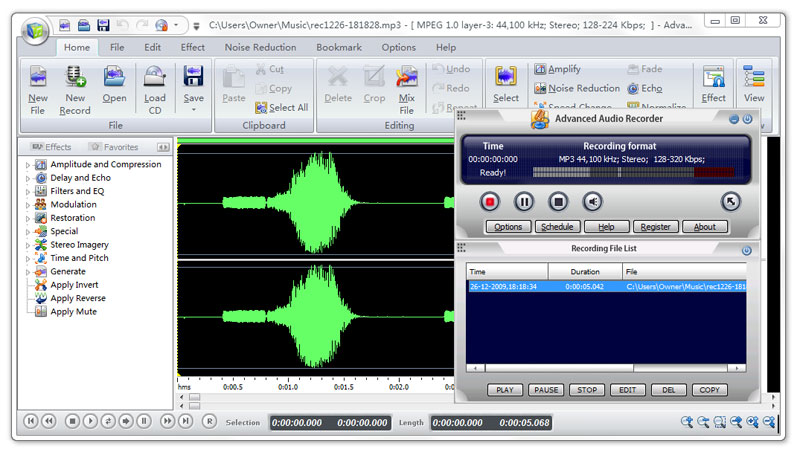 Advanced Audio Recorder can record any sound passing through any line of your sound card. For example, you can record sound being played back by an external program, sound from a microphone, an external LP, cassette, CD/DVD player, AM/FM. etc. Advanced Audio Recorder can record any sound passing through any line of your sound card. For example, you can record sound being played back by an external program, sound from a microphone, an external LP, cassette, CD/DVD player, AM/FM. etc.
Pros: Advanced Audio Recorder records any audio passing through the sound card of the system. That includes not only the line-in inputs such microphone or external CD player/music system but any program/games on the computer that plays audio through the sound card. So if you have a stack of vinyl records, old/new CDs that needs to be ripped or a DVD movie whose soundtrack you absolutely love. Cassettes or whatever that needs to be converted to MP3 or some other digital format is fodder for this program.
WAV, MP3, OGG or WMA are the formats it can handle easily. Recording is always with the CD quality default. Settings are available for changing sampling frequency and sample size in bits to have a more compressed file size if you need to. Obviously the quality would not be as good. Automatic start, stop, pause and restart are possible. You are able to set up hot key based controls and schedule recording that can be stopped automatically and the machine shut down. This enables completely un attended sessions. Cut, copy, paste and trim are the editing features that you can use to get a finished product you want. Audio waveform displays help you do these easily visually. High pass. Low pass and notch filtering can help you clean up any noise in the track. Overall the user interface is simple and easy to use too. A built in CD burner lets you create music discs with your own selection of music.
Cons: One should be aware of the copyright issue. One needs to understand that creating copies for own use from material that (CD etc) that you already own is the only situation that is legal.
{More Info and Download}
Posted in Main, Multimedia, Music, Shareware, Voice | No Comments »
Tuesday, January 20th, 2009
 I am still trying to get a hang on this download app. It is complicated in that it comes with other app that one wouldn’t exactly find useful. I am still trying to get a hang on this download app. It is complicated in that it comes with other app that one wouldn’t exactly find useful.
Download Accelerator Plus (DAP) leverages patented technology, ease of use and rich features including: multi-connections for fastest download from most responsive servers, auto-recovery from lost connections and errors, AlwaysResume (where standard resume is not supported), scheduling, file management tools, auto hang-up and much more.
As for me there are other better and more efficient download managers out there, but then “one’s man’s poison is another man’s food”. It may be good enough for you.
Check it out at http://www.speedbit.com/ and let me know what you think.
Posted in Main | No Comments »
Tuesday, January 20th, 2009
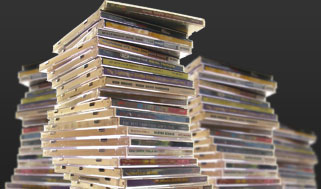 One thing about MediaMonkey is that it keeps improving with every new version. I first came in contact with it when I needed an app to convert file formats. Now it’s a universal music manager working with a very wide range of file formats. One thing about MediaMonkey is that it keeps improving with every new version. I first came in contact with it when I needed an app to convert file formats. Now it’s a universal music manager working with a very wide range of file formats.
Its app window is so beautiful one could get satisfied by just staring at it. It organizes your music and edits tags in your audio library with a powerful, intuitive interface, automatically looks up media info from the Internet. You could also sync iPhones, iPods, & MP3 players, converting & leveling tracks on-the-fly.
Media monkey is the best as far as I’m concerned. It also allows you customize your window with Skins, plugins, visualizations, and hundreds of user-written scripts that extend MediaMonkey’s functionality.
The latest version – MediaMonkey 3.1.0.1213 Beta, was released just last week with some cool upgrades, check it out at www.mediamonkey.com/

Posted in Main | No Comments »
Monday, January 19th, 2009
 A full-featured multi-resource calendar application designed specifically for planning, managing, and scheduling important dates and times. A full-featured multi-resource calendar application designed specifically for planning, managing, and scheduling important dates and times.
Pros: eReminder is a calendar application that enables you to save appointments, tasks, events, contacts, notes and more. An all around schedule management tool that simplifies the process of getting things done from day to day by better managing your time. You can view several schedules at the same time (example: your office schedule, your personal schedule, etc.) as well as standard day by day calendar view (view by day, week, month, or year) and grid view. Automatic reminders are set for important events, appointments, birthdays, anniversaries etc. The program will also inform you by email of the same: It automatically keeps track of recurring events. It provides simple interfaces to share information with MS Outlook, MS Project / MS Project Server, and Intuit QuickBooks. It also has a very decent print function that prints out in a nice easy human readable format. The calendar can also be shared with family, friends, colleagues, with the option of having certain information (events) as private and others as public.
Cons: There is little to complain about here. But a better interface would really have completed the package. As it stands the interface does all that is required of it, but one thing that is especially irritating is the Parrot helper. The Parrot constantly comes up with messages as if it were a personal secretary. There is probably some way to turn it off but it couldn’t be found during testing. The price is also too high and this kind of functionality can be purchased for less, or even for free.
{More Info and Download}
Posted in Main | No Comments »
Monday, January 19th, 2009
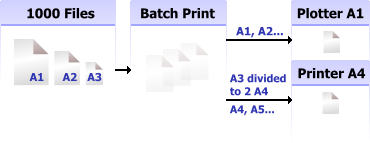 2D Batch Print for AutoCAD DWG, DXF, PLT 1 is a commendable application for automated batch printing the drawings. It is capable of working with different drawing formats, without requiring AutoCAD for its functioning. The application supports a multitude of formats, including DXF, DWG, along with HPGL, SVG, TIFF, CGM and many more. It further allows you to send particular formats to a specified printer, as it is capable of detecting the drawing size automatically. The printing program truly eases out your drawings printing task, by making the process entirely automated. Further, it provides wide range of features to filter drawings and customize print settings. The software is easy to operate, and drawings can be printed from one model onto different printers. 2D Batch Print for AutoCAD DWG, DXF, PLT 1 is a commendable application for automated batch printing the drawings. It is capable of working with different drawing formats, without requiring AutoCAD for its functioning. The application supports a multitude of formats, including DXF, DWG, along with HPGL, SVG, TIFF, CGM and many more. It further allows you to send particular formats to a specified printer, as it is capable of detecting the drawing size automatically. The printing program truly eases out your drawings printing task, by making the process entirely automated. Further, it provides wide range of features to filter drawings and customize print settings. The software is easy to operate, and drawings can be printed from one model onto different printers.
When using the dx2D Batch Print for AutoCAD DWG, DXF, PLT 1 application, with the first step, you need to select the drawing files that you want to print. The options on the toolbar are Batch Print, Batch Preview, File list, INPUT-OUTPUT List, Inputs List, Output Lists and Log, which help you to perform different functions. Using the File list features you can select the files that would be shown in the file list dialog. Next, click on INPUT-OUTPUT List to select the printing Group and the different sizes to print the drawings. Moving on with the process, you’re can use the ‘Batch Preview’ option for previewing the drawings, and for customizing the printing settings. With printing settings, you can alter drawing borders, CAD drawing, Statistics, Output and Additional Settings. Further, you can use the Input filters for drawings classification, from the generated file list in groups. Moreover, you can edit the file mask filter and file format filter, and finally, completing the necessary selections you can print your drawings with ease.
2D Batch Print for AutoCAD DWG, DXF, PLT 1 application proves to be an effectual support in printing your drawing files with required attributes.
{More Info and Download}
Posted in Main | No Comments »
|
|
|




