Archive for the 'Main' Category
Tuesday, September 2nd, 2008
 Agenda At Once is a Windows to-do and schedule software that could be just what you need. Agenda At Once is a simple but powerful organizer that’s easy to learn and intuitive to use. Agenda At Once is a Windows to-do and schedule software that could be just what you need. Agenda At Once is a simple but powerful organizer that’s easy to learn and intuitive to use.
I love the fact that it can be installed on your portable flash drive for accessing your to-do lists on the move easily.
Integrating all your PIM needs in the same interface: to-do list management, time planning, contacts, reminders, recurring options and notes; makes this software a really cool tool worth having.
The software costs $39.95 but you can enjoy the trail version first to see if it can serve your needs. The publisher also claim to have a money back guarantee but it is bets to tray it out first before committing your cash to it.
Check it out at http://www.agendaatonce.com/
Posted in Main | No Comments »
Monday, September 1st, 2008
 Modern professionals usually find it difficult to maintain proper schedules of their important business meetings, and other such related activities. Even the best personal secretaries often fail to devise proper schedule for the professionals, and hence a software application for the purpose is highly sought for, and XemiCo Today Calendar 1.0 is one such application. The software is used with the Pocket PC device, which helps you in tracking the dates for your important appointments. The program is capable of reading the information straight from the Pocket Outlook, and colors the dates according to how much busy you would be on some particular date. It allows in sorting the busy or free days as per your schedule. You can even customize the calendar by selecting from the two different views that are color coded calendar, and the list of appointments. Modern professionals usually find it difficult to maintain proper schedules of their important business meetings, and other such related activities. Even the best personal secretaries often fail to devise proper schedule for the professionals, and hence a software application for the purpose is highly sought for, and XemiCo Today Calendar 1.0 is one such application. The software is used with the Pocket PC device, which helps you in tracking the dates for your important appointments. The program is capable of reading the information straight from the Pocket Outlook, and colors the dates according to how much busy you would be on some particular date. It allows in sorting the busy or free days as per your schedule. You can even customize the calendar by selecting from the two different views that are color coded calendar, and the list of appointments.
XemiCo Today Calendar 1.0 is easy to install and sports a well structured interface. It displays a calendar with marked with colors to shows the level of how much busy you are on a certain day. It reads the information from your Pocket Outlook and set the appointments on the given dates. When you place new appointments you can easily check for free days by looking at the colors of the days. It represents the business level of your days with three colors: orange, yellow, and red. Yellow color is assigned to the day when the appointments are low in number. Orange color represents the day with average number of appointments and red color is for busiest day of all. You can set these levels yourself by modifying the program’s preferences. It provides you with shortcuts to access the Pocket Outlook, to switch between 1-month and 2-months views, etc. You can be free from the tensions relating to the appointments and easily manage them.
XemiCo Today Calendar 1.0 application eases the job of managing various appointments, and arranging new activities with the existing ones.
{More Info and Download}
Posted in Main | No Comments »
Monday, September 1st, 2008
 Religion serves as an effective binding force for the mankind, and citing the significance of the term, a number of web developers are trying to bring the concept on Internet. This would definitely help in enhancing the impact of this force. If you’re also willing to join this league, and create a website based on religious theme, then you would find Religious Web Elements 1.0 worth using application. It provides you graphics and templates based on religious themes. Religious Web Elements 1.0 consists of images of temples, churches, statues, cross, fire light, etc, which can be easily placed on your website. It proves to be a great collection relating to churches, monasteries, Buddhists, Christians, Jewish and Muslims faiths. It proves to be a fantastic collection of web elements for the websites designed for religious faiths religious and organizations. The high quality images or logos are provided in various formats, which make them suitable for your requirements. Religion serves as an effective binding force for the mankind, and citing the significance of the term, a number of web developers are trying to bring the concept on Internet. This would definitely help in enhancing the impact of this force. If you’re also willing to join this league, and create a website based on religious theme, then you would find Religious Web Elements 1.0 worth using application. It provides you graphics and templates based on religious themes. Religious Web Elements 1.0 consists of images of temples, churches, statues, cross, fire light, etc, which can be easily placed on your website. It proves to be a great collection relating to churches, monasteries, Buddhists, Christians, Jewish and Muslims faiths. It proves to be a fantastic collection of web elements for the websites designed for religious faiths religious and organizations. The high quality images or logos are provided in various formats, which make them suitable for your requirements.
Religious Web Elements 1.0 proves its worth as a tool for rapid design when you’re creating website based on religious theme. It provides you with different samples to use for your site to give it perfect look. Inserting these images would make the website look professionally created. It provides you with samples of religious web templates, photo and logo graphics. The sample of religious web templates includes the CSS files, HTML Layouts, and Web Graphics. These are easy to use and can be edited through any HTML editor. With the religious photo samples you’re provided with high quality digital images. You can find the images of different religious institutions, religious symbols and statues for placing o your websites. The samples of religious logo graphic consist of large range of religious logos for religious organizations, churches, prayer groups, spiritual podcasters, and other groups of worship. Use them with your website to make it look beautiful giving it a perfect appearance.
Religious Web Elements 1.0 is an easy way to get the religious theme based images for placing on to your website.
{More Info and Download}
Posted in Main | No Comments »
Monday, September 1st, 2008
 Unauthorized intrusions on to our PC are among primary concerns for most of the modern day computer users, as it can potentially harm their professional lives. If you are also looking for an optimum tool to protect your system against the illicit access, then Genie Eyes Only 1.0 is a competent solution for you. This application is capable of protecting your data by using the ‘Advanced Encryption Standard’ method. It is capable of encrypting, decrypting, hiding, and even completely wiping the files and folder with ease. The application consists of Wizard-based interface that makes the process extremely smooth. It supports protecting the files on your own PC, as well as, on the network location. It uses multiple-layers encryption for the protection. It doesn’t necessitate you to open the program again and again, in order to protect your files, as it integrates its features with right clicking menu that appears with the files and folders. Unauthorized intrusions on to our PC are among primary concerns for most of the modern day computer users, as it can potentially harm their professional lives. If you are also looking for an optimum tool to protect your system against the illicit access, then Genie Eyes Only 1.0 is a competent solution for you. This application is capable of protecting your data by using the ‘Advanced Encryption Standard’ method. It is capable of encrypting, decrypting, hiding, and even completely wiping the files and folder with ease. The application consists of Wizard-based interface that makes the process extremely smooth. It supports protecting the files on your own PC, as well as, on the network location. It uses multiple-layers encryption for the protection. It doesn’t necessitate you to open the program again and again, in order to protect your files, as it integrates its features with right clicking menu that appears with the files and folders.
Genie Eyes Only 1.0 is modestly designed and consists of a wizard style interface that utilizes a sequential process to safeguard your important files. It opens with an attractive interface and provides different options set in it. To start protecting your data first you’re required to select the ‘Secure Data’ option. Moving to next step, you can select and add the Files and Folders that you want to be protected. To confirm you can view the list of the selected files on the left side of the interface. ‘Remove’ and ‘Remove All’ option is provided to make the selection specific and to make a new selection. Then you need to select the Encryption settings; you can use the Master Password or a use a new one. With the ‘More Options’, you can ‘Hide encrypted, and wipe selected Files/Folders’ or wipe the selected ones. Start the encryption process after making all the selections. You can Hide or Unhide the files and folders, and decrypt the files easily, whenever required. To make the program work as per your requirements, you can change the preferences for General, Encryption, Wipe and Context Menu.
The Genie Eyes Only 1.0 proves comes across as an excellent utility in securing your confidential data and provides you features to apply password protection for safeguarding your data from unauthorized access.
{More Info and Download}
Posted in Main | No Comments »
Thursday, August 28th, 2008
 IdentityPal Lost & Found is a free service to help reunite lost USB pen drives with their owners. IdentityPal Lost & Found is a free service to help reunite lost USB pen drives with their owners.
No installation is necessary. Just download the ZIP file,and copy the files to the root directory of your USB drive, and thats it! When it’s inserted into a computer, it will then display a main screen containing an address of the IdentityPal Service, ready for printing out. Whoever found your USB pen drive can then return it to you for free via IdentityPal’s Postage-Paid Return Mailing Service.
This service ships a lost USB drive back to its registered owner while keeping their personal information totally private.
Once your tracking ID is confirmed,your drive will be shipped back to you at no charge. This is worth trying out if you worry about losing your USB drive and its totally free.
Check it out and download here.
Posted in Freeware, Main, USB | No Comments »
Thursday, August 28th, 2008
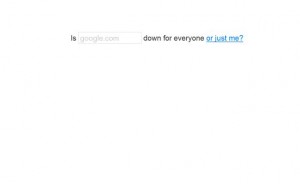 DownForEveryoneOrJustMe.com is a web service that serves a single and effective function: to see if that website you’re attempting to load is actually down, or if your own computer or network filters are the trouble. DownForEveryoneOrJustMe.com is a web service that serves a single and effective function: to see if that website you’re attempting to load is actually down, or if your own computer or network filters are the trouble.
When you can’t get your homepage, or your favorite website (this one of course!), just go to DownForEveryoneOrJustMe.com,and put in the url of the website that’s gone AWOL, and find out if it’s really, um…down for everyone or just you.
I guess this may not work perfectly in a multi-server situation—for example, if a few Google servers were down but not others.
Even so, its still a quick and easy way to determine if your problem is at your end or the site you’re trying to reach.
May be worth bookmarking – http://www.downforeveryoneorjustme.com/ !
Posted in Main, Web services | 1 Comment »
Thursday, August 28th, 2008
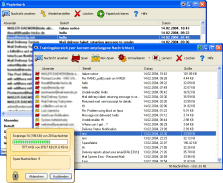 Here is useful freeware worth checking out! Here is useful freeware worth checking out!
Spamihilator simply annihilates spam, hence the name spam annihilator. It simply examines your Emails while downloading from the server and deletes unwanted advertising messages. You will love the fact that it works between your Email-Client-Software and the Internet. Such that every time you receive messages, they will be checked. Useless spam mails will be filtered out.
One thing I like about this software is that it runs virtually with almost every Email-Software such as Outlook 2000/XP/Express, Eudora, Pegasus Mail, Phoenix Mail, Opera, Mozilla, Netscape, etc.
A new version hit the software market just yesterday- Spamihilator 0.9.9.42. The latest changes in the new version include:
- New Link Filter
- The performance of the Training Area and the Recycle Bin has been increased (especially when displaying more than 1000 messages)
- The usability of the Training Area and the Recycle Bin has been improved. In particular it is now possible to switch between these two windows by a small button in the menu bar, even under Windows Vista
- A bug in the HTML mail parser has been fixed. This increases the recognition rate of all filters
- Fixed IMAP SEARCH command
- Two bugs in the mail date parser have been fixed
And lots more.
For more info on the new version and download check http://www.spamihilator.com/
Posted in Main | No Comments »
Wednesday, August 27th, 2008
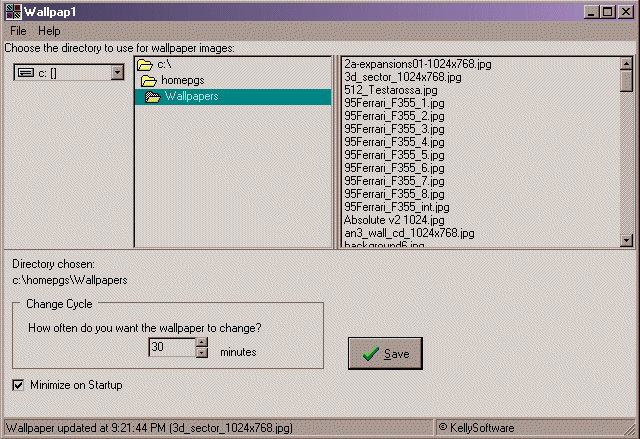 If you need a tool that will automatically change your wallpaper every now and then to give your pc a fresh look, you may want to check this out. It is called Wallpap1. If you need a tool that will automatically change your wallpaper every now and then to give your pc a fresh look, you may want to check this out. It is called Wallpap1.
Wallpap1 allows you to choose a directory of images you want to use as wallpaper, and l automatically update/change your wallpaper using the images in the directory you specify, at the cycle/interval you specify.
Wallpap1 supports GIF, JPG, and BMP.
A new version has just been released- Wallpap1 vs 2.00 with these latest changes:
- You can set the style of the wallpaper updates – Tile, Centered, Size to Fit
- It remembers the last directory used for wallpaper images
- Improvements to the interface
Wallpap1 works well with Windows 95 upwards but for best performance minimum OS I recommend is Windows 2000.
Want to check it out? Visit http://www.kellysoftware.com/software/Wallpap1.asp
Posted in Main | No Comments »
Wednesday, August 27th, 2008
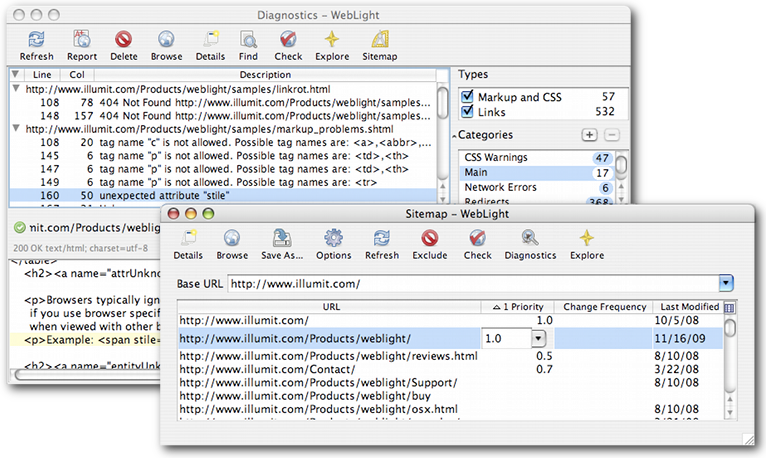 If you’ve been having problems with broken links and the likes, this tool may just be what you need. It is called WebLight. WebLight is a good web testing tool that scans sites for non-standard HTML and broken links. It is designed to help web developers deliver reliable web sites on time and it fulfils this purpose very well. If you’ve been having problems with broken links and the likes, this tool may just be what you need. It is called WebLight. WebLight is a good web testing tool that scans sites for non-standard HTML and broken links. It is designed to help web developers deliver reliable web sites on time and it fulfils this purpose very well.
In the latest version which has just been released- WebLight for Windows 5.0.2 Beta, certain changes were made to the features to help make the tool better. These changes include:
Added
- Compressed sitemap support
- Siteindex and multiple sitemap support
- Sitemap priority, changefreq, and lastmod import/export
Fixed
- Bugs reported by Alex and Charly
In case you are not one of us [windows fans], no worries, WebLight also comes in other editions. These include WebLight for Unix and WebLight for Mac OS X.
Check it out at http://www.illumit.com/Products/weblight/
Posted in Mac Stuff, Main | No Comments »
Monday, August 25th, 2008
 RSS Feed Creator PRO is a professional desktop RSS editor that allows you to create and maintain your own RSS news feeds and podcasts. RSS Feed Creator PRO – is the best solution for WYSIWYG editing of RSS feeds. RSS Feed Creator PRO is a professional desktop RSS editor that allows you to create and maintain your own RSS news feeds and podcasts. RSS Feed Creator PRO – is the best solution for WYSIWYG editing of RSS feeds.
Pros: This package enable creation of RSS feeds for your website. It takes care of the items you want to publish and get it syndicated to interested users. It’s a desktop editor that makes it easy for novice users with a wizard. The wizard asks a few questions and gets the feed done. If you understand what the feeds do yet knowing nothing about XML, the publishing vehicle, it helps you to create and manage the syndication feeds without a hassle.
A simple interface walks you through the process such as feed creation, naming it and specifying the items you need to publish and then the details that go with each of these items. An XHTML editor helps create hypertext descriptions that include links to the published item managed easily. The program handles podcasts too so that regular podcasts also can be syndicated the same way. It takes care of the specific needs of podcasting too. If you’d like to publish your podcasts in iTunes store, that too is possible with this publisher. Then finally when you are ready with the new feed it has all the facilities to upload the material to the designated website without a problem.
Cons: There are no noticeable problems with this package except that you must understand the usage of feeds though XML.
Overall: Nice and professional interface is one of the biggest assets of this program.
{More Info and Download}
Posted in Main | No Comments »
|
|
|





