Archive for the 'Main' Category
Tuesday, September 17th, 2013
 These days there are loads of browsers to choose from especially when you consider the fact that internet users love to make use of every application they can find. A browser that not only includes all the latest and easy to use features, but is also lightweight will always attract attention of millions of users. With Sundance, I am sure you won’t have too many problems when it comes to loading and reloading since it only takes a couple of seconds to do that. These days there are loads of browsers to choose from especially when you consider the fact that internet users love to make use of every application they can find. A browser that not only includes all the latest and easy to use features, but is also lightweight will always attract attention of millions of users. With Sundance, I am sure you won’t have too many problems when it comes to loading and reloading since it only takes a couple of seconds to do that.
What’s Sundance?
Sundance is a browser without a conservative interface. Its features include very clean user interface, without address bar, floating navigation bar, redirect, scrolling RSS, transparent forms, quick web search, quick menu, wysiwyg page designer, changeable user agent string.
Sundance is easy to use, and can be regarded as one of the very few browsers that takes just about 20 seconds or thereabout to load on your system. Though, it still has some catching up to do; nonetheless, it is not a program that will give you any problem even if you are using or installing it for the very first time on your system.
Want to check it out? Visit Digola.
Posted in Browsers, Main | No Comments »
Tuesday, September 17th, 2013
 Do you want a music player that combines so easy to use features to enable you enjoy your collection of music? Then M-Player is one to watch especially because of its easy to use features. Do you want a music player that combines so easy to use features to enable you enjoy your collection of music? Then M-Player is one to watch especially because of its easy to use features.
What’s M-Player?
M-Player is a general-purpose music player that allows you to listen to your favorite music with simplicity. The application is designed as a lightweight program to provide users with a cool and convenient means for listening to their music, or in short – a music player. The application features a friendly and robust graphical user interface with simple and intuitive controls and functionality.
M-Player includes some cool features and one of them is the ability to manage and access your disk music collection faster. The Library will load automatically when you first run the program asking for the location of your music files and generating the audio list that will later be used in the program. Apart from the expected playback abilities neatly laid out, M-Player will also display the cover of the album embedded in the audio tracks.
A couple of key updates and fixes have been made to this version, and they include the following: ability to easily shuffle through all library tracks through a click of a menu; tracks listed in the Statistics mode can now be repeated, shuffled or navigated through using the “Previous” and “Next” buttons and menu items; fixed a big which caused the total megabytes (MB) value of listed tracks for all modes to be calculated slightly wrong; etc.
Any downside?
There is absolutely nothing to complain about; M-Player is a great program that works perfectly. Want to check it out? Visit Mjsware.co.uk.
Posted in Main | No Comments »
Monday, September 16th, 2013
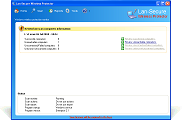 Your organization sure needs an application or program that can protect its computers from external attacks. There is no gain saying how important your company’s data or file is especially if you are already familiar with some of the stories making the rounds these days about how companies lose their important data. So, if you want a program that has the features to keep every computer safe within your organization; then you can try Wireless Protector Workgroup. Your organization sure needs an application or program that can protect its computers from external attacks. There is no gain saying how important your company’s data or file is especially if you are already familiar with some of the stories making the rounds these days about how companies lose their important data. So, if you want a program that has the features to keep every computer safe within your organization; then you can try Wireless Protector Workgroup.
What’s Wireless Protector Workgroup?
Wireless Protector is a program that acts as a server to all protected computers and it needs to be installed only once on any active windows platform that connected by LAN cable to the company network. The software powerful engine can run as windows program or windows service and protect any number of computers by installing a remote service over them. It is also monitoring the protected computers for active wireless auto switch protection. The software support Windows or Mac-OSX operating systems and can protect the following devices: Bluetooth, Firewire, Infrared, Modems, Portable Wireless Phones, Removable USB and Wireless 802.11 and Broadband (3G/4G/WiMax) network devices.
Wireless Protector automatically disables wireless and other devices on computers connected to the company network by LAN cable and re-enable the devices when the LAN cable is disconnected from the protected computers.
The program has a 30 day limitation and a 10 computer workgroup license would cost you $99.
Want to check it out? Visit: WirelessAutoDisable.
Posted in Main | No Comments »
Friday, September 13th, 2013
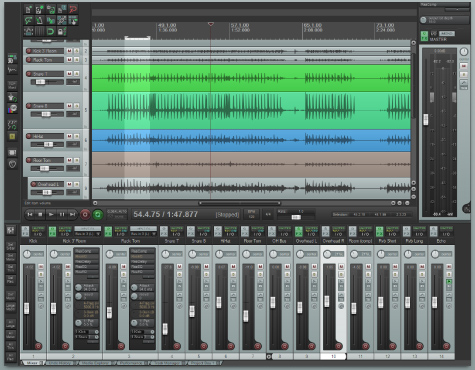 Do you want a program that can help you record, arrange, edit, and render multi-track waveform audio? Then one of the programs you can take a look at is REAPER. Do you want a program that can help you record, arrange, edit, and render multi-track waveform audio? Then one of the programs you can take a look at is REAPER.
What’s REAPER?
REAPER is a powerful but sensible Windows application that lets you record, arrange, edit, and render multi-track waveform audio. It provides an extensive set of features, but is a very small and lightweight application (the installer is less than 1 megabyte, and includes many effects and a sample project).
REAPER supports ASIO, Kernel Streaming, WaveOut, and DirectSound for playback and recording. It reads WAV, OGG, and MP3 files, and records WAV files. You can arrange any number of items in any number of tracks and use audio processing plug-ins (DirectX and Jesusonic). REAPER also supports volume, pan controls and envelopes per track, multi-layer undo/redo, and user creatable colour themes.
REAPER has all the basic features you will ever need when it comes to editing, recording. Some of these key features include the following: Layer recorded tracks and takes over previous recordings; Hundreds of audio and MIDI processing effects included, or choose from thousands of third-party effects; Record audio and MIDI from multiple inputs simultaneously; all editing and effects are completely non-destructive; and edit recordings in almost any imaginable way.
The application works with almost any hardware and can be used in combination with a vast universe of other software and plug-ins.
Any downside?
REAPER is without doubt a great program that has all those nice features; and the price too is not on the high side.
Want to check it out? Visit Cockos.
Posted in Main | No Comments »
Friday, September 13th, 2013
 On the internet these days, there are several applications that are being introduced or updated with all the advanced features to make things easier for everyone. Though, some applications are offer or work contrary to what they were created for originally; the fact that users have a lot to choose from makes things quite exciting. TortoiseSVN is an exciting open source program with all the features you need to handle binary files. On the internet these days, there are several applications that are being introduced or updated with all the advanced features to make things easier for everyone. Though, some applications are offer or work contrary to what they were created for originally; the fact that users have a lot to choose from makes things quite exciting. TortoiseSVN is an exciting open source program with all the features you need to handle binary files.
What’s TortoiseSVN?
TortoiseSVN provides a nice and easy user interface for Subversion, and as a Subversion client, TortoiseSVN has all the features of Subversion itself, including: most current CVS features; directories, renames, and file meta-data are versioned; commits are truly atomic; branching and tagging are cheap (constant time) operations; efficient handling of binary files.
Quite a number of features have been updates, and the application now seems to been working better than previous versions. Though, TortoiseSVN is an application that requires some technical knowledge; but it sure won’t take time to find your way around how it works.
This version of TortoiseSVN takes care of quite a number of fixes have been made; and like I already said, it’s more stable than it use to be.
Want to check it out? Visit TortoiseSVN.
Posted in Main | No Comments »
Thursday, September 12th, 2013
 Are you looking for an application that enables you to easily access your hosted server remotely? Do you also wish you could find a good program that has all the unique and easy to use features that include stored routines and foreign keys? Then DbNinja is a program worth taking a look at. Are you looking for an application that enables you to easily access your hosted server remotely? Do you also wish you could find a good program that has all the unique and easy to use features that include stored routines and foreign keys? Then DbNinja is a program worth taking a look at.
What’s DbNinja?
DbNinja is an advanced web-based toolset for MySQL database administration and development, and is a must-have for those who wish to access their hosted servers remotely. It supports all the latest features including: triggers, events, views, stored routines and foreign keys. DbNinja allows to import and backup data and MySQL object structures, manage users and much more. DbNinja has a highly functional and elegant user interface, and can be used securely in any modern browser on any operating system.
DbNinja has a lot of amazing and easy to use features that include the following: access all hosts and database objects from a tree view; manage and export user accounts and privileges; set limits on amounts of fetched data and query execution time; view and terminate active server connections; use keyboard shortcuts for common tasks; connect to multiple hosts at same time; manage indices, foreign keys and triggers; edit queries and routines efficiently with syntax highlighting; and many more.
Any downside?
DbNinja is a bit stable for now, and doesn’t seem to have any issue.
Want to check it out? Visit DbNinja.
Posted in Main | No Comments »
Thursday, September 12th, 2013
 Do you want an application that has the features to easily and automatically change your current wallpaper or active application icon\contents? Well you are lucky because AeroBlend is that freeware that has all the features you need to either automatically or manually change your wallpapers. Do you want an application that has the features to easily and automatically change your current wallpaper or active application icon\contents? Well you are lucky because AeroBlend is that freeware that has all the features you need to either automatically or manually change your wallpapers.
What’s AeroBlend?
AeroBlend is a program that automatically changes the Windows Colour to match the current wallpaper or active application icon\contents. When in “wallpaper” mode, as every one (wallpaper) is changed, either manually or via the Windows slideshow, the Windows colour will change to match the wallpaper.
New options and maybe fixes have been added to this version being reviewed. Some of these latest additions or changes include the following; added a new option to use the background colour if there is no wallpaper set (only in wallpaper mode), improved intensity in options, support for Windows 8 (Note: Windows auto colorization should be disabled), and several other minor bug fixes.
AeroBlend uses a quick algorithm to obtain the average colour of the wallpaper or icon or window content. Colour Intensity can be customized, as well as several other options. The application works on both Windows 7 and Windows 8; but requires that Windows Aero is already running on your system.
The program doesn’t have any issue to worry about.
Want to check it out? Visit CarthagoSoft.
Posted in Main | No Comments »
Thursday, September 12th, 2013
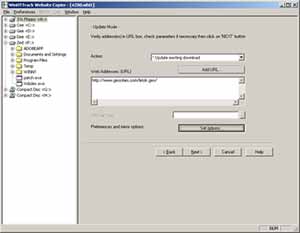 Do you feel like building recursively all directories, getting html, images, and other files from the server to your computer? Do you also wish you could download or install an offline browser that is fully configurable, and has an integrated help system? Then what you need is What’s HTTrack Website Copier! Do you feel like building recursively all directories, getting html, images, and other files from the server to your computer? Do you also wish you could download or install an offline browser that is fully configurable, and has an integrated help system? Then what you need is What’s HTTrack Website Copier!
What’s HTTrack Website Copier?
HTTrack is an offline browser utility that allows you to download a website from the Internet to a local directory, building recursively all directories, getting html, images, and other files from the server to your computer. It arranges the original site’s relative link-structure. Simply open a page of the “mirrored” website in your browser, and you can browse the site from link to link, as if you were viewing it online. It can also update an existing mirrored site, and resume interrupted downloads. It is fully configurable, and has an integrated help system.
What’s HTTrack Website Copier is absolutely free for all users; and comes with some amazing and easy to use features. As a newbie, you won’t find the application too difficult to understand since it only takes a couple of hours or minutes to get used to.
Though, HTTrack Website Copier is a bit easier to understand; nonetheless, its user interface is a bit old fashioned.
Want to check it out? Visit HTTrack.
Posted in Main | No Comments »
Thursday, September 12th, 2013
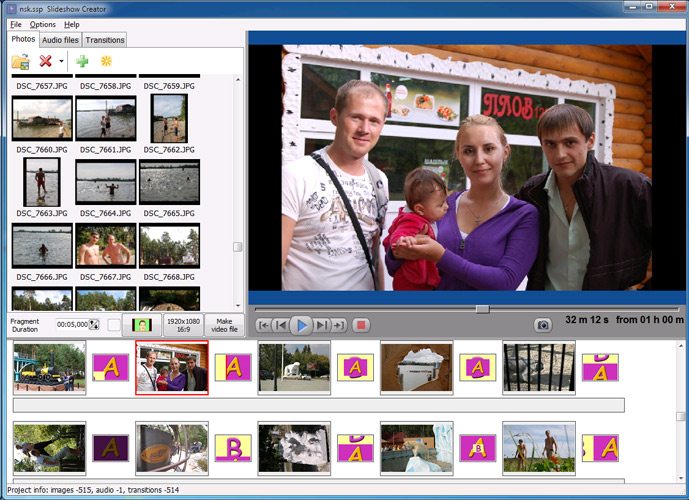 Do you wish to create super amazing slideshow videos? Do you also wish to upload hundreds of photos from your collections of holiday and summer files? Let me introduce Bolide Slideshow Creator; which is a freeware program that has some outstanding features to help you create amazing slideshow videos. Do you wish to create super amazing slideshow videos? Do you also wish to upload hundreds of photos from your collections of holiday and summer files? Let me introduce Bolide Slideshow Creator; which is a freeware program that has some outstanding features to help you create amazing slideshow videos.
What’s Bolide Slideshow Creator?
Bolide Slideshow Creator is the smart software which saves a lot of your time and makes it super easy for you to create just amazing slideshow videos. It is a program that helps you avoid uploading hundreds of photos from your summer holiday or birthday party or your friends’ wedding or some other celebration – instead you make only one stunning slideshow video which includes all your photos and even more.
Some new features and fixes have been made to this version of the program. Some of these newly added features and fixes include the following; the ability to insert an empty frame to the timeline, fixed looped playback function in full screen mode, fixes in pan&zoom effect, and several minor bugs were fixed as well.
Bolide Slideshow Creator supports virtually every image format you can think of. It also supports MP3/AAC/WMA/M4A/MP4/OGG music files for the background audio, and several other features.
Any downside?
Bolide Slideshow Creator doesn’t have any major downside; and besides, it is easy to use.
Want to check it out? Visit: Slideshow-creator.com.
Posted in Main | No Comments »
Monday, September 9th, 2013
 Windows 8 Modern apps (Metro or RT apps) are designed in such a way that they use up the entire computer display. As a result, that weather app, mail program or stock ticker is going to use the entirety of your computer display. Some users do not know how to use this new feature. For such people, ModernMix has been designed to help them. Windows 8 Modern apps (Metro or RT apps) are designed in such a way that they use up the entire computer display. As a result, that weather app, mail program or stock ticker is going to use the entirety of your computer display. Some users do not know how to use this new feature. For such people, ModernMix has been designed to help them.
What is ModernMix?
ModernMix allows you to run Modern (Metro) apps in a separate window on your desktop. It has a configuration window, where you can choose the way that Metro applications should appear when opened from the Start Screen or the desktop. It can also disable the animated flip when launching full screen apps.
With ModernMix, you can resize the modern Windows app – the standard minimize, maximize and close buttons- using the mouse. It has a control mode that allows you to switch between display modes – full screen and windowed. You can also set your preferred windows size and use it as often as you want to.
Some of the features of this application are: it enables you to run multiple Modern apps in individual separate windows on the desktop as well as launch them from the desktop. Modern app window sizes are remembered the next time you launch them. Active Modern apps will also appear on your taskbar where they can be pinned for quick access later. Also create desktop shortcuts for Modern apps.
To know more about this application, please go to Stardock.com.
Posted in Main | No Comments »
|
|
|




