Archive for the 'Windows' Category
Sunday, September 16th, 2007
One of the biggest pet peeves that a lot of people have concerns the idea of lots files. Chances are if you’ve been using a computer for any amount of time you know exactly what this means. How many times have you had all of your stuff saved quite nicely on your hard drive only to find out one day that something bad has happened to your hard drive and in the wake of that something bad happening you have lost all of your files? Damaged media can really hamper a person’s ability to do anything nowadays and regardless of whether it is a hard drive or some sort of removable media, you need to find a way to recover some of those files.
And this is exactly where Encopy 4.32 Beta can come to your rescue. Because of the way in which the software was designed, Encopy can help to rescue data from damaged media even when standard system tasks fail at the task. It has become the best friend of a number of people because of this ability and many people have been able to recover extremely important work specifically because of the use of the Encopy software. Best of all, the software is absolutely free to use!
More information can be found here.
Posted in Beta version, Developer, Main, Security, Shareware, Utilities, Windows | No Comments »
Friday, September 14th, 2007
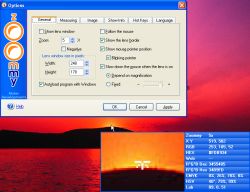 Zoommy is the software is for magnifying anything that is present on the desktop or anywhere else. It is also of much use for the partially visually impaired people using PC for their work. You can use it for having the information about the various aspects of the images. Zoommy is the software is for magnifying anything that is present on the desktop or anywhere else. It is also of much use for the partially visually impaired people using PC for their work. You can use it for having the information about the various aspects of the images.
The software gets quickly downloaded and installed. It opened up with a small rectangular screen on the right bottom of the desktop. Making the software active wherever you take the mouse the screen below shows the magnified form of the area. It has the zooming option from -4 x to 30 x that you can see the minor parts also. When you take the mouse to a place the blue information panel appears on the lens screen. It shows the Zoommy lens pixel size, the axis information, the RGB level of that particular area, HEX, etc. You need not to open the properties of the images. You can know the image properties of your desktop wallpaper and almost everything. It stays at your system tray and contains the right options. When you come back to the lens area then the lens disappears and the screen shows the options. You can zoom in and out whenever you want, have the measurements and also can slow down the mouse. Hide or show the lens; change the lens width and height; and show border and pointer position. Set the color mode, brightness, contrast and you can make it transparent through the given levels. Select the measure unit to be pixel, inches, percent, etc. You can choose the info to be shown on the blue panel and select the new profiles or delete one. Clicking on Options a dialog box appears showing different options. Set the general options relating windows, select image copying and saving options, etc. Set the color, transparency, etc; and select the hotkeys, language and info options. You can even take the screen shots of any area and save it as an image file.
The software is a good utility for design professionals and for the people who are visually impaired. The downside point of the software is that it does not have any help guide and needs internet access for any help. Overall we will still give it an appreciable 4 star rating because it performs exceedingly well.
(More info and Download)
Posted in Business, Commercial, Developer, Shareware, Shell and Desktop, Windows | No Comments »
Thursday, September 13th, 2007
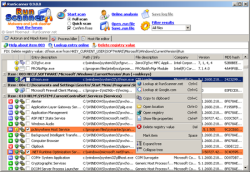 One of the pitfalls of the modern internet explorer (the person, not the software program) is the ease with which our computers can contract programs that we never wanted in the first place. Installers, dialers, spyware, malware, viruses and everything else under the sun can be downloaded to our computers without our knowledge and a lot of the time we can’t do anything about it, if for no other reason than the fact that we don’t even know about it in the first place. It is possible to fight back against these types of unwanted intrusions and one of the ways that it can be done for free is to utilize the RunScanner tool as part of a larger fight against getting rid of unwanted software. One of the pitfalls of the modern internet explorer (the person, not the software program) is the ease with which our computers can contract programs that we never wanted in the first place. Installers, dialers, spyware, malware, viruses and everything else under the sun can be downloaded to our computers without our knowledge and a lot of the time we can’t do anything about it, if for no other reason than the fact that we don’t even know about it in the first place. It is possible to fight back against these types of unwanted intrusions and one of the ways that it can be done for free is to utilize the RunScanner tool as part of a larger fight against getting rid of unwanted software.
As previously mentioned, RunScanner is a completely free tool and herein lies a lot of its appeal. What it does is it scans your hard drive and the rest of your system in the attempt to find all of the different programs that are configured and running on your system. This means that it will find all of the programs that you currently have running and in addition to that will find all of the programs you didn’t even know you had on your computer.
Installer programs, autostart programs, adware programs, spyware programs, homepage changing programs, drivers and malware programs will all be easily detected by the RunScanner software. Once you know where they are, you can take the appropriate steps to make sure that they are gone!
More information can be found at http://www.runscanner.net/
Posted in Developer, Information Management, Internet, Main, Security, Shareware, Windows | No Comments »
Thursday, September 13th, 2007
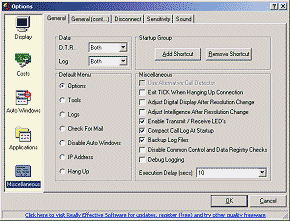 There are a number of people nowadays that have made the switch to some kind of broadband service for their Internet, but there are at the same time still quite a few people that are interested in the idea of broadband, but either don’t have it in their area or alternatively can’t afford it. Dial-up is a cheaper option and one that is more accessible to the majority of internet users in this world today. Therefore, enhancement of dial-up is going to be something useful to a large number of people and that perhaps accounts for some of the popularity of the TICK 1.17 software. There are a number of people nowadays that have made the switch to some kind of broadband service for their Internet, but there are at the same time still quite a few people that are interested in the idea of broadband, but either don’t have it in their area or alternatively can’t afford it. Dial-up is a cheaper option and one that is more accessible to the majority of internet users in this world today. Therefore, enhancement of dial-up is going to be something useful to a large number of people and that perhaps accounts for some of the popularity of the TICK 1.17 software.
The TICK 1.17 software is a free piece of software that does a lot for enhancement of your dial-up experience. Firstly, it will allow you to keep track of all of your sessions of internet browsing so that you can see how long each dial-up call was and ultimately how much that call is going to cost in the context of your current internet service provider. It will also give you information about the amount of data transfer that went back and forth during that call so that you can get an idea of how your efficiency with using the internet changes from day to day or even session to session depending on how many times you use the internet each day.
It is a very useful piece of software about which more information can be found at http://www.reallyeffective.co.uk/tick_index.html
Posted in Business, Developer, Internet, Main, Shareware, Utilities, Windows | No Comments »
Thursday, September 13th, 2007
 One of the interesting aspects of the technological boom of recent times is that storage is getting to such a size that without organization it eventually becomes impossible to find anything. For example, if you have an iPod then you know exactly what I’m talking about! Some iPod devices have the ability to hold hundreds if not thousands of songs and indeed when it comes right down to it if you are able to download a thousand songs to one place, you are going to have problems if you don’t have them organized! One of the interesting aspects of the technological boom of recent times is that storage is getting to such a size that without organization it eventually becomes impossible to find anything. For example, if you have an iPod then you know exactly what I’m talking about! Some iPod devices have the ability to hold hundreds if not thousands of songs and indeed when it comes right down to it if you are able to download a thousand songs to one place, you are going to have problems if you don’t have them organized!
And that, my friends, is where Floola comes in. Floola is actually a multi-operating system program, but the specific version that is mentioned here in this blog posting is a Windows-based program. It is completely free and it is a piece of software that you can use to manage not only your iPod, but you can also use it for any Motorola cellular phone. It works on any mobile device that supports the iTunes software and ultimately it allows you to stay organized which in turn allows you to get to the songs that you want a lot quicker.
Floola for Windows is definitely one of the more interesting pieces of freeware out there today, because it fills such an important purpose with a minimum of hassle.
More information can be found at http://www.floola.com/
Posted in Audio, Developer, Freeware, Main, Music, Windows | No Comments »
Thursday, September 13th, 2007
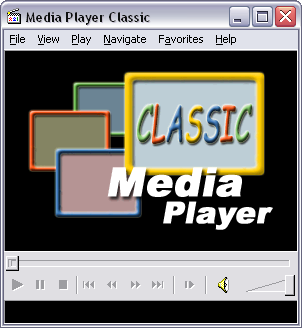
There is no doubt in the minds of many that Windows Media Player is a great example of a piece of software that Microsoft has done right. There are some things that they do wrong in their operating systems and attached programs and some things they do right; most people would agree that WMP is in the latter category. However, just because it works fine already doesn’t mean that someone can’t make improvements on it and that is exactly the attitude that publisher Gabest took when he created the Media Player Classic.
Users of the old Windows operating systems will immediately recognize the layout of the MPC as being very similar to the layout used by older versions of Windows Media Player. This was done intentionally so that a person that wants to keep the familiarity but change the software can download MPC to their computer and not lose a step in their music enjoyment experience.
However, in spite of the look-alikes of the two pieces of software, there are many features that MPC has that the WMP does not. For example, MPC has real-time zoom on DVD programs as well as a dedicated section of the software for DVDs; something that is really more of an afterthought than anything else on WMP. In addition to that, the MPC supports a wide range of file formats including the infamous .ram RealVideo format that WMP seems to hate.
All of this in a free package is quite impressive and more info can be found at http://sourceforge.net/projects/guliverkli
Posted in Design, Developer, Freeware, Main, Multimedia, Music, Video, Windows | No Comments »
Wednesday, September 12th, 2007
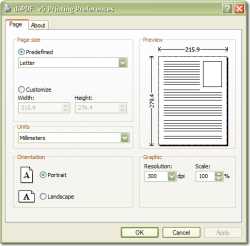 PDF files have really become the lifeblood of a lot of people. Whether you’re in online business and interested in making some money from viral e-books or alternatively whether you happen to just be a person looking to move some of your word files into formats that are harder to tamper with, PDF files are going to be what you turn to. Adobe perhaps did not know just how powerful and all-encompassing their concept was when they initially came up with it, but nevertheless it has and many different files have been created in PDF format to the betterment of the creator. PDF files have really become the lifeblood of a lot of people. Whether you’re in online business and interested in making some money from viral e-books or alternatively whether you happen to just be a person looking to move some of your word files into formats that are harder to tamper with, PDF files are going to be what you turn to. Adobe perhaps did not know just how powerful and all-encompassing their concept was when they initially came up with it, but nevertheless it has and many different files have been created in PDF format to the betterment of the creator.
One thing that has really held back the PDF market in a lot of areas however is the lack of a really good free PDF converter. There is of course the very expensive Adobe software and then a lot of really ineffective trials or freeware, but the doPDF 5.2.230 software is quite different. It installs itself as a virtual printer, meaning that you can actually access it by looking at your list of printers in Windows. Furthermore, in order to convert your documents to PDF all you have to do is print to that printer and it will handle the rest. It can convert MS Word documents to PDF documents quite easily.
The best thing is that it’s free! More info can be found at http://www.dopdf.com/
Posted in Freeware, Information Management, Main, PDF, Utilities, Windows | No Comments »
Wednesday, September 12th, 2007
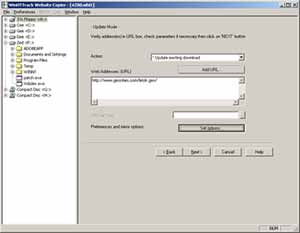 One thing that you’re probably aware of if you’ve been browsing for any amount of time is that getting websites to show up nicely offline is actually something that is quite difficult to do. Sure, there’s internet explorer’s work offline function, but it happens to be notoriously unreliable and since now a significant number of the internet browsing population does not use internet explorer for their browsing, it then falls to the public to come up with a method that is useful. This helps people with non-permanent internet connections and limited connectivity contracts because it allows them to look through informational websites when they are not online. One thing that you’re probably aware of if you’ve been browsing for any amount of time is that getting websites to show up nicely offline is actually something that is quite difficult to do. Sure, there’s internet explorer’s work offline function, but it happens to be notoriously unreliable and since now a significant number of the internet browsing population does not use internet explorer for their browsing, it then falls to the public to come up with a method that is useful. This helps people with non-permanent internet connections and limited connectivity contracts because it allows them to look through informational websites when they are not online.
This is exactly what the HTTTrack Website Copier for Windows 3.41-3 allows you to do. You can take any website and download it to your local directory so that you can look at it offline. It will copy all of the effects, the images, the sounds, the directories and everything else associated with the website so that you can view it offline exactly the same as you would be able to online. It is an excellent piece of software to have because it allows you to do a lot of reading of content websites you might be following even if your internet connection happens to go awry.
More information on this free piece of software is available at http://www.httrack.com/
Posted in Developer, Information Management, Internet, Main, Programming, Utilities, Windows | No Comments »
Tuesday, September 11th, 2007
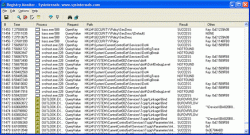 When you look at the plethora of registry monitoring tools that are currently available, regardless of whether they are free or proprietary, what you are going to find is that they ultimately fall into two different categories; static or dynamic. Static registry monitoring devices are the majority product in the market right now and basically what they allow you to do is take a look at the applications that have accessed your registry as well as the changes that they have made to registry values. While this is certainly useful information, there is so much more that could be done and the dynamic Regmon 7.04 is a great example of that. When you look at the plethora of registry monitoring tools that are currently available, regardless of whether they are free or proprietary, what you are going to find is that they ultimately fall into two different categories; static or dynamic. Static registry monitoring devices are the majority product in the market right now and basically what they allow you to do is take a look at the applications that have accessed your registry as well as the changes that they have made to registry values. While this is certainly useful information, there is so much more that could be done and the dynamic Regmon 7.04 is a great example of that.
In addition to the functionality of a static registry program, you also get real time monitoring of all of the applications that are currently accessing your registry. In addition to that, you will also find out the keys they interact with, the data they access as well as any changes that they make; one again in a real-time format. This means that you can sit there with this program and use it to understand exactly what different applications might do to your registry. If you were ever wondering what the programs actually do, you can learn it through just looking at the reports generated by this program.
More information can be found on the publisher’s homepage at http://www.microsoft.com/technet/sysinternals/SystemInformation/Regmon.mspx
Posted in Main, Security, Shareware, Utilities, Windows | 1 Comment »
Tuesday, September 11th, 2007
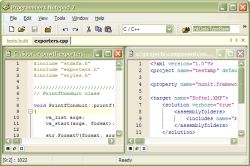 One of the things that have become very popular in today’s culture is programming. Almost everywhere you look there are people that have knowledge of at the very least coding and at the very most multiple programming languages both of the object oriented nature and otherwise. It is only natural considering the relative importance that computers have gained in our world that programming would become more important and indeed the release and subsequent popularity of the Programmers Notepad 2.0.7.667 Beta is proof that programming is something that many internet-savvy people have started to learn. One of the things that have become very popular in today’s culture is programming. Almost everywhere you look there are people that have knowledge of at the very least coding and at the very most multiple programming languages both of the object oriented nature and otherwise. It is only natural considering the relative importance that computers have gained in our world that programming would become more important and indeed the release and subsequent popularity of the Programmers Notepad 2.0.7.667 Beta is proof that programming is something that many internet-savvy people have started to learn.
Whether you are new to programming or a seasoned veteran with multiple software pieces under your belt, what you are going to find is that ultimately the Programmers Notepad is going to help you along greatly. Not only does it separate different aspects of a programming language from each other through colour coding (with a number of different languages already built in as recognizable by the system), but it also allows you to customize that colours to match any colour scheme you might already have in your mind. Furthermore, the most recent update of this Notepad now includes HTML, PHP and PHP Script so you can quite literally do everything with it.
More information available at http://www.pnotepad.org/
Posted in Beta version, Developer, Main, Programming, Shareware, Text, Utilities, Windows | No Comments »
|
|
|




