O. James Samson - June 11, 2010
Sandboxie is software which allows users run their browser, or any other program, so that all changes that result from the usage are kept in a sandbox environment, which can then be deleted later if they decide to. What this does is to allow a user remove traces of their Internet or PC activities, as well as to reverse any changes to their favorites, home page, registry and much more.
The benefits of Sandboxie includes: it traps all malicious software downloaded by the browser in the sandboand and can be discarded trivially thereby providing secured; browsing history, cookies, and cached temporary files collected while Web browsing stay in the sandbox; Viruses and other malicious software that might be hiding in email can not break out of the sandbox and infect real system; and it prevents wear-and-tear in Windows by installing software into an isolated sandbox.

Sandboxie runs in the system tray and it is user-friendly as all that is needed to start a sandboxed session is to simply launch browser, or any other program via the tray icon, rather than the regular way. It runs programs in an isolated space that prevents them from making permanent changes to other programs and data in the computer.
Want to check it out? Visit Sandboxie
Rating:  Loading... No Comments »
Ciaran Moore - June 11, 2010
 For your computer to be safe and protected, you need to be running an antivirus to keep your computer protected from threats coming from the outside; worms, viruses, malware, spyware and other malicious programs. While many Internet savvy people are familiar with the more popular antivirus programs like AVG or Norton, there’s an antivirus program that’s been constantly providing complete protection despite being lesser known. This program is called Exterminate It. For your computer to be safe and protected, you need to be running an antivirus to keep your computer protected from threats coming from the outside; worms, viruses, malware, spyware and other malicious programs. While many Internet savvy people are familiar with the more popular antivirus programs like AVG or Norton, there’s an antivirus program that’s been constantly providing complete protection despite being lesser known. This program is called Exterminate It.
Exterminate It is a very simple antivirus program that only offers basic scanning and removing of malware and other threats on your computer.
The program is so much lighter than any other antivirus programs available in the market so it only requires minimal system requirements. To install the program, you’ll need at least 10 MB free disk space. There’s no need to worry if you already have antivirus program installed on your computer. In fact, you don’t need to uninstall them as the program is compatible with other security suites.
Simple and clean, that’s how it’s graphical user interface can be described. It’s white and gray combination makes the window pleasant to the eye. The program also provides a wide display area for the viruses and malware detected.
The only drawback of its interface is the menu. When you click an item in the menu, the rest of the items will vanish from the screen. You need to click the “back to scan” button on the upper portion of the screen to go back to the menu items.
As with the popular antivirus programs, this program offers basic features of scanning and removing threats found on your computer. But the scanning and cleaning capabilities of the program are limited only to the registry and system files, not on the entire hard drive and external devices like USB flash drives. Updates are not a problem as the program’s web server provides a huge database for the latest threats. You can be sure that your computer is being protected real time and up to date.
A good feature of this program is its ability to allow users to submit newly found threats which the program’s database failed to detect through its feature called “Submit State Functionality”. Not only that you make your computer free from viruses, you also contribute to the information about undiscovered threats for other people to be aware of.
There are more features and tools to be discovered when you install and explore this program. But it seems the main ones mentioned here are a good extra level of protection alongside you’re usual security software.
You can check out and download Exterminate It at exterminate-it.com
Rating: Loading... 2 Comments »
O. James Samson - June 11, 2010
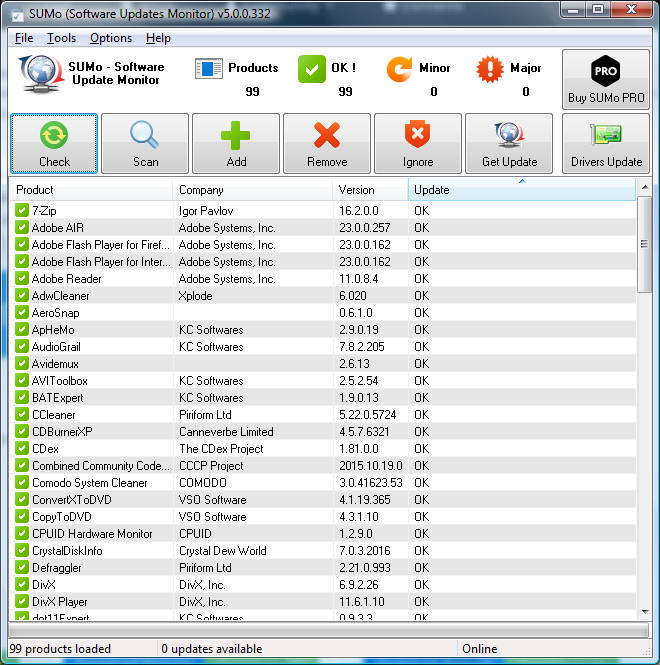 SUMo (Software Updates Monitoring) is a tool which allows users to keep their PC up-to-date and notifies users when updates are available. It detects applications a user is making use of and tracks updates. It provides opportunity for users to be notified once a new version is detected. SUMo (Software Updates Monitoring) is a tool which allows users to keep their PC up-to-date and notifies users when updates are available. It detects applications a user is making use of and tracks updates. It provides opportunity for users to be notified once a new version is detected.
Some of the features of SUMo are as follows: automatic detection of installed software; filter/authorized beta versions; ignore list; more compatibility; reduced false positive than other Update Monitors.
SUMo also works by simply by depending on social networking because its database is populated by the other users. Users that have access to make use of up-to-date software will be able reduce the risk of encountering bugs and will benefit from more features.
Many users have had to complain about its GUI which they think is not up to standard. This is so because it does not work properly at 120 DPI. It is also use to report a lot of false updates which includes falsely detecting HP software as “ACDSee”, and other useless and misleading entries. Bad as all these may sound, SUMo is also very slow.
It is very difficult to uninstall SUMo as it does not completely uninstall from the PC.
Want to check it out? Visit Kcsoftwares
Rating: Loading... No Comments »
Ciaran Moore - June 10, 2010
 Joboshare 3GP Video Converter is not just your ordinary video file format converter as it does a lot of things other converters fail to do. The program has full support to the frequently used video files in the digital worlds these days like .avi, .mov, MPEG, XviD and DivX and many more. There are lots of things to look forward to this program and these will be discussed in this review. Joboshare 3GP Video Converter is not just your ordinary video file format converter as it does a lot of things other converters fail to do. The program has full support to the frequently used video files in the digital worlds these days like .avi, .mov, MPEG, XviD and DivX and many more. There are lots of things to look forward to this program and these will be discussed in this review.
The interface is easy to understand, intuitive and very user friendly. The display portion of the video files is large which shows that the program supports multiple files to be converted simultaneously. There’s also a player on the upper left portion of the window to play video to be converted.
The program provides rich features and tools for the users. There’s the video converter which the program does best. You can convert any video file formats to .3gp extension faster and higher quality using this program. The program supports almost all of the video files available. Video conversion is faster compared to other converters.
Aside from converting different video files to .3gp, the program also supports the reverse; convert .3gp file into different video file formats supported by this software like .3gp to mpeg etc. if you’ve got a video from your mobile phone and you want to play it on your computer but your player don’t support .3gp, Joboshare will do the job for you.
Other features include extracting audio files from video file then saving as a MP3, WAV or AAC audio file formats. This feature is useful if you want to rip the soundtrack of your favorite movie. You can even rip a clip from the original video then save it as another video file. So if you have a favorite scene in the movie, you can now have it without playing the whole movie over again. There’s still more to features to explore on this program. Install it and utilize its full potential.
Joboshare 3GP Video Converter is highly recommended for users who love to watch video on their mobile phones and have the right budget for high quality software.
You can buy or download Joboshare 3GP Video Converter at joboshare.com
Rating: Loading... 1 Comment »
O. James Samson - June 9, 2010
 Rainmeter can best be described as a desktop customization platform through which a user can enhance his Windows computer at home or work place with skins: handy, compact applets which float freely on your desktop, much like Windows Sidebar gadgets, or dashboard widgets for the Mac. Rainmeter can best be described as a desktop customization platform through which a user can enhance his Windows computer at home or work place with skins: handy, compact applets which float freely on your desktop, much like Windows Sidebar gadgets, or dashboard widgets for the Mac.
Rainstaller provides users with the chance to easily distribute skins (Skins can now be distributed as an archive with the extension), include any fonts, third party plug-ins or RainThemes, addons to their end user audience on Customize.org or DeviantArt.com and they can also install everything in just a few clicks.
Rainmeter skins provide you with useful information at a glance Rainmeter make it easy for anyone to keep an eye on system resources, like memory and battery power, or even online data streams, which includes email, weather forecasts and RSS feeds.
It is user-friendly as all that is required is to click the Rianmeterskin file from anywhere on the system, click either “Express” or “Custom” Install, and in some few seconds skins is loaded and up and running. Also Rainmeter enables all files to be put in the right place without the users needing to move files and folders. Can record notes and to-do-list and help launch favorite applications.
Want to check it out? Visit Rainmeter
Rating: Loading... No Comments »
O. James Samson - June 9, 2010
 This program should never be compared with Skype because there are a lot of differences in both programs. ooVoo is however a multi-user video application in its own class. The application supports up to six different users charting and communicating with one another all at the same time. Users can send and receive files and video messages to other ooVoo users across the net. Interestingly, even those who don not have this software installed can still receive messages as well. This program should never be compared with Skype because there are a lot of differences in both programs. ooVoo is however a multi-user video application in its own class. The application supports up to six different users charting and communicating with one another all at the same time. Users can send and receive files and video messages to other ooVoo users across the net. Interestingly, even those who don not have this software installed can still receive messages as well.
ooVoo on the low side is packed with too many advertisements to the frustrations of users. The publishers should have taken their time to reduce the number of ads, in order for users to enjoy the program whether free or not.
To fully enjoy the use of this program, users must have a web camera, a microphone, and a good working broadband connection. Users can invite their friends through email or video messages straight from ooVoo. You can even get to chat with other friends who do not have ooVoo on their computer; simply give them a video call right from your application.
Users who want to enjoy this program can do so without having to pay for it. However, if you want something more compact, you may have to go for the paid package.
Want to check it out? Visit Oovoo.com
Rating: Loading... No Comments »
O. James Samson - June 9, 2010
 The latest version of Music Label 2010 can best be described as a premier music collection organizer, which enables users to catalog their entire music collection (CDs, vinyl’s, MDs, MP3s etc). Users do not have to type because it uses CDDB2 and ID3 technology and it downloads a lot of information about each album and its track. Aside from the downloaded information, users can also add a lot of information like; Rating, Comments, Lyrics, Price, Condition, Location and much more. The latest version of Music Label 2010 can best be described as a premier music collection organizer, which enables users to catalog their entire music collection (CDs, vinyl’s, MDs, MP3s etc). Users do not have to type because it uses CDDB2 and ID3 technology and it downloads a lot of information about each album and its track. Aside from the downloaded information, users can also add a lot of information like; Rating, Comments, Lyrics, Price, Condition, Location and much more.
Music Label is a very mature product which uses a powerful database engine. This obviously sets it apart from other products in this category. So of its features includes: ability to keep database from other family members; the large volume of database that can be stored and so on.
Users can actually catalog any type of media ranging from CD and vinyl to MP3 files on their hard drive, or even cassettes. It helps users to add their own media types, making Music Label future proof.
One sad point is the fact that it can not handle large collections, it does not sort by bitrate, CPU usage very large thereby forcing system to slow down, and it does not easily uninstall.
Want to check it out? Visit Codeaero
Rating: Loading... No Comments »
Ciaran Moore - June 9, 2010
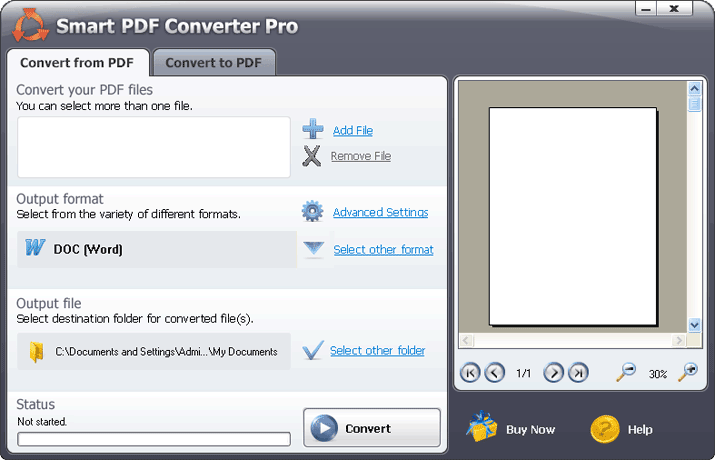 Many websites on the Internet utilize pdf files in displaying tutorials, e-books and other documents online. But in order to create content within your pdf files, you need an editor where you can write the content. If you’re using MS Word, you need to convert your .doc to .pdf. To convert your .doc and other files to pdf, try Smart PDF Converter. Many websites on the Internet utilize pdf files in displaying tutorials, e-books and other documents online. But in order to create content within your pdf files, you need an editor where you can write the content. If you’re using MS Word, you need to convert your .doc to .pdf. To convert your .doc and other files to pdf, try Smart PDF Converter.
Smart PDF Converter offers features to convert different files like doc, xls, and html among others to pdf file. It seems to converts document faster than any other pdf converter programs available.
It’s main window is very user friendly, as tasks are labeled according to functions, captions of the functions of each of the objects on the screen. The program is also easy to understand and use, as large icons are used to emphasize each task and short tips and tutorials are available within the screen. It doesn’t even take you a minute to convert a file to pdf.
It supports conversion not only of documents, but also spreadsheets files (xls), picture files (jpeg, gif, png, and tiff) and other source files like HTML and notepad’s txt files. It produces high quality pdf file output, perfect for your needs whether you use it on your website or upload it to the Internet. Also when converting pictures, you have the option to fine-tune the photo output quality simply by using a slide bar.
Aside from converting different files to pdf, the program also has the feature to convert pdf files to word document, excel spreadsheet, jpeg, tiff and HTML. It also give you the option on what the output looks like through the advanced setting menu.
Other features include installation of add-Ins into Microsoft Word that allows you to open pdf file in Microsoft Word. You can now edit your pdf file as if it’s an original word document. There’s also a Virtual PDF printer that supports printing and the program allows you to password protect your pdf files to ensure that you’re the only one that has the authority to edit your pdf files.
Smart PDF Converter is perfect for users who maintain a website that contains pdf files like a free tutorial site. The program provides a fast way to convert files to pdf and vice versa without sacrificing output quality.
You can download or purchase the product at SmartPDFConverter.com
Rating: Loading... 1 Comment »
O. James Samson - June 9, 2010
 Looking for tools to help you produce high-quality and standards-based websites? Microsoft Expression Web 4.0.205250.0 is one of those well designed applications good enough for you. The application has the following in-built features: visual diagnostic tools; web standards; and CSS design capabilities. Looking for tools to help you produce high-quality and standards-based websites? Microsoft Expression Web 4.0.205250.0 is one of those well designed applications good enough for you. The application has the following in-built features: visual diagnostic tools; web standards; and CSS design capabilities.
The application makes your work smoother and easier, even if you work with; ASP.NET, AJAX, HTML/XHTML, CSS, JavaScript, and PHP among others. The Microsoft Expression Web makes the task of creating and maintaining a website a wonderful experience.
This program is no doubt a good one, but users who do not have any professional experience should not use it. It is a bit technical, but easy to handle for those with some little technical skills. It can be used to design, develop, and finally publish feature-rich websites that meet very high demands and standards. Users must have a 1GB of RAM and above, and 1.5 GB or more of available hard-disk space.
Users also have to worry about the size of this program because it will definitely take a lot of space on your system. For those whose PCs don not have a lot space, this program might just cause it to slow down. It supports Windows7, Vista, and Windows XP Service Pack 2.
Want to check it out? Visit Microsoft.com.
Rating: Loading... No Comments »
O. James Samson - June 4, 2010
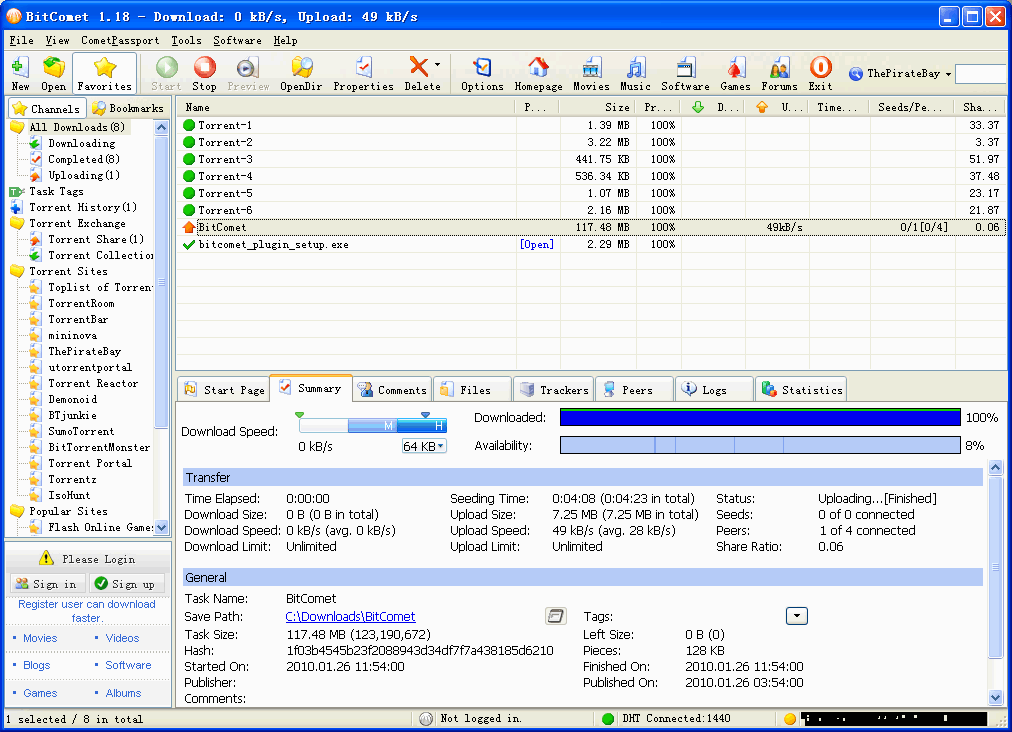 BitComet is BitTorrent/HTTP/FTP download management software, which is powerful, fast, very easy-to-use, and the good part is that it is completely free to download. It contains advanced features that can help users accelerate downloading speed up to about 5 – 10 times faster than the normal speed, or even more. BitComet is BitTorrent/HTTP/FTP download management software, which is powerful, fast, very easy-to-use, and the good part is that it is completely free to download. It contains advanced features that can help users accelerate downloading speed up to about 5 – 10 times faster than the normal speed, or even more.
Some of the new innovations that distinguishes BitComet from the previous one is basically the fact that it comes with the following; new command in file menu: “Import Unfinished Download”, it supports uTorrent, Xunlei, it can start download from torrent infohash directly in “Open torrent from URL” dialog box, users can easily drag&drop task names to rearrange task list, it is capable of showing BT task pieces number, it does not use proxy for tracker and peer connections, improve compatibility of install package with Vista/Win7 and much more.
With BitComet, files can actually be disabled, so that they are not downloaded or set to higher or lower priority. This eventually gives users the option to select which file finish first.
Another high point of BitComet is that it can automatically configure Internet Connection Firewall (ICF) and Internet Connection Sharing (ICS) in Windows XP. Finally, BitComet supports Multi-tracker, UTF-8 extension, UDP tracker Protocol v2 and DHT.
Want to check it out? Visit Bitcomet
Rating: Loading... No Comments »
|
|
|





