Ciaran Moore - December 2, 2009
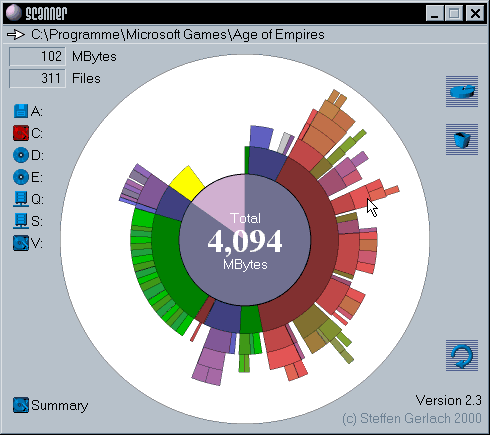 How much space is taken up by various things on your hard drive? How much empty space is on it? Although it’s simple to run directory listings to get responses to these questions, the responses don’t always make much sense. In the end its just a bundle of numbers on your screen. So if you could view your disk use graphically, it may make much more sense.
Scanner is a program that allows you to do exactly that. Aim it at your hard drive, removable storage, or network volume and have a look at those pretty images. Utilising a sunburst chart—an extended pie chart with concentric rings—this utility will show up the proportional sizes of all major directories,folders and files on your hard drive or storage space. Curious about a specific one? Click it to acquire info specific to your selection.
Its a free utility for Windows computers so if you’d like to test it out, you can get it at the homepage here.
Rating:

Loading...
1 Comment »
O. James Samson - December 2, 2009
 Sums up detailed information about Internet Explorer Add-ons, Uninstallers, Services, Processes, Windows, Drivers, Connections and opened files. System Explorer 2.0 Beta 4 makes Registry and Files snapshots for easy comparing of system changes. The result that comes as a result of these comparisons is displayed in a Tree like view and text list.
The publishers have taken their time to add a performance graphs for monitoring usage of system resources in time. Suspicious files are now easy to lookup through the virus total, easy search details about file/process via online databases and an easy access to your computer system utilities.
System Explore 2.0 Beta 4 is a freeware and gives you so much features that you begin to wonder if it is really a freeware program. The performance graph for monitoring usage of system resources in time, Security Extension for automatic check of processes, modules and selected files among other new features added to this version are delight to work with.
Want to check it out? Visit Systemexplorer.mistergroup.org
Rating:
Loading...
No Comments »
O. James Samson - December 1, 2009
 Public PC Desktop 6.3 is desktop software that turns the look of your computer around and makes it look more attractive than the usual. With this program, your desktop becomes an internet kiosk. The setting can refined to completely disable access files installed on your computer while still offering full access to all important applications specified by you.
Though I am not a big fan of some categories of freeware, I still think the price for this program which stands at $39 is on the high side. Not a bad program if you ask me but not good enough for the price placed on it by the publishers. The program which can also perform some basic security functions such as restricting access to your computer has an uninstaller and is restricted to a 30 day trial period for those who want to try it out.
Public PC Desktop 6.3 supports multiple security codes, availing you the opportunity to specify the most acceptable type of access to a locked desktop which include username and password authentication and time locked code which allows you to access workstations for certain period of time.
Want to check it out? Visit Getfreefile
Rating:
Loading...
No Comments »
O. James Samson - December 1, 2009
 Though NetLimiter Pro (64-bit) 3.0 Beta 5 is still in Beta stage, I still believe it is going to solve some issues about Internet traffic and control applications that hitherto have or gain access to the Internet. You can deploy this software to set your download and upload speed limits for applications even on single connection. It is built with the ability to enable you share your Internet connection bandwidth among all applications running on your system.
At $29.95, NetLimiter Pro (64-bit) 3.0 Beta 5 is unique and is not one of those every day software because there are not really many of such program in the same category offering similar services. I have no problem with the price because it does make my online and Internet activities much easier. At least there is a software that controls all applications that access the Internet through my computer.
NetLimiter Pro (64-bit) 3.0 Beta 5 is built to offer a comprehensive set of Internet tools to enhance your internet activities. One of such unique feature is the real-time measurement and long-term per application internet traffic statistics making you the king when it comes to the control of your internet connections.
Want to check it out? Visit Netlimiter.com
Rating:
Loading...
No Comments »
O. James Samson - December 1, 2009
 At $49.00 The Security Administrator 13.3 is not a bad shareware program especially since it is a security software that ensures that your computer security system is centralized. Security Administrator protects your computer and restricts access. With this program, the vulnerability of your computer is reduced or may be eliminated.
Security Administrator 13.3 allows you to disable your boot keys, context menu, Registry editing and DOS Windows among others. You can choose to customize the settings in a way that access can be denied to each individual component of various Control panel applets, passwords, printers, Network and so much more. You can also hide your desktop icons, start menu items and individual drives.
Password protection can also be applied to Windows to restrict users from running specific unwanted applications on your computer. The publishers have also included among the features of this software, the function that allows you to view statistics of computer use by kids or employees and security restrictions can be applied universally or to specific computer users all depending on how you customize it.
Want to check it out? Visit Softheap.com
Rating:
Loading...
No Comments »
O. James Samson - December 1, 2009
 This is one program I have been using for some time now and II have to say that it is one of the best I have seen. What’s running is a program that gives you a clear picture of happenings inside your computer. It simply explores processes, IP-connections, services drivers all through a very simple and easy to understand functions even for the amateur out there.
What’s running 3.0 Beta 3 is the new version just released though in Beta stage. It is built to display the modules involved in a given process. With this program, your computer system is never out of your control because you can decide to control your system just by starting and stopping services and processes. Configuration is even much easier to do and you can do this on program start up easily without the help of a pro.
Version 3.0 Beta 3 comes with some new changes like: support for 64-bit processes, CPU, memory and io graphs, graphs and so much more all for your delight. Best of all is that it is still a freeware program and a good addition for your software library.
Want to check it out? Visit Whatsrunning.net
Rating:
Loading...
1 Comment »
O. James Samson - November 30, 2009
 Diskeeper 2010 professional 14.0.896 automatically defragments your disk for you. It is specially built with features that allow you to schedule and configure it in a way that is suitable for your use. Fragmentation normally occurs during normal windows operation and files are broken up in pieces and saved on different parts of the hard disk. This allows increase in the amount of time it takes to access single files on your computer.
This is one of the best performing programs in its category. I have been using the free version for sometime now and I must attest to the fact that I am very convinced of the performance which in my view is encouraging. The pro version is one step ahead and I know the publisher of this software have done a great job. At $49.50, the PRO version of Diskeeper 2010 is a delightful program.
Diskeeper 2010 Professional 14.0.896 works well on Windows 7 even though it runs a bit small on start up. The Pro version is however limited to a 30 day limit to allow a user try out to see if he should go ahead and purchase it or not.
Want to check it out? Visit Diskeeper.com
Rating:
Loading...
1 Comment »
O. James Samson - November 30, 2009
 With this software, you can create protected VCD/DVD Discs and USB Memory Sticks. It does this by creating a protected area or areas on the media and you just enter a password to view all protected contents. All protected Discs/USB stick is fully autonomous and does not require any specially installed software on your system.
Master Voyager 2.29 is 256 bits standard encryption software used for protecting records and files on your computer system. Your files and records are sensitive things you need to keep very well from the prying eyes of strangers and what ever it cost you or what ever length you go to make sure that they are safe and intact will not be too much.
Another great advantage of this software is that it does not require you to buy any special CD burning software, this one will do all that you have to do in that area.
Want to check it out? Visit Mvoyager.com
Rating:
Loading...
No Comments »
O. James Samson - November 30, 2009
 Software Office contains plan maker, presentation, text maker (word) and basic maker (macro writer) and can be described as one of the lightest software in its category. It is easy to install on your computer and is so fast that it loads without taking your time and make you wait and waste your precious time. You can drag and drop, arrange your icons the way it suits you, and to crown it all, it has this wonderful interface that is so attractive you will love it the first time you use it.
It is fully compatible with Microsoft Office formats and open documents formats. The speed like I said before works like jet and the most amazing thing about it is that it still comes with wonderful features you will almost think you are using the Microsoft Office. For a software of its magnitude not weighing more than 45 megabytes, SoftwareMaker Office 2010 Beta is good software and works very well for me right from installation.
This version from my own point of view is miles ahead in terms of service delivery. At least I do not have to worry about service pack every three months because it does not require anything of such. The fact that SoftMaker Office 2010 is still in Beta testing stage makes it software that will surely go places. It is still a commercial Demo and no price fixed yet.
Want to check it out? Visit Softmaker.com
Rating:
Loading...
No Comments »
O. James Samson - November 30, 2009
 This is an automotive software with advanced automotive features to back up all your files for you. It has a standard zip format which gives you the ability to restore all zip utility. You can choose to email your back ups as you wish. You can choose to schedule tasks by the second, minute or hourly, weekly, daily or even monthly all depending on your choice.
JakBack for Windows 8.32 supports dynamic variables to achieve advanced automated tasks making sure you can do other things knowing that your program is working silently to ensure that all your files are well kept and safe. You do not have to fear that you will lose your files because they are safe.
Some other great features of this software include: A local directory monitor that allows you to back up data when a file or folder change is detected, copying of files using wildcards on schedule( can also append time and dat6e on files) to achieve purpose, email notification of task failure based on task exit codes among other features that make it a great tool.
JaBack for Windows 8.32 is however a free software and can be used for personal or home use.
Want to check it out? Visit Hiteksoftware.com
Rating:
Loading...
No Comments »





