O. James Samson - June 10, 2009
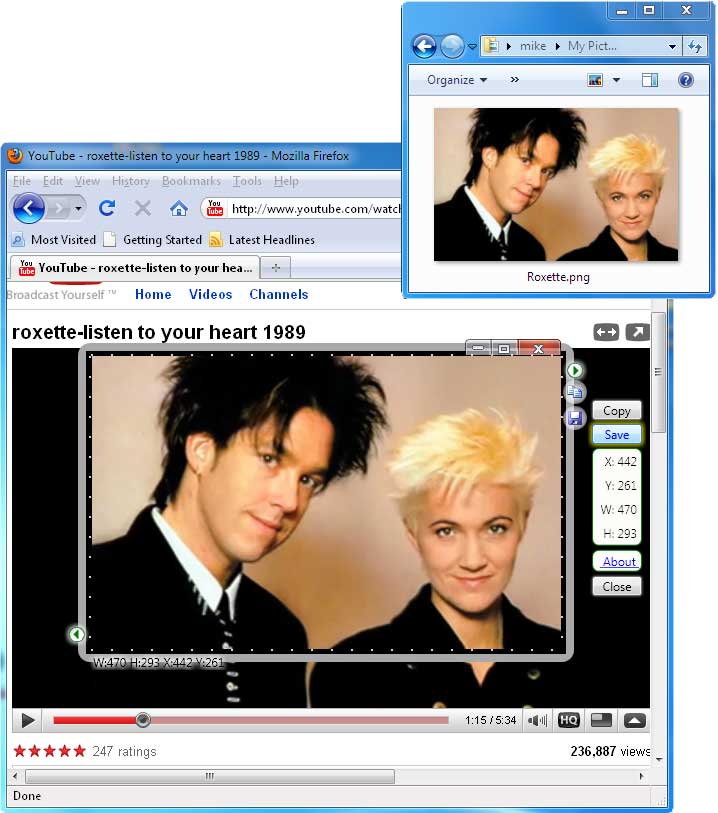 At first glance, Snapashot could be your regular screen capturing tool. It can help you grab what’s on screen and place them on your favorite image editing tool. You can think of it as a “Print Screen” tool except that it can capture almost anything on the screen. At first glance, Snapashot could be your regular screen capturing tool. It can help you grab what’s on screen and place them on your favorite image editing tool. You can think of it as a “Print Screen” tool except that it can capture almost anything on the screen.
But the application offers something more than regular screen capturing. Native screen capture tool will capture everything on the screen – including toolbars, web addresses and even the taskbar will be captured. This could pose a problem especially when you’re planning to share the screen captures since your personal data will be shared as well. You could cut them through an editing tool but it could take some time.
Snapashot on the other hand provides complete control to the user on screenshot size. When the see the screen that needs to be captured, users will just launch the application where they can select which area to be captured. Since the application is very small (only 74kb), it can be launched in an instant. No installation is required since it works with .Net Framework which is a required application before Snapashot could be used.
A pro version is also available which give users better screen resolution, editing with text and borders and unlimited support from developers. But the free version is powerful enough for personal use as it provides a decent screen capture with full customization in terms of size. The screen captured image could be saved in five image formats for easy sharing and editing on different image editing tools.
Check it out at http://nicekit.com/screen-capture/best-free-snapshot.htm
Rating:  Loading... No Comments »
O. James Samson - June 10, 2009
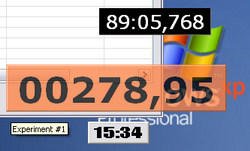 XNote Timer is a small but very powerful application. The application is less than 100kb in size and does not require any installation which means XNote Timer could be launched right after download. The default setting of the application provides a digital timer in simple black and white interface. The application can be fully customized in size without having to interrupt the operation. Users can even customize the timer itself as they can remove hours and minutes to allow seconds-only timer. XNote Timer is a small but very powerful application. The application is less than 100kb in size and does not require any installation which means XNote Timer could be launched right after download. The default setting of the application provides a digital timer in simple black and white interface. The application can be fully customized in size without having to interrupt the operation. Users can even customize the timer itself as they can remove hours and minutes to allow seconds-only timer.
Along with these impressive features, XNote Timer can also be used for countdowns. These countdowns could be set with default sounds that come with the application. However, users can customize the countdown alarm by using an Mp3 or any audio file as its sound. You can use your favorite music or recorded sound as an alarm to this countdown timer. Users can also launch an application along with the audio file alarm. Through proper configuration, external devices connected to the computer could even be controlled through XNote Timer.
The timer can also note the log countdown. The information could even be exported to MS Excel so that the data registered in the timer could be saved.
Since XNote Timer could be launched without any installation, users can launch multiple timers at the same time. Each timer can be customized independently so each timer will have the ability to launch various files in different times.
While XNote Timer doesn’t have a clock, the application makes up for this lacking ability with very impressive features and customization without requiring too much disk space.
Check it out at http://dnsoft.swrus.com/
Rating: Loading... No Comments »
O. James Samson - June 9, 2009
 BB FlashBack Express is a powerful screen, video and audio recording tool. It can easily capture activities in your desktop including its sounds for better understanding. The application also allow recording of audio from external sources especially from your computers’ microphone. This makes it easier to add instructions and commentaries on the activities happening on the screen. BB FlashBack Express is a powerful screen, video and audio recording tool. It can easily capture activities in your desktop including its sounds for better understanding. The application also allow recording of audio from external sources especially from your computers’ microphone. This makes it easier to add instructions and commentaries on the activities happening on the screen.
The said features could also be found in many screen recording tools. But what makes BB FlashBack Express different is its ability to record webcam activities together with screen presentation and audio recording. Practically everything that happens on your screen could be captured by this simple application.
The interface of the application is very simple. After installation, the application will be placed in system tray (lower right of the screen) in order for the application to be launched in an instant. Users could also drag the controls in the taskbar to the desktop for an easier access. For first time users, a wizard is automatically launched in order to guide users on how to record from various sources.
The recorded activity could be saved in two formats: Flash and AVI. Flash is very useful since the format could easily work with various video sharing websites such as YouTube, Viddler, Revver and Blip.TV. To make things easier, the application also provide functions for users to easily upload their recorded files to the mentioned video sharing websites.
Additional features such as additional media format, video editing, additional text and more are available in upgraded versions (Standard and Pro).
Go to http://www.bbsoftware.co.uk/bbflashbackexpress/home.aspx for more info
Rating: Loading... No Comments »
O. James Samson - June 8, 2009
 AM (not AIM) Messenger is probably one of the most useful freeware for any small business. Simply put, this application will allow instant messaging within the network environment. Instead of using IM applications that uses the Internet to connect, this application will run without any required online connectivity as long as there is there is stable network connection. Through local IM, users will no longer be susceptible to outside intrusion. AM (not AIM) Messenger is probably one of the most useful freeware for any small business. Simply put, this application will allow instant messaging within the network environment. Instead of using IM applications that uses the Internet to connect, this application will run without any required online connectivity as long as there is there is stable network connection. Through local IM, users will no longer be susceptible to outside intrusion.
Although AM Messenger is a freeware, it doesn’t lag behind popular online IM applications. Aside from simple chat, the application can also support emoticons, create user groups, archiving and spell checker. It could even support file transfer between two users without any problem.
AM Messenger could be a very powerful IM application however it will require some configuration before it could be completely implemented. Network detection should be a little bit challenging especially for those who are not familiar with basic network configuration. But as long as network is stable, AM Messenger will work with little to no problem. Administrators are also required to download the server client in order to smoothly run the application. The server client provides a very powerful administrative function as it could ban users and manage the application in terms of offline messages and file transfer protocols.
Check it out at http://www.geocities.com/ranjandd2002/
This freeware may take sometime before it could be fully used since it needs individual configuration. But once AM Messenger is up and running, the application could be a very powerful tool for in-house communication without requiring the business to go online.
Rating: Loading... 1 Comment »
O. James Samson - June 8, 2009
 There are many registry cleaners to choose from online. While many of them could be very helpful in increasing the efficiency in terms of speed of the application, some are not providing the expected results. Anyone considering downloading this type of application should be very careful as a good registry cleaner could help and a bad registry cleaner could just use up resources. There are many registry cleaners to choose from online. While many of them could be very helpful in increasing the efficiency in terms of speed of the application, some are not providing the expected results. Anyone considering downloading this type of application should be very careful as a good registry cleaner could help and a bad registry cleaner could just use up resources.
Fortunately, Baku is a registry cleaner that could help users increase the speed of their computers. The application, when launched, automatically scans for unused registry and deletes them since they are no longer useful. Data that also slows down the implementation of some application are also deleted. From browser history to data on recently opened documents, Baku will delete those data to increase the speed of the applications.
But the feature of Baku is not actually on the said functions since most registry cleaners also offer them. Baku is a unique registry cleaner because it deletes unused registry as well as compact the used registry. By “compacting” the used registries of your applications, Baku speeds up the present applications. Although this function is a little bit challenging since it could crash an application, a wizard is provided to automate the different functions of Baku.
Like most registry cleaners, Baku also provides data back-up in case users want to restore the deleted registries. The interface is also easy to understand as it could sort out data in various formats. A search tool is also available in case you wanted to look for a specific file to be excluded in registry cleanup.
Check it out at pmcchp.com
Rating: Loading... No Comments »
O. James Samson - June 8, 2009
 FoxScribe is a very easy to use, easy to understand CD/DVD burning application. Users will not have a hard time understanding how to use the application as the interface is very straightforward. The user friendly wizard provides a clear path for users who wanted to use the application for various sources. Users will just click on the process they want to do and select the appropriate file. The rest will be taken cared of by the application. FoxScribe is a very easy to use, easy to understand CD/DVD burning application. Users will not have a hard time understanding how to use the application as the interface is very straightforward. The user friendly wizard provides a clear path for users who wanted to use the application for various sources. Users will just click on the process they want to do and select the appropriate file. The rest will be taken cared of by the application.
But even though the application is very simple, it doesn’t lack on impressive features. Aside from regular file burning on CDs and DVDs, the application could also be used to burn ISOs which transforms a simple CD or DVD into a full installer. Again, the user would just have to use the simple wizard and let the application do everything.
Probably the most impressive feature of the application is on its treatment of audio files. Users can still treat the audio files as simple data and simply store them on a CD or DVD. However, if they want to create an audio CD, they can use the wizard to select a number of songs and burn the files. The files written on CDs are not just simple files since the profile such as artist, genre, year of production and other information will be available for users.
FoxScribe is a no-nonsense CD/DVD burning application. This free software could easily become your favorite burning tool because it doesn’t have any complicated commands which greatly appeals to those unfamiliar with this process.
More info? Visit http://www.foxmediatools.com/foxscribe/
Rating: Loading... No Comments »
Tilgore Kraut - June 6, 2009
 The means of communications have advanced to an entirely new level and instant messengers have emerged as the most credible of them all. Instant messaging has made our lives a lot easier by enabling people to share their thoughts with friends and family in real-time. These applications include text, audio and video chat features helping web users to interact with friends, co-workers, and other online users while giving a personal touch. However, you can also use instant messenger for professional purposes, such as online customer support, and a lot more. You can make your customer support service more interactive by integrating instant messaging service with your website. Well, you’re not required to carry out the time-consuming process of searching for a tool for the purpose, as Expressway Flexchat 1.0 is there to help you. It’s a web application that allows adding real-time text and audio/video chat to any website. The means of communications have advanced to an entirely new level and instant messengers have emerged as the most credible of them all. Instant messaging has made our lives a lot easier by enabling people to share their thoughts with friends and family in real-time. These applications include text, audio and video chat features helping web users to interact with friends, co-workers, and other online users while giving a personal touch. However, you can also use instant messenger for professional purposes, such as online customer support, and a lot more. You can make your customer support service more interactive by integrating instant messaging service with your website. Well, you’re not required to carry out the time-consuming process of searching for a tool for the purpose, as Expressway Flexchat 1.0 is there to help you. It’s a web application that allows adding real-time text and audio/video chat to any website.
While starting Expressway Flexchat you’re shown a modestly designed interface with smoothly operable options. The chat application can be integrated to function effectively with web browsers and Flash player. It begins with impressive interface, where you can chat with your friends or customers. Further it even allows you to make money by advertising or by providing space for online meetings, services, product selling, etc. Flexchat enables building online community, chat rooms, add extensions, chat personalization, along with setting the online status. Coming to the chat, it supports audio, video and text chat that increases interactivity. With text chatting, you can enter customized text, smileys, etc to make it more interactive. The chat application can further be used for several purposes like E-Learning, Dating, Customer Service, Discussion Forums, Professional Consultations, Interoffice Communications, Webinars, Meeting, etc.
Expressway Flexchat is easily integrated with websites and flash players to make it easier for your customers and clients to interact with you.
{More Info and Download}
Rating: Loading... No Comments »
Tilgore Kraut - June 6, 2009
 As a web developer you may often go through hassles while working with flash, especially when it comes to building Flash Pan or Zoom viewer. However instead of taking up any complicated process, it’s recommended to go for a tool for the purpose. Though the online space has huge number of such tools, but if you haven’t found a suitable one yet, then you must give a try to Aleo Flash Pan Zoom Viewer 1.0. The program is an effective way of creating flash pan, and also zoom viewer for SWF and image files. You can easily operate the application as it doesn’t require users to have specific knowledge of Flash and Adobe Flash Studio. The program further supports drag and drop, zoom in/out, customizable control panel, adding audio controller and preloader to flash movie, and perform different other action. As a web developer you may often go through hassles while working with flash, especially when it comes to building Flash Pan or Zoom viewer. However instead of taking up any complicated process, it’s recommended to go for a tool for the purpose. Though the online space has huge number of such tools, but if you haven’t found a suitable one yet, then you must give a try to Aleo Flash Pan Zoom Viewer 1.0. The program is an effective way of creating flash pan, and also zoom viewer for SWF and image files. You can easily operate the application as it doesn’t require users to have specific knowledge of Flash and Adobe Flash Studio. The program further supports drag and drop, zoom in/out, customizable control panel, adding audio controller and preloader to flash movie, and perform different other action.
Elaborating the console of Aleo Flash Pan Zoom Viewer 1.0, the upper panel displays the options to create new project, save it, publish it, or check for results and and access Help. Below this, you’re provided Flash Viewer Style panel, using which you can select viewer style, publish, enable auto preview, preview, and reset the entire features for making new selection. Moving further, the left mid area is the display area for images along with navigation displayed don it, and its right side consists of customizable features for viewer such as Movie width, frame rate, shape, corner results, etc along with attributes relating pan and zoom, multiple images, mouse and keyboard, control panel, image selection list, navigator, audio controller, and preloader. Next on the interface is Image segment on bottom left, where you can add, delete and sort images, after which the image and global options can be altered. Finally save the results and publish them.
Using the Aleo Flash Pan Zoom Viewer you can comfortably build zoom viewer and flash pan for images and SWF files.
{More Info and Download}
Rating: Loading... No Comments »
Tilgore Kraut - June 4, 2009
 While watching to your favorite video clips over any online video portal, the idea of downloading it must have struck your mind. But, you often have to drop the idea, as these videos are embedded with the websites and usually aren’t provided with any downloading feature. Although a number of video downloading tools are available over the web, but finding the tool suiting your requirements may take up much of your time. If you haven’t found an apt one yet, then Ashampoo ClipFinder HD 2.04 is what you might be looking for. It’s a proficient tool that not only downloads the web videos but also lets you search, play, and convert and save the videos files with desired format from MP4, FLV, MP3, 3GP, MOV, or AVI. It further supports downloading videos from 15 known popular video portals that are YouTube, Spike, Vimeo, Veoh, LiveVideo, Google Video, blip.tv, Dailymotion, Metacafe, Yahoo! Video, videu, MySpace, MyVideo, SevenLoad, and ClipFish. While watching to your favorite video clips over any online video portal, the idea of downloading it must have struck your mind. But, you often have to drop the idea, as these videos are embedded with the websites and usually aren’t provided with any downloading feature. Although a number of video downloading tools are available over the web, but finding the tool suiting your requirements may take up much of your time. If you haven’t found an apt one yet, then Ashampoo ClipFinder HD 2.04 is what you might be looking for. It’s a proficient tool that not only downloads the web videos but also lets you search, play, and convert and save the videos files with desired format from MP4, FLV, MP3, 3GP, MOV, or AVI. It further supports downloading videos from 15 known popular video portals that are YouTube, Spike, Vimeo, Veoh, LiveVideo, Google Video, blip.tv, Dailymotion, Metacafe, Yahoo! Video, videu, MySpace, MyVideo, SevenLoad, and ClipFish.
The appearance of Ashampoo ClipFinder HD interface can be changed using different skins. Moving to the main screen, the upper side contains a toolbar presenting Online Videos, My Videos, Settings, Internet, Help and About tabs. The Online Videos tab is where you can begin with searching the videos on different websites listed in separate segments in mid area. Enter the keyword and hit search to find relevant video on all or individual website, the results of which are lined up within the segments. Now, the searched video can be right-clicked to get the options for playing, downloading, copying URL, adding the selected videos to My Videos. The program plays the video with its own integrated player that even contains the download and copy URL feature. With My Videos the videos can be organized within different categories, and using Settings, you can enable/disable different program features, change skin, and manage video portals along with their username and password.
Using the Ashampoo ClipFinder HD 2.04 you can search and download different videos from web and convert them for mobile phones, mp3 player, and other media devices.
{More Info and Download}
Rating: Loading... No Comments »
Tilgore Kraut - June 4, 2009
 Graphs Made Easy is a free, easy to use program to make line, bar and pie graphs. It has a simplified, self-explanatory user-interface, and allows date values on the X- axis. There are no data grids or set-up wizards – just enter the data. Graphs Made Easy is a free, easy to use program to make line, bar and pie graphs. It has a simplified, self-explanatory user-interface, and allows date values on the X- axis. There are no data grids or set-up wizards – just enter the data.
Features: Graphs Made Easy is a free and easy to use program to make graphs. The graph types include line, bar and pie graphs. The user interface is quite intuitive. You can not only create the graphs, adding legends and annotations are easy too. Choose color of graphs, data graduations on the axes, annotations of pie graphs are all easily done. There are no data grids or set-up wizards. Simply entering data does the job. The graphs created can be saved as images in many of the popular image formats. Formats available include EMF, PNG, BMP and JPEG. When saving as images you can set the resolution you want to save the image at. This can be up to 999 DPI.
If you need to you can export the graph images via cut and paste. The free version (GME Basic) has ease of use features that allow easy data entry and creation of features like labels, arrows, legends and axis markers. The download package includes the Standard version and can be enabled for trials. The standard version provides these features discussed as well as enhanced graphics capabilities such as shaded and translucent colors, curved lines for graph creation etc.
Overall: A nice and simple graphing package. You are able to export the graphs to other documents.
{More Info and Download}
Rating: Loading... 1 Comment »
|
|
|


 (1 votes, average: 4.00 out of 5)

