O. James Samson - December 15, 2008
 Here is a modern, portable and fast Linux operating system that has a modular approach and outstanding design, it is called slax. In spite of its small size, Slax offers a large range of pre-installed programs for daily use, which has a well organized graphical user interface and useful recovery tools for system administrators. Here is a modern, portable and fast Linux operating system that has a modular approach and outstanding design, it is called slax. In spite of its small size, Slax offers a large range of pre-installed programs for daily use, which has a well organized graphical user interface and useful recovery tools for system administrators.
The modular approach it has provides the ability to include any other software in Slax easily. Other programs like text editor, networking tool or game can be simply added by downloading a module with the software and copy it to Slax, without a need to install and to configure.
For beginners or busy people, there is a step by step method to build your own customized operating system by using web-based interface.
For more details, visit: www.slax.org
Rating:  Loading... No Comments »
Tilgore Kraut - December 12, 2008
 AptDiff is a visual text/binary files comparison and merging utility for Windows 2000/XP/2003/Vista. It is highly useful for software developers, web designers and other professionals. AptDiff is a visual text/binary files comparison and merging utility for Windows 2000/XP/2003/Vista. It is highly useful for software developers, web designers and other professionals.
Pros: AptDiff is a Windows utility that does text/binary files comparison and merging. It is compatible to Windows 2000 to Vista. There are dual panes in the application that visually displays the differences in the files very effectively. Differences between the two files are highlighted for easy spotting. The color coding used can be customized easily. The color coding scheme can clearly indicate each line/byte added, deleted or changed. This could be very useful for software and web site developers besides other uses. The difference display can be formatted into a HTML page for publication on the web. Picking out the files for comparison is easy through the browser integrated into the application. File changes are detected and the display moves to the first difference. Navigation is easy thereafter; horizontal and vertical scrolling is synchronized. You could customize the way the panes are split. The application mode can be easily set to text or binary. Command line support, customization of keyboard shortcuts, multi language support, customizable toolbar are some other nice features.
When comparing text it can merge differences, merge differences in selected text, watch for changes outside the application and reload the file, comparison reports in HTML can be created, Unicode support, unlimited levels of undo/redo, can ignore white spaces, leading whitespace, trailing whitespace and case of characters while comparing. It can delete differences easily. When comparing binaries it compares byte by byte, navigates by differences within bytes and file sizes can be unlimited. AptDiff can be installed on FLASH or other portable drives including all user configurations. That lets you take the application anywhere.
{More Info and Download}
Rating: Loading... 1 Comment »
Tilgore Kraut - December 12, 2008
 Today an average professional has a number of accounts to keep track of and these include email accounts, bank accounts, etc. Invariably it becomes difficult to manage and remember the passwords relating to these. Similar is the case with the credit card numbers, and since people may have different credit cards for official and personal use and it’s not easy to remember these. Saving such information in documents or writing them on paper, is not safe as anyone can easily access the important information. So, in order to ensure secure information storage of all your ideas, passwords, credit card numbers, etc, you can try the HiznOrganizer 1.0.1. It provides extremely easy to use feature-set that alleviates the risk of storing critical information with its strong password protection. Today an average professional has a number of accounts to keep track of and these include email accounts, bank accounts, etc. Invariably it becomes difficult to manage and remember the passwords relating to these. Similar is the case with the credit card numbers, and since people may have different credit cards for official and personal use and it’s not easy to remember these. Saving such information in documents or writing them on paper, is not safe as anyone can easily access the important information. So, in order to ensure secure information storage of all your ideas, passwords, credit card numbers, etc, you can try the HiznOrganizer 1.0.1. It provides extremely easy to use feature-set that alleviates the risk of storing critical information with its strong password protection.
HiznOrganizer 1.0.1 allows the users to store their ideas, numbers, password, etc and store all the information in a single database. Beginning with the presentation part, the program’s interface is simple and doesn’t include any complex features. Starting up with the functioning, it provides you a home database folder that you can rename as per your requirements. If you’re creating the database the program requires you to enter the Title, description, and a password to protect it from unauthorized access. While renaming the folder, you can further add new category folders to store the information accordingly. Along with these, the right click menu is associated with the folders to help in information adding, and database properties options. Further, to this sequence, you can form notes and store them with the specific folders. These notes and folders are shown in tree form to be easily accessed by the user. With these, the application includes other common features like copy, cut, paste, open and save for using database and stored information conveniently. If there’s any confusion regarding application features or functioning, you can take the assistance of Help file.
HiznOrganizer 1.0.1 combines uncomplicated functionality with a bunch of easy to use features for recording different ideas, information, passwords, etc.
{More Info and Download}
Rating: Loading... No Comments »
Tilgore Kraut - December 12, 2008
 Have you ever experienced difficulty in playing your audio CD because of an non-supported format? Well then you should give a try to the MP3Producer DE 2.60 software it seamlessly converts audio files from your CDs, giving quality output and has multilingual support. The interface and Help manual of the application is designed to be presented as per the selected language. It is compiled of commendable set of features that allow you to easily convert the audio files into different known compressing formats like WAV, WMA, MP3, and OGG. Moreover, it enables you to search the CD info on internet, edit the ID3 Tag, and also provides ‘Extract CD Segment’ feature for copying any specific part of your Audio CD. Have you ever experienced difficulty in playing your audio CD because of an non-supported format? Well then you should give a try to the MP3Producer DE 2.60 software it seamlessly converts audio files from your CDs, giving quality output and has multilingual support. The interface and Help manual of the application is designed to be presented as per the selected language. It is compiled of commendable set of features that allow you to easily convert the audio files into different known compressing formats like WAV, WMA, MP3, and OGG. Moreover, it enables you to search the CD info on internet, edit the ID3 Tag, and also provides ‘Extract CD Segment’ feature for copying any specific part of your Audio CD.
Just load the CD and the MP3Producer DE 2.60 would detect it and you can then begin the conversion task. After CD selection, the application collects the audio files and enlists them with First of the Four options provided on program screen. Moving on, you can select desired tracks and convert them to any of the supported formats with ease. Now, the second option is ID3 Tag that allows you to write ID3v1 and ID3v2 tag into output files, and even edit the associated info like Artist, Album, etc. Further, you can retrieve from, and submit information to FreeDB database, by filling the necessary fields. Next option to work with is ‘Filename’, which allow selections regarding Output Directory, subdirectory and filename, and playlist. To choose the desired filename format, the program provides the ‘Mask Editor’ option. The last option is ‘MP3 Settings’ that requires you to select CD-ROM, sample rate, channel mode, bitrate, presets, etc. Moreover, you can extract desired part of the CD through ‘Rip Segment Definition’ feature, and alter various other program configurations making it function accordingly.
{More Info and Download}
Rating: Loading... No Comments »
Tilgore Kraut - December 12, 2008
 If you have been using the default Window image viewer application for previewing your images you have stored in your PC, chances are that you might have felt irritated while using it, as you have to surf through many images, or every time find and click the required image from the folder, to preview it. If you have got bored of it and looking for an easy and decent change, then you may find Tweed 1.2 application worth trying. It’s a modestly designed image viewer utility, consisting of a widescreen display, and is compatible to work with all known image formats. The image viewer displays the selected folder’s images as thumbnails on right panel to easily select the image you want to view. It also supports some common functions associated with the image viewer like copy, edit, rotate, etc. If you have been using the default Window image viewer application for previewing your images you have stored in your PC, chances are that you might have felt irritated while using it, as you have to surf through many images, or every time find and click the required image from the folder, to preview it. If you have got bored of it and looking for an easy and decent change, then you may find Tweed 1.2 application worth trying. It’s a modestly designed image viewer utility, consisting of a widescreen display, and is compatible to work with all known image formats. The image viewer displays the selected folder’s images as thumbnails on right panel to easily select the image you want to view. It also supports some common functions associated with the image viewer like copy, edit, rotate, etc.
Tweed 1.2 consists of functions that can be easily understood and operated by even novice users. The program’s interface, it’s divided in two parts; the left wide area has been set for displaying image, and the right pane shows the image thumbnails. To begin viewing images with the application, you need to surf through the image folder, and open the images with the program. The application would collect the images of the folder and display their thumbnails to select and view the desired image. Further, it is accompanied with the features placed on the top right side, and using these you can copy, cut and paste the image to the desired location, and also shred the file if necessary. Further, you’re also provided the feature that gives you the access to open the image for editing. The application displays the current folder’s name on the window caption. It also supports various keyboard functions to control clipboard operations, navigation bar view, rotate image, and even more.
Tweed 1.2 is a simple and easily usable image viewer application that supports user’s to view images of various formats including camera RAW formats.
{More Info and Download}
Rating: Loading... No Comments »
Tilgore Kraut - December 11, 2008
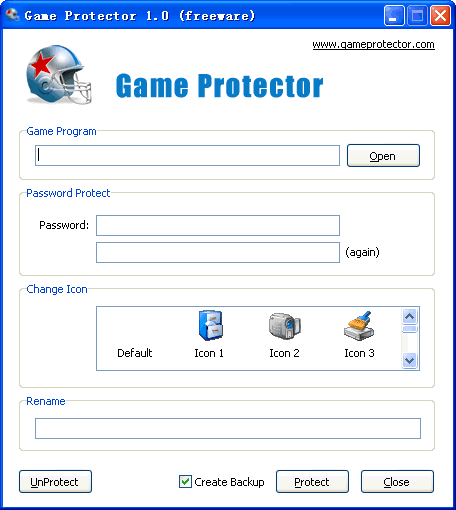 Game Protector protects any game with a password and when any user tries to open game it prompts for a password, so that only you can launch it, it is free software. Game Protector protects any game with a password and when any user tries to open game it prompts for a password, so that only you can launch it, it is free software.
Pros: Game Protector helps you password protect a game or any other program on your machine. Once locked down with a password anybody trying to launch the game or the program will be prompted for a password. Thus effectively only you will be able to launch these programs on the machine. This then can effectively hide the programs/games that you want to keep private from other users on the same machine. In fact even if they are copied onto other machines, the password lockdown still holds.
The program interface is very simple and direct and easy to use. When trying lock down there are three simple steps after you specify the name of the game/program to be locked out of public view. Specify the password, double entry ensures the correct password is applied. Next step is to choose an icon. It could be the default one or one out of three other choices available and then you can specify the new name, if any. You can choose to have a back up and then simply click protect to have the lock down done.
You can remove the lockdown from the programs any time you need to. Simple click on the unprotect button is all that needs to be done. The interface lets you change the icons and actually hide the type of program that has been locked down as you can change the name too. It’d be useful for parental control too. With Game Protector you can choose to allow or block specific games, you can control what games can be played in Windows.
{More Info and Download}
Rating: Loading... 1 Comment »
Tilgore Kraut - December 11, 2008
 Task-Planner addresses the problem: Who is to do what and when. To this end Task Planner contains two schedules 1) the activity schedule and 2) the working hours schedule and an automatic assignment procedure based on competencies. Task-Planner addresses the problem: Who is to do what and when. To this end Task Planner contains two schedules 1) the activity schedule and 2) the working hours schedule and an automatic assignment procedure based on competencies.
Pros: Task-Planner addresses the task assignment problem. It does this by breaking down the problem into three issues. These are the activity schedule, the work schedule and then the assignment problem that of who does what and when. This is done automatically by matching competencies required for the job and those available with specific employees. Scheduling both the tasks and the employees is a unique approach. This ensures that tasks are manned by a minimum set of employees. This layout pinpoints the primary scheduling problem thereby making it manageable. Assignment of right staff can be made easily. The familiar planning board metaphor is used for displaying the plan. The application provides templates that are really simulation tools that can very clearly tell you if the planning is on the right track.
The program is able to do automatic allocation based on qualifications and availability of resources. The effect of staff variation on the task execution plan is indicated so that remedial actions can be taken quickly. In case of unscheduled absenteeism you could again see the consequences on the time line immediately. The application could be useful wherever there’s a regular pattern about the tasks and the working hours schedules. Industries like health care, hospitals, service business can use this tool effectively.
{More Info and Download}
Rating: Loading... No Comments »
Tilgore Kraut - December 11, 2008
 Coly Photo Viewer is a fast, easy-to-use photo viewer, editor and converter. It supports all major formats and has many features, such as photo viewing, red eye removal, enhancing colors, slide show, many graphics effects and batch conversion. Coly Photo Viewer is a fast, easy-to-use photo viewer, editor and converter. It supports all major formats and has many features, such as photo viewing, red eye removal, enhancing colors, slide show, many graphics effects and batch conversion.
Pros: Coly Photo Viewer is not only a photo viewer but also is an editor and a photo format converter. Photo viewing, red eye removal, resizing, cropping, emailing, enhancing colors, many graphics effects, JPEG lossless rotation, slide show, fast thumbnail browsing, batch conversion, file operations etc are just some of the features available. Fast thumbnail browsing and resizing as well as full screen view are available. Keyboard shortcuts make your operations quite easy to manage. Slide show is supported. The program supports a wide range of photo formats that include JPEG, TIFF, PNG, BMP, GIF, PSD, ICO, JPEG2000, SGI.. The full range include up to 30 formats that cover most of the popular formats in use. As thumbnails are displayed you get a histogram display of the 3 colors in the photograph. The same display area also shows EXIF data about the photograph.
Edit and effects include red eye removal, resize/resample, adjust color/color balance, rotate or flip, change of color depth, JPEG lossless rotation and so on. The effects portfolio includes sepia, colorize, emboss, threshold, negative, gray scale, threshold, mosaic, wind, blur and so on. Unlimited levels of undo and redo lets you experiment without limits. The program also acts as a converter of formats from one to the other in its supported formats. Several output formats are JPEG, TIFF, PNG, BMP, GIF, TARGA, ICO, JPEG 2000. You specify directories and all the internal folders will be taken care of. The conversion is done as a batch. Printing. E-mailing of the pictures or setting the same as a wall paper can be done from within the application.
{More Info and Download}
Rating: Loading... No Comments »
Tilgore Kraut - December 9, 2008
 This is a one-stop password manager, that not only helps to remember all your passwords but also features automatic form-filling functions. This is a one-stop password manager, that not only helps to remember all your passwords but also features automatic form-filling functions.
Pros: This is a highly rated (CNET #1 & PC Magazine) tool that helps you manage all your passwords. All one needs to do is to remember one password that is used to log in to RoboForm and RoboForm remembers all other passwords. So there isn’t a long trail of complicated passwords which you have to remember anymore. All you need to make sure of is that you remember the RoboForm password. Once RoboForm is running it automatically picks up username/password pairs that you enter at any given website and then automatically fills them in the next time you visit the same website. This seems as if it is much the same as a Windows Password Manager which provides the same function, however the Windows Password Manager does not enforce any security of its own so that any user will be logged in to those websites – in RoboForm it only works once you have logged in to RoboForm first.
A database of passwords can only be managed offline. So that if you have changed your passwords elsewhere you can update those changes into RoboForm manually.
And if all this is not enough, the RoboForm adds an Identity Editor feature for good measure. The Identity Editor can be used to fill in all necessary information about yourself (Name, Address, Credit Cards etc.) so that in the future when required to fill in long and boring forms on the Web, RoboForm will do that automatically for you (hence the name RoboForm). RoboForm uses AES encryption for added security. The interface is highly intuitive and easy to use, and there is a Toolbar that attaches to your Web browser which further adds to your convenience.
The major addition in version 6.9.91 over previous versions is that there is now support for Firefox 3.0.
Cons: The only problem is that now this is a Single point-of-failure. Although, chances are rare that that will happen.
{More Info and Download}
Rating: Loading... 1 Comment »
Tilgore Kraut - December 9, 2008
 The Family Database 2009 stores your family’s information (or business info). The Family Database 2009 stores your family’s information (or business info).
Pros: This application is essentially a database interface built on top of SQLServer Express. It lets you enter and manage a range of details about people. The package is positioned to be a database of contacts of people known to your family members. However it obviously can be used as a contacts database for your business contacts equally well. The details include besides name and address other details such as birthdays and e-mail addresses as well. The data-grid view provides a consolidated view of the database. You could traverse it, after selecting the table via mouse click, with the arrow keys or the tab key. A search functionality can search out a record in the database quite easily based on data in any one field. You get a view of the records found after the search. To get back to the regular view one has to refresh the display specifically. For entering the details for any contact one moves to the forms view which has text fields for every bit of data the package can store. Edit existing records through the same view too. Calendar view shows all the birthdays coming up in a consolidated view. The last tab enables generation of license key on registration.
Cons: Multiple fields for telephone numbers to include mobile/cell numbers and fax numbers also are required. Without this it’ll be difficult to use this application as a business contacts diary. Similarly one would expect reminders/alarms about the birthdays to be truly useful.
{More Info and Download}
Rating: Loading... 1 Comment »
|
|
|



 (3 votes, average: 4.33 out of 5)

