Tilgore Kraut - October 10, 2008
 A social web browser, that is a web browser that is designed for all your social browsing needs by directly accessing a variety of social web services including Facebook, Twitter, Digg, Pownce, Flickr, and Youtube. A social web browser, that is a web browser that is designed for all your social browsing needs by directly accessing a variety of social web services including Facebook, Twitter, Digg, Pownce, Flickr, and Youtube.
Pros: Flock is designed to be a one-stop browser for all your social networking needs. It grants you access to Facebook, Youtube, Digg, Pownce, Flickr, and Twitter all in one place. It has an attractive and easy-to-understand and navigate interface. Whether your need is to download and upload videos; uploading, downloading and sharing of photos; or just keeping in touch with your social circle, Flock will get the job done. Easy dragging-and-dropping options allow you to move content easily from site to site. There is an integrated blog editor which makes blogging a breeze, also you can add RSS feeds using its very own RSS feed reader as and when you need to. All this adds up to this being a mean piece of software for those who say spend a lot of time on Facebook, or on Youtube or on both and are tired of going back and forth between browser windows.
As if all of this wasn’t enough Flock also integrates webmail capabilities for the most common email services: Yahoo!, Gmail and AOL. So that now your emailing needs can also be handled at one location and you will get notifications when new mail arrives. The media bar also allows you to preview media content.
Cons: The interface is attractive but it is almost certain that some users will find that there are one too many buttons. But this is a minor criticism. Also, some social networking people will no doubt still have to use their standard web browser to access them.
{More Info and Download}
Rating:  Loading... No Comments »
Tilgore Kraut - October 9, 2008
 In order to add appeal to any software or application, the web developers often look for functional tools to make the software icons alluring. As the icons often tempt us to click on to the application and thereby explore its features. If you are also in search of a suitable application to design an optimum icon for your application, then just try out Network Security Icons 1.0. The application provides a wide range of high quality icons, which can be used for software related to network security, desktop security, internet security or database security. It’s worth using for the Software Developers, Professionals Programmers and Web Developers. The provided collection of icons can be used for different software, irrespective of the platform they are used and developed on. The icons so formed can be utilized for Vista, Mac, XP, Linux or applications based on Pocket PC. In order to add appeal to any software or application, the web developers often look for functional tools to make the software icons alluring. As the icons often tempt us to click on to the application and thereby explore its features. If you are also in search of a suitable application to design an optimum icon for your application, then just try out Network Security Icons 1.0. The application provides a wide range of high quality icons, which can be used for software related to network security, desktop security, internet security or database security. It’s worth using for the Software Developers, Professionals Programmers and Web Developers. The provided collection of icons can be used for different software, irrespective of the platform they are used and developed on. The icons so formed can be utilized for Vista, Mac, XP, Linux or applications based on Pocket PC.
Network Security Icons 1.0 is fantastic icon collection package to be used for different network and security software. It offers you 4066 royalty-free stock icons that are provided with different attributes. The icons are provided in 3 diverse button icon states; Regular, Disabled (Inactive Button State) and HOT (Rollover Button State). Further it includes icons with 5 different formats that are GIF, PNG, ICO, JPG, and BMP Magenta. Even you need not worry about the proper visibility of the icons as they are offered with 7 different resolutions (sizes); 16×16, 24×24, 32×32, 48×48, 72×72, 128×128 and 256×256 icons. The icons can easily be used for the software, toolbar or website purposes. The given icons are mainly categorized as User Icons, Virus Icons, Internet icons, Cop Icons, Agent Icons, Network Devices Icons, etc, these further contain different sub-categories.
Network Security Icons 1.0 makes a mark owing to its extensive collection of easy to use icons that makes your software or website access even better.
{More Info and Download}
Rating: Loading... No Comments »
Tilgore Kraut - October 9, 2008
 Won’t you like to play with your images and see how you look in different frames and forms? So what’s holding you; just let your creativity come out, as the Arcadia PhotoPerfect 2.91 (build 55) application, is there to assist you all along. Now, add various eye-catchy effects to your images and make them absolutely stunning. The application is an integration of wide range of image editing features that supports users in adding captivating effects to your images. It helps you in removing any sort of error, by taking a portion out of the image for editing purpose. This will help you in giving a whole new look to the images by beautifying them as per your wish. Won’t you like to play with your images and see how you look in different frames and forms? So what’s holding you; just let your creativity come out, as the Arcadia PhotoPerfect 2.91 (build 55) application, is there to assist you all along. Now, add various eye-catchy effects to your images and make them absolutely stunning. The application is an integration of wide range of image editing features that supports users in adding captivating effects to your images. It helps you in removing any sort of error, by taking a portion out of the image for editing purpose. This will help you in giving a whole new look to the images by beautifying them as per your wish.
The Arcadia PhotoPerfect 2.91 (build 55) is a breeze to use and you would find it interesting to make the desired changes in all your images and you may feel to keep on editing the images for a new look every time. Load the images or image folder into the program by ‘Open’ feature or from the small browser window provided with it. It displays the containing images in filmstrip form, at the bottom side. The selected image is shown at the mid screen for making the modifications. Different tools are given at the bar on the left side to perform functions like crop, select, red eye removal, automatic contrast, histogram, color balance, resize images, cushion correction, retouching, image optimization, and even more. The right side displays the small windows presenting different features like histogram, processing resources, etc. It consists of wide range of features that lossless operations, batch processing, index print, series print, color management, use external applications, masking, tone value, cropping, aspect ratio rotate, flip, perspective, labeling, insert copyrights, noise reduction, different image optimization tools, and even more options are there. Make whatever changes you want and easily save the file.
With the Arcadia PhotoPerfect 2.91 (build 55), you can create images with striking and artistic looks.
{More Info and Download}
Rating: Loading... No Comments »
Tilgore Kraut - October 8, 2008
 The forward-thinking folks at Google have implemented a novel solution to prevent regretful drunken digital correspondence to friends, family, co-workers, and loved ones. Gmail engineer Jon Perlow is introducing Mail Googles, a new feature that will tease the bean before ill-conceived late night and weekend emails can be sent out. Mail Goggles are presently available in the Labs tab on Gmail settings. Once activated, users can select the days and times when they’re most likely to be recreating in a fashion unsuitable for CC’ing the entire office. The forward-thinking folks at Google have implemented a novel solution to prevent regretful drunken digital correspondence to friends, family, co-workers, and loved ones. Gmail engineer Jon Perlow is introducing Mail Googles, a new feature that will tease the bean before ill-conceived late night and weekend emails can be sent out. Mail Goggles are presently available in the Labs tab on Gmail settings. Once activated, users can select the days and times when they’re most likely to be recreating in a fashion unsuitable for CC’ing the entire office.
Default settings are the tender hours between 10 PM and 4 AM on Fridays and Saturday. Before an ill-conceived email is allowed to make its rounds, Mail Goggles offers the constitution a checkup by asking a series of math problems that must be solved in 60 seconds. Several levels of difficulty are available for drunken savants. To activate Mail Goggles, go into Gmail’s settings, and turn on Mail Goggles in the “Labs” tab. Then adjust how and when it works in the “General” tab. Read the rest of this entry »
Rating: Loading... No Comments »
Ciaran Moore - October 8, 2008
 Recently I’ve made a pleasant discovery: The KMPlayer. It’s not just another media player,but,in my opinion,very possibly the ONLY media player you will ever need. Recently I’ve made a pleasant discovery: The KMPlayer. It’s not just another media player,but,in my opinion,very possibly the ONLY media player you will ever need.
How can I make such a bold claim?
The playback abilities are very impressive; It plays just about every video and audio format you’re likely to ever use (with its own internal codecs as standard, so no downloading messy codec packs!) and it’s very customizable. It can be skinned and a whole lot more (I tend to like the default skin anyway) with all key and mouse actions fully customizable.
It also has very good subtitle support, and a neat option to have the subtitles only show on the black bars, underneath your movie instead of over it. As far as audio goes, it has some features which are very directly infuenced by winamp such as the same kind of winamp options,playlist support and it’s even compatible with some winamp plug-ins! Audio streaming is supported too so you can listen to your favorite radio stations online.
It has a very extensive list of options which can be customized to your liking with just a little experimentation. I liked it so much, I uninstalled winamp and my dvd/media player. Maybe you will too? Let me know!
Check out the official forum where you can read more info and download the latest version.
Rating: Loading... No Comments »
O. James Samson - October 7, 2008
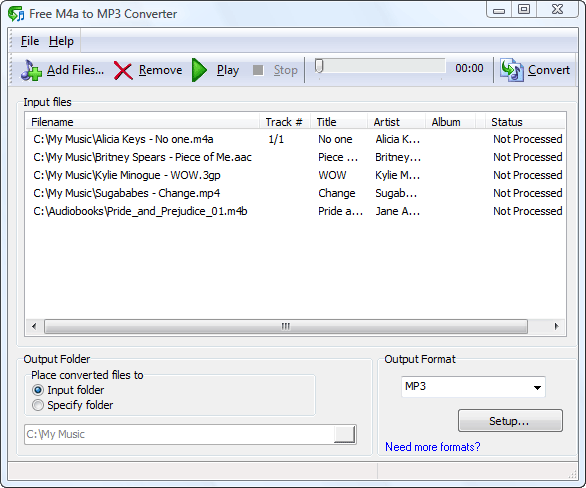 M4a is a popular audio format but can’t be read by most audio players manufactured today. The audio players that could interpret this format are usually expensive. On the other hand, MP3 is a popular format that could play in almost any audio player. That is why M4a files are often converted to MP3 for compatibility. M4a is a popular audio format but can’t be read by most audio players manufactured today. The audio players that could interpret this format are usually expensive. On the other hand, MP3 is a popular format that could play in almost any audio player. That is why M4a files are often converted to MP3 for compatibility.
If you’re looking for a converter, try Free M4a to MP3 Converter 6.0 from Maniac Tools. As the name suggests it’s a free application that will allow you to convert your M4a audio files to MP3. Aside from the widely popular MP3 format users could also convert M4a files into WAV. Other files such as 3GP, M4b and AAC could be converted into MP3 or WAV. The 3GP file is usually in video format but the audio could be extracted and converted into your preferred format.
The interface of the application is very simple. You don’t need to specifically search the file for conversion from the application. There is a drag and drop functionality which improves interaction. The application also allow files to be converted in batches as M4a files are small and would be very inconvenient if you have to convert them one by one.
Aside from being an audio converter, the application could also be used as an audio player. Although it lacks interactivity compared to most audio players, it does the basic job of playing different audio file format. The application also comes in different languages which you can change at will after installation.
If there’s one thing you could ask from the developers of the application, it should be in the increased interface. The bit rate should be part of the front page of the interface. The setup in the lower right side of the application could be easily missed which will not improve the quality of the application.
Check out http://www.maniactools.com/soft/m4a-to-mp3-converter/index.shtml for more info…
Rating: Loading... 1 Comment »
O. James Samson - October 7, 2008
 Mobile entertainment is slowly becoming an important part of everyone’s lives. Their music, movies and pictures have to be with them most of the time because of the constant need to travel. Because of iPod and other mobile entertainment devices, mobile entertainment has become possible. Mobile entertainment is slowly becoming an important part of everyone’s lives. Their music, movies and pictures have to be with them most of the time because of the constant need to travel. Because of iPod and other mobile entertainment devices, mobile entertainment has become possible.
But movies bought in online stores for mobile products are sometimes too expensive it’s not worth it. That is why most have opted to convert DVDs into mobile gadget friendly format such as 3GP (mobile phones) and MP4 (iPod).
ABC 3GP/MP4 is a highly recommended video converter for different reasons. The best reason for downloading this software is on being a freeware. Not a single cent is asked of you to have this software. Originally, this software is released only for 3GP and 3GPP2 format for compatibility for simpler mobile phones. However, the latest version added the MP4 format as mobile phones especially those running with Windows Mobile 5 and beyond could play MP4 files clearer.
The compatible files for the converter have also increased. It is now compatible to almost any video format including the very recent H264. The options for frame rate, video size as well as kbps have also been increased. You could convert your video to as much as 768 kbps. Additional options are still available such as trimming the videos so that you’ll have your preferred clips that would fit in your mobile phone. But in a 3GP format, you can reduce your movies up to 10% and still enjoy the movie with almost the same quality. But even with this update, the interface did not change one bit. You still can preview the videos you are about to convert and view them during conversion. The only small addition is the recommended software from the same maker of the application. You won’t even notice it if you are busy converting your videos.
Check it out at http://www.abcmedia.tv/3gp-converter.htm
Rating: Loading... 2 Comments »
O. James Samson - October 6, 2008
 NotePro is a tool that helps in creating and editing of text files with more options than the default Notepad/WordPad programs that come with Windows. NotePro is very relevant when you are not in need of the power and complexity of a full-fledged word-processor despite the fact that it has many powerful features typically found in a word-processor. This application is simple to use. NotePro is a tool that helps in creating and editing of text files with more options than the default Notepad/WordPad programs that come with Windows. NotePro is very relevant when you are not in need of the power and complexity of a full-fledged word-processor despite the fact that it has many powerful features typically found in a word-processor. This application is simple to use.
NotePro creates and saves Rich Text Format, Word, Windows Write, and HTML files used by Microsoft Word and other word-processors and it handles standard text files. With NotePro, you can have multiple documents open at a time.
The basic Features of NotePro include:
- Absolute control over text appearance.
- Use any TrueType font installed on your system and control the font size and attributes (bold, italic, underscore, or strikethrough)
- Use colored text, including background fills.
- Onscreen, you can quickly increase or decrease text size, add super- or subscript text, and change the text alignment.
- Just like word-processor, NotePro lets you create custom “styles” for your text – define a font, face, attributes, color, and alignment.
- NotePro also has a built-in Spelling Checker,
In general, NotePro is easy-to-use and offers a lot of features. In a little package it possesses nearly all of the most-used features of a word-processor.
Want to check it out? Go to www.crystaloffice.com/notepro
Rating: Loading... No Comments »
O. James Samson - October 6, 2008
 WinLock is a security program for personal or publicly accessible computers running all versions of Windows from 95 to Vista. WinLock ensures that only authorized people can have access to sensitive information on your computer. WinLock is a security program for personal or publicly accessible computers running all versions of Windows from 95 to Vista. WinLock ensures that only authorized people can have access to sensitive information on your computer.
This security tool allows you to put a limit on your users from accessing system resources like Control Panel, Desktop, and system registry, disable Windows hotkeys (such as Alt-Ctrl-Del, Alt-Tab, Ctrl-Esc, etc.), hide the Start button and Taskbar.
WinLock allows you to control the duration of people on your computer. It runs from the system tray and requires a password for access to be granted to the available settings.
This program loads automatically with Windows and allows you to add an optional start up message, provide audio notification, and set the time limit.
WinLock does so many other things like denying unauthorized users access to selected files, applications, and Explorer windows (Recycle Bin, My Computer, etc.), usb and hard drives. It filters Internet content and prohibits access to questionable Web sites.
When this program is enabled, access is denied for unauthorised users except with the use of password.
WinLock can be controlled and configured remotely by means of WinLock Remote Administrator application. WinLock Remote Administrator is the network security solution for Windows networks. It helps quickly configure remote WinLock clients via network, lock remote workstations, and apply security profiles by means of easy-to-use interface.
Below are the functions of WinLock:
- • System restrictions – disable command prompt, Control Panel, Safe Mode, and more…
- • Time-limited access – control how long other users can use the computer
- • Restrict Start Menu – hide the selective Start menu items, block context menus
- • Control Internet access – allow access only to the trusted sites only, and block all others
- • Sofware filter – block access to the downloaders, games, messaging clients, or CD burners
- • Hide drives – hide your system and network drives in Windows Explorer
- • Logging – monitor changes to the Windows shell and writes these changes to the log file
To get more details, browse: www.crystaloffice.com/winlock
Rating: Loading... No Comments »
Tilgore Kraut - October 3, 2008
 A browser for the Video web, search, watch and download all the videos that you need from Youtube, Google Video, Yahoo Video and more. A browser for the Video web, search, watch and download all the videos that you need from Youtube, Google Video, Yahoo Video and more.
Pros: As its name suggests this is an explorer (i.e. a browser) for tube type applications. The word “Tube” used to be shorthand to describe a TV set but now has grown to include any type of video content, especially video content on the Web (think Youtube). The Tube Explorer is a tool that has been designed to enable users to browse, search, and download videos from Youtube, Yahoo! Video, Google Video, MetaCafe, DailyMotion and many many more. It also gives you the ability to save the downloaded videos in a host of formats including 3GP, 3GPP2, MP4, MP3, WMV, AVI, DVD and more. It also allows you to convert between these formats. Additionally it allows you to split a given video into smaller videos and join smaller video fragments into larger files. Batch downloads can be initiated with just a single click.
Although the interface needs improvement it conveniently displays videos from different websites in different folders, in a folder pane. Showing easy to see screen-captures in the main browsing pane and has its own player on the lower left which is a big convenience for people who don’t like to have other player’s loading time slowing them down. The downloaded video manager is a one stop shop for managing the downloaded video content (i.e. copy, move, sort etc.).
Cons: The main limitation is that the interface is a little unattractive. Although one gets used to it over time, it needs sufficient improvement before users who like a certain look and feel to start using it full-time (especially in the Vista era).
{More Info and Download}
Rating: Loading... No Comments »
|
|
|





