Tilgore Kraut - January 18, 2008
 Increase your typing skills so that you can perform any work faster than before. You need not go to any other place to learn typing as you can do it while you’re sitting in your office or home. TypingWeb Amazing Free Typing Tutor 4 can prove to be good assistance for improving your typing skills. It’s has simple user interface that provides you with different levels to learn and then test your skill and make improvements. With its well structured lessons and exercises you would know about your weak points that you can work upon. Increase your typing skills so that you can perform any work faster than before. You need not go to any other place to learn typing as you can do it while you’re sitting in your office or home. TypingWeb Amazing Free Typing Tutor 4 can prove to be good assistance for improving your typing skills. It’s has simple user interface that provides you with different levels to learn and then test your skill and make improvements. With its well structured lessons and exercises you would know about your weak points that you can work upon.
TypingWeb Amazing Free Typing Tutor 4 software opens with a screen that asks for your username and then you can continue onto the next step. On the screen you get the main options placed on the top. With the ‘Main’ option you get the course, lessen, etc are placed at the middle screen from where you can choose and start typing. You can take the step to step lessons for learning the keys and then begin the typing of words and so on. You can even keep see the record of the progress level with the stats that you can even export. Keys option let you learn and memorize the keys. You can change the preferences like enabling the sounds, small fonts, problem keys to be shown, and so on. Make your interface look pleasing by changing the skin according to your choice. You can save your profile and go to the most interesting part of the program the ‘Games’ option. You can select the game that teaches you the typing in a delightful manner. Type the words while playing different games having enjoyment. It’s so much fun to learn typing with TypingWeb Amazing Free Typing Tutor 4.
TypingWeb Amazing Free Typing Tutor 4 software is excellent for learning typing with effortless ease. It covers almost all the aspects that are required to learn and makes typing interesting for the user.
{More info and Download}
Rating:  Loading... No Comments »
Tilgore Kraut - January 18, 2008
 Now you can remember everything from the birthday to the important projects that you need to make or present by the date with the help of TimeBell 1.3 software which will take care of most of your remembering work without fail. It’s easy to use and you are unlikely to experience any difficulty to set the features. Now you won’t forget the meetings with your boss, the subjects that you wanted to discuss with him and of course now you would not be charged as guilty for forgetting your anniversary. Now you can remember everything from the birthday to the important projects that you need to make or present by the date with the help of TimeBell 1.3 software which will take care of most of your remembering work without fail. It’s easy to use and you are unlikely to experience any difficulty to set the features. Now you won’t forget the meetings with your boss, the subjects that you wanted to discuss with him and of course now you would not be charged as guilty for forgetting your anniversary.
The program takes up the current date and time from your PC itself. You need to enter the date and time on which you want to set the reminder for. You can type in the message like ‘Daughter’s Birthday’, ‘Meeting with Boss’, etc to get with the reminder. If you set a time work on a particular file or want to be reminded of some file then you can attach a file with the reminder to be displayed. Select the sound of your choice from the given selection so that it catches your attention you notice the reminder. You can see the list of the reminder set by you with all the details like date, time, message, files to be opened, etc. If you want to Reboot and Shutdown at a specific time, then you just need to set the time for the action to take place. Change the skin of the program to make it look attractive. You can minimize on start and also have the program to start with windows.
{More info and Download}
Rating: Loading... No Comments »
Ciaran Moore - January 18, 2008
 Have you ever been on vacation and trying your best to take a good photo of/with a monument or tourist attraction? But people keep getting in the way of the shot or walking or standing in the way? You could wait, but if its a busy area, you might be waiting a long time! Have you ever been on vacation and trying your best to take a good photo of/with a monument or tourist attraction? But people keep getting in the way of the shot or walking or standing in the way? You could wait, but if its a busy area, you might be waiting a long time!
Now there’s an alternative! Simply take multiple photos, ideally with a tripod or very steady hand.
When you get home, simply go on over to this website to use “Tourist Remover”! How it works is, it stitches the tourist-free areas of your multiple shots together to form one “tourist-free” photo, free of unwanted people in the frame.
No one will ever know that your shot used a little technological help, and you won’t even have to hire any crowd control!
Check it out here.
Rating: Loading... No Comments »
Ciaran Moore - January 18, 2008
 Wouldn’t it be good if you could have one program that would do several useful things for your computer? Things such as optimizing it, cleaning it, and improving speed, reliability, privacy and security? Wouldn’t it be good if you could have one program that would do several useful things for your computer? Things such as optimizing it, cleaning it, and improving speed, reliability, privacy and security?
If this sounds good to you, then you might wanna take Glary Utilities for a test drive. While the name may not sound too exciting, it seems to be a very good, well programmed, well thought out, and most importantly of all, useful piece of software.
Its an all in one utilities suite that has some very useful things that most computer users are sure to find useful at some stage. This includes a disk cleaner for scanning for and removing junk temp files from your computer to free up valuable space. It also has a registry cleaner which so far seems pretty good compared to most ones i’ve tried out, just be careful and try not to delete anything you’re not absolutely sure about. If in doubt, you can make a backup first. Other features enable you to delete empty folders and dead shortcuts. Read the rest of this entry »
Rating: Loading... No Comments »
O. James Samson - January 16, 2008
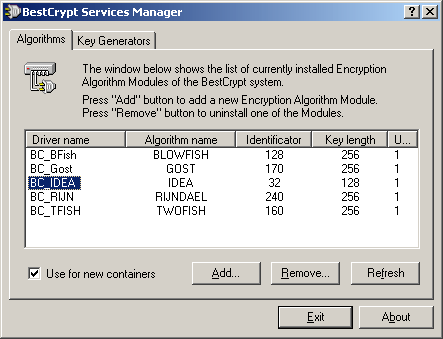
The latest version of the IDEA plug in for the BestCrypt software is now available on the market and the reason that it has become so popular in such a short time is the fact that this is an easy way for you to encrypt things without having to worry about it being too easy to decrypt. The encryption software programs have started to become more popular as the average level of web sophistication increases and users begin to realize that their more important e-mails need to be encrypted at some point. This has spawned a number of excellent software programs such as BestCrypt and those software programs have a number of modules that can be used within them.
This particular module is the IDEA plug in for BestCrypt and it simply uses the IDEA algorithm in order to encrypt the information that you want kept secret. The great thing about this plug in is that it works on all Windows systems so that regardless of what version and structure of Windows you happen to be running at the time, you are still going to be able to use the IDEA plug in when you want to encrypt certain pieces of information. This plug-in has been tried, tested and true for awhile and the latest version makes it just that much better.
More information is available at http://www.iarsn.com/ideaplugin.html
Rating: Loading... 1 Comment »
O. James Samson - January 16, 2008
 The newer version of Paint.NET has finally been released and for the fans of this excellent piece of software it has come not a moment too soon! The newest release of this piece of software has fixed bugs that occurred during installation as well as some poor performance during installation depending on the options that were selected. While I never experienced this when using the software, apparently some people had prolonged wait times of up to 20 minutes during an installation or removal process. The newer version of Paint.NET has finally been released and for the fans of this excellent piece of software it has come not a moment too soon! The newest release of this piece of software has fixed bugs that occurred during installation as well as some poor performance during installation depending on the options that were selected. While I never experienced this when using the software, apparently some people had prolonged wait times of up to 20 minutes during an installation or removal process.
For those of you that are new to this program, Paint.NET is a rather interesting piece of software in the sense that it has become something that is used for something totally different from what it was originally intended for. The authors of Paint.NET wanted it to be a standalone and free replacement for the paint program that comes with windows, but as different versions started to come out and reception to the program began to grow more favourable, the program creators eventually decided on making it into a full-featured program supporting layers, shading and a number of other drawing tools that are either not available in paint or alternatively are available in much more detail in Paint.NET.
More information can be found at http://www.getpaint.net/
Rating: Loading... No Comments »
O. James Samson - January 15, 2008
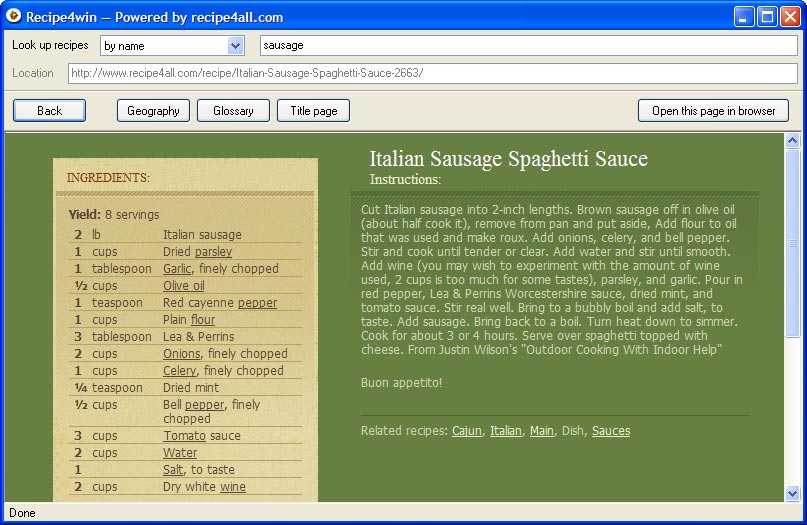 Are you looking for a great way to find all kinds of different recipes for cooking? Well, if so, then the Recipe4win 1.1 software is exactly what you need. This handy piece of freeware was released on January 4th and has quickly become a fan favourite amongst people that have taken the time to download it and install it on their computer. It also comes with an uninstaller, which is more than can be said for many of the freeware programs that are available in today’s world. Are you looking for a great way to find all kinds of different recipes for cooking? Well, if so, then the Recipe4win 1.1 software is exactly what you need. This handy piece of freeware was released on January 4th and has quickly become a fan favourite amongst people that have taken the time to download it and install it on their computer. It also comes with an uninstaller, which is more than can be said for many of the freeware programs that are available in today’s world.
This program is actually quite simple, but at the same time is quite effective. All it does is link up with the central database available at recipe4all.com and it allows you to browse through all of the different recipes available for that website until you find one that will work for you in whatever situation you happen to be in. For example, you can search by specific keywords for a specific recipe, you can search by ingredients that are used in the different recipes or you can even search by geography and the region of the world that a specific recipe comes from. These are all excellent modes for you to use to find that perfect recipe for any occasion and the Recipe4win software engine allows you to do that in record time.
More information about this program is available at http://www.recipe4all.com/software/
Rating: Loading... No Comments »
O. James Samson - January 15, 2008
 One of the most interesting things about writing on free programs that are available is that you can actually take a look at these programs and see what motivates the people that make them. In the case of VicMan Software, the creators of My Pictures 3D, the motivation was what was perceived as being a dull selection of screensavers that were available with the typical Windows system. What started out as a screensaver quickly developed into so much more and the eventual result was released on January 4th and labelled as version 1.2 of My Pictures 3D. One of the most interesting things about writing on free programs that are available is that you can actually take a look at these programs and see what motivates the people that make them. In the case of VicMan Software, the creators of My Pictures 3D, the motivation was what was perceived as being a dull selection of screensavers that were available with the typical Windows system. What started out as a screensaver quickly developed into so much more and the eventual result was released on January 4th and labelled as version 1.2 of My Pictures 3D.
What My Pictures 3D is, quite simply, is an online gallery. This gallery is something similar to what you would see if you walked into a small art gallery near your house that regularly exhibited different works of painters in a single room. You get to walk around the room and look at different paintings and that is exactly what happens in this program as well. The only catch is that instead of paintings, what you will be looking at is different favourites from your particular photo album on your hard drive and in addition to being able to look at them through the use of the program, you can also set the program as your screensaver to have others look at them when your screensaver is on. It is an absolutely spectacular program that is available for free online.
More information can be found at http://www.mypictures3d.com/
Rating: Loading... No Comments »
Ciaran Moore - January 14, 2008
 Comodo Firewall pro is a totally free, award-winning firewall. Comodo Firewall pro is a totally free, award-winning firewall.
I first tried out this program after i realized that the recent versions of ZoneAlarm were slowing up my computer a little too much. While ZoneAlarm is a great program, the version I was using was a little too much of a resource hog on my particular system.
So, in my quest to find a replacement I finally settled on Comodo Firewall as it runs smoothly, easily and doesn’t take up much resources.
The latest version is even better, as it contains “Defense +” an advanced Host Intrusion Prevention System (HIPS) that monitors and protects important system resources and guards against unauthorized system changes such as rootkit installations, memory injections, keyloggers and more. So rather than having 2 separate programs; a firewall and HIPS program. You get both in one!
Apparently, according to some tests conducted, it even surpasses the capabilities of similar paid-for software. Not bad for a freebie huh?
Basically, this is a very good Firewall/Intrusion Prevension System that’s both easy enough for beginners to use and also has plenty of things for the more advanced computer geek types to sink their teeth into if they so choose. It does what it sets out to do and does it well!
Wanna see for yourself? Head on over to the homepage here where theres more details and the free download.
Rating: Loading... 2 Comments »
Ciaran Moore - January 11, 2008
 As you probably know by now (hopefully), its essential these days to have an anti-malware/spyware/adware scanner. Along with the mandatory protection of an antivirus program of course. As you probably know by now (hopefully), its essential these days to have an anti-malware/spyware/adware scanner. Along with the mandatory protection of an antivirus program of course.
A-Squared Free is ,as the name implies, a free scanner for scanning your computer for nasties that may have crept on behind the scenes. It contains a massive database that is very regularly added to, just be sure to update it each time before you run it. I advise doing a full system scan the first time you use it, but you can also use it by right clicking on a folder and choosing it from the context menu to scan that folder. Its extensive and growing database of Trojans, Spyware, Adware, Worms, Keyloggers, Rootkits, Dialers and other such unwelcome guests on your computer makes this another powerful tool in the ongoing job of keeping your computer secure and private.
Its interface is neat, easy on the eyes and simple to use. It currently has over 4 million users, so they must be doing something right!
You can find out more info and download it by clicking right here.
Rating: Loading... 1 Comment »
|
|
|





