O. James Samson - September 7, 2007
 With the advent of wireless internet, what people are seeing more and more often is that the areas around them are full of wireless connections. With people sending data back and forth as well as using wireless for convenience purposes, there is a good chance that some place near you has wireless connections that can be used. Ultimately, it is a great thing to have simply because of the convenience factor, but if you are interested in using some of the wireless signals around you then you really need to know where they happen to be first. With the advent of wireless internet, what people are seeing more and more often is that the areas around them are full of wireless connections. With people sending data back and forth as well as using wireless for convenience purposes, there is a good chance that some place near you has wireless connections that can be used. Ultimately, it is a great thing to have simply because of the convenience factor, but if you are interested in using some of the wireless signals around you then you really need to know where they happen to be first.
For example, if you want to know exactly where the wireless networks in your area are, then you can use the NetStumbler 0.4.0 to find out. It is a program that has the ability to search your area and find out the location of any 802.11b and 802.11a wireless local area networks. In addition to that, it includes GPS functionality so that you can use the two together as a powerful tool for quite literally “stumbling onto the internet.” The name is quite apt in that sense and many people have tried and approved this completely free piece of software.
More information can be found at http://www.stumbler.net/
Rating:  Loading... No Comments »
O. James Samson - September 6, 2007
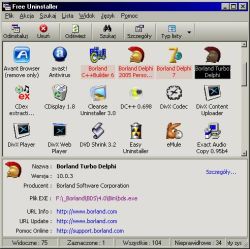 When you take a look at all of the different software pieces out there, what you often see is that there are a number that seem to created for some weird purpose that you wouldn’t really use on any regular basis. The Free Uninstaller is the exact opposite of that; it is a software program that is created with a very common use in mind. When you consider the add/remove program that comes with the Windows software, you can come to the conclusion that there are a lot of faults in it. It doesn’t work all the time and the permissions issues can sometimes really derail any plans you might have had for that annoying piece of software that you just can’t seem to uninstall. When you take a look at all of the different software pieces out there, what you often see is that there are a number that seem to created for some weird purpose that you wouldn’t really use on any regular basis. The Free Uninstaller is the exact opposite of that; it is a software program that is created with a very common use in mind. When you consider the add/remove program that comes with the Windows software, you can come to the conclusion that there are a lot of faults in it. It doesn’t work all the time and the permissions issues can sometimes really derail any plans you might have had for that annoying piece of software that you just can’t seem to uninstall.
There is actually a dual purpose to this program. First, it replaces the add/remove program that comes with Windows with a far more effective uninstaller; one that can remove any application that was installed with the Windows operating system. In addition to that, it also has the ability to remove entries from the uninstall list; fixing the other big problem with Windows add/remove software. Have you ever noticed a piece of software on the list that you just removed and tried to remove it again only to be told it wasn’t a real file? That’s a very frustrating situation and the Free Uninstaller 1.1 can be used to make sure it doesn’t happen again.
More info can be found at http://www.freeuninstalleren.glt.pl/
Rating: Loading... No Comments »
O. James Samson - September 6, 2007
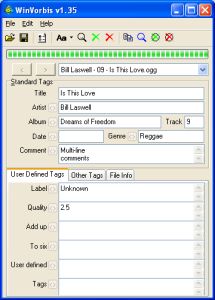 One of the coolest things ever developed for the use of online music files is the concept of Ogg Vorbis tags. These are tags attached to audio files that allow you to give information to other people that might be using the same file later on to listen. For example, if you’ve ever seen a file pop up in your Windows Media Player with information regarding the name of the artist, the title of the song, the year of publishing, the CD cover or anything else, what you were looking at was very likely a Vorbis tag! One of the coolest things ever developed for the use of online music files is the concept of Ogg Vorbis tags. These are tags attached to audio files that allow you to give information to other people that might be using the same file later on to listen. For example, if you’ve ever seen a file pop up in your Windows Media Player with information regarding the name of the artist, the title of the song, the year of publishing, the CD cover or anything else, what you were looking at was very likely a Vorbis tag!
Well, now you can create and maintain your Vorbis tags through the use of the WinVorbis 1.60 editor. It is a multi-file editor that really makes the process of encoding and entering tags for a whole CD’s worth of songs as easy as possible. Not only does it allow you easy editing of the typical artist and title tags, but it also allows you define up to a maximum of six other tags specifically for use with your CD files. It is about as user friendly as can be and the reason that so many people like it is specifically because it tags music tagging and makes it extremely easy.
Oh and by the way it’s free as well; more information on it can be found at http://winvorbis.stationplaylist.com/
Rating: Loading... No Comments »
Ciaran Moore - September 6, 2007

jv16 powertools is an all in one program containing various tools and utilities for your computer. It contains a registry cleaner, file wiper, duplicate file finder and lots more.
The main reason I was trying it out was because the registry cleaner seems to be different from any I’ve ever tried in the past. Apparently it has “Stateful registry cleaning” which is different from most registry cleaners and you can read more on that on this page here.
The numerous other utilities may be useful at times but the interface can be a little confusing, so i wouldn’t recommend this software for those who aren’t too knowledgeable about the inner workings of their pc. But if you’re computer savvy and looking for an all in one solution to some common computer tasks,it’s definitely worth checking out, as long as you know what you’re doing.
Click here for the homepage with the full list of features and detailed info on each one.
Rating: Loading... No Comments »
O. James Samson - September 5, 2007
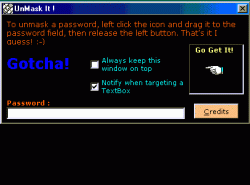 One of the things that people that have used computers for a long time are aware of is how annoying it can be to retrieve passwords that you have lost. While many websites are now coming to their senses and using e-mail retrieval systems, at the same time many are not and therefore it can be difficult to figure out if the stuff behind the asterisks is actually the stuff that you want. One of the things that people that have used computers for a long time are aware of is how annoying it can be to retrieve passwords that you have lost. While many websites are now coming to their senses and using e-mail retrieval systems, at the same time many are not and therefore it can be difficult to figure out if the stuff behind the asterisks is actually the stuff that you want.
Well, not you can use this handy dandy piece of software to make sure that you can figure out exactly what is beyond the asterisks in a password field. It has an extremely easy to use interface and extremely easy instructions to go along with them. If you want to use it to find out what a set of asterisks really stands for, then you can click and drag the icon to the password and then release to find out what the password actually is. It will retrieve the password from any password field.
This is a handy piece of software because it allows you to figure out what something is, even after you’ve already forgotten. More information can be found on the publisher’s homepage.
Rating: Loading... No Comments »
O. James Samson - September 5, 2007
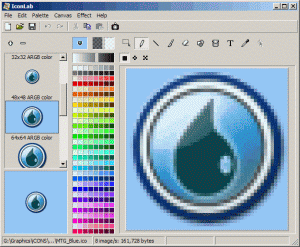 Icons are one of the staple items of today’s world. It has even gotten to the point where to the left of the URL in most modern browsers, you can actually see an icon that represents the website you are visiting. It is really quite remarkable if you think about it, since icons were nowhere to be found just a few years ago. However, web design of any serious nature requires the need for icon creation and that of course requires the need of specialized software specifically designed to handle the editing difficulties of smaller icons. Icons are one of the staple items of today’s world. It has even gotten to the point where to the left of the URL in most modern browsers, you can actually see an icon that represents the website you are visiting. It is really quite remarkable if you think about it, since icons were nowhere to be found just a few years ago. However, web design of any serious nature requires the need for icon creation and that of course requires the need of specialized software specifically designed to handle the editing difficulties of smaller icons.
Enter the IconLab 1.0. Often described as being one of the most powerful free icon editors out there, it is actually a small program when all is said and done. The size belies the strength in this case however as it allows you to change icons in many different ways and supports formats up to 32-bit. You can even change the file types of different icons and of course in addition to that you can edit them in any way that you deem necessary. All of the typical drawing effects are available.
More info available right here.
Rating: Loading... No Comments »
O. James Samson - September 5, 2007
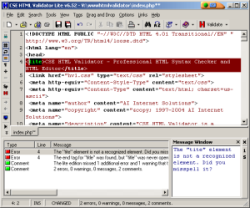 When you take a look at all of the different coding languages used in internet development today, you can see that there are quite a few indeed. If you ever want to be good at web development, it goes beyond learning HTML nowadays. You need to know XML, XHTML, CSS, SQL, PHP, ASP and a number of other programming languages. With new languages emerging all the time you are going to find it becoming harder and harder to keep knowledge of all of the tags from all of the languages in your head at once. When you take a look at all of the different coding languages used in internet development today, you can see that there are quite a few indeed. If you ever want to be good at web development, it goes beyond learning HTML nowadays. You need to know XML, XHTML, CSS, SQL, PHP, ASP and a number of other programming languages. With new languages emerging all the time you are going to find it becoming harder and harder to keep knowledge of all of the tags from all of the languages in your head at once.
Therefore, software is necessary. Even if you don’t want to work in a web development program like Dreamweaver or FrontPage, you should still use software to check your code. Programming different parts of code for hours on end is going to make anyone make the odd mistake here and there, so you want to be absolutely sure that anything you take a look at also gets looked at by an impartial set of eyes. The CSE HTML Validator Lite 8.0130 is something that you definitely something you want to look at because it is exactly that; an impartial pair of eyes. It will tell you how good your code is and whether or not there are any mistakes present. It will also show you the line numbers of those mistakes and that information alone is priceless in allowing you to design your dream website.
More information can be found at http://www.htmlvalidator.com/
Rating: Loading... No Comments »
O. James Samson - September 4, 2007
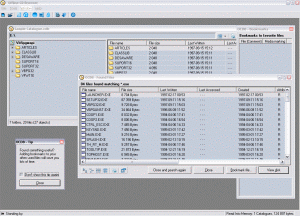 When you think about it, part of making software for the computer should be in making tasks that people almost don’t even think about when they do them easier. In other words, if you can take an everyday task that a person has to do and find a way for them to make that task easier, then you have really accomplished a great feat in your software design career. When you think about it, part of making software for the computer should be in making tasks that people almost don’t even think about when they do them easier. In other words, if you can take an everyday task that a person has to do and find a way for them to make that task easier, then you have really accomplished a great feat in your software design career.
Take the example of file browsing. If you’re like most computer savvy users, what you are going to find is that you have a number of different CDs with a lot of data on each CD. Every CD that you’ve made that contains files from Microsoft office, programs, software and games are all going to be CDs that you might need to browse at some point to find a specific file. If you’ve got hundreds of CDs to look at, this can become a real problem in terms of loading and unloading a CD each time you want to look at its contents.
If you have the Offline CD Browser however, what you can do is make copies of your CDs and save images of their file contents within the program itself. Then, when you need to find a file, you can look through all of your CDs in moments because of the file structures having been saved on the hard drive. You can’t activate any of the files, but searching through them is a breeze.
More information can be found at http://www.anderssoftware.com/ocdb/
Rating: Loading... 1 Comment »
O. James Samson - September 4, 2007
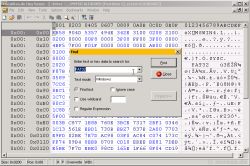 Tiny Hexer has been one of the most popular free hex editors because of all of the functionality that it has. When you are using Tiny Hexer, you can do almost anything you’d like to a binary file. You can edit multiple files in .mdi format to your heart’s content with the software as well as use it to take a look at sectors of any data medium that you can think of (hard drive, disk drives and many others). You can even use the Tiny Hexer to change information regarding the virtual memory of processes activated on your system. Tiny Hexer has been one of the most popular free hex editors because of all of the functionality that it has. When you are using Tiny Hexer, you can do almost anything you’d like to a binary file. You can edit multiple files in .mdi format to your heart’s content with the software as well as use it to take a look at sectors of any data medium that you can think of (hard drive, disk drives and many others). You can even use the Tiny Hexer to change information regarding the virtual memory of processes activated on your system.
In addition to all of that great functionality, Tiny Hexer as a piece of software was also something that was scriptable as well as something that could be used to view plugin data structures in browsers. However, there are a number of people that use the Tiny Hexer software that don’t need any of the functionality provided by either the scripting or the plugin options and therefore these people can benefit from the use of the Tiny Hexer Medium Edition software. It has all of the editing abilities that users of the original Tiny Hexer will expect, but without any of the scripting or plugin support for a leaner piece of software.
More information available at http://www.mirkes.de/en/freeware/tinyhex.php
Rating: Loading... No Comments »
O. James Samson - September 4, 2007
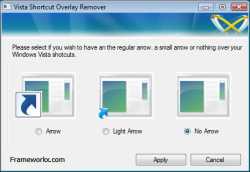 If you’ve been using any version of Windows, then you will probably be familiar with the mechanism that Microsoft uses to distinguish true icon pieces from icon pieces that have been placed where they are as shortcuts to other icon pieces located elsewhere throughout the user’s hard drive. The mechanism for signifying the difference between a true icon and a shortcut is a small arrow that is put on overlay to the icon itself. This arrow is easily distinguishable and is used by Windows users to figure out which of their icons are shortcuts and which are not. If you’ve been using any version of Windows, then you will probably be familiar with the mechanism that Microsoft uses to distinguish true icon pieces from icon pieces that have been placed where they are as shortcuts to other icon pieces located elsewhere throughout the user’s hard drive. The mechanism for signifying the difference between a true icon and a shortcut is a small arrow that is put on overlay to the icon itself. This arrow is easily distinguishable and is used by Windows users to figure out which of their icons are shortcuts and which are not.
Of course, some users might want to remove this arrow for aesthetic purposes, simply because some people don’t like the look of it. While that’s been fine up until now, one of the vexing things about Windows Vista (one among many) is that there is no mechanism in place to actually remove that arrow. And because of the design scheme of Windows Vista, the arrow can actually be more annoying than in previous versions; especially to people that want it gone.
Well, if you want your arrows gone with minimal fuss, then take a look at the Vista Shortcut Overlay Remover 1.3. It is a program that allows you to either leave the shortcut arrows as they are, dull their effect and lighten their colour, or alternatively remove them altogether. It is a nifty little program to add to your hard drive and of course it is completely free to use.
More information available at http://www.frameworkx.com/frameworkx/content.aspx?ch=60&id=531
Rating: Loading... No Comments »
|
|
|





