O. James Samson - March 28, 2014
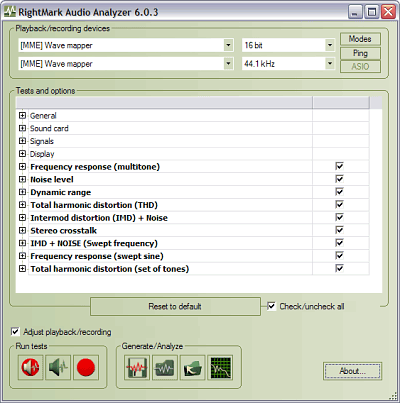 Are you searching for a handy piece of software that can perform quality analysis for any audio equipment connected to your computer? Then this might just be the review you need because it’s about a program called RightMark Audio Analyzer. Are you searching for a handy piece of software that can perform quality analysis for any audio equipment connected to your computer? Then this might just be the review you need because it’s about a program called RightMark Audio Analyzer.
What’s the deal with this program?
RightMark Audio Analyzer is an independent audio measurements open-source project. The test suite performs various tests of electroacoustical performance of sound cards and other real-time audio devices. Testing is accomplished by playing the test signals and recording them after they pass through the testing chain. There are several tests that you can perform. Frequency response and total harmonic distortion allow speaker system testing, but you also have tests for your system subwoofer and other devices.
All the playback or recording devices are automatically detected by RightMark Audio Analyzer and displayed in a drop-down menu, allowing you to choose the item you want to test, as well as the sampling modes (rate and capacity). The main user interface of the program bundles all the configuration options and the test lists. Before playing the test signals, you can choose to normalize them, in order to eliminate different signal levels.
Any downside?
The program’s user interface is a bit difficult to understand.
Want to check it out? Visit Audio.RightMark.org.
Rating:  Loading... No Comments »
O. James Samson - March 28, 2014
 Are you looking for a program or media player that has all the features that you need, with the ability to play virtually everything that you need? Are you also looking for a program that won’t give you any problem when it comes to understanding its interface? Then Media Player Classic is one program you should take a look at. Are you looking for a program or media player that has all the features that you need, with the ability to play virtually everything that you need? Are you also looking for a program that won’t give you any problem when it comes to understanding its interface? Then Media Player Classic is one program you should take a look at.
Media Player Classic – BE is a free and open source audio and video player for Windows. It is based on the original “Media Player Classic” project (Gabest) and “Media Player Classic Home Cinema” project (Casimir666), but contains additional features and bug fixes.
The publisher has done a lot of work to this new version, and it now includes a number of updates such as the following: Renumbered versions – now it consists of three digits (MAJOR.MINOR.PATCH); MPCVideoDec – disable DXVA for WMV3 Complex profile; libpng 1.7.0 b35 git-3ac960f1; Fixed crash when closing a window settings file associations when called from a UAC; fixed changing settings interface; and some menu items are not marked as active.
Media Player Classic is lightweight, and easy to use. It does not have any downside.
Want to check it out? Visit SourceForge.net.
Rating: Loading... No Comments »
O. James Samson - March 28, 2014
 Do you own a cyber cafe and desire a program that comes complete with management features? Maybe you should read this review about TrueCafe because it might just be what you have been looking for! Do you own a cyber cafe and desire a program that comes complete with management features? Maybe you should read this review about TrueCafe because it might just be what you have been looking for!
What’s the big deal about TrueCafe?
TrueCafe is a friendly cyber cafe software with a complete set of features for cyber cafe management: Wi-Fi billing, thin clients support (NComputing, Windows Terminal Server), tickets, license keys, pre-paid and post-paid sessions, point-of-sale, a terminal protection, print charging, URL log and traffic calculation, reports, etc.
You can even charge the customers of your cafe, club, shop, hotel, etc. when they use your Wi-Fi hotspot from their Wi-Fi laptops. The software also allows you to cut down your game licensing expenses using the license key (CD-key) management system, automatically charge your customers for monochrome and color printing, organize a chat between operator and customers, browse a terminal screenshot, task manager and volume control. Sell items to walk-in customers, and make your unique receipt design.
You can also use TrueCafe Client software to lock cyber cafe terminals and display customer session info, remotely turn on, shutdown or restart terminals, start or terminate any application on a terminal, configure a list of applications that a user can start. Once you have it installed on your system, it allows a customer to order items from a terminal. Setup any imaginable pricing model.
Any downside?
TrueCafe for 1 PC costs $30. The upgraded version for 4 PCs and up to 10 Wi-Fi connected devices will cost you nearly a hundred bucks ($99.90).
Want to check it out? Visit TrueCafe.net.
Rating: Loading... No Comments »
O. James Samson - March 27, 2014
 Are you searching for an easy to use program designed for the creation and burning of ISO files, as the name implies. But it packs other useful features as well? Then you should consider a program like ISO Workshop; and you can find out more by reading the review. Are you searching for an easy to use program designed for the creation and burning of ISO files, as the name implies. But it packs other useful features as well? Then you should consider a program like ISO Workshop; and you can find out more by reading the review.
What’s the big deal about ISO Workshop?
ISO Workshop is a free application specifically designed to facilitate disc image management, conversion and burning operations. The program has a very simple user interface that lets you focus on the most important aspects of the process, allowing the program to do the rest.
ISO Workshop’s user interface is represented by a common window with a well-organized layout which enables you to create ISO images from local files and folders, by specifying a name, output directory and type (CD, DVD, Blu-ray disc, Bridge, DVD-Video, or Boot). To burn an ISO image to disc, all you have to do is select the destination drive (in case you have multiple CD/DVD writers), as well as finalize the disc (a requirement by most media players) and make it eject automatically when the task is done.
Does the program have any downside?
The program offers to change or install software or components such as browser toolbars that users may not require.
ISO Workshop is free for private use, still the Business Edition would cost you $19,95.
Want to check it out? Visit GloryLogic.com.
Rating: Loading... No Comments »
O. James Samson - March 25, 2014
 Want a program that will easily help you rename multiple files in one swoop? Do you also want such a program to come with all the features that can easily be customized just for your use? Then what you need is a program known as EF Multi File Renamer. Want a program that will easily help you rename multiple files in one swoop? Do you also want such a program to come with all the features that can easily be customized just for your use? Then what you need is a program known as EF Multi File Renamer.
What is EF Multi File Renamer?
EF Multi File Renamer a versatile tool for comfortable renaming of numerous files or whole directories (including subfolders) in a processing step. Select the rule(s) you need for the current task from an extensive set of predefined rules. Each rule has its individual settings. Renaming tasks can be implemented clearly with a minimum of efforts.
With EF Multi File Renamer, defined rules sets can be saved and used again; and because you can deactivate individual rules, EF Multi File Renamer offers a great variety of flexibility and function. The position of each rule in a set can be easily changed. Some of the important features in the program include the following: clear, easily understood definitions, from simple to complex renaming rules, with multiple options. Rule sets can be saved and used again later; undo the last renaming operation; recursive processing of subfolders and the files contained in them; etc.
Any downside?
EF Multi File Renamer has a 30 day trial limitation. Full version license would cost you $15.
Want to check it out? Visit Efsoftware.com
Rating: Loading... No Comments »
O. James Samson - March 25, 2014
 As a busy executive who always have a lot of schedules lined up for the day or week, one of the things you need to do is get yourself organised. What that means is that you should get a calendar that contains features that will enable you plan things ahead; a kind of personal assistant if that is what you choose to call it. One program you can use when it comes to planning ahead is Rainlendar. As a busy executive who always have a lot of schedules lined up for the day or week, one of the things you need to do is get yourself organised. What that means is that you should get a calendar that contains features that will enable you plan things ahead; a kind of personal assistant if that is what you choose to call it. One program you can use when it comes to planning ahead is Rainlendar.
What is Rainlendar Lite?
Rainlendar is a feature rich calendar application that is easy to use and doesn’t take much space on your desktop. The application is platform independent so you can run it both on Windows and on Linux. The appearance can be customized with skins and you can even mix different skins together.
Rainlendar helps you in a lot of ways including the following: supports events and tasks which both are kept in separate lists; notifies you in advance before the event is due so that you don’t forget your important events; data is stored in the standard iCalendar format (RFC2445) which is supported by most calendar applications; look and feel of the calendar can be changed with skins; translated to over 50 different languages so you can use it in your native language; etc.
Any downside?
Rainlendar is a great program that does not have any downside.
Want to check it out? Visit Rainlendar.net.
Rating: Loading... No Comments »
O. James Samson - March 25, 2014
 Any program that will simplify the way you do things especially when it comes to doing a lot of things on Windows is worth a try; and that is why having a program like Windows Post-Install Wizard (WPI) is not a bad program. Find out more about what the program is all about and what it can offer you. Any program that will simplify the way you do things especially when it comes to doing a lot of things on Windows is worth a try; and that is why having a program like Windows Post-Install Wizard (WPI) is not a bad program. Find out more about what the program is all about and what it can offer you.
What is the big deal about Windows Post-Install Wizard (WPI)?
Windows Post-Install Wizard (WPI) is a hypertext application designed for giving users choice. While Windows XP offers many ways of customizing the setup process out of the box, its major drawback is the lack of being able to select which applications an end user may install.
Formerly, end users and administrators needed to either download the files manually or create overly complex scripts that could only be used once. This allows you to create one image, which can then be custom configured, and optionally, automated, so that end users can install any applications that have been configured into WPI.
Windows Post-Install Wizard is also commonly used to add many applications to your windows installation disks. This way you can simply automate the complete process of Windows and program installations.
Want to check it out? Visit Wpiw.net
Rating: Loading... No Comments »
O. James Samson - March 25, 2014
 The benefits of watching free TV online are quite amazing especially when you have the right program already installed on your system. Let’s just say that is precisely why you need to read this review about ChrisPC Free Anonymous Proxy. The benefits of watching free TV online are quite amazing especially when you have the right program already installed on your system. Let’s just say that is precisely why you need to read this review about ChrisPC Free Anonymous Proxy.
What’s ChrisPC Free Anonymous Proxy all about?
ChrisPC Free Anonymous Proxy is a powerful software application with a friendly and ergonomic user interface that allows you to surf anonymously online and enjoy watching free TV and on-demand television when living abroad, travelling, on business or holiday. Home who are users looking for greater security and privacy can use ChrisPC Free Anonymous Proxy to ensure privacy from their internet surfing. The Expat Internet Browsing Add-on enables you to gain access while abroad to popular websites like Hulu.com, Netflix.com, BBC iPlayer, ITV Player.
Also you can watch live tv, full episodes and on-demand television whilst overseas from ABC Full Episode Player, CBS Full Episodes, Dish Online, FX Networks, NBC Video, RTE Player, STV Player, LiveStation, SeeSaw, PlayTV.fr, Rai TV Italy, CBS, CBC Television, Global TV, FOX on Demand, British Eurosport Player, TF1, M6 Replay, W9 Replay, RTE Player, RTVE, Setanta Sports Canada, View TV, Zattoo, Wilmaa, TV.com and more. Watch your favourite TV programs anywhere.
Want to check it out? Visit Chris-PC.com.
Rating: Loading... No Comments »
O. James Samson - March 24, 2014
 Do you want a simple video editor designed to easily help you cut, filter, and encode? Do you also wish for that program to have the kind of features that has support for a lot of files including AVI, DVD compatible MPEG files, and many more? Then what you need is Avidemux. Do you want a simple video editor designed to easily help you cut, filter, and encode? Do you also wish for that program to have the kind of features that has support for a lot of files including AVI, DVD compatible MPEG files, and many more? Then what you need is Avidemux.
What’s the big deal about Avidemux?
Avidemux is a free video editor designed for simple cutting, filtering and encoding tasks. It supports many file types, including AVI, DVD compatible MPEG files, MP4 and ASF, using a variety of codecs. Tasks can be automated using projects, job queue and powerful scripting capabilities. Avidemux is also very easy to use especially if you are that kind of user that is already used to video editing and cutting. All you need to do is spent a couple of minutes with it to find out how it works; and the rest is easy.
Avidemux is a program that is also available for Linux, BSD, Mac OS X and Microsoft Windows under the GNU GPL license. The program was written from scratch by Mean, but code from other people and projects has been used as well. Patches, translations and even bug reports are always welcome.
Any downside?
The publisher is yet to fix the MPG audio sync bug among a couple of others.
Want to check it out? Visit Fixounet.Free.fr.
Rating: Loading... No Comments »
O. James Samson - March 24, 2014
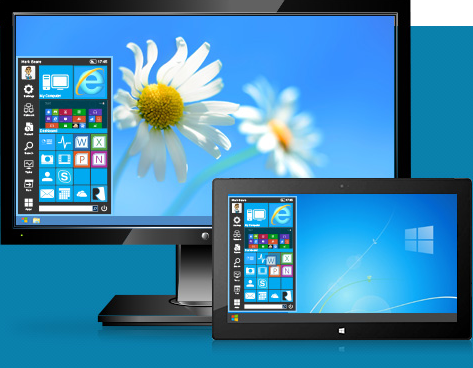 Did you know you can actually enhance the start menu of your Windows 7 or Windows 8 to make it look even more beautiful? Did you know that there is an application built or designed just for that purpose? The answer to those questions is yes; and that is with a program like Start Menu Reviver. Did you know you can actually enhance the start menu of your Windows 7 or Windows 8 to make it look even more beautiful? Did you know that there is an application built or designed just for that purpose? The answer to those questions is yes; and that is with a program like Start Menu Reviver.
What is the big deal about Start Menu Reviver?
Start Menu Reviver enhances Windows 7/8 by reviving a fully functional Start Menu with an attractive Metro-style interface to enable maximum productivity using your Windows Desktop screen. The software retains everything from the original Windows start menu and improves your experience by offering you Essential System Controls, Customizable Shortcut Tiles and other Must-Have Features to help you access and manage all your files, applications and PC settings a lot faster and from one central location. It is also touch-optimized and works with Windows 8 based tablet computers.
One great thing about this software is that it is not only very easy to use, but also easy to install. Start Menu Reviver is one of the most amazing programs designed to make you enjoy your Windows 7 or 8; it simply makes it more beautiful.
Want to check it out? Visit ReviverSoft.com.
Rating: Loading... No Comments »
|
|
|





