O. James Samson - September 8, 2013
 Feeling frustrated that you don’t know where and how to look for your favorite programs on your Windows 8 PC? Well, I’ve found a very good way to relieve you (and other users) of such frustration. Here it is – StartIsBack. Feeling frustrated that you don’t know where and how to look for your favorite programs on your Windows 8 PC? Well, I’ve found a very good way to relieve you (and other users) of such frustration. Here it is – StartIsBack.
What is StartIsBack?
StartIsBack returns Windows 8 a real fully featured start menu and start button, behaving exactly like the ones in Windows 7. It radically improves desktop usability and makes new Start screen clutter-free. It is fully native lightweight zero-privileges program, cheap and fair, fast, stable and secure.
It is an extremely tiny application that allows you to assign the classical Start button and Start menu to Windows 8. It packs a few configuration settings that can be handled by users of any level of experience.
The side menu of this application is transparent and simply highlights every new program in the list unlike other similar apps that return the old Start menu and button. It can also save your searched items (if it was previously indexed by Windows).
It is extremely lean running and does not put a strain on the computer’s overall performance, as it uses a pretty low amount of CPU and system memory. It is highly responsive to key strokes and mouse commands. It does not hang, crash or display error dialogs.
StartIsback, the author of this application, added the following new features to this version: New: Latvian, Bulgarian translation, Fixed: minor configuration problems and Updated group policy file.
To find out more about this awesome application, please go to StartisBack.
Rating:  Loading... No Comments »
O. James Samson - September 7, 2013
 if you like saving your large collection of favorite music then you should definitely check out MediaMonkey. if you like saving your large collection of favorite music then you should definitely check out MediaMonkey.
What is MediaMonkey?
MediaMonkey is an easy-to-use music manager and media jukebox for serious music collectors and iPod users. MediaMonkey catalogs your CDs, OGG, WMA, MPC, FLAC, APE, WAV and MP3 audio files. It can also be used to search for missing Album Art and track information via Freedb and the web, and includes an intelligent tag editor and an automated file and directory renamer to organize your music library.
It includes a CD ripper, CD Burner, and audio converter for saving music, and manual or automated playlist editors for creating music mixes. Its player automatically adjusts volume levels so that you don’t have continually fiddle with the volume control and supports hundreds of Winamp plug-ins and visualizations; or if you prefer, it can use Winamp as the default player. It also includes portable audio device synchronization that allows you to quickly synch tracks and playlists with iPods and other portable audio devices.
Ventis Media Inc., the publisher of this program has added the following ne features to this version: Fixed [Burning / Disc Handling] Connecting some devices triggers a ghost CD drive entry in Tree; Fixed [Burning / Disc Handling] Burn Wizard: Returing back to ‘Edit CD/DVD/BD content’ page is buggy (regression in 4.1); Fixed [DB/FileMonitor] Artist node fails to display Albums without an ‘Album Artist’; Fixed [DLNA/UPnP] UPnP connection issues[Framework: Scripts/Extensions] PlaylistByID and RelatedObjectID should be 0 for Playlists node, but not -1.
Downsides
A bloatware. While it would a great app for music management, but I wouldn’t use it as a media player. As a freeware, it is still okay.
To learn about this application, visit MediaMonkey.
Rating: Loading... No Comments »
O. James Samson - September 3, 2013
 We sometimes need to scan and digitize hard copy documents. The challenge usually is that the resultant copy contains far less details and is often too large to be distributed online. WinDjView was designed to address these issues. We sometimes need to scan and digitize hard copy documents. The challenge usually is that the resultant copy contains far less details and is often too large to be distributed online. WinDjView was designed to address these issues.
What is WinDjView?
WinDjView is a fast, compact and powerful DjVu viewer for Windows with continuous scrolling and advanced printing options. It is an advanced image compression technology that makes the process of scanning and digitizing paper documents in a format that captures enough detail to be useful but in files small enough to distribute online very simple and easy.
With this application, you could easily make available tons of books, magazines, and other important stuff that otherwise would come in files much too large to be hosted. It has a tabbed, browser-like interface with a typical Windows toolbar and a scrolling side panel displaying file thumbnails. The top tabs function like browser windows, displaying selections, while side tabs access functions like Search Results and Bookmarks.
Some of the main features of this program are: Supports all popular Windows versions (8, 7, Vista, XP, 2000, Server 2008, Server 2003). It has tabbed document interface. Alternatively it can open each document in its own window. Continuous or single page layout, with an option to group facing pages. It supports dictionaries that translate words under mouse pointer. It has Text searching and copying abilities among several other features.
Andrew Zhezherun, the author of this application, has added a new feature to this version: WinDjView 2.0.2 fixes a few bugs of the previous version.
To know more about this application, please go to WinDjView at Sourceforge.
Rating: Loading... No Comments »
O. James Samson - September 3, 2013
 Do you own a small business downtown or manage a restaurant and you’re searching for an application that allows you to more efficiently and effectively manage your inventory and invoicing? Get iMagicInventory! Do you own a small business downtown or manage a restaurant and you’re searching for an application that allows you to more efficiently and effectively manage your inventory and invoicing? Get iMagicInventory!
What is the big deal about this program?
iMagicInventory puts you in full charge of your inventory and invoicing needs. It helps you to save time, manage customers more effective and puts you several steps ahead of your competition. What can this program do for you? You can create invoices within minutes. Its intelligent reordering system allows you to order for new items way ahead of time.
Its reporting feature helps you to analyze your invoices and track your sales. Using this program, you can manage tables and create bookings in a matter of seconds, view arriving customers and update status of booking. You can create databases for your customers, track all your inventories in several locations and manage your stocks better and more effectively. It offers full barcode support for many barcode scanners. Its other features are: Complete inventory and stock management, quickly create invoices, automatic generations of reorder items which help to create repeat customers, maintain a client database, import existing inventory, strong security access, support multiple users and interactive reporting.
iMagic Software, the makers of this software, have added the following new features to this version: GUI Updates, New Barcode Printing Options, New Export Options and Report Updates.
If you use invoices and inventories, this is one application you most definitely should have.
To learn more about this amazing program, please go to iMagicInventorySoftware.com.
Rating: Loading... No Comments »
O. James Samson - September 2, 2013
 Losses are an inevitable part of life. No matter how careful you are, they just happen. What do you do when you lose your entire music, video or picture gallery on your iPod? Not to worry. TouchCopy to the rescue. Losses are an inevitable part of life. No matter how careful you are, they just happen. What do you do when you lose your entire music, video or picture gallery on your iPod? Not to worry. TouchCopy to the rescue.
TouchCopy allows users to copy songs, playlists, podcasts, and videos from their iPod, iPhone or iPad to their PC or directly into iTunes. This is a ‘must have application’ for anyone that uses iPod, iPhone or an iPad. It allows you to backup multimedia files, apps, messages, contacts, audio books, call logs, calendars and so on. If your music, photos, apps and videos are still available on your iPhone, iPad or iPod – TouchCopy can retrieve all of these and more from your device and safely restore your iTunes library.
And been a smart application, it will prevent iTunes from attempting to re-sync your device while TouchCopy is running. It has a search function which allows you to save music to a computer or transfer it into iTunes as a playlist and a backup option, enabling you to save all their iPod music, movies and playlists at the touch of a button.
In a few simple click, TouchCopy would help you retrieve your iTunes content back – the entire content – your Playlists, Videos, Podcasts, Photos, Apps, Games, iBooks, Contacts, Calendars, Notes, Messages. So even when you PC is corrupt and requires to be formatted, you can be rest assured that you lost nothing on your iPod, iPhone or iPad.
Unlike other similar applications, TouchCopy can transfer all the data stored on your iOS device to your PC (not only the music and videos). Thus, you can use it to extract and copy your SMS conversation logs, voicemails, address book entries, calendars, notes and ringtones. In addition to this, it can also backup content to internal or external hard drives.
Some of the features of this application are: Transfer iPhone and iPad Apps to iTunes. Backup your Messages. Transfer your iPhone SMS, MMS and iMessages. Backup iPhone Contacts. Transfer iPhone Contacts. Transfer books from iPhone, iPod Touch or iPad. TouchCopy enables disk mode on iPod Touch, iPhone or iPad.
This is an amazing application to have if you use iPod, iPhone or an iPad.
To learn more about this awesome application, please go to WideAngleSoftware.
Rating: Loading... No Comments »
O. James Samson - August 31, 2013
 Are you an average or above average seller on ebay? What if there were an application that saves you time and help increase sales, would you be interested? If yes then take a look at eBay Turbo Lister. Are you an average or above average seller on ebay? What if there were an application that saves you time and help increase sales, would you be interested? If yes then take a look at eBay Turbo Lister.
What is eBay Turbo Lister?
eBay Turbo Lister is a free listing tool for medium to high volume sellers. It allows you to you create professional-looking listings, as well as upload and edit items in bulk.
Some of the features of this program are: Enter all your item information offline, then upload them all at once, Change formats or add item specifics of multiple items at one time, Duplicate and copy existing listings to create new items in your inventory. You can also use it to format text with a few clicks of your mouse, Make changes to items directly in main grid and Sell similar and Relist items directly in application.
Other features include: Remove fields that you don’t use in the listing form, Find and Replace makes editing items easier and Gain more control over your listings with the Listing Activity view. Read the rest of this entry »
Rating: Loading... No Comments »
O. James Samson - August 31, 2013
 Are web images not looking as sharp and impressive as you have always wanted them to be? Are you looking for an easy to use application that has all it takes to enable you compress media and other vital files? Then RIOT – Radical Image Optimization Tool is what you should be looking at. Are web images not looking as sharp and impressive as you have always wanted them to be? Are you looking for an easy to use application that has all it takes to enable you compress media and other vital files? Then RIOT – Radical Image Optimization Tool is what you should be looking at.
What’s RIOT- Radical Image Optimization Tool?
RIOT – Radical Image Optimization Tool is a free program designed to efficiently optimize images for the Web. Saving images for web/email/other media with the best compression ratio and quality is a difficult task if you don’t have the right tools. Choosing the right format then choosing the right parameters are the key factors of smaller files. Previewing the resulting image and the projected filesize will help the user choose the best settings. This kind of image optimization software is often called “Save for web”.
RIOT is a multi-tool that has an easy to use interface to compare the original with the optimized image in real time and instantly see the resulting file size. This multi tool optimizer is lightweight, fast and simple to use, yet powerful for advanced users. The application can be integrated with your favourite application including IrfanView, GIMP, XnView, etc.
Any downside?
The XnView plugin only works with only one image at a time.
Want to check it out? Visit ” target=”_blank”>Criosweb.ro.
Rating: Loading... No Comments »
O. James Samson - August 30, 2013
 Got some videos that you would like to edit their subtitles? Like to sync existing subtitles with your movies very quickly? Then get Subtitle Editor. Got some videos that you would like to edit their subtitles? Like to sync existing subtitles with your movies very quickly? Then get Subtitle Editor.
What is Subtitle Editor all about?
This is a freeware for editing video subtitles. It allows you to easily adjust a subtitle if it is out of sync with the video and much more. It is designed to help you edit and create subtitles or synchronize existing ones with your movies without wasting too much time.
It is very easy to get used to, ell organized and easy to navigate. In the settings menu, you can customize the application to suit you; whoever you are- professional or beginner. Another interesting feature of this application is that it has massive support – well over 80 various types of subtitles. You can even convert the files to the desired format with only a few clicks.
Apart from its synchronization and editing functions, it also has an auto-translate feature that is based on Google Translate, so it supports a lot of languages. Subtitle Editor has great features that professionals and beginners alike would find helpful and is very easy to use.
Nikse.dk, the author of this application, made the following language changes to this version: Added Spanish (Mexico) language file, added a few new subtitle formats, updated Portuguese language file. They also updated Basque langauge file, updated Dutch language file and Czech language file.
To find out more about Subtitle Editor, please visit http://www.nikse.dk/.
Rating: Loading... No Comments »
O. James Samson - August 30, 2013
 Is you Mac OS X running rather slowly? Thinking of how best to increase your system speed? Here’s what will do the magic – Magician. Is you Mac OS X running rather slowly? Thinking of how best to increase your system speed? Here’s what will do the magic – Magician.
What is Magician?
This utility is a very powerful system optimization tool designed to make Mac OS run a lot faster. It not only improves the speed of your Mac OS, it also serves to clean Mac to enlarge disk space, monitoring system status in real time, like CPU usage and disk info, listing installed software for further operation, managing all your working documents, sports, music and photos and showing your hardware info for upgrade.
Some of the other benefits of using this freeware include the following: system optimization items that help users clean Mac to speed up Mac, one click helps scan out all useless data existing on Mac and also one click enable Magician to clean Mac perfectly, it shows Mac basic information, like system info, hardware info, document info and software info, helps you to monitor fresh system activity in seconds, like memory usage, CPU usage and CPU temperature, etc. it helps you monitor the overall health of your Mac system.
Magician Software Ltd, the publisher of this application, added these new features to this version: Enhanced detection in App Uninstallation, optimized memory usage of Magican, enabled displaying Fan speed in floating window even if Fan Control closed and fixed network speed display bug in Firewall part.
Downsides?
To familiarize yourself with this program, go to MagicanSoft.
Rating: Loading... No Comments »
O. James Samson - August 30, 2013
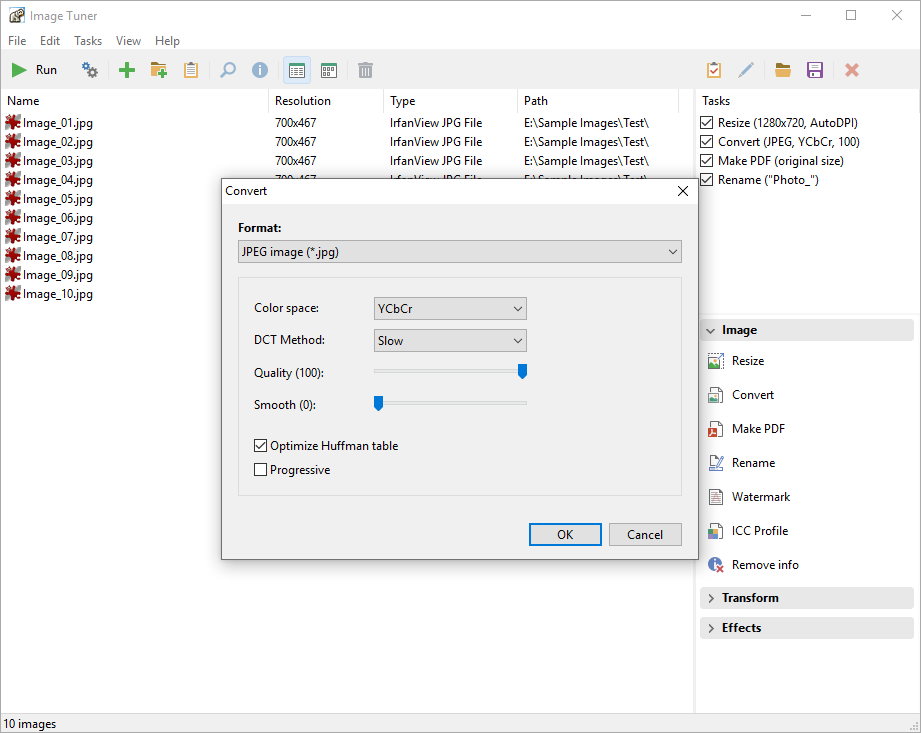 One great feature of a unique program or application is when everyone including an amateur is able to get used to its user interface without stress. Image Tuner happens to be one of such great applications that is easy to understand even for an amateur. One great feature of a unique program or application is when everyone including an amateur is able to get used to its user interface without stress. Image Tuner happens to be one of such great applications that is easy to understand even for an amateur.
What’s Image Tuner?
Image Tuner is a free batch image resizing, renaming, conversion and watermarking tool with a super-intuitive and straightforward interface. Based on an extremely fast image processing engine, this award-winning software has a bare minimum of controls and will help you with the most typical image-related tasks. You can work with individual files and entire folders to resize, convert, rename and watermark images with surprising ease.
Image Tuner has a couple of new additions and bug fixes that include the following; added buttons to rotate JPG files (lossless) in preview mode, added option to keep timestamps of images, added Polish translation, and fixed bug with “access violation” in preview mode. Image Tuner is also able to retain some of its old features that have endeared it to the hearts of several users over the years. It comes with more than a dozen resize filters, lots of JPEG options (DCT, optimal Huffman, progressive, smoothing), as well as several output settings.
Any downside?
Image Tuner gives you nothing to worry about; and it’s absolutely easy to understand.
Want to check it out? Visit GloryLogic.
Rating: Loading... 1 Comment »
|
|
|





