Author Archive
Monday, August 23rd, 2010
 Basically for small contractors and accountants; TaxGst 2.4 offers all the basic items these categories of users need and even more. Some of the basic tools accountants and small businesses use include; income and expenses, invoicing, account payable and receivable, sales tax, and others. Though big businesses may also find some need for this, the truth is that it doesn’t really feature too many tools for them. It allows you to get to do other things because it is just about a single click and that is about all. Basically for small contractors and accountants; TaxGst 2.4 offers all the basic items these categories of users need and even more. Some of the basic tools accountants and small businesses use include; income and expenses, invoicing, account payable and receivable, sales tax, and others. Though big businesses may also find some need for this, the truth is that it doesn’t really feature too many tools for them. It allows you to get to do other things because it is just about a single click and that is about all.
TaxGst can be downloaded and tried for 60 days by every user, especially those who have never used it before. During the 60 days trial period, users can enjoy all the features and benefits that come with it. The trial period is a long time to learn all the features because it offers very easy to understand tools. It practically turns your invoicing and tax calculation into something very easy. As a matter of fact, it makes your accounting tasks easier than you think.
TaxGst 2.4 does not feature some regular accounting tools such as; accounting ledgers, stock control, bank, and accounting journal. I find this rather a minus for this program; many accountants who might still need some of these tools might also still find this funny as well. At $22.00, those small businesses and small contractors may still find it a wonderful program after all.
Want to check it out? Visit Taxgst
Posted in Main | No Comments »
Monday, August 23rd, 2010
 ZC Dream Photo Editor Collage is a photo editing application that can combine your most favorite photo into an artistic compilation. The program makes photo editing a bit of fun, while allowing you to easily blend your digital photo onto another picture. Furthermore, you can also add some pretty frames, cartoon, icon pictures, flowers, and many more. As a matter of fact, you can write your comments on the photos in order to make it more attractive. ZC Dream Photo Editor Collage is a photo editing application that can combine your most favorite photo into an artistic compilation. The program makes photo editing a bit of fun, while allowing you to easily blend your digital photo onto another picture. Furthermore, you can also add some pretty frames, cartoon, icon pictures, flowers, and many more. As a matter of fact, you can write your comments on the photos in order to make it more attractive.
Some of the features include: ability to set shadow to create collages with three dimensional effects; feature that lets you adjust the transparency of your photo, making it easy to achieve that artistic blend of both photo and background image; feature that lets you save your artwork; feature that lets you design some professional pictures; and also comes with 32-bit image processing technology that enables you blend your photos into another backdrop perfectly.
Basically there are other programs more expensive than this one, and as a matter of fact, they also come with more features. I don’t really want to comment on the price, but I think it is fair enough all the same. Really, ZC Dream Photo Editor has some other great features, and you can download for $29.95.
Want to check it out? Visit ZCstar
Posted in Main | 1 Comment »
Friday, August 20th, 2010
 This is no doubt one of the best open source software around; an SVG editor that has built-in capabilities that works like Illustrator, or CorelDraw. Though may not have the full potential of CorelDraw, Inkscape for Windows 0.48 supports SVG features which include the following; texts, gradients, node editing, alpha blending, svg-to-png export, grouping, paths, basic shapes, and many more. This is no doubt one of the best open source software around; an SVG editor that has built-in capabilities that works like Illustrator, or CorelDraw. Though may not have the full potential of CorelDraw, Inkscape for Windows 0.48 supports SVG features which include the following; texts, gradients, node editing, alpha blending, svg-to-png export, grouping, paths, basic shapes, and many more.
Definitely not to be wholly compared to CorelDraw in terms of capacity to perform, Inkscape for Windows 0.48 still remains a great program. For those who would love to scale this application based on the achievements of CorelDraw and Illustrator, I think their assessment may not just be fair. This program is quite different from other similar ones, and no attempts should be made to compare it to any other.
Absolutely open for all categories of users, Inkscape for Windows has definitely witnessed a lot of improvements. Users can download and install this program on many other operating systems, and enjoy some of its features. For the professional out there, I think you can still go ahead with your professional painting and editing with this application. I am positive that nothing much will be missed in terms of comparing its ability with other applications.
Want to check it out? Visit Inkscape
Posted in Main | No Comments »
Friday, August 20th, 2010
 Privatefirewall is a personal firewall that is built to detect all forms of intrusion or invasion. It is built with internal capacity to block or even eliminate illegal access to your personal computer. Apart from blocking or denying access to unwanted programs, Privatefirewall also has features that help you monitor the sensitive areas of your computer. Of course it also has other features like; ability to report any strange intrusion, easy to install, provision of high-performance protection right, and intuitive interfaces which allows advanced users to easily adjust default settings to create custom configurations. Privatefirewall is a personal firewall that is built to detect all forms of intrusion or invasion. It is built with internal capacity to block or even eliminate illegal access to your personal computer. Apart from blocking or denying access to unwanted programs, Privatefirewall also has features that help you monitor the sensitive areas of your computer. Of course it also has other features like; ability to report any strange intrusion, easy to install, provision of high-performance protection right, and intuitive interfaces which allows advanced users to easily adjust default settings to create custom configurations.
The version has just been released-version 7.0.21.1. Some major changes and other minor changes in this version have been added to this version. Some of these changes include; fixing of driver access check to, resolved issues code defect related to isolated BSOD incidents, fixed bug in where Privatefirewall identified (and generated unnecessary alerts), modification of various port and application related default settings among others. Above all, this freeware program features several technology layers designed to prevent damages caused by viruses and other potentially unwanted programs.
Basically it is a freeware program, but it does a lot of things for your program, and that to me is good enough for both home and commercial users. I believe users are going to enjoy it because of so many other features this version comes with, which have not exactly been mentioned here.
Want to check it out? Visit Privacyware
Posted in Main | No Comments »
Friday, August 20th, 2010
 DU Meter 5.01 is a bandwidth monitoring program to help you stay informed about your bandwidth usage. The application is built with the extra ability to help you know both present and future trends regarding your bandwidth usage. It helps you to control your bandwidth usage; saving you a lot of trouble that usually come with downloads. When you consider how internet service providers (1SP) have been coming hard on bandwidth usage, then you would understand what I mean. DU Meter 5.01 is a bandwidth monitoring program to help you stay informed about your bandwidth usage. The application is built with the extra ability to help you know both present and future trends regarding your bandwidth usage. It helps you to control your bandwidth usage; saving you a lot of trouble that usually come with downloads. When you consider how internet service providers (1SP) have been coming hard on bandwidth usage, then you would understand what I mean.
DU Meter 5.01 gives you the edge because it gives you a clear picture of how much bandwidth is being used; utilizing different displays to inform you what is actually going on with your bandwidth. For instance, the application displays real-time graph, numerical display, and in other cases even both displays. It is easy to understand because it is not built with too many technical features to get you confused.
The application has actually been around for sometime now, and each version that has been released has really been impressive. If you have never used this program before, the publishers have given a 30 days trial period to know how good the program is. That for me is enough time to understand how it works.
The program like I said earlier has been around for some time,and is popular among many users all over the world.
Want to check it out? Visit Hageltech
Posted in Main | No Comments »
Friday, August 20th, 2010
 If you are in search of a program that combines both the features of an antivirus and virtualization technology, Returnil Virtual System 2010 Home is for you. The program has features that could help you protect your system against a majority of potentially unwanted programs. It simply clones your system’s partition and boots your computer its system instead of its original Windows. If you are in search of a program that combines both the features of an antivirus and virtualization technology, Returnil Virtual System 2010 Home is for you. The program has features that could help you protect your system against a majority of potentially unwanted programs. It simply clones your system’s partition and boots your computer its system instead of its original Windows.
This makes it possible for you to carry out all your computer activities within the virtual or cloned environment. This makes your computer free from any potentially unwanted attack, especially from malware, and other errors. One of the immense benefits of installing this program on your computer is that it also scans your computer during installation. This is ensures that your computer is free from all forms of virus attacks.
 Returnil Virtual System 2010 Home Lux 3.2.10006 RC2 is not a freeware, but is quite affordable. Even though there are other ways of securing your computer even at no cost, Returnil is still not a bad idea after all. Returnil Virtual System 2010 Home Lux 3.2.10006 RC2 is not a freeware, but is quite affordable. Even though there are other ways of securing your computer even at no cost, Returnil is still not a bad idea after all.
Some of the newly added features and minor fixes include; changing of default disk type to FAT32 to minimize impact of the virtual disk to the rest of the system, fixing of deletion of virtual disk under Windows Vista, fixing of Windows recovery in the case of manual corruption of A/V updates among others.
Want to check it out? Visit ReturnilVirtualSystem
Posted in Main | No Comments »
Thursday, August 19th, 2010
 This highly customizable freeware application supports two individual Gmail accounts; including inbox and custom labels. It also features: Tray Icon change on new email; continuous alerts until a new email is opened; Skinnable tray popup alerts on new email; feature that lets you set custom ‘check for mail’ interval; proxy support (including support for authentication); auto start and hide options; customizable GUI, and many others. This highly customizable freeware application supports two individual Gmail accounts; including inbox and custom labels. It also features: Tray Icon change on new email; continuous alerts until a new email is opened; Skinnable tray popup alerts on new email; feature that lets you set custom ‘check for mail’ interval; proxy support (including support for authentication); auto start and hide options; customizable GUI, and many others.
Spiffy 0.5.3 may be a freeware program, but it definitely has wonderful features to compete among some paid alert programs. As a matter of fact, Spiffy 0.5.3 also supports up to five different accounts at the same time. This gives you better opportunities to do some other things on your computer.
Spiffy 0.5.3 can hold its own among programs like; Scott’s Gmail Alert, Gmail Notifier 1 and 2, as well as Google Notifier. To install or have this application on your computer, you need to install .NET Framework 2.0, and of course you must have a Gmail or Google application accounts.
For a program that is completely free, but still gives you the opportunity to enjoy some wonderful features, I think Spiffy’s publishers have done well. Users who don’t speak English can also download this program because it also comes in other languages too. Some of these languages include; Dutch, Hebrew, Spanish, Swedish, and Italian.
Want to check it out? Visit Multiweb.nl
Posted in Main | 1 Comment »
Tuesday, August 17th, 2010
 This one goes for $44.99 per download, but demands some little technical knowledge to get used to. The truth is that Graphic Workshop Professional is an application that should have cost a little less than the price currently placed on it. I really can’t say how many users would want to pay that much for this program, which still has a long way to go. This one goes for $44.99 per download, but demands some little technical knowledge to get used to. The truth is that Graphic Workshop Professional is an application that should have cost a little less than the price currently placed on it. I really can’t say how many users would want to pay that much for this program, which still has a long way to go.
The Graphic Workshop Professional 4.0 Beta 3 has a drag and drop features, a display of slide show images, and batch processing. Apart from these features, users can also benefit from a feature that lets them print image files to any printer fully supported by windows, and of course a Pentium-optimized functionality among others.
The above are just to mention a few of some of the features you can find in the application. In addition to the above features, users can browse their image collection, view pictures, print their graphics even as hard copies, maintain a sophisticated keyword database, convert between formats, decode pictures from the internet, and many more.
Among the latest changes users can benefit from in this version include; the implementation of windows special folders, the beta to install issue is now a thing of the past, fixing of some noticed bugs in past editions, among others.
The Graphic Workshop Professional 4.0 Beta 3 supports formats such as; Adobe Digital Negative DNG digital camera raw image files, Casio digital camera, Windows enhanced metafiles, and many more. The Graphic Workshop Professional 4.0 is still a Beta program, and hopefully more work can still be done on it to make it perfect.
Want to check it out? Visit Mindworkshop
Posted in Main | No Comments »
Tuesday, August 17th, 2010
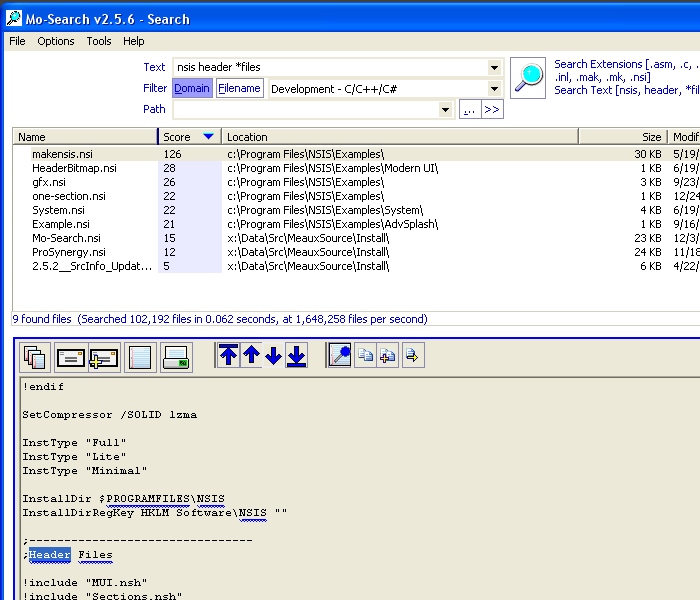 Mo-Search 3.1.1 Beta 1 helps you to rank and, then score your files by searching file contents or file paths. Some of the benefits of installing this freeware include; searching of network drives, integrated file viewer, and integrated EXIF QuickView adjacent to previewed images, among others. Mo-Search 3.1.1 Beta 1 helps you to rank and, then score your files by searching file contents or file paths. Some of the benefits of installing this freeware include; searching of network drives, integrated file viewer, and integrated EXIF QuickView adjacent to previewed images, among others.
Some of the latest additional features include: improved performance; addition of FTP tool UI responsiveness; Indexing speed, and Searching speed among others. There are other additional changes, including minor bug fixes which make it a bit different from the past edition.
It further features file viewer with highlighted matches; this displays file contents and matches without launching separate applications. Users can also benefit from other features like; tool that helps them to find duplicate files, tools that helps them to network drives, and most significantly; a feature that ranks and sort results easily.
The more files stored on your computer; the more difficult it is to trace and identify some of them. That is why it takes more time to trace some files, slowing down a lot of things both for you and maybe your computer. This application is built to help you gain control of the location of all files and data. It helps you to easily and quickly locate your files, and puts you in charge as usual.
Mo-Search 3.1.1 Beta is popular among many users because of its features and usefulness; not because it is freeware. Not many freeware program ranks this high in terms of features and usefulness.
Want to check it out? Visit Meauxsoft
Posted in Main | No Comments »
Tuesday, August 17th, 2010
 This is a free defragmentation tool that helps you to easily defrag your computer, after analyzing it. The problem with some computers is that after working for some time, they become slower and don’t work as when they were newly bought. Glarysoft Disk SpeedUp 1.0.0.286 Beta is one of those tools that helps restore the speed of your system. This is a free defragmentation tool that helps you to easily defrag your computer, after analyzing it. The problem with some computers is that after working for some time, they become slower and don’t work as when they were newly bought. Glarysoft Disk SpeedUp 1.0.0.286 Beta is one of those tools that helps restore the speed of your system.
Your disk accumulates and becomes cluttered with all kinds of data fragments as a result of daily usage. These can be caused by installation and uninstalling of applications, file downloading, deleting, saving of files, and many more. Some of these actions make your system to experience hang ups and record all sought of errors. All you need is a single click or two, and your system will be up and running once again, thereby optimizing disk performance.
Glarysoft Disk SpeedUp 1.0.0.268 Beta has some very good features such as; quick and optimized defrag to allow for easy and quick defragmenting, support for FAT, FAT16, FAT32, NTFS, NTFSS, NTFS + EFS files, customizable preset features to enable you set the program to your taste, an interactive Drive Map, among others.
I discovered that this application was able to rearrange my computer files in matter of seconds. Apart from that, it was able to help my computer reorganize most of the fragmentation for the purpose of speeding up my system. After the entire process, my computer became the better for it.
It is worth trying out for many reasons; moreover it is freeware and comes at no costs either to your system or to your pocket.
Want to check it out? Visit Glarysoft
Posted in Main | No Comments »
|
|
|




