Author Archive
Friday, October 4th, 2013
 There are loads of media players out there but VLC is arguably one of the best and most popular media players available. There are loads of media players out there but VLC is arguably one of the best and most popular media players available.
What is the big deal about this program?
VLC (VideoLAN) is designed as a multi-platform multimedia player for all kinds of users. VLC (VideLAN) has the capacity to read DVD, VCD, Audio CD, MPEG, and DivX files from a satellite card and TV cards. It can also read a stream from a network sent by the VideoLAN Server or another source.
With this program, users do not need to keep track of dozen codec packs that they might need to install. This is so because it comes with support for nearly all codec there is. The beauty of this tool is that it can play back the file or media if it is damaged, missing or broken into pieces. It does this by been able to play all the video and audio information that is still intact.
Some of the main features of this application are: Simple, fast and powerful media player.
Plays everything: Files, Discs, Webcams, Devices and Streams. Plays most codecs with no codec packs needed: MPEG-2, DivX, H.264, MKV, WebM, WMV, MP3. Runs on all platforms: Windows, Linux, Mac OS X, Unix. Completely Free, no spyware, no ads and no user tracking. Can do media conversion and streaming.
Downsides?
None at all. My best ever media player.
To learn more about VLC, please do visit VideoLAN.
Posted in Main | No Comments »
Thursday, October 3rd, 2013
 Want an application that helps you to manage your host file with ease? What you probably need is HostsMan. Want an application that helps you to manage your host file with ease? What you probably need is HostsMan.
What is the big deal about HostsMan?
HostsMan is a freeware that allows you to easily manage your host files. Some of the main features of this program include: built-in hosts updater; enable/disable usage of hosts file; open Hosts file with one click; merge two hosts files; built-in hosts editor; prevent other programs of writing to the hosts; scan hosts for errors, duplicates and possible hijacks; find how many host names; easily install newly downloaded hosts file; create encrypted backups of your hosts file; resolve host names; keep log of latest blocked sites; exclusion list and more.
It is clean – it does not contain adware, spyware or viruses. It is also easy to use.
The publisher, abelhadigital.com has added a few new changes to this version. They include: detection of common issues in “Troubleshooting Information”; main window redesigned; more code refactoring and UI tweaks and Fixed: the installation of an update may fail if the corresponding cached file is not available.
Downsides?
It is too complicated for the casual/novice users.
To know more about this application, please visit AbelhaDigital.
Posted in Main | No Comments »
Thursday, October 3rd, 2013
 Want to run any native Win32 application or script as a Windows service? Then use FireDaemon Pro. Want to run any native Win32 application or script as a Windows service? Then use FireDaemon Pro.
What is FireDaemon Pro?
FireDaemon is a system utility that allows you to install and run any native Win32 application or script such as BAT/CMD, Perl, Java, Python, TCL/TK as a Windows service. It is very easy to install and configure and has a low memory/CPU overhead.
It has the ability to run when no one is logged in, the ability to run a specific local or domain user and to run for specific periods during the day, week or month.
Some of the main features of this program are: Run any application as a Windows service. Edit the properties of any built in Windows service. It ha simple service configuration via intuitive GUI, CLI or XML all in one product. It is simple to integrate into Active Directory and Windows Server Clusters. It has a comprehensive logging and debugging, broad service monitoring and failure recovery options. It is very light on memory and CPU consumption. Sub-process prioritization and job grouping and CPU binding on multi-CPU / multi-core systems.
FireDaemon Technologies Limited, the publisher of this application, added these features to this version: Windows 8, 8.1, 2012, 2012 R2 support, pre-Shutdown notifications, managed service accounts, switch to session 0, Windows open debug log from GUI and support for unlimited cores.
To find out more about this program, please visit FireDaemon.
Posted in Main | No Comments »
Wednesday, October 2nd, 2013
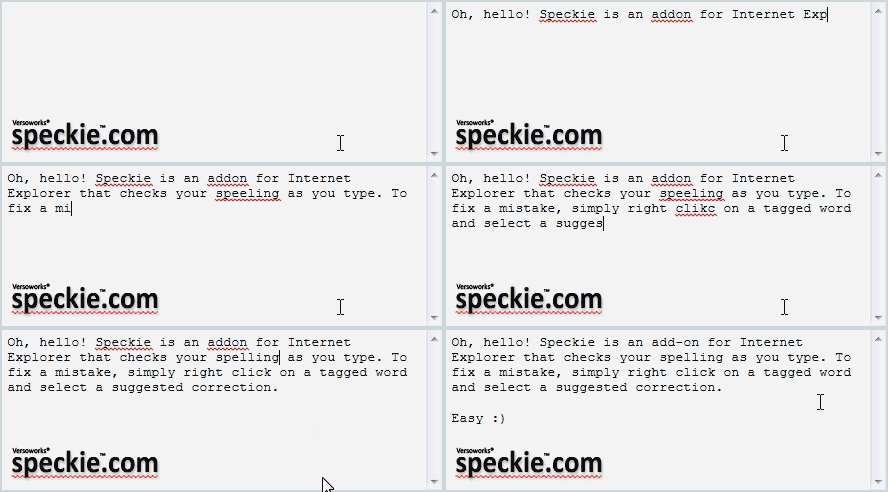 Speckie is an add-on to Internet Explorer that is designed to offer you a dedicated, real-time spelling checker inline spell checking capability similar to that found in other web browsers such as Firefox. Speckie works on Windows running Internet Explorer versions. It is available for both the 32 bit and 64 bit versions of Internet Explorer. Speckie is an add-on to Internet Explorer that is designed to offer you a dedicated, real-time spelling checker inline spell checking capability similar to that found in other web browsers such as Firefox. Speckie works on Windows running Internet Explorer versions. It is available for both the 32 bit and 64 bit versions of Internet Explorer.
Speckie is the first and only dedicated real-time spell check for Internet Explorer and is fully compatible with the latest Internet Explorer 9.
What is the big deal about Speckie?
Right from its inception, Internet Explorer had always lacked an essential feature; Real Time spell check. Speckie was designed to correct that. This useful add-on suggests you the correct spelling. All you have to do is to choose the correct word. It offers an inline spell checking capability similar to that found in other web browsers such as Firefox. It supports Windows XP, Vista and 7 running Internet Explorer versions 6, 7 or 8. It is available for both the 32 bit and 64 bit versions of Internet Explorer.
Speckie is a great concept that can save a lot of wasted time and confusion by checking your spelling in IE as you type. It’s great for searches, data entry fields, and other daily business, but just think about how great it is to be able to check your spelling in online forums and similar postings before you hit the Send button. Speckie’s spell-checking capability is great, and its Updates and other functions all worked fine, too.
English is not your first language? No problem! Speckie doesn’t provide spell check for only English words. The add-in provides you with dictionaries for a large number of languages which you can install and use immediately. You can also have multiple dictionaries active at the same time in case you need to write in more than one language.
The author of this program, Versoworks Pty Ltd, has added a few changes to this version: Added support for IE 11, improved support for Rich Editors, Updated the Settings UI to be more touch screen friendly, Added a spell check dialog to improve working with large bodies of text. Updated the spell check functionality so that words are no longer tagged with each key stroke on IE 8 and older and updated the Speckie Dictionary Installer to allow uninstallation of dictionaries via the command line.
Downsides?
None that I know of. A very good built-in spell checker. Great correction for Microsoft oversight.
To know more about this amazing software, please go to Speckie.
Posted in Main | No Comments »
Wednesday, October 2nd, 2013
 There are loads of media file players in the market. I’d like you to try out one: BlazeDVD. There are loads of media file players in the market. I’d like you to try out one: BlazeDVD.
What is this BlazeDVD all about?
BlazeDVD is a full-featured and easy to use DVD, Video CD, Audio-CD and media file player. It has superior video and audio (Dolby) quality, in addition to other enhanced functions such as: record DVD movies into MPEG2 video or MP3 audio file, optional skins, playback image and DV, image capture and bookmark, etc. It supports DIVX, MPEG4, RM, QuickTime, WMV, WMV-HD, MacroMedia Flash and popular media formats of Internet. With BlazeDVD, you can convert recorded files into MP4 for iPod, PSP, BlackBerry, Mobile Phones.
Some of the features of this application are: PIP (Picture in Picture), Parental Control, Capture Screenshot supported, Theatre-like DVD / Video Enjoyments on PC, All-in-one media player to play all common video formats like AVI, MPEG, VOB, WMV, DTS, HD (high-definition) videos, etc. With this DVD player software, you are able to enjoy the converted video movies by iPod, PSP, iPhone or other media players. Multi-languages supported.
Downsides?
BlazeDVD with its easy to use interface is simply a masterpiece.
Want to try it out? please go to BlazeVideo.
Posted in Main | No Comments »
Wednesday, October 2nd, 2013
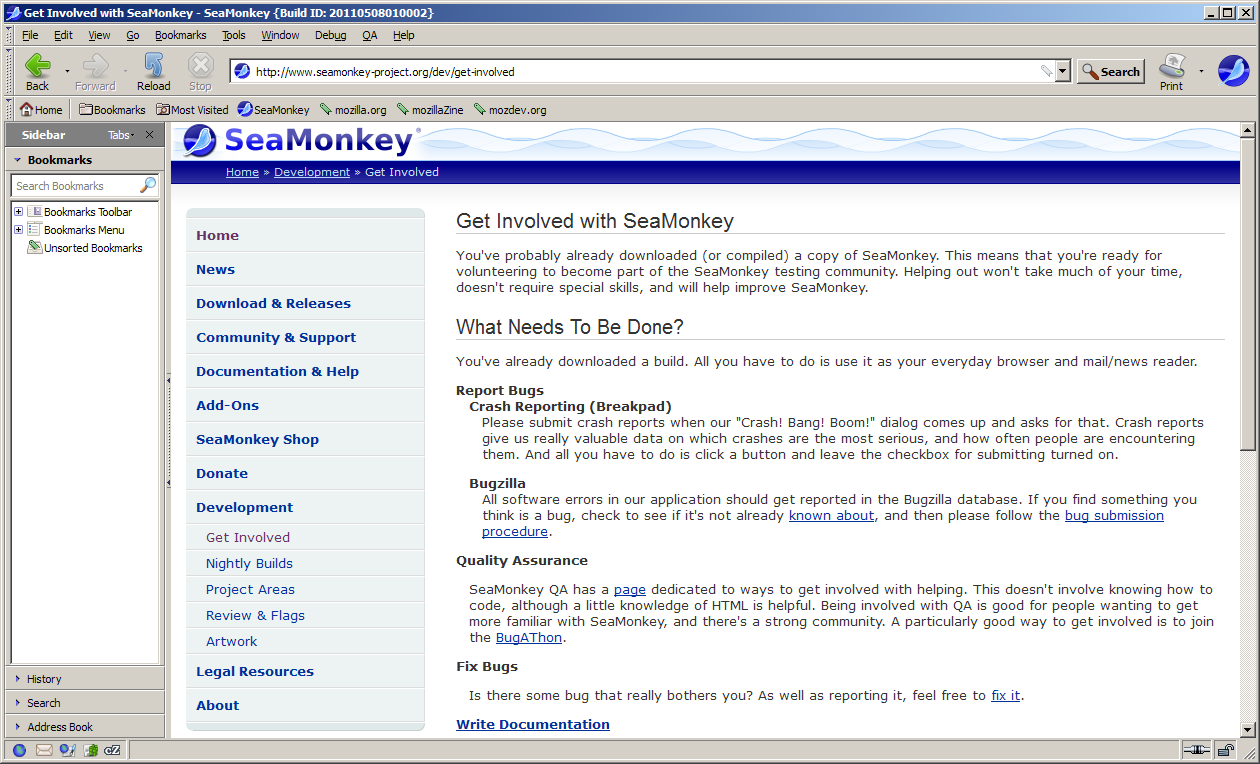 Need an all-in-one Internet application suite? Your web-browser, advanced e-mail and newsgroup client, IRC chat client, and HTML editing all in one app on your Windows PC? If yes, then go for SeaMonkey for Windows. Need an all-in-one Internet application suite? Your web-browser, advanced e-mail and newsgroup client, IRC chat client, and HTML editing all in one app on your Windows PC? If yes, then go for SeaMonkey for Windows.
What is SeaMonkey for Windows?
SeaMonkey is an all-in-one internet application that has web browser, advanced e-mail and newsgroup client, IRC chat client, and HTML editing. Built with much of the same Mozilla source code which powers such successful siblings as Firefox, Thunderbird, Camino, Sunbird and Miro, SeaMonkey is sure to appeal to advanced users, web developers and corporate users.
It’s web browser interface is similar to the one of Firefox, with a few additional features. In the Window menu you can instantly access the browser (SeaMonkey Navigator), mail and groups (shares code with Mozilla Thunderbird), HTML editor (SeaMonkey Composer), address book and IRC chat (ChatZilla).
With this application, you could create multiple profiles, a new e-mail account, write a new message, open a new composer page in which you can write HTML code, you can encode characters, change the SeaMonkey theme, access browsing history, translate the whole content of a page, manage cookies, images, popups, data, passwords, downloads and add-ons, set up sync, and access web development tools.
Some of the features of this application are: Web-browser; advanced e-mail and newsgroup client; HTML editing made simple; and IRC chat client. Imagine having all your internet needs in a single application. SeaMonkey is an open source program and is free for use by all.
Downsides?
None. Seamonkey gives you the best of both worlds – Firefox and Thunderbird.
Want to check it out? Visit Seamonkey-project.org.
Posted in Main | No Comments »
Tuesday, October 1st, 2013
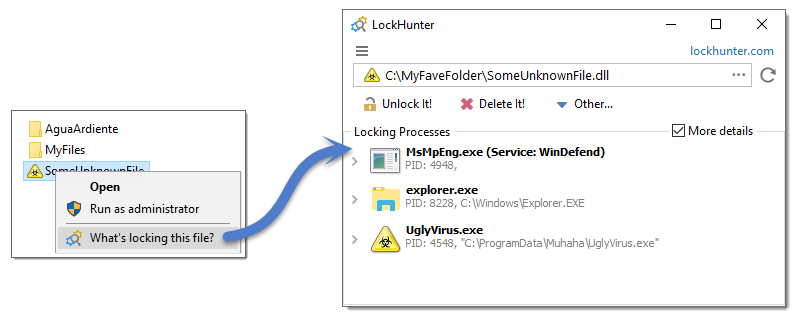 Are malware or other programs blocking your access to some of your files without any good reason? Then let LockHunter help you take care of those files. Are malware or other programs blocking your access to some of your files without any good reason? Then let LockHunter help you take care of those files.
What is the big deal about LockHunter?
LockHunter is a freeware that allows you to delete files blocked by something you do not know. It is also very useful for fighting against malware, and other programs that are blocking files without a reason. Unlike other similar tools it deletes files into the recycle bin so you may restore them if deleted by mistake.
Some of the main features of this freeware are: Shows processes locking a file or folder. Allows you to unlock, delete, copy or rename a locked file. Can forcibly delete a file that Windows does not allow you to delete at next OS restart. It deletes files into the recycle bin, so you may restore them if deleted by mistake. Allows you to remove locking processes from hard drive. Gives you detailed information on the process. Integrates in to Explorer menu among others.
To familiarize yourself with this app, please do visit LockHunter.com.
Posted in Main | No Comments »
Tuesday, October 1st, 2013
 Wouldn’t it just be cool to if you could be able to manage your Android right from your PC? SnapPea has now made that a possibility. Wouldn’t it just be cool to if you could be able to manage your Android right from your PC? SnapPea has now made that a possibility.
What is SnapPea?
SnapPea allows you to use your Android right from your computer: organize your contacts, music, and pics from the comfort of your desktop, transfer any file in the blink of an eye, send text messages from a full-size keyboard, without touching your phone. Importing your iTunes library to your Android is just a click away. Download thousands of apps for your Android, instant and free of charge all from your computer.
With SnapPea, you could also modify the ringtone, notification and alarm sound straight from the interface. You may also view the entire list of contacts from the phone and even edit them by adding phone numbers, emails, website and other details. It’s also possible to view the apps that are installed on the device and manage them, as well as the music files, pictures and videos on the computer.
SnapPea has a lot of features including the following; Send text messages from a full-size keyboard, without touching your phone, importing your iTunes library to your Android is just a click away, etc. it has a simple interface and a clean layout and is very easy to configure. It’s possible to create a backup of all files straight to the computer.
Want to check? Visit SnapPea.com.
Posted in Main | No Comments »
Tuesday, October 1st, 2013
 A lot of applications including Geany and TextPad require users to define their own command line parameters and add a new build button to the interface. Nevertheless, changes to the build commands can be messy and counter-intuitive. Some of these applications also lack a convenient project management system. However, EMPU is an application that eliminates these issues with an entirely clean and easy to use interface while also maintaining complete functionality. A lot of applications including Geany and TextPad require users to define their own command line parameters and add a new build button to the interface. Nevertheless, changes to the build commands can be messy and counter-intuitive. Some of these applications also lack a convenient project management system. However, EMPU is an application that eliminates these issues with an entirely clean and easy to use interface while also maintaining complete functionality.
What is E.M.P.U.?
E.M.P.U. stands for Enhanced Multilingual Programming Utility. Basically E.M.P.U. is a lightweight text editor with many of the features of an IDE. E.M.P.U. features custom build commands for each file type as well as unique commands for each individual project. These commands can be edited by the user as well. Project configuration files are very small. E.M.P.U. also features a project merge system to easily update projects to a new version. All of the basic features of a programming text editor are present along with many project management conveniences.
Recent changes and updates made to the program include the following: updates are now checked for on a separate thread; performance and stability updates; added terminal hotkey; minor interface changes; changes to the quick search option; and changes to the strip trailing whitespace method.
Any downside?
The program is easy to use, seems to be a bit more stable than earlier versions.
Want to check it out? Visit IndieSoftWorks.org.
Posted in Main | No Comments »
Monday, September 30th, 2013
 Need to make conference calls and share information to a group of people all in real time? Then try out TeamTalk. Need to make conference calls and share information to a group of people all in real time? Then try out TeamTalk.
What is TeamTalk?
TeamTalk is an intuitive conferencing system that provides great help to groups of people that are searching for a centralized platform were they can exchange messages, media files and share information all in one place. Members of the group can communicate with other members in real time using both audio and video. All you need is just a microphone and a web camera and you’re good to go.
It is a lightweight utility, with a simple-to-use interface provides private rooms for every group of users and the ability to connect to a standalone server for both LAN and Internet environments. Another amazing feature of TeamTalk is that you could use it to share applications on your desktop with other users. So if you have a user with a premium application on his/her desktop, no need to buy. Just share!
Some of the features of this program are: Real time audio and video conversations, Public and private instant text messaging, File sharing among group members, High quality audio codecs with both mono and stereo and Push-to-talk and voice activation. Others include Record conversations to disk, Standalone server for both LAN and Internet environments, Private rooms/channels for every group, User authentication with accounts and Accessibility for visually impaired.
Downsides?
Hmmmm….. Nice program for crisp clear communication.
To learn more about TeamTalk, visit Bearware.dk.
Posted in Main | No Comments »
|
|
|





