Author Archive
Tuesday, February 19th, 2008
 Arranging Bookmark at times becomes a hassle when you need to deal with a large number of links. To help with your task the BixBookmark 2.1 comes across as a capable tool since it allows you to manage the links along with the screenshots. It also supports the function of opening the links directly from the program, in any of the popular browsers. You can keep each link saved specifically according to their different categories. The software also supports the features like setting the thumbnails, searching, checking the duplicates, password protection, etc. In short with this utility you can put as many bookmarks as you can and get all favorite sites with single click. Arranging Bookmark at times becomes a hassle when you need to deal with a large number of links. To help with your task the BixBookmark 2.1 comes across as a capable tool since it allows you to manage the links along with the screenshots. It also supports the function of opening the links directly from the program, in any of the popular browsers. You can keep each link saved specifically according to their different categories. The software also supports the features like setting the thumbnails, searching, checking the duplicates, password protection, etc. In short with this utility you can put as many bookmarks as you can and get all favorite sites with single click.
BixBookmark 2.1 displays the categories on the left side panel with an expandable folder menu. The containing links are shown on the right side on selecting the folder that you can access to the site with any of the famous browser like MS Internet Explorer, Opera, Maxthon, Mozilla, Firefox, etc. For creating and adding the link you need to set required information in the dialog box. The tool helps you to store, arrange, sort and so on, the links for the required website pages. If you’re having official links that are important and need to be secured so that nobody visits it, you can use the software to protect the folder having such links by setting the password. It also supports creating the thumbnails for the WebPages so that you can have the view of the content of the page. Even it supports creating the back up and restoration of the bookmark collection. You can search the required link easily with the context search features fro the large list of the links.
BixBookmark 2.1 helps managing links in an easy way and it also supports visiting the relating site directly through the program.
{More Info and Download}
Posted in Bookmarks, Commercial, Developer, Information Management, Internet, Reminder, Shareware, Utilities, Windows | No Comments »
Monday, February 18th, 2008
 Do you often need to startup your computer to get the updates relating to the Google finance portfolio courses? If you are fed up of this process, won’t you like to have something that could make the work easier? Now you can get all the updates at your mobile with My Portfolio 1.0. This software is easy to work and is a valuable addition to your phone. You can get the Portfolio updates as automatic or manual as per your needs. It is also capable of providing the history records of the portfolio courses so that you can get the required data whenever required. The interface is friendly and easy to use. Do you often need to startup your computer to get the updates relating to the Google finance portfolio courses? If you are fed up of this process, won’t you like to have something that could make the work easier? Now you can get all the updates at your mobile with My Portfolio 1.0. This software is easy to work and is a valuable addition to your phone. You can get the Portfolio updates as automatic or manual as per your needs. It is also capable of providing the history records of the portfolio courses so that you can get the required data whenever required. The interface is friendly and easy to use.
For adding, updating and managing your Google portfolio the software My Portfolio 1.0 is worth using as you can get information on your mobile phone when required. When you have transferred the file and installed the program at your phone then you can start working with it. Go to the Program or Own file for the program and set the login ID with the ‘Settings’. The Portfolio is shown in the list form; Symbol, Last Price, Change in Percent and Mkt Cap. You can view the details of all the items and for updating you can select to update ‘Manually’ or ‘Automatically’. You would get the updates that you can save. You can even have the glance over the history of the rates of Google finance course. You can have the history recorded by setting the Start and End date for it and select to connect. Having your Google finance portfolio on your mobile phone you need not to sit in front of your PC every time you want to know about any details.
My Portfolio 1.0 for the mobile phone gives you the freedom to stay away from your PC and still keep an eye on your Google finance portfolio. The software is sure to gain currency amongst many users owing to the convenience of accessibly it allows.
{More Info and Download}
Posted in Developer, Google, Mobile | No Comments »
Monday, February 18th, 2008
 Today a large section of people use different mailing accounts which they simultaneously try to access using their Outlook email client. While using a number of them, one might face confusion and might forget the password of any of your mailing accounts. The Password Recovery Toolbox for Outlook Express 1.1.5 is designed to solve such an issue with effortless ease. This software can help the users to get their passwords recovered in an easy manner. Today a large section of people use different mailing accounts which they simultaneously try to access using their Outlook email client. While using a number of them, one might face confusion and might forget the password of any of your mailing accounts. The Password Recovery Toolbox for Outlook Express 1.1.5 is designed to solve such an issue with effortless ease. This software can help the users to get their passwords recovered in an easy manner.
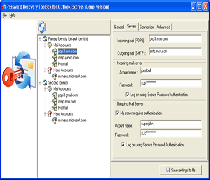
The Password Recovery Toolbox for Outlook Express 1.1.5 provides us with some simple steps to get the password recovered. The program starts working instantly at the startup and displays the recovered password and the related information of the mailing accounts. The email account and the settings are shown on the right side of the screen. With all the shown features you get the information relating to the Server features like incoming mail, POP3, and Outgoing SMTP server. It also shows the Incoming Mail Server setting relating to the Account and the Password. You can also know which features for Outgoing mail server are enabled like the server authentication and to log in using Secure Password Authentication. The software easily recovers the passwords and visualizes the mail and account settings. The additional feature of the program provides you with the feature that helps you to save the configurations relating to the Outlook Express identities in a text file. Likewise the software is capable of managing current users several identities. You can even have the data recovered for another user also. You would find the software easy to use and also easy for installation as it is compatible all the Windows versions except Windows 95.
{More Info and Download}
Posted in Developer, E-mail, Information Management, Outlook, Security, Shareware, Windows | No Comments »
Saturday, February 16th, 2008
 When you watch you favorite movie on your DVD, many a times you might have felt like taking snaps of your favorite scenes. You can make this possible with the DVD Snapshot 1.5.5. It helps you to take the snapshots from the DVDs easily by selecting the exact point from where you want to take the shot. You can effortlessly capture freeze frame image and save the image with you. In addition you can make the images, the cover of your slideshow or DVD, etc and then share these pictures with your family and friends. When you watch you favorite movie on your DVD, many a times you might have felt like taking snaps of your favorite scenes. You can make this possible with the DVD Snapshot 1.5.5. It helps you to take the snapshots from the DVDs easily by selecting the exact point from where you want to take the shot. You can effortlessly capture freeze frame image and save the image with you. In addition you can make the images, the cover of your slideshow or DVD, etc and then share these pictures with your family and friends.
To get these spectacular snapshots you just need to install DVD Snapshot 1.5.5 in your system and get started. Make the selection of the video and open it with the DVD Snapshot program. When you are ready for the snapshots then you can begin making the selection for the points on the DVD for taking the snapshots. Play the video from the options given on the top and you can select the scene while viewing it. To play the video you need not to move to any other program or screen for it but it gets played in the same program. Pause it and place the pointer at the time duration where you liked the shot. You need to watch care fully for deciding for which you can choose the level of the speed and even have the view zoon in or out. Capture the shots and the program would ask you to save the image on your hard disk. You can have the camcorder being transformed into a digital camera that can take virtual snapshots of the captured video. You can have the images taken and used for various purposes.
DVD Snapshot 1.5.5 is capable of taking images from the DVD movies or other videos in a seamless manner with high quality. You can use the images for the slideshow title, send the images to your friends, even get them printed and place them on your room’s wall, etc.
{More info and Download}
Posted in Design, Developer, DVD, Shareware, Utilities, Windows | No Comments »
Thursday, February 7th, 2008
 Streaming Audio Studio: All-In-One Sound Recorder, Editor and Converter has tools to analyze, record, edit, and convert audio file, produce music loops, digitize and clean-up old recordings. Streaming Audio Studio: All-In-One Sound Recorder, Editor and Converter has tools to analyze, record, edit, and convert audio file, produce music loops, digitize and clean-up old recordings.
Pros: Streaming Audio Studio application is a all-in-one sound recorder, editor and converter. You can use to analyze, record, edit, and convert audio file, produce music loops, digitize and clean-up old recordings. You could record and play sounds, import and export audio files, drag-and-drop, trim, copy, paste, split and merge to aid in its functions. A set of real time effects also can be added to the recordings. Waveform and spectral view of the sound recordings and audio effects filters along with an unlimited undo/redo helps in the edit process. Most popular formats such as mp3, wma, wav, vqf and ogg are supported.
Streaming recording helps recording of cassettes, vinyl records or live performances directly to hard disk in mp3 or any other format you prefer. Level meters indicate volume levels so that adjustments could be made for optimal recording.
Cut, copy, paste and delete set of operations on the audio waveform/spectrum diagrams make editing really simple. Unlimited undo steps help in going back indefinitely to undo mistakes and go back to a known reference point. One could modify the envelope directly if that is useful. Drag and drop paradigm helps make the editing even easier. (more…)
Posted in Audio, Audio Editor, Developer, Shareware, Windows | 1 Comment »
Thursday, February 7th, 2008
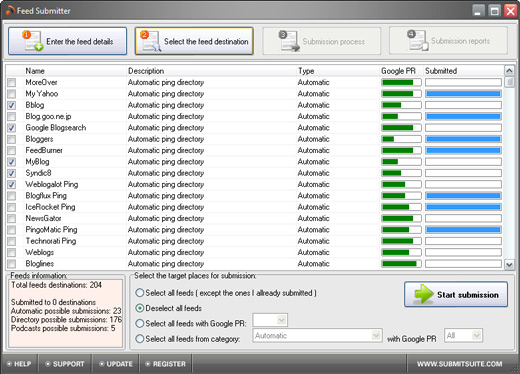 Feed Submitter is a semi-automated blog promotion tool that helps increase traffic and RSS feed subscribers. The feed subscriber quickly submits your feed to 200 of the top blog and RSS feed directories. Feed Submitter is a semi-automated blog promotion tool that helps increase traffic and RSS feed subscribers. The feed subscriber quickly submits your feed to 200 of the top blog and RSS feed directories.
Pros: The Feed Subscriber is a semi automated submission tool for blog and RSS feed directories. The application knows about 200 odd such directories and can submit to them automatically. The user need not hunt for such directories and submit manually one by one. It’s possible to submit multiple feeds at a time.
Many blog readers follow these directories to find what’s new in a specific keyword category. Besides the first visit, a majority of these readers subscribe to update feeds to follow a blog if they like it. That simply means repeat visitors or traffic. It is this traffic that is the basis of many a follow up activities. Without traffic none of those actions make sense. So, to increase the probabilities of more and more people visiting you virtual enterprise, you’ll need to get your content known widely. So submission to more directories that guide readers to blogs in specific niches is the starting point for many a venture.
To avoid the tedium of manually submitting details individually, the feed submitter does it automatically, with the option to do it manually still, if you prefer that. Any number of RSS feed submissions can be done with the application filling in the submission details automatically. The submitter has a up to date list of directories that number more than 200. Podcast or Videocast submissions also can be made optionally. The user interface is easy to use and easy to understand. No significant learning time is required.
Cons: Final effectiveness of any such tool is if traffic can be built up effectively. It’d depend on the popularity of the directories too. That will depend on other factors however, including quality of your blog of course. What can be assessed is whether submissions get done alright.
Overall a definite 4 star application.
{More info and Download}
Posted in Business, Commercial, Information Management, RSS, Shareware, Windows | No Comments »
Thursday, February 7th, 2008
 When you place images on your website, etc, you might have often got worried about their protection and their possible theft by copycats. In case you are looking for a solution to avoid such hassles then WinWatermark 2.0.0 is possibly among the best choices available. It aims at protecting your images by using watermarks has support for image files of various formats such as JPEG, BMP, PNG, and many others. It allows you to customize your watermark in an effective manner that protects your images from copying. When you place images on your website, etc, you might have often got worried about their protection and their possible theft by copycats. In case you are looking for a solution to avoid such hassles then WinWatermark 2.0.0 is possibly among the best choices available. It aims at protecting your images by using watermarks has support for image files of various formats such as JPEG, BMP, PNG, and many others. It allows you to customize your watermark in an effective manner that protects your images from copying.
WinWatermark 2.0.0 has a neat user interface with fluid contours. You can load the files and folders that you want to place the watermarks on. The right side shows the list of the images where you can add and remove them. The preview of the images is shown on the left panel. You can crop the images by selecting the crop mode that can be applied on all the images. Resize the image by setting the Image size, mode, and settings and does the resizing on batch mode. Rename the image files by changing the settings for the output name. While you put the watermarks you simply need to type the text and them set the font style size, etc for it. If you’re placing image watermarks then you need to select the images, set the rotation, opacity, and alignment, etc. With the options features you can have the image changes saved while switching to another and even have the EXIF info copied to the clip board. Select the quality and smoothness of the output and make the output directory selection. Process the images and get the results easily and fast.
WinWatermark 2.0.0 has the ability to read and write the images in various formats along with being a good utility for inscribing watermarks. Counting all the features and experiencing the functionality, the software has been given the rating of 4 points.
{More info and Download}
Posted in Developer, Multimedia, Photo, Shareware, Video, Windows | No Comments »
Thursday, February 7th, 2008
 Are you a web developer or a digital photographer? Then you might need to have the images resized and converted to other formats. With the iRedSoft Image Resizer 3.27 software it becomes a piece of cake to resize the images by pixel dimensions or ratio as you desire. The software also supports importing and exporting of images with formats like PNG, JPG, BMP, PCX, Photoshop, Targa. It also retains the EXIF/IPTC headers and also lets you add shadow effect to the images. Are you a web developer or a digital photographer? Then you might need to have the images resized and converted to other formats. With the iRedSoft Image Resizer 3.27 software it becomes a piece of cake to resize the images by pixel dimensions or ratio as you desire. The software also supports importing and exporting of images with formats like PNG, JPG, BMP, PCX, Photoshop, Targa. It also retains the EXIF/IPTC headers and also lets you add shadow effect to the images.
iRedSoft Image Resizer 3.27 software is rather convenient to operate owing to its neatly set menu driven options. To start working with the program you need to load the files or you can also select the folders. The images can also be loaded through the Drag and Drop method. The images get listed with the program by their name and path in the Control Center page. You can preview the images to move out the ones that are not required. You can select the Image Properties feature for the images with the dropdown menus; set the Image format, Resizing methods, Maximum Height and Width, Resize Percentage, JPEG Quality, etc. You can also select the ‘Add Drop Shadow’ to the images and also select the File Properties for setting the Target Directory for saving the images to. You can also have the images rotated as you require them to be. When you have done all the selections then you can click on ‘Process All’ option on the left side panel. The images will be processed and saved to destined folder. You can clear the list with ease for making the fresh selection.
iRedSoft Image Resizer 3.27 maintains the quality and does the resizing, taking the ratio or pixel dimension into consideration for providing better results. It has been given the rating of 4 as it does the resizing work with perfection and achieves the task in appreciable less time.
{More info and Download}
Posted in Multimedia, Shareware, Windows | No Comments »
Thursday, February 7th, 2008
 Have you ever thought of making yourself into a cartoon? Well even if you do not have a good hand in drawing there is a remarkable utility called Photo to Cartoon 1.2 that can help you to convert your images into stylish cartoons and portraits. You can get colored or black and white cartoons that you can utilize for various purposes. You can easily load your digital images and then get your images converted into cartoon easily by a click. Now think of this using your caricatures in the form of the clip arts and put them as the sign o the emails, letters, etc. It will make your work more expressive, attractive and would make a mark on the viewer’s mind. Have you ever thought of making yourself into a cartoon? Well even if you do not have a good hand in drawing there is a remarkable utility called Photo to Cartoon 1.2 that can help you to convert your images into stylish cartoons and portraits. You can get colored or black and white cartoons that you can utilize for various purposes. You can easily load your digital images and then get your images converted into cartoon easily by a click. Now think of this using your caricatures in the form of the clip arts and put them as the sign o the emails, letters, etc. It will make your work more expressive, attractive and would make a mark on the viewer’s mind.
Photo to Cartoon 1.2 can be used without any trouble as the features are rather simple even for the average computer user. First you need to load the picture with the given option on the screen. The loaded picture’s preview is shown at the right side of the screen and them you can easily locate the face that you want to create the cartoon of. When you have done the selection then you just need to click on draw Cartoon and done. While saving the image you can save it with desired width and height. You can make the selection of the cartoon style and also you can enable the Constrain Proportion. The preview of the cartoon is also shown on the screen according to the selected style. Make different cartoons of your friend’s pictures and gift them to your friends to make them feel happy that you made the sketch for them. The software is quite easy to be used by anyone and its all fun to use.
Photo to Cartoon 1.2 would make various cartoons from any of your pictures. Make portraits and place them at your walls or frame it and gift it to your friend. The utility will surely add a new flavor to your digital imagery.
{More info and Download}
Posted in Fun, Photo, Shareware, Windows | 1 Comment »
Thursday, January 31st, 2008
 While searching for the perfect candidates for your organization you need to surf many sites and get the ones that suit to your organization needs. Employees form most important part of the organization and selecting the efficient ones is much crucial task. But now you can directly find the resumes of capable candidates with the suitable qualification. With the ResumeFinder 2008 you can search for candidates and it carries out resume search with Google. You can find resumes using the filters like the keywords, location, years of experience, etc. With it you can also send the automatic or bulk emails to the candidates by using the pre-defined templates. While searching for the perfect candidates for your organization you need to surf many sites and get the ones that suit to your organization needs. Employees form most important part of the organization and selecting the efficient ones is much crucial task. But now you can directly find the resumes of capable candidates with the suitable qualification. With the ResumeFinder 2008 you can search for candidates and it carries out resume search with Google. You can find resumes using the filters like the keywords, location, years of experience, etc. With it you can also send the automatic or bulk emails to the candidates by using the pre-defined templates.
ResumeFinder 2008 helps you to find the resumes based on various aspects like location, job portals, etc. The toolbar is set with the explorer window that makes the search easier and the results are shown in the explorer window itself. It work with best search scripts and makes your work easier. For making the search perfect you need to set the Options given with the program. First you need to set the Search Settings; select the Search Engine, Regional Settings and Search Settings for searching in the updated WebPages. Script Settings are there for creating and selecting script, etc. Job Portals Settings allow you to search resumes with specified job portals or websites. You can set the URLs for the sites with the Site Settings features for using them in the portal search. Even if you’re looking for someone from the same location them you can have the search conducted by the location. Set the location with the settings and then make the selection of the desired ones for the resume search. You can also select the location filter for having more specified search. So set your preferences and start searching for the resumes.
With ResumeFinder 2008 you can also save the search setting for use in future and also search for the resumes that have been updated or posted in recent time.
{More Info and Download}
Posted in Business, Developer, Information Management, Internet, Reminder, Shareware, Utilities, Windows | No Comments »
|
|
|




