Archive for the 'Main' Category
Wednesday, January 28th, 2009
 Accidental data losses from PCs have always been among one of the notorious issues of modern days. Our PCs are very prone to virus attacks or other form of illicit intrusions that could end up in sudden system crash, and ultimately loss of data. Moreover, certain other issues, such as hard drive failures, connection issues, etc, could also result in accidental loss of information. Though these losses pose irremediable troubles, an effective backup could save us from getting trapped into it. One such commendable application that truly deserves your attention is Quick Backup 4.0. You simply need signing up and installing the application for the back up creation. It supports creating backup of emails, documents, files, and network drives. Further, you can also set specific schedule for running daily online backup. Accidental data losses from PCs have always been among one of the notorious issues of modern days. Our PCs are very prone to virus attacks or other form of illicit intrusions that could end up in sudden system crash, and ultimately loss of data. Moreover, certain other issues, such as hard drive failures, connection issues, etc, could also result in accidental loss of information. Though these losses pose irremediable troubles, an effective backup could save us from getting trapped into it. One such commendable application that truly deserves your attention is Quick Backup 4.0. You simply need signing up and installing the application for the back up creation. It supports creating backup of emails, documents, files, and network drives. Further, you can also set specific schedule for running daily online backup.
Using Quick Backup 4.0 is extremely easy as you just need to sign up, install the application, and begin creating backup of the desired files. Login and the main screen of the utility presents different options to begin with; ‘Create a backup task’, ‘Restore file/folders’, ‘Manage existing task’, and ‘My account/plan’. First time users need to click on ‘Create a backup task’ option, which presents program window prompting you to select backup type from Daily Backup, Real Time Backup, and Email Backup. Daily backup create automatic online backup of selected files on daily/weekly basis.
Real Time backup and Email Backup help creating backup of files you’re working on, and Outlook/Outlook Express emails, respectively. The backup creation wizard provides steps to make file/folders/drives/network drive selections, followed by the selection of backup type, backup schedule, backup time, name of backup task, and finish. Making necessary selections, the program begins the scheduled tasks. You can easily restore data, and manage backup tasks with Delete, Edit, and Migrate options. Furthers using ‘Options’ you can check your account info, change password, alter backup schedules, encrypt folders, access error logs, and set program startup options.
Quick Backup 4.0 utility facilitates creating secure online backup for all your important data with a simplified selection process.
{More Info and Download}
Posted in Main | 1 Comment »
Wednesday, January 28th, 2009
 Internet has clearly redefined the entertainment options in current scenario, with a huge chunk of population is shifting towards web-based activities and content. Online videos rest among the prime entertainment entities for the modern world, and hence the web is currently flooded with a number of video sharing websites. Well, the real crunch comes when we try to download these videos, as a few prominent websites don’t sport the downloading feature. However, the issue could largely be resolved by trying out the new Hulu Downloader 1.0. It’s an effective Windows utility offering diverse features to grab, save, and play flash movies, conveniently. The program comprises of ‘FLV Browser’, ‘FLV Downloader’, ‘FLV to Video Converter’, ‘Video to FLV Converter’, ‘FLV Audio Ripper’, and ‘FLV Fixer’. Internet has clearly redefined the entertainment options in current scenario, with a huge chunk of population is shifting towards web-based activities and content. Online videos rest among the prime entertainment entities for the modern world, and hence the web is currently flooded with a number of video sharing websites. Well, the real crunch comes when we try to download these videos, as a few prominent websites don’t sport the downloading feature. However, the issue could largely be resolved by trying out the new Hulu Downloader 1.0. It’s an effective Windows utility offering diverse features to grab, save, and play flash movies, conveniently. The program comprises of ‘FLV Browser’, ‘FLV Downloader’, ‘FLV to Video Converter’, ‘Video to FLV Converter’, ‘FLV Audio Ripper’, and ‘FLV Fixer’.
While beginning to download the flash movies with Hulu Downloader 1.0, the FLV Browser option is where you can enter website URL or search engine URL for searching the desired video. The URL of pages, with videos embedded in it, is grabbed and displayed at browser window’s bottom side. You can highlight desired URL and click Download, after which it gets listed with ‘FLV Downloader. This option enlists the flash movies in downloading process, which can be assigned a category after downloading. Further, the downloaded movie file can be added to ‘FLV to Video Converter’ option, where you can split, crop, watermark, and afterwards convert it into MP4, AVI, MPG, WMV, VOD, 3GP, or DV format. The program also offers ‘Video to FLV Converter’ option for converting other format videos into flash format. Listen to your favorite music by extracting it from the flash movie using ‘FLV Audio Ripper’ feature. With the various features, the application can also work to repair the FLV file through the ‘FLV Fixer’. It even integrates a player to play the flash movies. Followed up with all, it also gives you the liberty to alter Options relating Standard Settings and Skins.
Hulu Downloader 1.0 sports an intuitive interface is accompanied by a sophisticated feature-set to support easy grabbing, saving, converting, and playing the flash movie.
{More Info and Download}
Posted in Main | 2 Comments »
Tuesday, January 27th, 2009
 Full-featured digital audio editing software that offers a variety of audio recording, mixing, editing, analyzing and effects processing possibilities. It provides an intuitive, easy-to-use interface and is designed for the everyday user. Full-featured digital audio editing software that offers a variety of audio recording, mixing, editing, analyzing and effects processing possibilities. It provides an intuitive, easy-to-use interface and is designed for the everyday user.
Features: Mp3 Editor Pro is a audio editor. Its features make it suitable in producing studio quality recordings. Recording, mixing, editing, analyzing and effects processing gives it its power. If you understand what to do it has the tools to do it via a easy to user interface. Inter conversion between formats is possible. The formats supported include MP3, WMA, WAV, Ogg Vorbis and many others. There’s a set of effects and tools for the conversion between formats So preparing audio for presentations, flash animations or websites this is a tool that’s going to be handy for producing quality clips.
Supported audio formats are Uncompressed WAV PCM, Compressed WAV (GSM, DPCM, DSP, U-Law, A-Law and others); MPEG2 Layer 3 (MP3), MPEG2 Layer 2 (MP2), WMA (Windows Media Audio), Ogg Vorbis, AIFF, AU, MPC (Music Pack), VOX (Dialogic ADPCM), RAW (Uncompressed PCM, U-Law, A-Law), G.726, G.723, G.721, Audio CD tracks.
To help editing accurately you can display audio files in the waveform or the spectral view modes and apply zooming. You then mark the positions where editing needs to be applied. Edit and master audio with the following tools Cut, Copy, Delete Silence, Paste, Paste From File, Mix, Mix From File. There’s a range of filters and effects that you can apply. The filters include BandPassFilter, FFTFilter, HighPassFilter, HighShelfFilter, LowPassFilter, LowShelfFilter and NotchFilter. Effects that can be applied include Amplify, Delay, Fade, Flanger, Invert, Normalize, Reverse, Silence, Stretch, Vibrato, Echo. It works with Windows 98/Me/NT/2000/XP/2003/Vista operating system or higher.
Overall: Quite a useful tool that can be used to produce professional clips if you know your filters and effects well.
{More Info and Download}
Posted in Main | No Comments »
Tuesday, January 27th, 2009
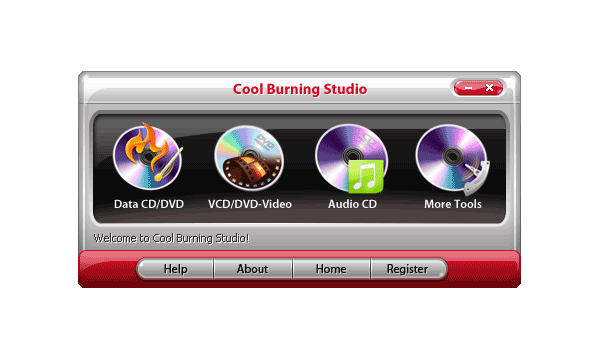 Many users are tired of over-complicated CD burning applications that are getting harder and harder to use. Sometimes you can waste most of your time just trying to find a function. Cool Burning Studio focuses on what you want! Many users are tired of over-complicated CD burning applications that are getting harder and harder to use. Sometimes you can waste most of your time just trying to find a function. Cool Burning Studio focuses on what you want!
Features: This application is positioned as a simple to use burner software. This is in contrast with many other products that are quite complicated. The application also offers file back up as an additional feature in addition to the simple operation for disc burning being offered. The burner applications are so complex at times that figuring out the feature is quite complex. His application offers burning of discs quickly, easily. It offers maximum quality as well as minimum hassle.
Burning of data in the form of files and folders on data CD or DVD or even Blu-ray discs are possible with this application.
Creating and burning disk images on CD/DVD and Blu-ray discs is easy too. You can both create and burn ISO, CUE/BIN image formats. You can rip music from CDs and burn music to audio CDs and MP3 discs on CD, DVD and Blu-ray in a variety of formats. Audio CDs can be created from WAV, MP3, WMA and Ogg Vorbis files. Video DVD, VCD and SVCD burning features are also available. Making copies of audio, video or data discs are easy and the burn speed and related options get set easily. Erasing of rewriteable media features is also available. The disc types that can be handled include CD-RWs / DVD+RWs / DVD-RWs/ DVD-RAM/ BD-Res.
Overall: Good features and ease of use makes this a really useful application. HD-DVD support also is included. That is not an useful feature any longer unless you have a HD player already. Copy creation goes with a responsibility of making sure you do not violate copyright issues.
{More Info and Download}
Posted in Main | 1 Comment »
Monday, January 26th, 2009
 W.O.T ( Web Of Trust) is a free add-on for Firefox. Its purpose is to let you know if you come across hyperlinks in your search results or webmail which may lead to potentially dangerous sites. These sites could install spyware/malware/adware/viruses or contain browser exploits, phishing attacks or fraudulent activities. W.O.T ( Web Of Trust) is a free add-on for Firefox. Its purpose is to let you know if you come across hyperlinks in your search results or webmail which may lead to potentially dangerous sites. These sites could install spyware/malware/adware/viruses or contain browser exploits, phishing attacks or fraudulent activities.
It works by adding a color coded “traffic light” next to hyperlinks, green indicates the link is safe, yellow warns you to be cautious, and red alerts you of potential dangers. It also provides an optional child safety rating.
W.O.T gets data from hundreds of sources, such as listings of fraudulent sites, as well as allowing user comments about sites.
It currently has almost 3 million users and ratings for over 20 million sites, so if you’re concerned with surfing online safely, it’s well worth checking out.
More info at the homepage here.
Posted in Browsers, FireFox, Freeware, Main, Security | 2 Comments »
Monday, January 26th, 2009
 Tired of the normal web browsers like Opera, Safari, Mozilla Firefox etc? Want to give your Internet a experience a whole new look? Then I may have found something cool for you. It’s called Maxthon. Tired of the normal web browsers like Opera, Safari, Mozilla Firefox etc? Want to give your Internet a experience a whole new look? Then I may have found something cool for you. It’s called Maxthon.
Maxthon is a powerful web browser with a highly customizable interface. It is actually based on the Internet Explorer engine which means that what works in IE, works the same in Maxthon. You maybe b wondering why bother with this if it’s same as IE, well it comes with some cool tweaks and additional features, so it isn’t the same at all.
The additional efficient features include a cool Tabbed Browsing Interface; Mouse Gestures; Super Drag&Drop; Privacy Protection; AD Hunter; Google Bar Support; External Utility Bar; and Skinning.
Recent changes in the version 2 includes:
- Improved Ad Hunter
- Built-in Online Favorites Service
- Improved Feed Reader, Magic Form Filler
- Smart Acceleration
- Splendid Skins
- Improved History, Super Proxy, Seperated User Account, File Sniffer and more
Though this is a cool tool it is still not the best it can be as it should be made more user friendly and bug free.
Not withstanding the minor hiccups, this browser is one worth checking out.
Want to give it a shot? Visit http://www.maxthon.com/
Posted in Browsers, Main | No Comments »
Friday, January 23rd, 2009
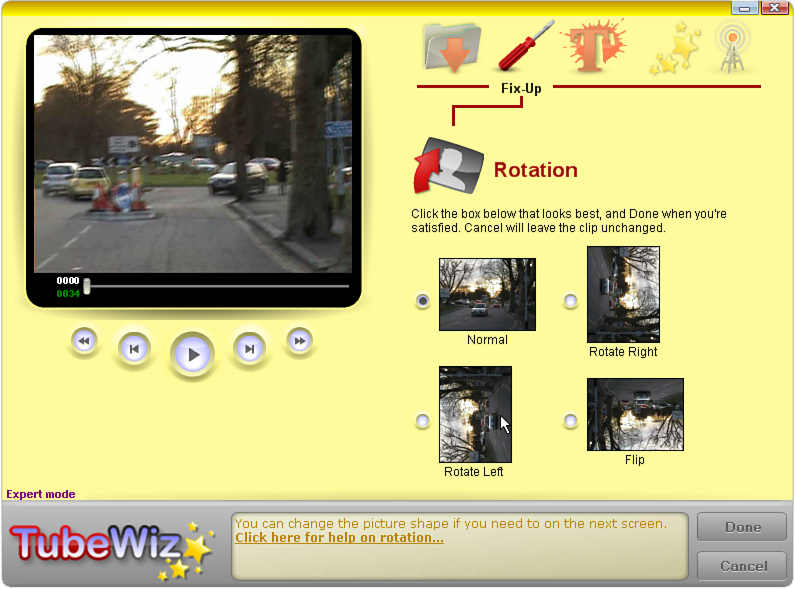 Now here is a cool tool that is fun to use. Tube Wiz functions as a good video editor that can correct picture shape, rotate the picture if it was filmed upside-down or sideways by mistake, and reduce or remove camera shake for many types of shot. Now here is a cool tool that is fun to use. Tube Wiz functions as a good video editor that can correct picture shape, rotate the picture if it was filmed upside-down or sideways by mistake, and reduce or remove camera shake for many types of shot.
The really nice feature I love about this software is that it has Dface blurring built-in. It lets you hide objects for privacy, such as faces, signs and licence plates, or you can even replace them with images. Ain’t that cool?
In the latest version which just hit the software market- Tube Wiz 1.5, a couple of changes have been made to make the tool even better.
The changes include:
- Easy in-video editing and trimming
- Full support for YouTube widescreen & HD fomats
- Export directly to Flash video format (also AVI & MKV)
- More international fonts in captions, subtitles, etc
Want to see if this is what you need?
Go to http://www.tubewiz.com/Public/newhome.aspx
Posted in Main | No Comments »
Friday, January 23rd, 2009
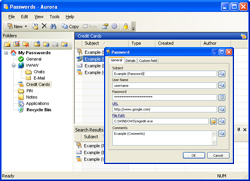 Here is a tool really worth checking out. Aurora Password Manager is a handy piece of software for storing and editing diverse confidential data, such as your credit card number, cellular phone pin-code, code to a cipher lock, website access code, e-mail box password and the like. Here is a tool really worth checking out. Aurora Password Manager is a handy piece of software for storing and editing diverse confidential data, such as your credit card number, cellular phone pin-code, code to a cipher lock, website access code, e-mail box password and the like.
How Does It Work?
The utility locks all stored information with a strong 256-bit AES (Advanced Encryption Standard) password and ensures its safety.
The cool thing is this tool is developed with simplicity and ease of use in mind. Even if you can’t make up a password on your own that is difficult to guess, the program can do it for you. With a built-in advanced password generator, that randomly chooses a case-sensitive combination of characters, this cool tool is really something.
The latest version released not too long ago is Vista compatible. The only con to this tool is the price, $29. But then the money may save you a lot of headaches and protection from identity thieves.
Want to check it out? Go for the trial version first and see if this meets your need…
Visit http://www.animabilis.com/
Posted in Main | No Comments »
Friday, January 23rd, 2009
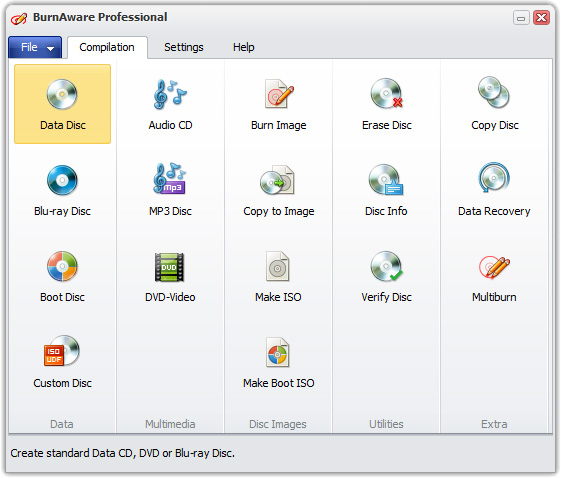 If you have been less than satisfied with previous burning software you’ve been coming across, you may want to give this a shot. This tool is called BurnAware. BurnAware allows you to easily perform the most common disc burning tasks: write to all CD/DVD media types, including Blue-Ray; write Audio CDs and DVD-Video files; create and burn disc images; write multi-session discs and much more. If you have been less than satisfied with previous burning software you’ve been coming across, you may want to give this a shot. This tool is called BurnAware. BurnAware allows you to easily perform the most common disc burning tasks: write to all CD/DVD media types, including Blue-Ray; write Audio CDs and DVD-Video files; create and burn disc images; write multi-session discs and much more.
I love the fact that it includes additional burning tools which help you to copy your CDs and DVDs with digital photos, documents, games, movies and music easily. One other thing worth mentioning is the fact that with BurnAware Home you can compile and burn bootable discs and disc images.
For almost $30, the price thing kicks in again. In my personal opinion it’s just too expensive. I mean there are free tools all over the internet that does stuff similar to this. The tool is a good one but I think it would fare better if it was a freeware that accept donations instead of the $30 price tag. But then that is just me. The truth is it does what it says it does, which is something in its favour. So go check it out and see if it is money worth spending for you.
At least check out the trail version, a 10 day trial may convince you. Go to http://www.burnaware.com/burnaware_home.html
Posted in Main | No Comments »
Thursday, January 22nd, 2009
 SmartFolio is state-of-the-art asset management software for investment professionals and private investors. It contains advanced portfolio optimization and risk management algorithms, based on the latest achievements in portfolio theory. SmartFolio is state-of-the-art asset management software for investment professionals and private investors. It contains advanced portfolio optimization and risk management algorithms, based on the latest achievements in portfolio theory.
Pros: SmartFolio is an advanced, easy to use analytical tool for portfolio analysis and management of investment portfolios according to the investor’s risk profile. Investment professionals and private investors can use the software to make meaningful investments decisions. SmartFolio is a state-of-the-art asset allocation software for investment professionals and private investors. SmartFolio contains advanced asset allocation, portfolio optimization and risk management techniques. These techniques are based on advancements of portfolio theory. These mathematical techniques are from the developments in the last few years.
Techniques lead to practical indicators that help in advanced portfolio optimization, asset performance ranking, risk-reward Analysis and efficient frontier, portfolio risk analysis (VaR and CVaR), target shortfall probabilities analysis, minimization of transaction costs etc. The application has been upgraded to include the functionalities of Black-Litterman model, walk-forward optimization, import from Bloomberg Professional, import from an Excel table, batch import, and automatic update from all data sources. It supports multi-period investment paradigm and supports portfolios that feature assets with non-Gaussian distribution of returns or non-linear inter-dependencies such as options and hedge funds. Other major functionalities are portfolio construction, estimation of parameters, portfolio optimization, historical simulations and data management. The application is supported on Vista also.
{More Info and Download}
Posted in Main | No Comments »
|
|
|




