Archive for the 'Main' Category
Tuesday, March 18th, 2008
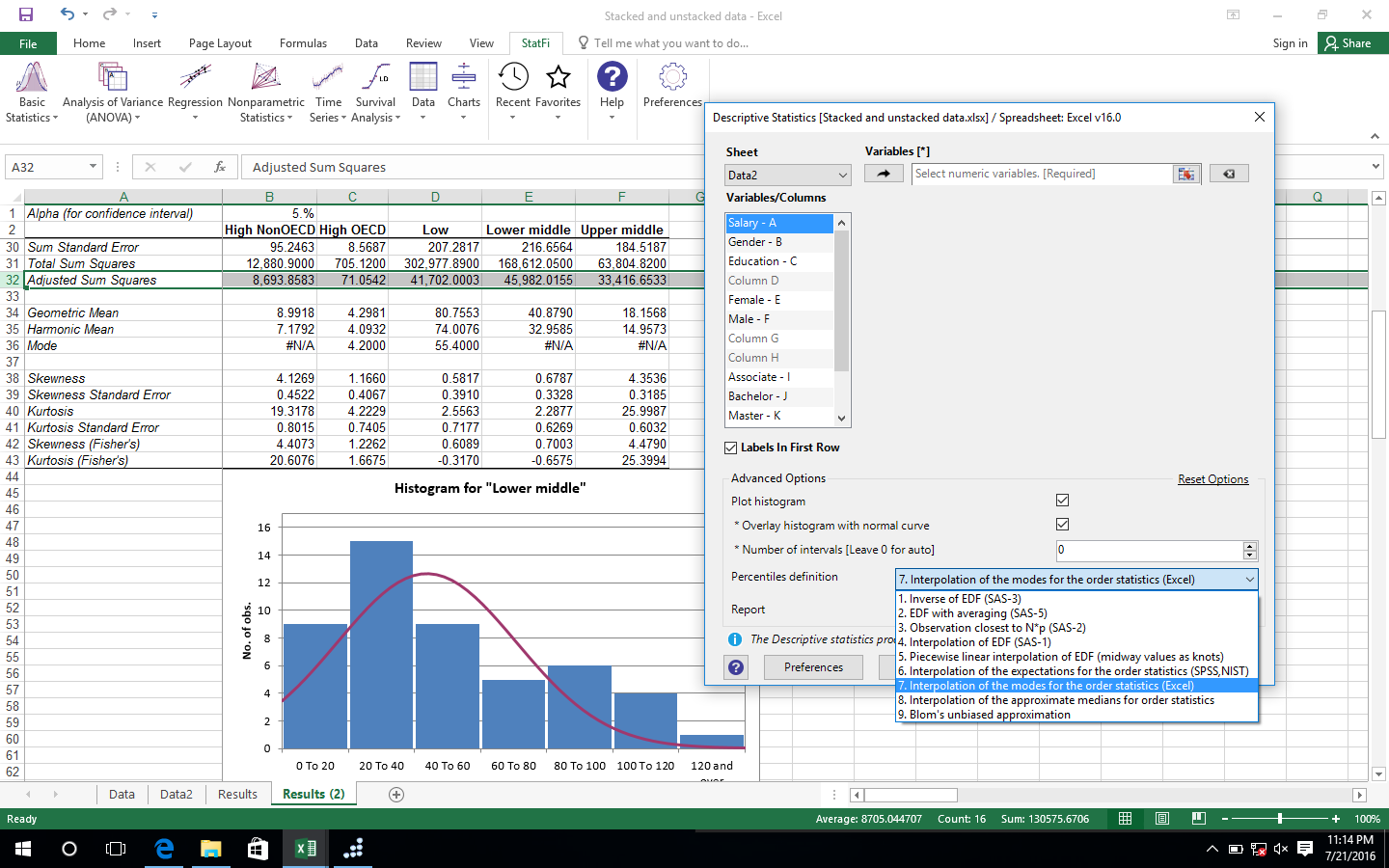 Need a good statistical tool? Check this out! StatPlus may be just what you’ve been looking for. Need a good statistical tool? Check this out! StatPlus may be just what you’ve been looking for.
StatPlus is a user-friendly statistical software which has a simple graphical user interface. This software possesses a wide range of statistical tool applicable to different field such as biostatistics, gambling operations, calculation of lotteries, economics insurance etc.
Some of the statistical analysis tool include determining descriptive statistics, normality test, fisher F-test, table analysis, cochran Q Test, multivariate linear regression, time series analysis, polynomial regression, profit analysis and so much more.
The cool thing about this tool is it’s simplicity; StatPlus is easy to use because there are given instructions to follow for every procedure.
For more info and download, visit http://www.analystsoft.com/en/products/statplus/
Posted in Commercial, Developer, Main, Shareware, Statistical software | No Comments »
Monday, March 17th, 2008
 Have you ever imagined being able to use your webcam in more than one application at a time? Yes, it’s possible with tools like Manycam. This is a program which makes this possible by splitting one video stream into several video streams. Sounding good? Well, give it a try, and choose Manycam virtual Webcam as the video source in your webcam applications. There are some features you can also add to the video stream by using Manycam, such as time, text and funny animations. Have you ever imagined being able to use your webcam in more than one application at a time? Yes, it’s possible with tools like Manycam. This is a program which makes this possible by splitting one video stream into several video streams. Sounding good? Well, give it a try, and choose Manycam virtual Webcam as the video source in your webcam applications. There are some features you can also add to the video stream by using Manycam, such as time, text and funny animations.
Manycam just got better with its latest update on march 13 with these latest features:
- Create, add and submit new pre-made ManyCam effects;
- New video source “Custom Desktop”;
- New “Drawing over video” effect;
- Additional features in “Text over video” effect: multiline input text, transparent background and text, color background;
- Gif files support in “Still Image” video resource;
- Pause, Stop buttons in Movie Source.
You can get more information on www.manycam.com
Posted in Developer, Main, Video, Webcam, Windows | No Comments »
Monday, March 17th, 2008
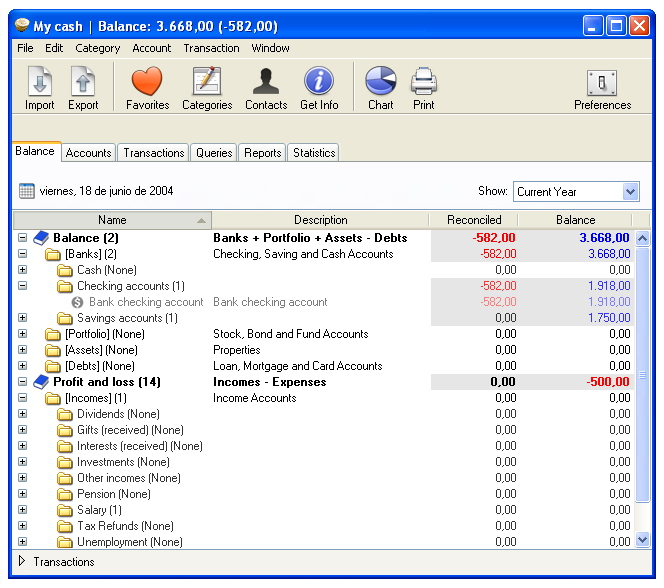 Proper monitoring and control of your finances help you know where your money comes from and to where it goes. Well, that’s where iCash comes in. It is a software designed to control your personal finance, keeping tabs on your incomes, expenses, debts, credits and Bank transactions for you. Proper monitoring and control of your finances help you know where your money comes from and to where it goes. Well, that’s where iCash comes in. It is a software designed to control your personal finance, keeping tabs on your incomes, expenses, debts, credits and Bank transactions for you.
This software just got updated recently and the following features were added and changes made:
Upgrades
- • It is now possible to select what accounts to use to calculate general balance displayed in status bar;
- • Automatic back-ups can be deactivated from the preferences;
- • Currencies can now be updated automatically when opening a document;
- • Account Statement report now includes a new column for Payee/Issuing.
Change
- • Preference panel has been redesigned and enhanced.
Fixed
- • New bank status display is now always visible;
- • Balance panel and balance status now automatically updated when updating exchange rates or default currency
For more on iCash go to http://www.maxprog.com/iCash.html
Posted in Developer, Finance, Main, Windows | No Comments »
Thursday, March 13th, 2008
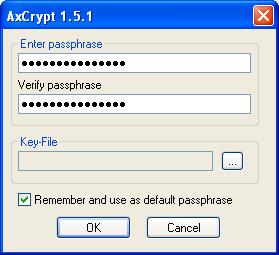 There are many different encryption programs that are available on the market but as is so often the case for specialized programs the ones that work the best turn out to be the ones that are free! This is extremely true of encryption as AxCrypt is most definitely one of the best encryption programs out there and it happens to be free as well. The program’s aim is to allow quick and easy encryption of any filename through utilization of the AES algorithm. There are many different encryption programs that are available on the market but as is so often the case for specialized programs the ones that work the best turn out to be the ones that are free! This is extremely true of encryption as AxCrypt is most definitely one of the best encryption programs out there and it happens to be free as well. The program’s aim is to allow quick and easy encryption of any filename through utilization of the AES algorithm.
The end result of an AxCrypt process is an encryption with 128-bit keys that is symmetrical in nature. It also allows the encrypted files to be compressed as well as editing with just two clicks of the mouse. When your file has been encrypted the file type changes from whatever it was to start with to the new AxCrypt encrypted file that possesses an extension of .axx and has a completely different icon from any other file type that you would normally see. The newest version of the program was released just a few days ago and it allows AxCrypt to become more aware of Windows Vista.
More information is available at http://www.axantum.com/AxCrypt/
Posted in Developer, Encryption software, Freeware, Main | No Comments »
Thursday, March 13th, 2008
 PicLens is an add-on for Firefox which improves your online image viewing experience in a really cool way. Once you install it, It can be invoked with one click whenever you visit several of the well-known image sites online including Flickr, Photobucket, Myspace, FaceBook, Fotki, Picasa web albums, Google image search,AOL image search and some others! PicLens is an add-on for Firefox which improves your online image viewing experience in a really cool way. Once you install it, It can be invoked with one click whenever you visit several of the well-known image sites online including Flickr, Photobucket, Myspace, FaceBook, Fotki, Picasa web albums, Google image search,AOL image search and some others!
You’ll notice that images at these sites now have a small arrow in the bottom left corner. Once you click this, PicLens launches and shows a gallery of all those pictures. This is no ordinary gallery though, its a 3D “wall” of images on a dark background. It looks pretty cool and it just gets cooler, because you can drag your mouse to move along this virtual “wall”. You can even use your scroll wheel to zoom in and out.
Clicking on an image expands it to full screen. There’s also a thumbnails strip at the bottom once in full screen mode. It also adds a small link at the top of your Firefox browser as an alternative way to start it, also you can search these image sites directly from inside PicLens. This enables you to view endless walls of pictures forever if you chose to without ever leaving it!
This is a must have for anyone who views a lot of pictures online, just try it and you’ll understand what I’m talking about. Also, if you happen to connect your computer to a large screen TV or monitor, then this program is a must (and I envy you!)
It was very fast on my computer when i tried (and kept) it and doesn’t seem to slow anything down at all. It only needs to be used whenever you feel like it and only takes one click to get in or out of it fast. It’s superbly designed and extremely user friendly.
Download it and see images and more info at the homepage here.
Posted in FireFox, Main, Photo | No Comments »
Wednesday, March 12th, 2008
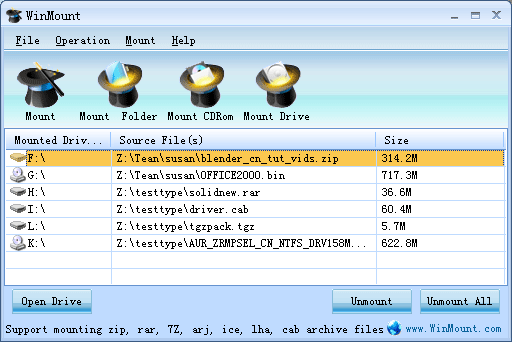 Need help in managing your compressed archives effectively and conveniently? Well, WinMount is a Windows utility which helps to do just that. With WinMount you can mount ZIP, mount RAR or ISO file to a new drive so that you can use those files inside directly instead of extracting them first which would take more time and consume much disk space. Need help in managing your compressed archives effectively and conveniently? Well, WinMount is a Windows utility which helps to do just that. With WinMount you can mount ZIP, mount RAR or ISO file to a new drive so that you can use those files inside directly instead of extracting them first which would take more time and consume much disk space.
WinMount was last upgraded on February 29, 2008 with these changes made:
- Fixed the bug of “Auto run the mounted driver” in the settings
- Fixed the bug on mounting SFX archives
- Fixed other bugs
For more info on WinMount, visit www.winmount.com
Posted in Main | No Comments »
Wednesday, March 12th, 2008
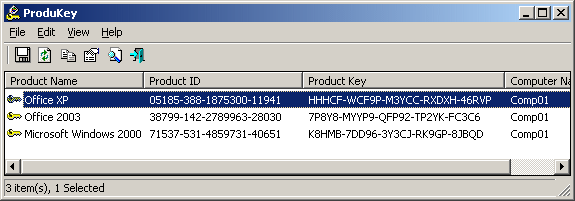 There are so many different things that can annoy the average web surfer and computer user and one of those things has to be the fact that it is so easy to lose product keys. With the new age of computer security that came about a few years ago, many programs required CD keys for installation. While this was fine when you initially purchased the program as the CD key was located on the box or on the jewel case, over time many people end up throwing those things out and when the time comes that they need the program again, they are out of luck in finding the CD key. There are so many different things that can annoy the average web surfer and computer user and one of those things has to be the fact that it is so easy to lose product keys. With the new age of computer security that came about a few years ago, many programs required CD keys for installation. While this was fine when you initially purchased the program as the CD key was located on the box or on the jewel case, over time many people end up throwing those things out and when the time comes that they need the program again, they are out of luck in finding the CD key.
Or at least they were out of luck until the wave of product key programs hit the market. This is one of those and it is one that has been around for a very long time. The latest version allows you to save .csv files from the software and it allows additional command line functionality within the program. It allows you to figure out the product ID keys for Microsoft Office, Microsoft Windows, Microsoft Exchange Server and SQL Server as well. It is extremely useful if you need to reinstall one of these programs and do not have another way to access that information.
More information is available at http://www.nirsoft.net/utils/product_cd_key_viewer.html
Posted in Main | No Comments »
Wednesday, March 12th, 2008
 The latest version of Fresh Download is out and considering the general popularity of this piece of software it is no surprise that one particular file website recorded over 20,000 different downloads in less than a day after it was released. Fresh Download is a freeware downloading software that has been around for years now and in that time it has established itself as being one of the most popular pieces of freeware of its time. The newest version looks great in the screenshot! The latest version of Fresh Download is out and considering the general popularity of this piece of software it is no surprise that one particular file website recorded over 20,000 different downloads in less than a day after it was released. Fresh Download is a freeware downloading software that has been around for years now and in that time it has established itself as being one of the most popular pieces of freeware of its time. The newest version looks great in the screenshot!
The point of Fresh Download is two-fold. The first point of the software is that you can use it to create a centralized downloading list so that you know at all times exactly what is going on download-wise on your computer. While this in itself is really something that would warrant a stand-alone piece of software, Fresh Download also allows you to accelerate your download process and in doing so it provides a second purpose that is wholly integrated into the overall program presentation. It is this combination of fast downloading and keeping tabs that makes Fresh Download as popular as it is and when this is combined with the fact that the program is free the popularity just explodes.
More information is available at http://www.freshdevices.com/freshdown.html
Posted in Download Managers, Main | No Comments »
Tuesday, March 11th, 2008
 Having just been released a couple of days ago, this version of Barracuda Drive is relatively untested by most of the people around. However, Barracuda Drive is a piece of software that many people would get a lot of use out of and because it happens to be freeware as well, it is very easy to see why so many people would download this particular piece of software. Having just been released a couple of days ago, this version of Barracuda Drive is relatively untested by most of the people around. However, Barracuda Drive is a piece of software that many people would get a lot of use out of and because it happens to be freeware as well, it is very easy to see why so many people would download this particular piece of software.
Barracuda Drive is a file manager program that is based on the web. This means that in order to use the program you do not need any kind of FTP software and the Barracuda Drive software can do basically anything that FTP software could do. You can use it for secure uploading to a particular web server and in addition to that you can use it for file management either on a web server or on your home computer. If you choose to manage your home computer files through Barracuda Drive then you’ll be able to get at them from anywhere in the world so long as you have a computer and an internet connection to use.
This great piece of software is quite handy and more information about it can be found at http://barracudaserver.com/products/BarracudaDrive/.
Posted in Freeware, FTP, Main | No Comments »
Tuesday, March 11th, 2008
 Normally when you want to make a quick note for future reference, it requires some effort. You have to grab a pen and paper, or maybe your PDA if you’re more technologically inclined. Normally when you want to make a quick note for future reference, it requires some effort. You have to grab a pen and paper, or maybe your PDA if you’re more technologically inclined.
With Jott, all you have to do is grab your cellphone and dial a special toll free number (which you can easily put on speed dial!) You then say who your message is for, such as “myself”, ” family”, or a work group or friends name for example. Now you can dictate up to 30 seconds of a message. This is then transcribed and emailed or texted to yourself as a reminder or to the chosen group.
At the moment its currently only available in the US and Canada, but is certainly an exciting idea which sounds like it could be very useful.
Sound interesting to you? Check out the website and test it out for yourself!
Posted in Information Management, Main, Reminder | No Comments »
|
|
|




