Archive for the 'Main' Category
Monday, February 4th, 2008
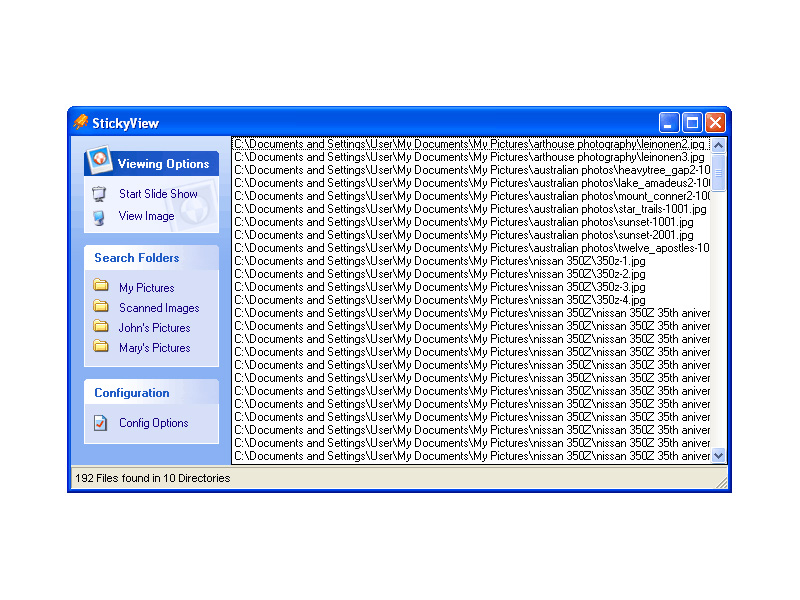
StickyView is an interesting piece of software because what it allows you to do is to view all of your images from different directories in one slide show without having to worry about going around and moving pictures around incessantly.
If you are like most people with computers, images will find their way into multiple folders and categories that will be removed from each other. This is not necessarily even because of disorganization, although for some people that probably does play a part! Even an organized person will have different folders for pictures and they might even have more folders than a disorganized person because of all of the different categories they have for their different pictures.
StickyView as a piece of software has a lot of good things about it, but the main is the extra convenience it provides. Windows can not play a slide show from multiple folders and this can make it very frustrating for you if you have similar pictures in different folders that you want to view at once (i.e. if you happen to arrange your folders by the date they were taken, for example). StickyView on the other hand will find all of your different picture files across directories and play them for you as much as you want. That makes it a truly worthwhile piece of software.
More information on it can be found at http://www.stickyview.com/
Posted in Developer, Main, Shareware | No Comments »
Tuesday, January 29th, 2008
  WinGet is a download manager that can increase download speeds by up to 300 percent. You may automatically resume broken downloads if your connection is lost or if your computer accidentally shuts down. WinGet is a download manager that can increase download speeds by up to 300 percent. You may automatically resume broken downloads if your connection is lost or if your computer accidentally shuts down.
Pros: WinGet download manager supports both ftp and http servers. One is able to queue all downloads in one go, the application will ensure downloads are reliably completed via unlimited retries and individual monitoring of each download scheduled. Even when there are breaks in the download the package is able to resume at appropriate points. WinGet lets you browse around the ftp site chosen to decide the pieces you’d like to download.
WinGet gets integrated into the browsers Internet explorer, Opera or the Firefox and operates as the default download manager. It is integrated into the right click menu.
Download speed can be tuned through parameter settings such as number of threads operating the download and simultaneous files being downloaded. In this age of multiple cores, whenever one has spare power, it could be utilized for speeding up the download process. The application is able to work through proxy servers too and communicate through the firewall.
Cons: Whether downloads get speeded up to 300% or not is questionable. This could not be measured. However, qualitatively the download speed does get speeded up.
Overall a easy to use application, easy to learn, fairly well designed it is a 4 star item.
Posted in Developer, Download Managers, Freeware, Main | No Comments »
Tuesday, January 29th, 2008
 AllKeys Macro is a macro program plus work/break timer and mouse replacement tool. Provides a flexible but robust macro solution that allows users to record and organize a large number of macros. AllKeys Macro is a macro program plus work/break timer and mouse replacement tool. Provides a flexible but robust macro solution that allows users to record and organize a large number of macros.
Pros: This application is a macro manager, work/break timer and a mouse replacement tool. As a macro manager it lets macros to be recorded, edited and arranged properly. Macros could be applicable to specific applications or to all of them. Macro would be a nice way to create keyboard short cuts for repetitive tasks such as filling your address somewhere or to launch your favorite web mail. The software lets you remap the keys to whatever location you want a particular key or a set of keys to be. When defining a macro one could specify an application for the macro. The macro would then operate only in the environment of that application. Import/export of macros are provided for. Editing facilities for editing a macro recorded already or imported can be done through a simple interface.
One really nice feature of the macro playback is the speed of playback. One usually takes a bit of time to type in the commands. But since a computer can take in the input much faster and yet recognize the key strokes, macros can be arranged to be played back at a faster rate.
If you would prefer, you could replace the mouse operation by keyboard strokes. Initially you define a set of keys to be the up/down and lateral movement keys as also left and right clicks on the mouse.
The work/ break timer functionality lets the user define his continuous work time in one stretch and the break time there after. You get alerts for the break time. What’s more is performance statistics like keystroke and mouse clicks done per minute are recorded and displayed.
Cons: The user interface feels a little too complicated for the application. Learning time too could be significant. Unless you use a lot of macros, investing in learning time may not be worthwhile.
Overall the application does perform a useful function, overall rating 4 stars.
Posted in Macro, Main, Programming, Shareware | No Comments »
Monday, January 28th, 2008
 WebmailSafety from Gwebs is free encryption for webmail. It ensures that emails sent across the internet are unreadable except by the sender and receiver. It does this by using RSA2048 & AES-256 Public Key encryption, ensuring very strong security. WebmailSafety from Gwebs is free encryption for webmail. It ensures that emails sent across the internet are unreadable except by the sender and receiver. It does this by using RSA2048 & AES-256 Public Key encryption, ensuring very strong security.
In order for it to work, the person you send to must also be using it. The site says it will soon be compatible with all other PGP software though and they’re also working on a Web Client for receiving secure email, but currently you must invite your friends in order for them to send or receive secure email with you. Also, note that it currently only works with Internet Explorer, but they say FireFox support will soon be on the way.
It currently supports Gmail, Hotmail, MSN mail, Live mail, Yahoo mail and AOL mail.
This is very interesting software for those of you interested in security and privacy online (or maybe just a little paranoid?)
To download it and try it out for yourself, (along with the over 210 thousand others and counting) go to the website here for further details.
Posted in E-mail, Main, Security | No Comments »
Wednesday, January 23rd, 2008
As soon as I saw this program, I knew that I was definitely going to download it and take it for a spin!
Why is that, you ask? Well, it’s because now that I am starting to earn more and have more credit and bills to take care of, having a personal piece of software that really helps me keep track of it all is exactly what I need. And that is exactly what Buddi will do for you. Buddi is a free piece of software (open source, to be exact) that will allow you to keep track of all of your personal finances and allow you to set up different accounts and categories while at the same time recording transactions that they happen to do. If you want a program to keep you honest about spending, then Buddi is exactly the program to do that for you.
Oh, and the absolute best thing about Buddi is that it happens to be a program created for people with no financial background and little experience in keeping track of their finances. It is the perfect program for the average Joe that just wants a little help with their financial existence.
More information is available at http://buddi.thecave.homeunix.org/en
Posted in Developer, Finance, Information Management, Main, Shareware, Windows | No Comments »
Tuesday, January 22nd, 2008
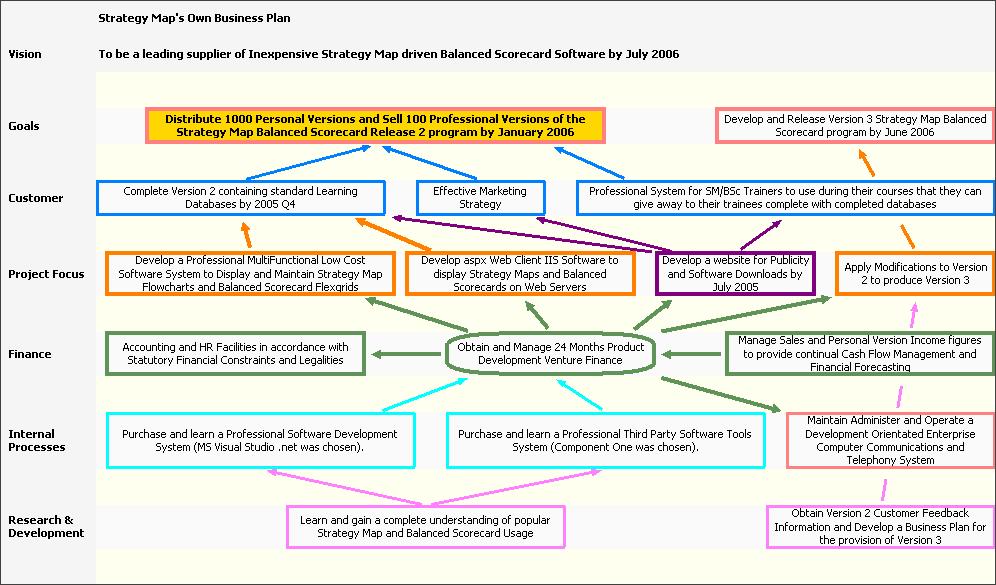
Whenever you tackle something, the best way to ensure success is to make sure that you have a strategy that makes success possible. Without a good strategy, even the best work ethic and the greatest mind will not be able to prevail over circumstances and that is why people that are good strategists have become important parts of some of the most successful businesses in the history of the world.
While there are some people that find it extremely easy to strategize for different things, personally I have never found it that easy and I know a number of people that would agree with that. Tools like mind maps and strategy charts have helped people that don’t strategize well on their own immensely and being able to computerize and use these tools as software programs makes the process much easier.
That is exactly what the Strategy Map does. It is a program that you can use to create mind maps and strategy charts that define the mission, what the goals of the mission are as well as the different objectives along the way along with competing perspectives on how to achieve those objectives. It is a very powerful piece of software that just happens to also be free.
For more information, check out http://www.strategymap.com.au/
Posted in Business, Commercial, Developer, Main, Reminder, Task Manager, Time Managment, Windows | No Comments »
Tuesday, January 22nd, 2008
 DC++ is an interesting tool. It is a direct connect service that actually allows you to connect to a number of other computers on the same network and exchange information with those computers in a way that makes it much faster than downloading a torrent file. The reason that it is perhaps not as popular as torrent downloading is because of the fact that when you download a torrent file, you can do so from websites and quite frankly from any other computer. DC++ on the other hand has limited connectivity that requires a network and therefore if you live in a university campus or other places with large residential networks you are going to be able to use DC++ in a much more effective way than you could currently use torrent software. DC++ is an interesting tool. It is a direct connect service that actually allows you to connect to a number of other computers on the same network and exchange information with those computers in a way that makes it much faster than downloading a torrent file. The reason that it is perhaps not as popular as torrent downloading is because of the fact that when you download a torrent file, you can do so from websites and quite frankly from any other computer. DC++ on the other hand has limited connectivity that requires a network and therefore if you live in a university campus or other places with large residential networks you are going to be able to use DC++ in a much more effective way than you could currently use torrent software.
ApexDC++ is a client that you can use for the DC++ service and it is a rather innovative client that rivals the best in the business. It allows you to use a block list manager to make sure that offenders of the system are not on your list to download from and it allows you a level of control and customization rarely used with these types of things. It also allows for super seeding, which even some torrent clients do not have. Add to that the fact that it has a very user friendly graphical user interface, constant updates and great support and it becomes very easy to see why it is so popular.
More information on it can be found at http://www.apexdc.net/.
Posted in Main | No Comments »
Monday, January 21st, 2008
 Do you find yourself working with a lot of files, regularly copying or moving them around? Maybe you just like to have a neat computer with everything neatly filed in the right place. Do you find yourself working with a lot of files, regularly copying or moving them around? Maybe you just like to have a neat computer with everything neatly filed in the right place.
I know that’s what I like, but unfortunately it tends to be easier said than done. It can be very time consuming, so instead, you find yourself with files and folders all over the place, total disorganization! If only there was an easier, almost instant, way to do it! Thats where FileTargets proves very useful.
Its a freeware right-click context menu add-on that couldn’t be much simpler to use and saves you a ton of time in moving or copying files. It adds a sub-menu with all your favorite folder names to the context-menu of all files and folders in your system so you can copy or move chosen files to pre-defined, most used folders with just a mouse click.
Now i have bad news and good news, the bad news is it’s discontinued software (why they did that i can’t understand, its an invaluable,little add-on, i wish things like this came as standard with windows) the good news is it’s still available on the homepage. Neat freaks and the highly organized will really appreciate Filetargets!
Click here to download it from the homepage.
Posted in Main | No Comments »
Monday, January 21st, 2008
 The latest version of the RunScanner software was released recently and it has already been downloaded thousands of times by many adoring fans that loved the previous versions of the program. In the newest version of the program, three major bug fixes have been put in place. The first is a fix of the invalid bitmap error that sometimes appeared for no reason, while the other two bugs deal with problems in analyses that the program carried out on different programs that were available and running on your system. All in all, this release of the software has been made much stronger by the bug fixes and that should come as very good news to people that already liked the previous version. The latest version of the RunScanner software was released recently and it has already been downloaded thousands of times by many adoring fans that loved the previous versions of the program. In the newest version of the program, three major bug fixes have been put in place. The first is a fix of the invalid bitmap error that sometimes appeared for no reason, while the other two bugs deal with problems in analyses that the program carried out on different programs that were available and running on your system. All in all, this release of the software has been made much stronger by the bug fixes and that should come as very good news to people that already liked the previous version.
RunScanner is a freely downloadable Windows utility that will allow you to scan your system at any given point and come up with all of the different programs that are running on it. It is much better than the task manager because unlike the rather unhelpful screens in the processes tab of the task manager, RunScanner gives you extremely detailed information about all of the programs running so that you know exactly what they are. This can help a lot in your quest to remove unwanted spyware, malware, adware and autostart programs from your running programs list and free up a wealth of system resources to be used elsewhere.
More information on this program is available at http://www.runscanner.net/.
Posted in Commercial, Developer, Main, Security, Shareware, Utilities, Windows | No Comments »
Monday, January 21st, 2008
 Threatfire is a behavior based malware detector.It guards against malware such as trojans, spyware, rootkits, keyloggers, and buffer overflows, based on behavior patterns consistent with these threats. This means that it doesn’t just rely on a signature database to compare the files on your computer against, although it has one too. Threatfire is a behavior based malware detector.It guards against malware such as trojans, spyware, rootkits, keyloggers, and buffer overflows, based on behavior patterns consistent with these threats. This means that it doesn’t just rely on a signature database to compare the files on your computer against, although it has one too.
This is always a limitation in signature based scanners (most virus and malware scanners) as they can only find known threats and can be useless against unknown or new threats (so-called ” zero-day” threats). Instead, Threatfire analyzes the activity of everything on your system for any suspicious behavior, which it then warns you about for you to take further action on.
According to test results published at the Threatfire website, it can increase the safety of your computer a great deal compared to just using an antivirus program.
It doesn’t seem to use up much resources and is very easy to use, as no complicated configuration is required. It’s available in a free and a pro version, the only difference being that the on-demand scanner in the free version is partially disabled,so it’ll scan for rootkits only.
The realtime protection is fully functional though, meaning you’re still fully protected against all known threats in the database as well as unknown threats that it may detect.
This is a neat program and good as an extra layer of protection and peace of mind. Click here for more details and download
Posted in Design, Information Management, Internet, Main, Security, Shareware, Shell and Desktop, Utilities, Windows | 1 Comment »
|
|
|




