Archive for the 'Main' Category
Sunday, October 8th, 2006
If you are a podcaster, or in some small way produce sound for someone else to hear, you need The Levelator. Unlike conventional compressors or limiters The Levelator is a smart level equaliser for any sound file. The cool part is that it works on both Mac and PC platforms as it is written in Java. It’s not actually a compressor, limiter or normaliser but it performs the fuctions of all three and in a really neat easy to use, automatic package.
It’s particularly good at things like interviews where you have a number of different voices on different microphones who may be closer or further away from the mic as they speak. The Levelator sorts out the different levels, working on both the transients (short term) and overall (long term) loudness of the whole file, and presents you with a cleaned up and perfectly balanced version. It can’t replace a skilled audio engineer, but it can do things that much more expensive audio clean up can do at no cost.
The software installs from the web directly onto your computer and give you and icon to run it on the desktop, then you drop a sound file onto the program window and it processes the file. The resulting file is processed in multiple passes to intelligently adjust the levels of different passages, so louder bits become lower and softer bits become more present. It’s a wonderful tool and totally free. It works with WAV and AIFF files, two industry standard sound file formats, but not unfortunately MP3. If you are releasing your audio in MP3 format you will have to use some other kind of sound file converter to arrive at that format. (more…)
Posted in Main | No Comments »
Sunday, October 8th, 2006
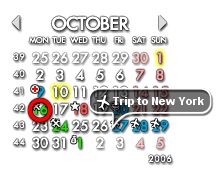 Rainlendar is a very small, free program that displays a skinnable, very customizable calendar on your desktop. You can also set reminders, with or without alarms for whatever date or time you choose and it has a useful to-do list as well. Rainlendar is a very small, free program that displays a skinnable, very customizable calendar on your desktop. You can also set reminders, with or without alarms for whatever date or time you choose and it has a useful to-do list as well.
This is a very useful calendar/to do list/reminder program that just sits in a corner on you desktop showing the current month with today marked and any days you have anything planned for, the to-do list or events list can be shown or can remain hidden. You can download skins at the website and at some other skin sites so that you can have it looking the way you want it, maybe integrating nicely with your desktop background.
It also displays the current date in the tray icon. I don’t know why this little program isn’t more well-known as its very light on the computer resources, looks good and is quite useful.
Posted in Main | No Comments »
Sunday, October 8th, 2006
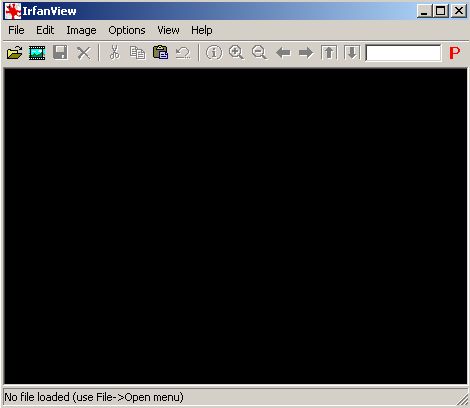
Irfanfiew is a very useful, small, efficient and easy to use image/photo viewer for windows for anyone who requires free image viewing software with basic image manipulation such as resizing, cropping, fixing lighting issues, etc.
That’s the simple explanation, but it also has more advanced features for those who need them (batch conversion, slide show creation, support for different file formats etc). I’ve been using this software for years now and its definitely one of my “must have” applications i highly recommend to anyone who wants a little more control over their images than the overly simplistic built in windows image viewer.
One tip: use the keyboard shortcuts for extra speed and convenience when navigating through pictures etc and you’ll wonder how you ever lived without this useful software!
Posted in Main | 1 Comment »
Sunday, October 8th, 2006
Writers are always seeking inspiration, and sometimes it’s hard to come by. Software tools can help, disturbing deeply entrenched thought patterns and spinning you off into interesting new territory. PyProse is a semi-random text generator which makes sentences using rules and word lists to create almost human sentence constructions.
The results from the program are oddly poetic, like for example: “These lips were telling her vending machines. What has underbrush cooked? To decline was uncorking us. Any vanishing meal shouted. We have vilified you, and to talk grips the history of steel”. (more…)
Posted in Main | No Comments »
Sunday, October 8th, 2006
 We’ve all heard about the spyware epidemic of recent years that continues to plague just about any computer connected to the internet (and if you haven’t heard about it I suggest you check my antispyware recommendations, its most likely one reason why your computer is running so slow! as just about every computer gets affected sooner or later). But as we all know, prevention is better than cure and that’s why one of the first things I install on a new computer is spywareblaster, a free program that blocks thousands of spyware from even being allowed into your computer in the first place. We’ve all heard about the spyware epidemic of recent years that continues to plague just about any computer connected to the internet (and if you haven’t heard about it I suggest you check my antispyware recommendations, its most likely one reason why your computer is running so slow! as just about every computer gets affected sooner or later). But as we all know, prevention is better than cure and that’s why one of the first things I install on a new computer is spywareblaster, a free program that blocks thousands of spyware from even being allowed into your computer in the first place.
Download it, install it, run the update and choose to protect all (or just any browsers you use) then that’s it! It’s done its job and doesn’t even have to be run again, but I recommend running the update from inside the program every once in a while to get the latest protection, this can be done automatically if you choose to upgrade to a paid version, but that’s the only real difference. It doesn’t remove currently installed spyware but is a very good preventative measure.
Posted in Main | 6 Comments »
Sunday, October 8th, 2006
 Of all the graphics software used in movies and TV the most impressive is the kind that generates natural looking landscapes in the computer that can be composited (that is to say seamlessly blended) with live action elements. Terragen is a free, at the moment at least, program for PC and Mac which does just that, and to an amazingly realistic degree. Of all the graphics software used in movies and TV the most impressive is the kind that generates natural looking landscapes in the computer that can be composited (that is to say seamlessly blended) with live action elements. Terragen is a free, at the moment at least, program for PC and Mac which does just that, and to an amazingly realistic degree.
You start off by making your basic landscape as grayscale bitmap, either in the program or in an external editor like PaintShop or PhotoShop. In this case the white areas are high and the dark areas are low. The software then makes this bitmap into a mesh, a 3D shape which can be rendered using lighting states set up in the program. The mesh can then be dressed with a variety of colors and moss and snow to your taste. You assign settings to the sky and water height and off you go for a render.
The program operates over a number of windows which are driven from a toolbar which generally sits on the left of your screen and you and open and close the windows at will. You don’t have to have them all open at once, but I found that during the development process it’s common that you have at least two open at a time, usually the rendering control and one other so you can preview the results of your tinkering. The program also handles animation so you can generate a sequence of images and move the camera to make “fly-throughs”. (more…)
Posted in Main | No Comments »
Sunday, October 8th, 2006
KeePass is a free, light-weight and easy to use password safe. You have many passwords to remember these days but you don’t want to use easy to memorize passwords because they’re easy to crack. This program allows you to generate very secure passwords and not have to remember any of them except one master password. It also highly encrypts your passwords (and usernames) so you won’t have to worry about anyone getting ahold of them.
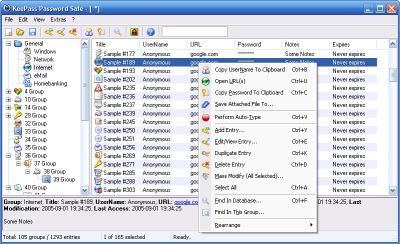
I’ve tried many “password safes” and KeePass is by far my favorite. The databases are encrypted using the best and most secure encryption algorithms currently known (AES and Twofish) and it uses SHA-256 as the master password hash. It also protects you from keyloggers by never making you type out your password. It even has in-memory password protection so physical password scanners won’t reveal your passwords. It has a host of great features that you should read up on its Web site.
Some people rely on saving all their passwords in their Web browser but the problem with this is that they’re extremely easy to find if anyone has access to your system and it encourages you to choose bad passwords. Plus if you reinstall your operating system or try to access your accounts from another computer you’ll be out of luck. So a good password manager is the right way to go.h You can configure KeePass to always sit minimized in your system tray and whenever you need to sign onto an account just pop it open and drag the appropriate password into the password field to log in to your accounts.
Posted in Main | 2 Comments »
Sunday, October 8th, 2006
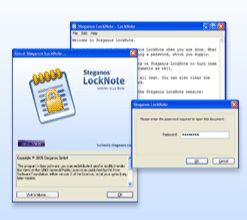 Ever wanted a private way to store important or personal details such as passwords, personal thoughts, maybe that next book you’re writing, or your plans to take over the world? Ever wanted a private way to store important or personal details such as passwords, personal thoughts, maybe that next book you’re writing, or your plans to take over the world?
Here’s a very useful and simple to use little program for anyone who wants a secure and private way to keep private notes, to-do lists, or anything else in a simple text file, without having to install and learn a complicated program.
It simply allows you to password protect text files. It comes in a self contained executable file, so no installation is required at all, you simply drag your text file onto the program icon and it then turns it into a password protected file which is also encrypted with AES 256bit encryption (very strong) so your private stuff inside stays private! (more…)
Posted in Main | No Comments »
Sunday, October 8th, 2006
I’ve downloaded a children’s game today called Diamond Dare 3.0. The game itself is pretty simplistic. Money, diamonds and rocks fly by on the screen and your only job is to click on the money or diamonds. Clicking on a rock loses you points.
The program is pretty easy to install and run but does have a couple glitches. You can only run the game once and it then closes and needs to be restarted. There are no instructions or help, and the levels jump for no apparent reason or will not end when you’ve cleared them.
Overall I’d have to say that this is a good first-try program with some potential but I wouldn’t recommend downloading it because you’re just going to be uninstalling it after about 5 minutes.
by Whiplash
Posted in Main | No Comments »
Sunday, October 8th, 2006
Foxit Reader is a great alternative to Adobe Reader for reading and printing your PDF files because it’s much lighter, faster and friendlier.
Foxit Reader is very fast, it loads up in a second and without any splash screens. Foxit doesn’t even require you to install it, you just run the standalone .exe, so it’s perfect for putting on a disk and using on other computers. (more…)
Posted in Main | 1 Comment »
|
|
|