O. James Samson - September 5, 2009
 Identity Finder Free Edition is a very powerful tool to protect personal information in your local computer. This application is unique since it aims to protect specific files inside your PC. Users will usually have to encrypt the entire file system which can use a lot of resources. With identity finder, only limited resources will be used which means the application will work without requiring a lot of additional resources from your computer. Identity Finder Free Edition is a very powerful tool to protect personal information in your local computer. This application is unique since it aims to protect specific files inside your PC. Users will usually have to encrypt the entire file system which can use a lot of resources. With identity finder, only limited resources will be used which means the application will work without requiring a lot of additional resources from your computer.
The application will allow users to scan the information on their hard drive. After file scanning, the application will show the data that should be encrypted as well as the security options for users.
Identity Finder Free Edition also offers online security. Transaction in Firefox and IE (Internet Explorer) can be encrypted and keyed-in data will not be monitored. The My Documents folder where the important files are usually located can be encrypted as well.
In addition to data encryption, users can also use the shredding tool that comes with the application. With the file shredding tool, users should be able to permanently delete the files. System cleanup and file vault function is also part of the free edition.
As a free edition, there are limitations. Identity Finder Free Edition can only protect personal financial information. Other personal information such as SSN and health information is not part of the free edition. But even with the limitation, the application should be more than enough to protect personal information for home users. The application even comes with remarkable tools such as file vault system and shredder.
Check it out at identityfinder.com
Rating:  Loading... No Comments »
O. James Samson - September 4, 2009
 Signo is a very powerful application that can significantly increase productivity for writers. The application basically offers a tool that can manage various hot keys that can implemented in various word formats. Other users can also benefit from Signo as it can be customized for additional functions. Signo is a very powerful application that can significantly increase productivity for writers. The application basically offers a tool that can manage various hot keys that can implemented in various word formats. Other users can also benefit from Signo as it can be customized for additional functions.
The unique function of Signo is the ability to implement short phrases with a simple hot key. Up to 10 words can be implemented with a keystroke. The information can be entered in the system without any challenges. Users should be able to easily install the system and run the application in the background.
The interface of the system is very easy to understand. For phrases, users just simply place their preferred phrase with the hot key starting with #. Learning the system is very easy and the application can be used without any problem in minutes.
Of course, the application has to be active in order to be used. This might discourage some users as multiple applications might require additional power from the computer. But Signo is installed in the system tray which means it will run in the background. Users should be able to run other applications normally.
The only challenge on the application is the use of # sign with other keystrokes. Some users extensively use # especially programmers. This means the application might do more inconvenience that actual use. However, the application is perfect for those who are using regular word applications since phrases can be easily implemented with a simple keystroke.
Check it out at kerkia.net
Rating: Loading... No Comments »
O. James Samson - September 4, 2009
 Searching for the right information online is a little bit challenging. There are browsers that can easily lag because of additional resources required but they are not related to your search. This problem is now catered by a simple application called zAngA. This application allows users to quick search for websites online as well as translation of the highlighted words. Searching for the right information online is a little bit challenging. There are browsers that can easily lag because of additional resources required but they are not related to your search. This problem is now catered by a simple application called zAngA. This application allows users to quick search for websites online as well as translation of the highlighted words.
Using the application is very easy. The application is a desktop software and it is installed in the system tray. The word that needs to be translated can simply be dragged to the application. The word will be immediately translated and displayed on the interface of the application. This function in the application can be customized based on the language needed by user. Because the application uses the internet as its source of information, the options for languages are basically unlimited.
Aside from being an efficient translator, the application can also be used as a search tool. Phrases can be dragged in the application and the search results will be immediately displayed. The websites recommended in the search results can be easily launched in the default browser because hot keys are added in the function in order to open the recommended website.
The only disadvantage of the application is that it heavily relies on online connection for its function. Users need to have a reliable internet connection before they can enjoy the functions of zAngA. The application addresses this concern by adding a timer function so that users will be informed on how long they will have to wait if the internet connection is slow.
Check it out at ez-worx.spaces.live.com
Rating: Loading... No Comments »
O. James Samson - September 4, 2009
 BumpTop is a desktop environment application that offers more than just simple background image for your computer. The application offers a wide variety of functions that can easily transform the way you interact with your application. You’ll be able to see more of what’s inside your computer and understand you system better right from your desktop. BumpTop is a desktop environment application that offers more than just simple background image for your computer. The application offers a wide variety of functions that can easily transform the way you interact with your application. You’ll be able to see more of what’s inside your computer and understand you system better right from your desktop.
The main feature of BumpTop is its visual representation of files and folders. The folders in your computer will be represented by size. The folder with the largest size is also the folder that has the most files or takes the most space in your hard drive.
Online integration is also very smart with this simple tool. Through BumpTop, users will be able to connect to various social networks such as Twitter and FaceBook. The installation and use of desktop functions is still the same even with the transformation since BumpTop is merely a 3D transformation of the desktop.
The interface of the desktop when used with BumpTop is simply stunning. The official website of the application allows various themes to be implemented in the desktop. These themes will dictate how the folders will and specific files look but they can still be fully customized based on the preference of the user.
Because it significantly changes the look and interaction with the browser, the required processing power of your computer increases. Applications and files in the desktop can be easily manipulated through mouse-gestures but they will require a relatively powerful PC before they can be launched and use with ease.
Check it out at http://bumptop.com/
Rating: Loading... No Comments »
O. James Samson - September 4, 2009
 The name says it all – Moo0 FileShredder is a very simple tool used to permanently delete files in your computer. This is very efficient tool to permanently delete files that contain highly sensitive or personal information. Moo0 FileShredder allows users to bypass “Recycle Bin” stage. The name says it all – Moo0 FileShredder is a very simple tool used to permanently delete files in your computer. This is very efficient tool to permanently delete files that contain highly sensitive or personal information. Moo0 FileShredder allows users to bypass “Recycle Bin” stage.
The main advantage of Moo0 FileShredder is its ability to delete the files without any possibility of future access. There are applications that can retrieve even the deleted files. This scenario will never happen if the file has been deleted using FileShredder.
Moo0 FileShredder is not like your average file deletion application. Many applications of this type will usually delete the files permanently without other options. FileShredder on the other hand, offers a variety of permanent deletion for the user. The application can change the file name, time stamp (when the file was created), file size and remove data inside the file after deletion. Users can choose to use all or select methods of deletion.
Even the interface of Moo0 FileShredder is unique. Instead of using right click function to delete the file, the application will provide “drop box” in the desktop. This is where users can drag and drop the file or files they need to delete. They can customize the level of deletion before they permanently delete the files.
Moo0 FileShredder is not your average file deletion tool. While it only does one thing, the application offers a good variety of options for users. The installation file is also relatively small (2.42mb) so the time from downloading the file and installation is fast.
Check it out at moo0.com
Rating: Loading... No Comments »
Tilgore Kraut - September 2, 2009
 Altysoft Free Video Converter is a free video conversion software can convert video files to avi, mp4, wmv, 3gp, mpeg1, mpeg2, mp3, VCD, SVD, DVD etc. it is also a DVD ripping, DVD backup and YouTube download software. Altysoft Free Video Converter is a free video conversion software can convert video files to avi, mp4, wmv, 3gp, mpeg1, mpeg2, mp3, VCD, SVD, DVD etc. it is also a DVD ripping, DVD backup and YouTube download software.
Features: Altysoft Free Video Converter is a free video conversion software. The application is capable of converting video to AVI, MP4, WMV, 3GP, MPEG1, MPEG2, MP3, VCD, SVD and DVD etc. You can back up DVD disks on to the HDD of your system too. Play them from the hard disk or create copies as needed. The utility will also let you download video clips from YouTube, convert and collect them for recording on disks. You just specify the URL of the video download site and click to start the download. Most popular video formats are covered. Convert the clips in a batch.
You can create the list, select the output format and then just click to get the process started. Ripping a DVD is easy with this tool. If you need to, you can convert the audio tracks to MP3, WAV and WMA and even between these formats as well. Video can be converted to either 16:9 or 4:3. You are now able to create video in formats that can be viewed in a range of players including the portable ones such as the iPhone, Zune and so on. The application is multi-thread capable. So that if you do have a processor in your machine which has more than 1 core, you will get a speed up in conversion. The interface is multilingual capable. Adjustable parameters help you tweak the process and these include frame size, video&audio quality, bit rate, frame rate, sample rate, codec, resolution, quality, etc. To make things convenient these setting profiles can be saved and reused other times if these are the optimum settings you use most often in a given scenario.
{More Info and Download}
Rating: Loading... 1 Comment »
Tilgore Kraut - September 2, 2009
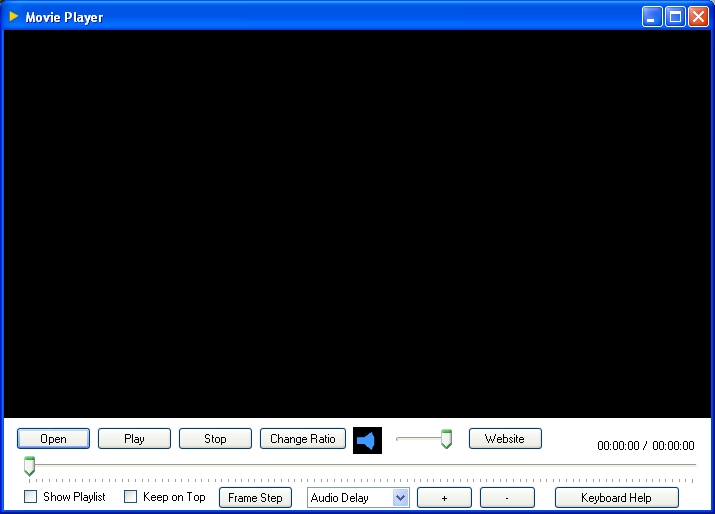 With a huge variety of media players hitting the market every now and then, you often need to deal with a lot many troubles in playing some of the audio and video formats, due to issues relating to format compatibility. Even, it turns out to be a hectic affair to convert your media files each time in order to make them compatible with your multimedia player. Nevertheless, now you can get rid of the entire problems and play almost all video and audio formats using a single player. The player referred here is Movie Player 1.0, which functions effectively to support playing all audio and video formats such as wmv, vob, mp4, rmvb, 3gp, mov, divx, avi, xvid, mpg, along with mkv, flv, for video, and mp3, flac, wma, aac, m4a, ac3, wav, and even more for audio. It even functions as DVD decoder, and also associates itself as a default player with the entire supported video and audio files. Further, it supports creating a playlist to avoid hassles of repetitive selections and maintain the continuity. With a huge variety of media players hitting the market every now and then, you often need to deal with a lot many troubles in playing some of the audio and video formats, due to issues relating to format compatibility. Even, it turns out to be a hectic affair to convert your media files each time in order to make them compatible with your multimedia player. Nevertheless, now you can get rid of the entire problems and play almost all video and audio formats using a single player. The player referred here is Movie Player 1.0, which functions effectively to support playing all audio and video formats such as wmv, vob, mp4, rmvb, 3gp, mov, divx, avi, xvid, mpg, along with mkv, flv, for video, and mp3, flac, wma, aac, m4a, ac3, wav, and even more for audio. It even functions as DVD decoder, and also associates itself as a default player with the entire supported video and audio files. Further, it supports creating a playlist to avoid hassles of repetitive selections and maintain the continuity.
With simple and decent appearance, the Movie Player 1.0 helps you in enjoying all your favorite audios and videos of any format. The options of the player are placed at the bottom side giving the entire upper part of the player screen as video viewing area. The features at the bottom include Open, Play, Stop, Change Ratio, Volume, Timeline bar, and options to Show Playlist, Keep in Top, Frame Step. Along with these, it includes dropdown list to adjust Audio Delay, Subtitle Delay, Speed, Brightness, Contrast, Hue and Saturation with the + and – sign buttons. Buy changing the ration you can make the video fit to screen or remain in original size. With no complexity involved the player application aids you in viewing and listening to your video and audio files with any format, whether downloaded from web, copied from a CD, etc.
Movie Player is easily installed and supports playing all audio and video formats, thus allowing you to view and hear any format media file without requiring conversion.
{More Info and Download}
Rating: Loading... No Comments »
Tilgore Kraut - September 2, 2009
 Free image converter is all-in-one solution for those who do not want to waste time and effort searching for 10 different converters to deal with different formats. Convert Bmp, gif, jpg, png, bmp, tiff easily within few clicks. Free image converter is all-in-one solution for those who do not want to waste time and effort searching for 10 different converters to deal with different formats. Convert Bmp, gif, jpg, png, bmp, tiff easily within few clicks.
Features: Image Format Converter is simple and easy to use software. It supports all image formats conversion to another image format. It takes in an image and creates a new one with a different size or format, or perform the task for a batch of graphic files with one click. Web designers and other IT professionals may need to do this often. Batch conversion is supported. You can rotate, alter the size of image (Resize) and crop of the input image. Free image converter is all-in-one solution for those who do not want to waste time and effort searching for 10 different converters to deal with different formats. Bmp, gif, jpg, png, bmp, tiff etc can be converted easily with a few clicks. Multi page TIFF images also are handled.
You will be able to handle large images. It works with a simple GUI and is supported on Windows XP 2000/2003/Vista/2008 and Windows 7.Contrats of the image can be adjusted. Image resizing is supported.
Overall: Good overall, some more edit features would have made sense.
{More Info and Download}
Rating: Loading... No Comments »
Tilgore Kraut - September 2, 2009
 FoxScribe is a CD/DVD burning software designed for Windows which fulfils your needs to do backups and create/read ISO files. It employs a very stable burner engine, full burning features, easy to select options, and much more. FoxScribe is a CD/DVD burning software designed for Windows which fulfils your needs to do backups and create/read ISO files. It employs a very stable burner engine, full burning features, easy to select options, and much more.
Features: FoxScribe is top CD/DVD burner for Windows. It can manage your back ups as well as to create and read ISO files. FoxScribe employs a very stable burner engine. It has a complete set of features to support your disc burning needs. Options available are easy to select through the simple to use interface. The program works with rewritable and multi-session discs. Audio, video and other data can be burnt into the CD/DVDs. You can create custom data if you want to. Disc images can be created and you can create copies of the media you own. You are able to save and encode audio and data tracks to files.
The program can handle dual layer discs easily. Being integrated with a file browser the operation of finding files is made easier. It can erase the media by several methods so as to ensure it is completely erased. Disc images in either ISO or BIN/CUE formats can be created. It does verification too on specified tracks.WMA, WAV, MP3 and ISO file formats are handled easily. It is able to scan SCSI/IDE bus for drives and save information as to their capabilities. It has multi-language capability.
Overall: An easy to use package.
{More Info and Download}
Rating: Loading... 1 Comment »
Tilgore Kraut - August 31, 2009
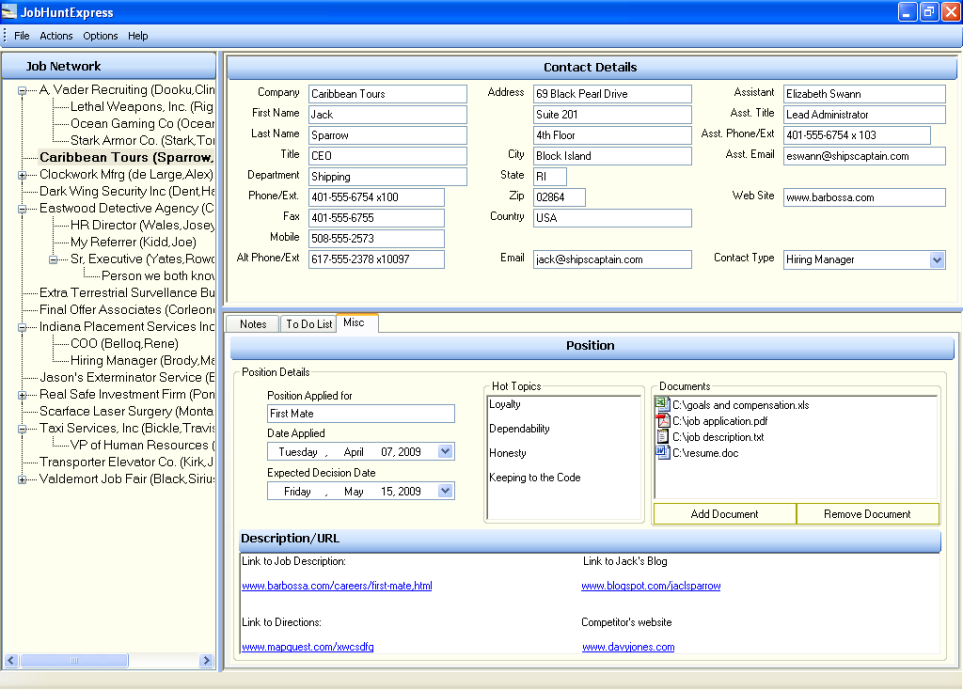 Organize, target, and cultivate all of your job opportunities, recruiters, and other important networking contacts quickly and effectively with powerful, yet easy-to-use tools to make you more successful at getting that great job that you deserve. Organize, target, and cultivate all of your job opportunities, recruiters, and other important networking contacts quickly and effectively with powerful, yet easy-to-use tools to make you more successful at getting that great job that you deserve.
Features: To get the job that you really want is possible only if you can increase the opportunities you have, more networking contacts you have and such other things that increase the probability for you. Job Hunt Express is an easy-to-use software package. It makes hunting a job very efficient and effective. What that means is that The important information for your job opportunities that are scattered about on different websites, on paper, on spreadsheets, and in your head need to be organized. The contact data for hiring managers, recruiters and other networking resources is stored in multiple places or in one awkward spreadsheet or document, you do not have an individual action plan or calendar tracking capability for each opportunity and such other chaos needs to be controlled into a organized way of managing contact details and follow through with a given opportunity.
Job Hunt Express provides you the means to get organized completely. You have to apply to more job openings, talk to more recruiters, network with more people, and generally be much more proactive just to be considered for an open position in this tough market. Like sales people manage their contacts this software application lets you manage job contacts. The interface is very well organized and gives you details of a contact and makes following a lead very easy.
Overall: A very nice tool for managing job hunt.
{More Info and Download}
Rating: Loading... No Comments »
|
|
|





