O. James Samson - June 9, 2014
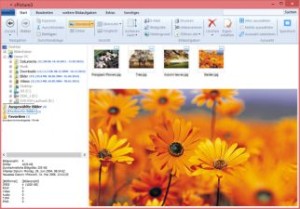 Do you want a program that can simply help you to edit digital pictures? cPicture is a very easy to use program that does not require any installation. All you need to do is to copy the current version of cPicture to get started. Do you want a program that can simply help you to edit digital pictures? cPicture is a very easy to use program that does not require any installation. All you need to do is to copy the current version of cPicture to get started.
What is cPicture?
cPicture is a program to view and work with your digital photos. It offers support for thumbnail browsing, EXIF display, histogram view, as well as various features to resize, rotate, crop and more. You can also remove red-eye effects, create a HTML gallery or picture index, and batch process images to perform selected operations on multiple photos at once. The program supports all popular images formats, and even view/convert various RAW formats as well (including Canon CR2), which is not often found in free image viewers.
The interface is easy to use and provides access to the features with non-technical commands (I want to…) and a modern look. cPicture LE offers several other handy features like mouseover image zooms, lossless rotation, image slideshow, command line options, colour profile support and more. The program comes as standalone executable, and does not require installation – it can be run from a USB drive.
Does it have any downside?
The demo version of the program is limited to ten days trial, while the PRO version goes for €14.95.
Want to check it out? Visit: http://cpicture.thecloudsite.net/
Rating:  Loading... No Comments »
O. James Samson - June 8, 2014
 Did you know you can put your stuff on the web and get to it from your computers, phones, or tablets? Did you also know you can edit documents, automatically add photos, and show off videos from anywhere? Of course, you can do all that and even more with Dropbox. Did you know you can put your stuff on the web and get to it from your computers, phones, or tablets? Did you also know you can edit documents, automatically add photos, and show off videos from anywhere? Of course, you can do all that and even more with Dropbox.
What is Dropbox?
Dropbox is the easiest way to store, sync, and, share files online. There is no complicated interface to learn. Dropbox works seamlessly with your operating system and automatically makes sure your files are up-to-date. Available for Windows, Mac, and Linux. It is a streamlined and comprehensive cross-platform online storage and synchronization utility, designed to store your data in the cloud and automatically keep it in sync between multiple desktop and mobile devices at a time.
Once Dropbox uploads your files onto its cloud storage servers, you can effortlessly generate and share public links to your files in order to allow friends and colleagues to access your data with ease and simplicity.
To use the Dropbox application is to copy your files within the Dropbox folder created on your Mac’s hard drive during the installation process, and they will be instantly synced to all your other devices running the app once the app detects any changes.
Does it have any downside?
The free account does not allow you to store more than 2GB of data. Also Dropbox stays one of the most expensive services. While other companies are fighting for the new clients by lowering the prices for more GBs, Dropbox still charges $10/monthly for a 100GB. Considering the fact that for the same $10 Google offers a 1TB (or just $2/monthly for a 100GB plan) it seems that marketing team of Dropbox have something to think over.
Want to check it out? Visit: Dropbox.com
Rating: Loading... No Comments »
Ciaran Moore - June 3, 2014
 Xinorbis is an extensive hard drive analyser that will certainly show you, in detail, precisely where all of your hard drive space has gone. Xinorbis is an extensive hard drive analyser that will certainly show you, in detail, precisely where all of your hard drive space has gone.
Firstly you need to tell the program just what exactly you’d like to check (a folder tree, or an entire drive).Then you need to leave Xinorbis to perform its scanning function. By definition it must scan each and every single file in your specified locations, so this will most likely require some time. It’s well worth the wait, however, simply because when the actual process is finished you’ll get detailed reports on every facet of your hard drive use.
So you can see which directories are taking the most drive space, for instance. Or which file types are turning out to be particular resource hogs: movies, audio files, documents, images, whatever it could be on the system.
A “File Attributes” panel lets you know exactly how many of the browsed files are hidden (perhaps useful for security), system files, created, accessed or modified today.
If other people make use of this PC then you will have the ability to sort your reports by file owner, so you may see which user is mainly responsible for the the majority of junk.
It’s easy to search for files by date range, so you could (for example) see how many files were created in the last month, and exactly where they were on your hard disk. A helpful Folder History option allows you to compare the contents of a folder or drive over time. A Duplicate File Finder finds files that might be using up your hard drive space right currently. And you can easily create detailed reports on all this, exporting them in HTML, CSV or HTML formats.
Often it requires a long time to create certain reports, but in the event that you’re the patient type then Xinorbis will reward you with a great deal of drive-related details.
Check it out at Xinorbis.com.
Rating: Loading... No Comments »
Ciaran Moore - June 2, 2014
 Are you currently a student or perhaps a fan of the field of biology as well as the human body? The BioDigital Human is an excellent free program that will give education as well as fun by providing you with a fresh way to view and learn all about the human body all together as well as particular systems. Are you currently a student or perhaps a fan of the field of biology as well as the human body? The BioDigital Human is an excellent free program that will give education as well as fun by providing you with a fresh way to view and learn all about the human body all together as well as particular systems.
The BioDigital Human is truly a superb internet based system that will make it possible for you to visually explore and discover all over the human body and all the actual systems inside it, in 3D.
You are able to register to make use of it for free with an e-mail, Google account or your Facebook. Just like a lot of the more recent free software available, it also offers a premium edition which costs a modest sum of money, however the free of charge version is superb in it’s own right. Read the rest of this entry »
Rating: Loading... No Comments »
Ciaran Moore - June 1, 2014

Do you operate a business and have to work together with co-workers which are in different states or even different countries? Do you require a fresh way to keep track of productivity on projects? Do you appreciate organizational tools for the most part? If you responded yes to any one of these then you may possibly be interested in checking out KanBanFlow, a resource for groups to work together online, free of charge!
KanBanFlow offers a visual breakdown of all the things that you and your team of collaborators are carrying out currently, along with what came before and what’s coming up after. Collaborators will understand what they really want to be performing but will additionally know exactly what other people are doing and where the whole project stands at any specific moment.
In the event that you’ve ever before had to head up a project, managing various people and their selective goals and tasks,then you are more than likely quite painfully familiar with the challenge such things can offer. dealing with other individuals as well as their specific goals and tasks,then you’re most probably quite painfully familiar with the struggle such things can present. Read the rest of this entry »
Rating: Loading... No Comments »
Ciaran Moore - May 30, 2014
 ZeZebra is free software that makes sending large files as simple as dragging and dropping (or right clicking) your files, however it is not your well-known file file hosting ‘upload’ service; instead, it installs as a desktop program and enables you to connect with other ZeZebra users direct without the need of uploading to some remote server. ZeZebra is free software that makes sending large files as simple as dragging and dropping (or right clicking) your files, however it is not your well-known file file hosting ‘upload’ service; instead, it installs as a desktop program and enables you to connect with other ZeZebra users direct without the need of uploading to some remote server.
Among its features, ZeZebra has Right Click functionality: in the Windows version, Direct Transfers: certainly no uploading to a server anyplace,Desktop to mobile transfer: without needing to have each device attached to the same network, and with no bandwidth limitations. Read the rest of this entry »
Rating: Loading... No Comments »
Ciaran Moore - May 30, 2014
 If you’ve ever wanted to design and style your own house from the floor plan up, or maybe you just like playing with 3D programs? Then Planner 5D, which makes it possible for you to perform these types of things and costs absolutely nothing to use, may be just the thing for you. If you’ve ever wanted to design and style your own house from the floor plan up, or maybe you just like playing with 3D programs? Then Planner 5D, which makes it possible for you to perform these types of things and costs absolutely nothing to use, may be just the thing for you.
Planner 5D is a great means to create, modify, understand more about and manage floor plan projects.
Regardless of whether you’re enthusiastic about making floor plans or perhaps you need to see exactly what your present plan might look like if you changed a couple of things around (such as furniture or even pulling down an occasional dividing wall), you will see that Planner 5D can make it very fast and easy to perform this stuff in a really visual and easy to use way. Read the rest of this entry »
Rating: Loading... No Comments »
O. James Samson - May 29, 2014
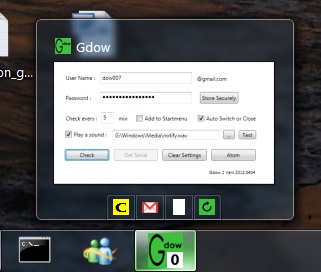 Do you want to be notified when next you receive an email from a loved one in your Gmail account? Then what you need is Gdow software, which has a lot of nice features. Do you want to be notified when next you receive an email from a loved one in your Gmail account? Then what you need is Gdow software, which has a lot of nice features.
What’s the big deal about Gdow?
Gdow 2 is a free Gmail notifier with shareware “on the fly” inbox management capabilities. Gdow 2 uses atom feed parsing for notification and simplified Gdow 2007 engine to connect and interact with Gmail account. For now interaction includes basic “on the fly” actions: delete, spam and archive.
In terms of notification, Gdow is built with all the capabilities of your normal Gmail so that you can know what goes on with your account within a few moments of it actually happening. To make things even better and more attractive, Gdow can be used through a one-click graphical user interface or through a right click menu from its location on the system tray.
The program is absolutely easy to download and install, which makes it all the more attractive to all users. It does not take up a lot of space on your system, and does not make your computer slow especially on start up. The publisher has fixed error ‘when applying an action due to Gmail change of request address.’
Does it have any downside?
A few errors have been dealt with, which makes the program more stable.
Want to check it out? Visit: gdow2.
Rating: Loading... No Comments »
O. James Samson - May 28, 2014
 Do you want to read and edit Wikipedia offline? Then you can start by using XOWA, which is a desktop application made just for that and other reasons that you will definitely love. Do you want to read and edit Wikipedia offline? Then you can start by using XOWA, which is a desktop application made just for that and other reasons that you will definitely love.
XOWA is a desktop application for reading and editing Wikipedia offline. Works with any Wikimedia wiki, including Wikipedia, Wiktionary, Wikisource, Wikiquote, and Wikivoyage as well as other specialized wikis such as Wikidata, Wikimedia Commons, Wikispecies, or any other MediaWiki generated dump. Also works with any non-English language wiki such as French Wikipedia, German Wikisource, Dutch Wikivoyage, etc. It can be customized at many levels: from keyboard shortcuts to HTML layouts to internal options.
XOWA has a lot of features that include the following: displays all articles from Wikipedia without an internet connection; works with any Wikimedia wiki, including Wikipedia, Wiktionary, Wikisource, Wikiquote, Wikivoyage; works with any non-English language wiki such as French Wikipedia, German Wikisource, Dutch Wikivoyage, etc.; works with other specialized wikis such as Wikidata, Wikimedia Commons, Wikispecies, or any other MediaWiki generated dump; updates your wiki whenever you want, using Wikimedia database backups; sets up Simple Wikipedia in less than 5 minutes; and many others.
Want to check it out? Visit XOWA.
Rating: Loading... No Comments »
O. James Samson - May 28, 2014
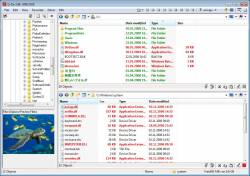 Do you want a program that can help you arrange and manage your files without stress? That program is Q-Dir because it has a lot of nice features that can save you a lot of time and even energy that can used on other things. Do you want a program that can help you arrange and manage your files without stress? That program is Q-Dir because it has a lot of nice features that can save you a lot of time and even energy that can used on other things.
What is the big deal about Q-Dir?
Q-Dir makes your files and folder easy to manage. Fast and easy access, with an amazing Quadro-View technique. You don’t have to renounce the usual, Drag and Drop, all Views, and other functions of your system. No! Q-Dir gives you other nice functions that make you happy. One can save many hand moves and also time.
Q-Dir (the Quad Explorer) makes your files and folder easy to manage, as an installed or portable Windows program. Fast and easy access to your hard disks, network folders, USB-Stiks, floppy disks and other storage devices.
The program is quite easy to use, and does not even take more than a few minutes for a newbie to get used to. The program runs smoothly on your system without even stressing the memory. One of the great things about Q-Dir is that it can also work very well on older systems.
Want to check it out? Visit Softwareok.com.
Rating: Loading... No Comments »
|
|
|

 Do you want a program that can simply help you to edit digital pictures? cPicture is a very easy to use program that does not require any installation. All you need to do is to copy the current version of cPicture to get started.



