O. James Samson - February 6, 2014
 Are you looking for a reliable application that can help you to assign key shortcuts for each action, while recording the distance you travel with your mouse every day? Then you need to pay close attention to the following review about FunMouse. Are you looking for a reliable application that can help you to assign key shortcuts for each action, while recording the distance you travel with your mouse every day? Then you need to pay close attention to the following review about FunMouse.
What’s FunMouse?
FunMouse is the Swiss-army-knife of mouse utilities. From scrolling the window under the mouse cursor to assigning extra actions for up to 7 mouse buttons as well as adding to that 36 hotspot shortcuts plus 16 mouse gestures for common every-day tasks or your own custom tasks; FunMouse has a lot to offer you.
Even if its just to paste a new screenshot to paint in one click to sending text to a new Gmail message, get instant translation to any language or check spelling from any application; FunMouse is a program that you will love to have on your system.
FunMouse gives you the possibility to backup and restore various mouse statistics and settings, exclude mouse gestures from certain programs, as well as to count keystrokes, left and right clicks.
Does FunMouse have any downside?
FunMouse is an adware program that comes with some annoying ads especially during installation.
Want to check it out? Visit FunMouse.org
Rating:  Loading... No Comments »
O. James Samson - January 31, 2014
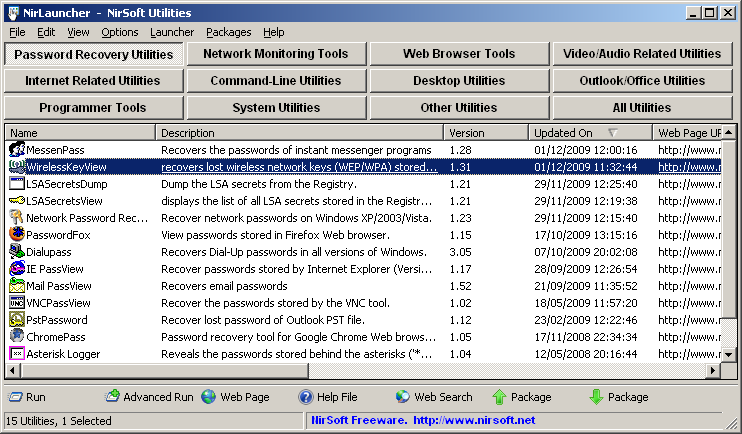 There are some very good or highly rated freeware programs that are available for download these days; and most of them are also very easy to use. It is not about hype actually; but the fact that users get exactly what they want from using such programs. One of such freeware programs is called NirLauncher. There are some very good or highly rated freeware programs that are available for download these days; and most of them are also very easy to use. It is not about hype actually; but the fact that users get exactly what they want from using such programs. One of such freeware programs is called NirLauncher.
What’s the big deal about NirLauncher?
NirLauncher is a package of more than 100 portable freeware utilities for Windows, all of them developed for NirSoft Web site during the last few years. It combines a lot of wonderful features that continue to make it one of the best freeware programs that can be downloaded.
It is compatible with any version of Windows including Windows 2000 and Windows 7. NirLauncher also works on x64 systems. Some the NirSoft utilities have a separated version for x64, and NirLauncher automatically run them when you’re in x64 system. Some of its quality features include the following: package includes variety of tools that you may need for your daily computer use, including utilities to recover lost passwords, to monitor your network, to view and extract cookies, cache, and other information stored by your Web browser, to search files in your system, and more; can be used from USB flash drive without need of any installation; and many more.
Any downside?
Apart from one or two false positives, NirLauncher is a nice program.
Want to check it out? Visit Nirsoft.net.
Rating: Loading... No Comments »
O. James Samson - January 31, 2014
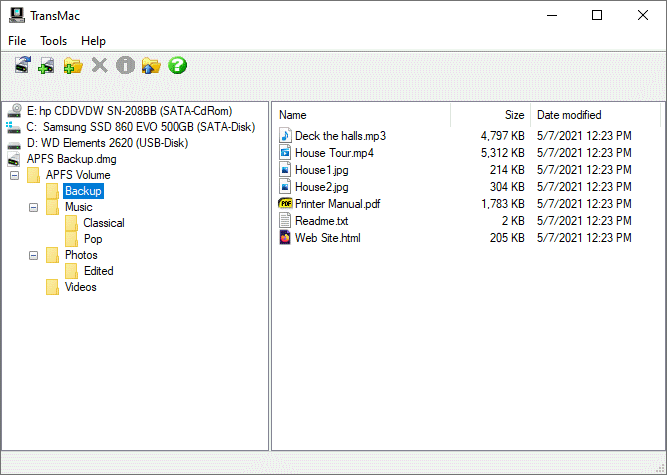 Are you looking for any application that will enable you to format any disk to be later accessed from Mac OS X, but also burn images in various formats, including DMG, IMG and ISO? Then you should read more about TransMac since it contains a lot of useful features. Are you looking for any application that will enable you to format any disk to be later accessed from Mac OS X, but also burn images in various formats, including DMG, IMG and ISO? Then you should read more about TransMac since it contains a lot of useful features.
What is TransMac?
TransMac is a program that will read, write, and format Macintosh high density diskettes, CDROMs, hard drives, and most removable drives (Iomega, Zip, Jaz, Clik, SyQuest, optical, etc.).
It has a very clean and easy to navigate interface, and is designed to allow users transfer files to and from HFS (Mac OS Standard) and HFS+/HFSX (Mac OS Extended and case sensitive) disks. TransMac application automatically detects the Macintosh disks, regardless if they are regular hard drives, CDs, DVDs or removable drives. Of course, it allows users perform a number of actions, including reading and writing data, but also copy, rename and delete files and folder just like on a regular disk.
The application also comes with comes with dedicated features to help users format any disk to be later accessed from Mac OS X, but also burn images in various formats, including DMG, IMG and ISO.
Want to check it out? Visit AcuteSystems.
Rating: Loading... No Comments »
O. James Samson - January 31, 2014
 If what you are looking for is a program that is able to convert various file formats; then LameXP might just be what you want. LameXP supports a lot of files formats including the ones you will find out in this review as you continue to read. If what you are looking for is a program that is able to convert various file formats; then LameXP might just be what you want. LameXP supports a lot of files formats including the ones you will find out in this review as you continue to read.
What’s the big deal about LameXP?
LameXP is a graphical front-end for the LAME MP3, Ogg Vorbis and Nero AAC audio encoders. Supported input types are Wave, MP3, MP2, OGG/Vorbis, FLAC, MP4/AAC, AC3, DTS, WavPack, Musepack, TTA, Speex, Monkey’s Audio, Shorten, ALAC and WMA. It also reads M3U, PLS and ASX playlists as well as Cuesheets. The easy-to-use interface supports multiple languages, including English, German, Spanish and Italian. Batch processing is implemented and multi-threading will be used, if several processors/cores are available. The Nero AAC encoder is not included, but it’s available from the Nero website as free download.
Advanced users can also adjust the LAME algorithm quality from poor quality (very fast) to best quality (very slow), enable bitrate management for LAME and OggEnc2, select sampling rate and MP3 channel mode, and much more. Users can also select rate control method (quality-based, average bitrate, constant bitrate), and adjust the quality/bitrate ratio (from level 0 to 9).
Want to check it out? Visit MulderSoft.com
Rating: Loading... No Comments »
O. James Samson - January 31, 2014
 Have you lost hope or tried accessing your computer with little or no success recently? Has your system been totally overtaken by virus and other potentially dangerous programs that make it very difficult to access? Then you need a rescue CD to help you recover access to your system. Have you tried or ever heard of a program called Avira AntiVir Rescue System? Read more about it in the review below. Have you lost hope or tried accessing your computer with little or no success recently? Has your system been totally overtaken by virus and other potentially dangerous programs that make it very difficult to access? Then you need a rescue CD to help you recover access to your system. Have you tried or ever heard of a program called Avira AntiVir Rescue System? Read more about it in the review below.
What is the big deal about this program?
Avira AntiVir Rescue System is a Linux-based application that allows accessing computers that cannot be booted anymore. Thus it is possible to: repair a damaged system, rescue data, and scan the system for virus infections. Just double-click on the rescue system package to burn it to a CD/DVD. You can then use this CD/DVD to boot your computer. The Avira AntiVir Rescue System is updated several times a day so that the most recent security updates are always available. The fact that it is updated regularly everyday makes it even more attractive.
Any downside?
Avira AntiVir Rescue System is one of the programs you will love to have, but it is also important to learn how to use it.
Want to check it out? Visit Avira.com.
Rating: Loading... No Comments »
O. James Samson - January 30, 2014

Emerge Desktop is a replacement windows “shell” (the desktop environment normally provided by Windows Explorer) for Windows 2000 and above. In order to replace Windows Explorer as a shell, it provides a system tray (the area that collects the icons collected at the lower right corner in Explorer), called emergeTray. It will also provide access to the users programs (normally accessed with the windows “start” button) via a right-click on the desktop, via emergeCore.
Emerge Desktop is implemented with MinGW-w64, an Open Source implementation of the GNU C compiler and utilities. Up to this point, closed source commercial projects have mainly been used (Microsoft Visual C++, Borland Delphi) to develop alternate shells as they use proprietary Microsoft API features. With Microsoft releasing more detailed information about these API calls, the MinGW win32api can be described quite complete. The program has an open API, which allows for applets to be coded with compilers other than MinGW if someone wishes to do so.
Any downside?
This program is designed for experienced users.
Want to check it out? Visit EmergeDesktop.org.
Rating: Loading... No Comments »
O. James Samson - January 30, 2014
 Technology has provided us with more ways than one to protect our precious files from potentially dangerous programs. These days we have several kinds of software that can help us keep some of those dangerous programs at bay; and one of them is Malwarebytes Anti-Rootkit. Technology has provided us with more ways than one to protect our precious files from potentially dangerous programs. These days we have several kinds of software that can help us keep some of those dangerous programs at bay; and one of them is Malwarebytes Anti-Rootkit.
What is Malwarebytes Anti-Rootkit?
Malwarebytes Anti-Rootkit is a comprehensive and reliable application whose main purpose is to protect your files and computer against rootkit attacks and repair the damage caused by the presence of these malicious viruses. Rootkits are designed to hide the presence of certain processes and programs so that your computer performance might get lower as the day go bye. Also, taking into consideration that cyber attacks become more sophisticated each day, your system will be more vulnerable if you do not ensure complete security.
What Malwarebytes Anti-Rootkit does is to minimize your exposure to data theft and hacking, maximize network uptime and protect your system. The program comes with a proactive scanning engine and with reliable malware detection and removal options, the application stops malicious processes before they even start.
The good thing about Malwarebytes Anti-Rootkit is that it doesn’t interfere with other installed software on your system.
Any downside?
The scanning process is a bit slow.
Want to check it out? Visit MalwareBytes.
Rating: Loading... No Comments »
O. James Samson - January 30, 2014
 Are you looking for an application that will enable you to view information on your hard drive and some external drives? Well, you might as well want to try out CrystalDiskInfo since it is primarily designed to supply internal information on your computer. Are you looking for an application that will enable you to view information on your hard drive and some external drives? Well, you might as well want to try out CrystalDiskInfo since it is primarily designed to supply internal information on your computer.
What is CrystalDiskInfo?
CrystalDiskInfo is a HDD health monitoring utility that is able to displays basic HDD information, monitors S.M.A.R.T. values and disk temperature. Once the program is initiated, it automatically displays a list of details on your hard drive. The user interface of CrystalDiskInfo is standard, but inexperienced users would probably have a hard time understanding the information displayed here.
As a user, you can view the health status and temperature of the drive, as well as S.M.A.R.T. information (e.g. “Read Error Rate”, “Spin-Up Time”, “Start/Stop Count”, “Seek Error Rate”, “End-to-End Error”), such as current, worst, threshold and raw values. Also, you can access “Disk Management” to create a simple partition (basic, spanned or stripped), configure disk conversion options, as well as extend and shrink partitions. You can also open the Windows Device Manager, set CrystalDiskInfo to run at startup, enable advanced disk search, select your preferred language, change the font, and many more.
Any downside?
CrystalDiskInfo offers to download or install software or components that the program does not require to fully function.
Want to check it out? Visit CrystalMark.info.
Rating: Loading... No Comments »
O. James Samson - January 30, 2014
 Have you always thought how things would be different if you could just save a lot of hours of looking for tutorials trying to achieve a certain stylized look? Some of us also spend hours going round and round in Photoshop; but did you know you can put an end to that just by using a simple program like CameraBag? Have you always thought how things would be different if you could just save a lot of hours of looking for tutorials trying to achieve a certain stylized look? Some of us also spend hours going round and round in Photoshop; but did you know you can put an end to that just by using a simple program like CameraBag?
What’s the big deal about CameraBag?
CameraBag handles all photo tasks, from basic adjustments and cropping to powerful high-end controls, and it features the modern and vintage styles we’re known for. But it’s also more than that: we’ve rethought what modern photo editing should be. The result is something completely new.
With CameraBag, you can find the following features: 150+ built-in high-quality adjustable filters; full suite of 30+ photographic tools, including advanced curve editors; build your own entirely new filters from scratch or from existing filters; elegant, modern interface; innovative tools not found anywhere else, such as CameraBag’s curve-based colour corrector; fast image processing via the revolutionary analogue Engine; 32-bits-per-component colour depth; Watermarking and custom image-based borders; Quicklooks and previews for fast visual decision-making; large, precise controls – works great on a laptop; and many more.
Want to check it out? Visit NeverCenter.com.
Rating: Loading... No Comments »
O. James Samson - January 29, 2014
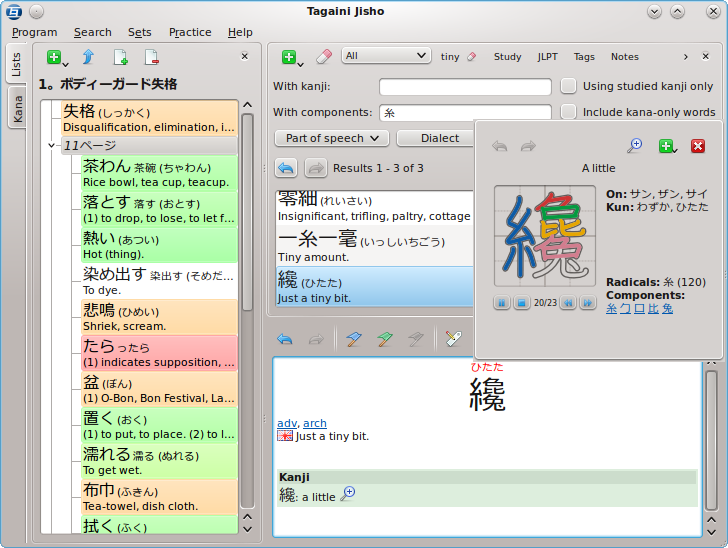 Japanese may not be as popular as say English or French for example; but it is no doubt one of those languages people also love to learn. The good news for all those who may wish to improve or learn this language, Tagaini Jisho offers them an excellent opportunity to do so. Let’s find out more about what Tagaini Jisho is all about, and what you can benefit from it. Japanese may not be as popular as say English or French for example; but it is no doubt one of those languages people also love to learn. The good news for all those who may wish to improve or learn this language, Tagaini Jisho offers them an excellent opportunity to do so. Let’s find out more about what Tagaini Jisho is all about, and what you can benefit from it.
What is the big deal about Tagaini Jisho?
Tagaini Jisho is a free, open-source Japanese dictionary and kanji lookup tool that aims at becoming your Japanese study assistant. It allows you to quickly search for entries and mark those that you wish to study, along with tags and personal notes. It also let you train entries you are studying and follows your progression in remembering them. Finally, it makes it easy to review entries you did not remember by listing them on screen or printing them on a small booklet.
Version 1.0.1 of Tagaini Jisho, which is the version in review, now has two new updates that include: an option to copy the main writing or reading of an entry to the clipboard directly from its right-click contextual menu; and ability to search for untagged entry.
Want to check it out? Tagaini.net.
Rating: Loading... No Comments »
|
|
|

 Are you looking for a reliable application that can help you to assign key shortcuts for each action, while recording the distance you travel with your mouse every day? Then you need to pay close attention to the following review about FunMouse.




