Author Archive
Monday, August 24th, 2009
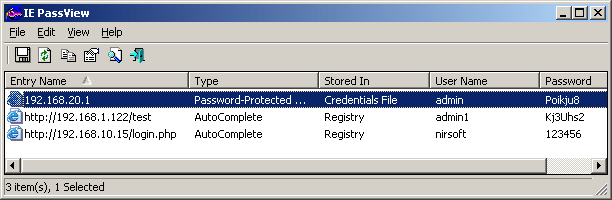 IE PassView is a small but very useful utility for IE (Internet Explorer) users. The application allows users to view username and password stored in various websites. It’s a very useful security tool because the software extracts this type of information and knows how these passwords are used in various websites. IE PassView is a small but very useful utility for IE (Internet Explorer) users. The application allows users to view username and password stored in various websites. It’s a very useful security tool because the software extracts this type of information and knows how these passwords are used in various websites.
The application automatically lists down every username and password you use in the browser. Aside from the security credentials, the application also informs the user how the username and password is applied in a specific website. Some sites will allow you to auto-fill the password while others have mandatory key-in of information.
A distinctive feature of the application is that it detects the storage location of the username and password. This is very important for users since this information will tell them if their username and password is stored in the website and not just in the browser. The application will tell you if the information was placed as credential file (stored in the browser) or in registry (provided in the application). Through this data, you’ll be able to detect which website has your username and password. Users can also export the username and password to their preferred document if they want the information viewed in another format.
The interface of the application is very simple. The size of the application is very small (less than 50k) so installation and use is almost in an instant. The application is a very small and lightweight utility but a useful companion for frequent IE users.
Check it out at http://www.nirsoft.net/utils/internet_explorer_password.html
Posted in Main | No Comments »
Friday, August 21st, 2009
 FTP Jet is a relatively unknown but very powerful FTP client. Now on its 2.0 version, the application has added powerful features to its already impressive abilities. It can even rival some commercial FTP applications since it has adapted to the demands of its users and even offered some more. FTP Jet is a relatively unknown but very powerful FTP client. Now on its 2.0 version, the application has added powerful features to its already impressive abilities. It can even rival some commercial FTP applications since it has adapted to the demands of its users and even offered some more.
The basics of FTP Jet are still there. Users can still enjoy easy download and upload of files in their preferred server. The client is also smart in interacting with the desktop. If you have a powerful PC, you can easily use the FTP client with virtually no lag if you’re using the application for simple uploads and downloads.
The application can easily download or upload files to the server without dominating your computer system. That means you’ll be able to use your computer for other purposes even though you’re actively using FTP Jet. Because the application can work in the background, access of folders within the server is very easy. Additional functions were even added such as folder comparison. This feature will help users easily sync their folders with the server.
The most impressive feature of FTP Jet is its ability to communicate with other servers. Transferring data from one server to another used to be very slow because some FTP clients do not fully support this function. This feature is now optimized in FTP Jet which should be useful for web developers who maintains multiple websites. All these features can be enjoyed in FTP Jet along with a very interesting interface that only eases the application’s operation.
For more info check out here
Posted in Main | No Comments »
Friday, August 21st, 2009
 Dynamic Draw is an easy to use graphics creator and editor. This application is very ideal for users who wants to create organizational charts or easy to understand workflows. The application is also highly interactive not only within the application but also in other applications because of file compatibility. Dynamic Draw is an easy to use graphics creator and editor. This application is very ideal for users who wants to create organizational charts or easy to understand workflows. The application is also highly interactive not only within the application but also in other applications because of file compatibility.
The interface of Dynamic Draw is very easy to understand. Anyone who has worked with MS Office can work with Dynamic Draw. The only difference is the left side of the application is populated with shapes that can be easily implemented in the application. But the application interface can be fully customized as the tabs and bars can be removed from the application. These shapes can be immediately resized and edited with text according to user’s preference.
Linking in the application is probably the easiest operation in the application. This was done since the application was specifically made to connect information or the various shapes within the interface. The links user provides also adjusts automatically so that they will be visible even though many links are added in a single box.
Interaction with other applications is possible with Dynamic Draw since the application supports OLE or Object Linking Embedding. Through OLE, users can simply copy the created chart in the application and past them in other applications such as MS Office. The application can also export the chart in various image files such as PNG, BMP or even PSD. It’s a full featured graph editor that can easily work with various applications because of its support for OLE and other image formats.
Check it out at dynamicdraw.com
Posted in Main | No Comments »
Thursday, August 20th, 2009
 AcronymGenie is a highly educational and informative application that help users know the exact meaning of the abbreviation. It’s very useful for users who are frequently offline since it provides a very extensive list of abbreviations with its corresponding meanings. Although the acronyms contained in the application is limited to computer terms, it’s still an extensive list as it deals with almost any type of acronym you encounter in computers. AcronymGenie is a highly educational and informative application that help users know the exact meaning of the abbreviation. It’s very useful for users who are frequently offline since it provides a very extensive list of abbreviations with its corresponding meanings. Although the acronyms contained in the application is limited to computer terms, it’s still an extensive list as it deals with almost any type of acronym you encounter in computers.
Even though the application contains a very extensive list of abbreviation, the application size is merely 656kb. Since it’s focused only in translating acronyms, it can place the necessary information and functions in less than 1mb.
The application also comes with a relatively powerful search tool. Users who can ask for a direct meaning of the abbreviation or use the “anagram” function wherein the acronym entered by users will be shuffled and matched on the database. Users can also search for “smileys” that can be implemented online. Reverse search or “Expansion” will also allow users to search the specific acronym. The search results can be copied and placed in users preferred document editor.
Because the internet is constantly expanding, there is a concern that the data could no longer become relevant. The application deals with that problem by allowing users to connect to the developer’s database wherein they can update the list of acronyms in the application.
AcronymGenie is a very useful offline tool. It’s lightweight and has a very extensive search tool that allows users to easily search for the specific meaning of the computer acronym.
Check it out at acronymmanager.com/
Posted in Main | No Comments »
Wednesday, August 19th, 2009
 IRC (Internet Relay Chat) may not be as popular as it used to but it’s still used by millions everyday worldwide. It’s still a highly efficient form of communication because it’s very easy to install and since it mostly text based, it will not require a lot of resources from its users. IRC (Internet Relay Chat) may not be as popular as it used to but it’s still used by millions everyday worldwide. It’s still a highly efficient form of communication because it’s very easy to install and since it mostly text based, it will not require a lot of resources from its users.
A recommended IRC client is ClicksAndWhistles. It’s a simple application that will allow you to chat in IRC instantly. Installation file is very small (only 1.06mb) which means you can start chatting in IRC in just a few minutes after download. If you’re familiar with an IRC, you’ll really enjoy using ClicksAndWhistles because of its additional features without using additional resources.
Among the features in ClicksAndWhistles is the support for different server connections at the same time. Some users are actually on a different server and old IRC clients can only support a single server. This means you have to disconnect from one server before you can chat to another user. But ClicksAndWhistles removes that restriction by allowing various servers to run at the same time in one client.
Other impressive features of ClicksAndWhistles are the additional function that could be launch by right clicking on the chat window, customization of background with pictures and additional username if you want to be identified as a different user in other chat windows. Along with the standard features and commands that come from a regular IRC client, ClicksAndWhistles can be considered as an upgraded IRC client that offers more features for better chat experience.
Check it out at http://i42.co.uk/stuff/
Posted in Main | No Comments »
Wednesday, August 19th, 2009
 Creating a website without any web programming knowledge is possible with the help of Fresh HTML application. This application will help anyone who wants to create a simple HTML-based website even without web coding knowledge. It comes with very easy to understand interface that lets any user create a website with relative ease. Creating a website without any web programming knowledge is possible with the help of Fresh HTML application. This application will help anyone who wants to create a simple HTML-based website even without web coding knowledge. It comes with very easy to understand interface that lets any user create a website with relative ease.
Fresh HTML uses WYSIWYG (What You See is What You Get) interface in its application. With this feature, anything that you place in the application will be automatically seen in your website. You can create a title for your website without any problem, add buttons and photos and add text according to your preferred size and font.
The interface of Fresh HTML is not difficult to work with because it uses the familiar MS Word look. Users will feel like they are simply creating a document with additional photos and links. Even the copy-paste, text-centering and bullet point commands are still in the application. The only difference is the additional commands that are placed in the right and left side of the application but they can still be removed and placed on top if you want a larger space.
But even though the application is geared towards users with limited familiarity with HTML, advanced web developers can still work with Fresh HTML. Aside from basic rendering of the website, the corresponding HTML code is automatically created. There is a dedicated tab for an HTML code and users who are familiar with HTML can further customize their website by adding functions or editing the HTML codes.
Check it out at http://www.freshwebmaster.com/
Posted in Main | 2 Comments »
Tuesday, August 18th, 2009
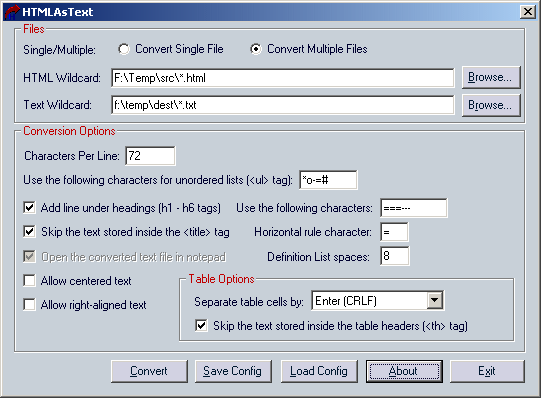 Extracting information online can be simplified with HTML AsText application. As the name suggests, the application extracts text in the HTML file and displays them as pure text. It’s the perfect tool for those who wanted to extract data from various websites so that it can viewed offline. Extracting information online can be simplified with HTML AsText application. As the name suggests, the application extracts text in the HTML file and displays them as pure text. It’s the perfect tool for those who wanted to extract data from various websites so that it can viewed offline.
The process of the application is very simple: users will target the HTML and specify the folder or destination of extracted text. The application will extract the text from the HTML and place the text in the folder as a text (.txt) file. It’s a very simple process and very useful to many users who wanted an available offline information.
What makes this application different from other text extractors is that HTMLAsText automatically ignores HTML tags. That means the text extracted from the website is automatically the data needed by the user. The functions for banners, headers and other commands unrelated to the data will not be included in the text file.
Users will also be able to convert multiple HTML files. While this is an advantage, it shows one small inconvenience from the application. Users have to first download the webpage before the data can be extracted as text file. But with a decent internet connection, you can easily download a webpage and extract the text file easily.
When using the application in extracting data that have bullets and tables, additional configuration is required so that the data will be displayed correctly. The characters per line in the text file should also be indicated. This might require some practice for first time users but HTMLAsText will work without any confusion after working with the application a few times.
Check it out http://www.nirsoft.net/utils/htmlastext.html
Posted in Main | No Comments »
Tuesday, August 18th, 2009
 Shape Collage is a very straightforward application. Its lightweight (less than 500kb) and only comes with the essential features in creating a collage of pictures. By using only the essential features, users can easily work with hundreds of photos without any problem because the application will not use resources just to work with images. At first glance, the application may look confusing because it lacks additional commands but after using the application a few times, you’ll know you have very a powerful and useful image editing software. Shape Collage is a very straightforward application. Its lightweight (less than 500kb) and only comes with the essential features in creating a collage of pictures. By using only the essential features, users can easily work with hundreds of photos without any problem because the application will not use resources just to work with images. At first glance, the application may look confusing because it lacks additional commands but after using the application a few times, you’ll know you have very a powerful and useful image editing software.
The application allows users to create a collage by transforming it into their preferred shapes. Users simply target the source of images and edit them after they are loaded in the application. Editing is very simple: users just have to choose the shape they want from the application and specify the space between photos. If the user does not like the available shapes from the application, they can create their preferred shape and the application will automatically copy the created shape. Additional configuration is also available from the application. Aside from spacing and shape, users can also specify the border photos and even the image background.
The most impressive feature of the application is the ability of the created photos to be further manipulated in other applications. Users can save the file as JPG, PNG and PSD. If you save the file in PSD, you can carefully edit the photos in Adobe Photoshop or its Open-Source alternative GIMP. When you open the file in these applications, you will notice that each photo in the collage has a separate layer. This means detailed customization is possible with this application.
Check it out http://www.shapecollage.com/
Posted in Main | No Comments »
Tuesday, August 18th, 2009
 aTunes is a free and powerful music library application that can be used as alternative to iTunes. The application has some of the powerful functions of iTunes while adding small features that might not be found in iTunes. Those with simple Mp3 players will surely love this application. The software is even a powerful CD ripper which is ideal to easily improve the playlist. aTunes is a free and powerful music library application that can be used as alternative to iTunes. The application has some of the powerful functions of iTunes while adding small features that might not be found in iTunes. Those with simple Mp3 players will surely love this application. The software is even a powerful CD ripper which is ideal to easily improve the playlist.
Installation of aTunes is very fast. Although the installation file is 20MB, the application can run in your computer in less than five minutes. The only inconvenience is when you compile your music in the application. If you have more than 1GB in music, you might wait a little bit long before aTunes can list all music files in its interface. But after initial scan for media files, file scanning will improve.
Using the playlist function in aTunes is almost the same as its popular counterpart. Songs can be filtered through various classifications, creation of m3u is very simple and users can even drag music files or m3u playlist.
Although aTunes have the behavior close to iTunes, those who own actual iPods should still tweak their device so that it can be recognized as an external device. aTunes will only work with mp3 players that work as external device. Other mp3 devices can easily work with aTunes as the application can easily synchronize with the external device.
The most impressive feature of aTunes is its online functions. The artists in your playlist can be used as reference for online search so that you can find their videos in popular video sharing sites. Podcast integration, lyrics display and Last.fm profile updates is also possible with aTunes.
Check it out at http://www.atunes.org
Posted in Main | No Comments »
Thursday, August 13th, 2009
 Soundbase 2009 is a basic, yet reliable MP3 player tool. It functions as an editor, player, and organizer of your music files; a good tool to help you manage your MP3 files more efficiently. Soundbase 2009 is a basic, yet reliable MP3 player tool. It functions as an editor, player, and organizer of your music files; a good tool to help you manage your MP3 files more efficiently.
While there are many similar programs available, Soundbase 2009 is probably one of the fastest ever made for this category, and what is even more appealing is that it can be customized easily. It features a hi-speed processing system that can smoothly run huge music libraries. This is great news for people who have no patience for lags when managing music files. Locating music files has never been so straightforward, and it also allows you to edit without a fuss.
Soundbase 2009 utilizes Microsoft DirectShow which enables it to capture and replay multi-media streams of the best quality and most common formats are supported, such as mpeg, OGG, APE, as well as FLAC.
If you are unfamiliar with such programs, don’t worry; Soundbase 2009 has a very user-friendly interface and the Help feature truly serves its purpose. It provides you with direct links to information on installation and other details you need.
One other aspect that makes Soundbase 2009 really attractive is the BASS Audio installer which can sure help in giving you better sound quality.
Soundbase 2009, as mentioned earlier, is flexible and customizable, which means you can add designs, organize music files to preferred locations, add tags, set up play lists, enable filters, and even create a history display. Moreover, you can simply drag selected songs from various databases and set them up to any location you like.
Since Soundbase 2009 is a freeware; it does not provide any warranty which is probably the only downside to this application.
For more information, you can check it out at dajukebox.com.
Posted in Main | No Comments »
|
|
|




