Author Archive
Friday, February 29th, 2008
 When it comes to internet security, everybody is looking for the next great thing, but for some reason BitDefender hasn’t quite gotten its name out there. However, BitDefender is actually one of the latest and greatest software programs to defend your computer from viruses, spyware, and stealthy attacks. It also has features to allow parents to block certain sites from their children. It includes a built-in firewall protection to keep hackers from detecting your computer, and to notify you when anyone else is logged onto your network. When it comes to internet security, everybody is looking for the next great thing, but for some reason BitDefender hasn’t quite gotten its name out there. However, BitDefender is actually one of the latest and greatest software programs to defend your computer from viruses, spyware, and stealthy attacks. It also has features to allow parents to block certain sites from their children. It includes a built-in firewall protection to keep hackers from detecting your computer, and to notify you when anyone else is logged onto your network.
The best part about BitDefender is that it is automatically designed to update itself every hour so there will never be a missed update, but should you ever miss an update, BitDefender’s Behavioral Heuristic Analyzer in Virtual Environments or “B-HAVE” technology will detect threats ahead of time and block them before you ever even know they are there. Not to mention the new technology that allows BitDefender to automatically scan and block out websites trying to gain access to your personal information. And all of this is done automatically without you even telling it what to do. Many users agree that this is one of the best internet security programs on the market simply because it does not slow your computer down while it is scanning, and it will not flood you with dozens of alarm notices.
Posted in Developer, Internet, Main, Security, Shareware | 2 Comments »
Thursday, February 28th, 2008
 Perfect for the small business, FormTool is a unique software designed to help you get rid of all of your paperwork and complete forms digitally. This program allows you to recreate the paper in your hand on the computer, and fill it out. Then you can mail it, save it, or file it any way you want. Plus, there are tons of other options and features that allows you to save time and be creative. Perfect for the small business, FormTool is a unique software designed to help you get rid of all of your paperwork and complete forms digitally. This program allows you to recreate the paper in your hand on the computer, and fill it out. Then you can mail it, save it, or file it any way you want. Plus, there are tons of other options and features that allows you to save time and be creative.
From the very beginning you can create your own forms, either the same as the ones you work with on paper, or you can design your own using FormTool’s simple form creating capabilities, including shapes, lines and check boxes. Once you are done you can send these forms out, or you can print them.
If you happen to be filling out a ton of forms with your information on them, FormTool will make life easier by automatically filling in information that has already been input on other forms. This saves you from answering the same questions over and over. Just in case, FormTool includes a special password option so that other people will not be able to access the saved information from your forms. And most importantly, FormTool comes with its own spell checking system so you never have to worry about misspelling important information.
More info available at www.formtool.com
Posted in Developer, Main, Templates, Windows | 2 Comments »
Friday, February 22nd, 2008
 Whether you are a student or you have a son or daughter that is a student, you know that resources are invaluable when it comes to writing reports and preparing for tests. Encyclopedia Britannica knows this as well, and they have created some of the best reference materials available for the computer that are now on the market. Whether you are a student or you have a son or daughter that is a student, you know that resources are invaluable when it comes to writing reports and preparing for tests. Encyclopedia Britannica knows this as well, and they have created some of the best reference materials available for the computer that are now on the market.
If you need help with your English course, Encyclopedia Britannica has reference software for Shakespear as well as software that includes a computerized version of the Merriam-Webster Dictionary. If you need help with your history course, Encyclopedia Britannica gives you the chance to purchase their software references on US Presidents, Black History, Hispanic Heritage and World War 2. There are also such titles as “Birds of the World” and “National Parks” for you to reference.
These are some of the best reference materials out there, and they include more than just page after page of information. They also give you the opportunity to access a list of the most important events pertaining to that subject, video and audio clips, as well as many pictures, photos, and historical essays on the topic. The best part is that you don’t have to spend a ton of time searching for relevant information because you can now do a simple keyword search and the computer will automatically tell you where to find the information that you are looking for. This is great for last minute essay writing and test crunching.
Posted in Developer, Information Management, Internet, Main, Web 2.0, Windows | No Comments »
Friday, February 22nd, 2008
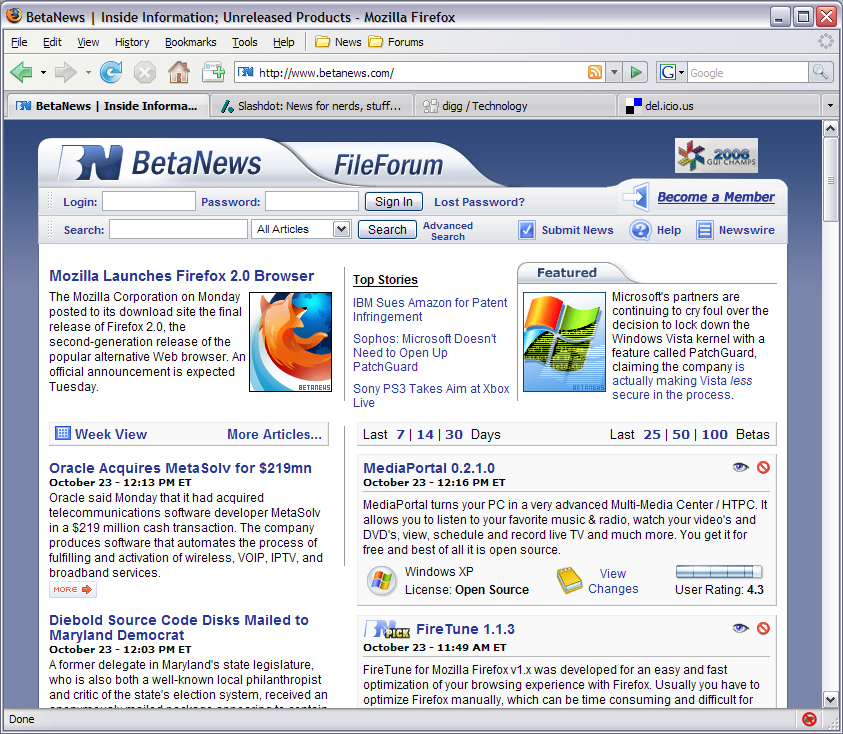 The coming of Mozilla Firefox to the world was a great event as many people were now able to get a browser that worked with what they wanted to do online. The great event is repeated every time a new version of the browser is released and recently the Mozilla Organization released the newest version of the Firefox browser, version 2.0.0.12. Ever since its inception, the goal of the Mozilla Firefox project was to make browsing online easier and more intuitive. Now, with help from a number of suggestions and programmers, they have done exactly that. The coming of Mozilla Firefox to the world was a great event as many people were now able to get a browser that worked with what they wanted to do online. The great event is repeated every time a new version of the browser is released and recently the Mozilla Organization released the newest version of the Firefox browser, version 2.0.0.12. Ever since its inception, the goal of the Mozilla Firefox project was to make browsing online easier and more intuitive. Now, with help from a number of suggestions and programmers, they have done exactly that.
In addition to things like tabbed browsing, the cross-platform nature of the browser and the built-in pop-up blocker that people already know about, the new version of Firefox comes with a number of different new and innovative ideas. Firstly, the actual software program itself has been streamlined so that it uses up fewer resources in being utilized. At the same time, a number of reported bugs have been fixed and both the privacy and security features attached to the browser have been updated. Finally, hassle free downloading is still incorporated into the overall design, something that should please downloading internet users that have used the previous versions of Mozilla Firefox.
More information about the latest version of Mozilla Firefox can be found at http://www.mozilla.org/projects/firefox/.
Posted in Browsers, FireFox, Freeware, Main, Security, Windows | No Comments »
Tuesday, February 12th, 2008
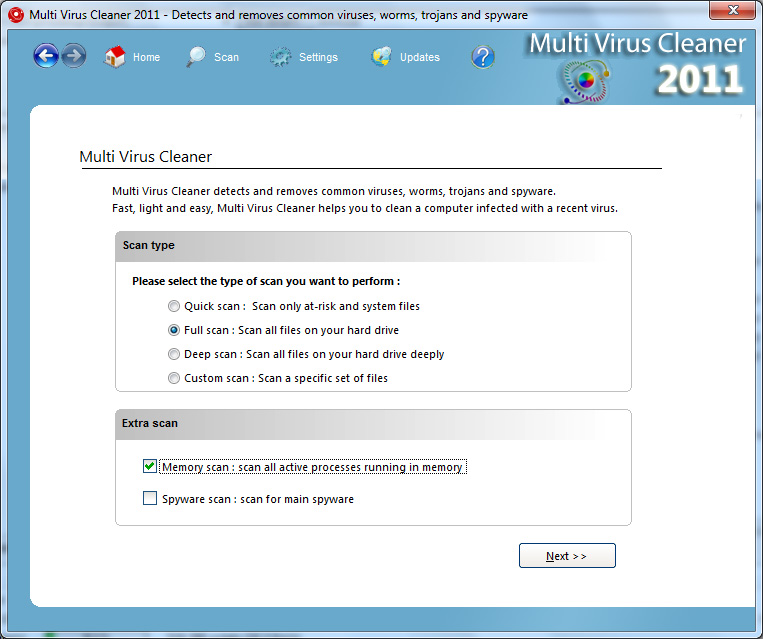 Multi Virus Cleaner is a very interesting piece of software for the simple reason that it is a tool that you use in a very specific and specialized situation, but when you do need to use that tool it delivers with a startling amount of effectiveness. The Multi Virus Cleaner, contrary to what the name might imply, is not a piece of software that you use as an anti-virus software. Anti-virus software comes with virus protection and regular scanning facilities, but at the same time is a full-featured way for you to prevent viruses from infecting your computer and ruining anything that you might have on your hard drive. Multi Virus Cleaner is a very interesting piece of software for the simple reason that it is a tool that you use in a very specific and specialized situation, but when you do need to use that tool it delivers with a startling amount of effectiveness. The Multi Virus Cleaner, contrary to what the name might imply, is not a piece of software that you use as an anti-virus software. Anti-virus software comes with virus protection and regular scanning facilities, but at the same time is a full-featured way for you to prevent viruses from infecting your computer and ruining anything that you might have on your hard drive.
However, this is not what Multi Virus Cleaner does. Multi Virus Cleaner is to be used when your computer gets infected by a virus and you then need to remove the virus from your computer. An anti-virus software might not be able to help you with some viruses, but the Multi Virus Cleaner can dispose of over 3400 types of virus, worm, Trojan and dialer. It also happens to be updated on a regular basis, meaning that more functionality is added to it all the time. This is simply one of the best free virus fighting tools out there and should be in the arsenal of every computer user when they need to remove a virus that has infected their system.
More information is available at http://www.viruskeeper.com/us/mvc.htm.
Posted in Developer, Internet, Main, Security, Shareware, Windows | No Comments »
Monday, February 11th, 2008
The MediaInfo Lite software is just a lighter version of the MediaInfo software in the sense that a number of the more complicated features from the software have been removed in order to decrease the resources on your computer that the program uses when it happens to run. The core functionality remains within the MediaInfo Lite software however and therefore people that are looking for basic functionality in terms of their media files in a package that does not eat up their RAM need look no further than MediaInfo Lite.
The basic functionality of the software is simply the ability to analyze media files that are on your hard drive or are on any attached media that you happen to have. This means that you can use MediaInfo Lite in conjunction with any media file in order to get the format of that file, the resolution that the file has if it is a video, the duration of the media file and a number of other pieces of essential information that will be required if you want to build and maintain an accurate listing of all your media files.
There is also extendable functionality through a shell for Windows Explorer, which allows you to gain that information about media files without having to actually go through the software. When the shell is installed, you will get that information when you hover over the file with your pointer.
More information is available at http://www.codecguide.com/download_other.htm#mediainfo.
Posted in Codec, Main, Video | No Comments »
Monday, February 4th, 2008
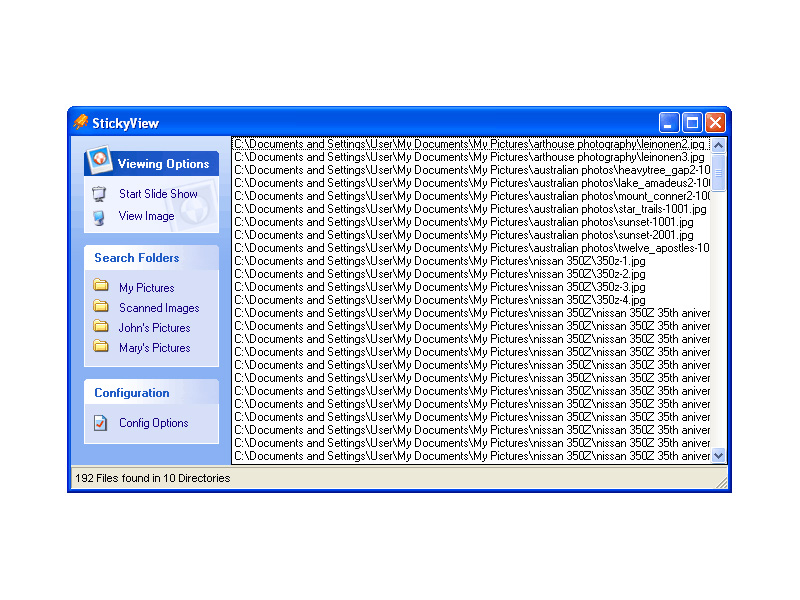
StickyView is an interesting piece of software because what it allows you to do is to view all of your images from different directories in one slide show without having to worry about going around and moving pictures around incessantly.
If you are like most people with computers, images will find their way into multiple folders and categories that will be removed from each other. This is not necessarily even because of disorganization, although for some people that probably does play a part! Even an organized person will have different folders for pictures and they might even have more folders than a disorganized person because of all of the different categories they have for their different pictures.
StickyView as a piece of software has a lot of good things about it, but the main is the extra convenience it provides. Windows can not play a slide show from multiple folders and this can make it very frustrating for you if you have similar pictures in different folders that you want to view at once (i.e. if you happen to arrange your folders by the date they were taken, for example). StickyView on the other hand will find all of your different picture files across directories and play them for you as much as you want. That makes it a truly worthwhile piece of software.
More information on it can be found at http://www.stickyview.com/
Posted in Developer, Main, Shareware | No Comments »
Wednesday, January 23rd, 2008
As soon as I saw this program, I knew that I was definitely going to download it and take it for a spin!
Why is that, you ask? Well, it’s because now that I am starting to earn more and have more credit and bills to take care of, having a personal piece of software that really helps me keep track of it all is exactly what I need. And that is exactly what Buddi will do for you. Buddi is a free piece of software (open source, to be exact) that will allow you to keep track of all of your personal finances and allow you to set up different accounts and categories while at the same time recording transactions that they happen to do. If you want a program to keep you honest about spending, then Buddi is exactly the program to do that for you.
Oh, and the absolute best thing about Buddi is that it happens to be a program created for people with no financial background and little experience in keeping track of their finances. It is the perfect program for the average Joe that just wants a little help with their financial existence.
More information is available at http://buddi.thecave.homeunix.org/en
Posted in Developer, Finance, Information Management, Main, Shareware, Windows | No Comments »
Tuesday, January 22nd, 2008
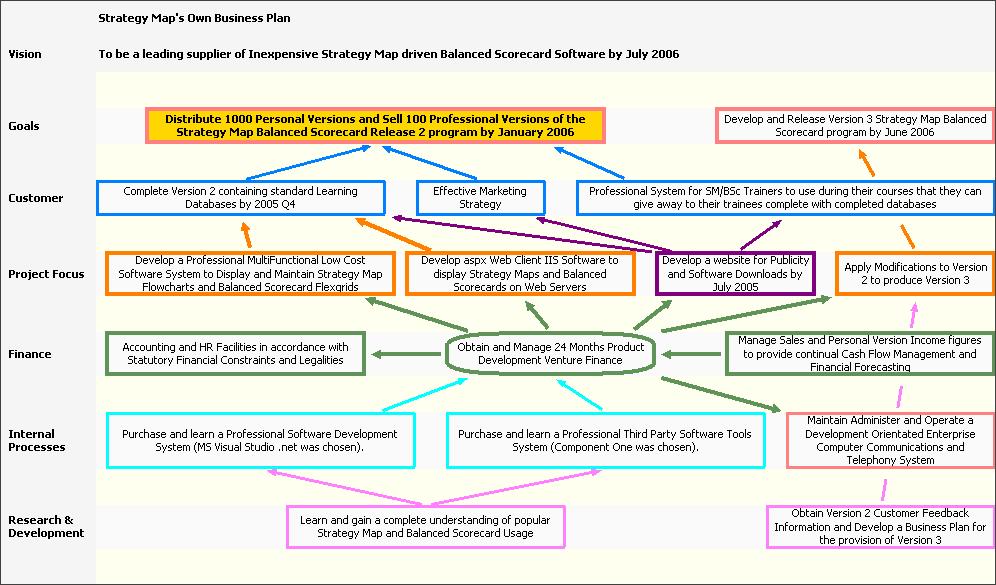
Whenever you tackle something, the best way to ensure success is to make sure that you have a strategy that makes success possible. Without a good strategy, even the best work ethic and the greatest mind will not be able to prevail over circumstances and that is why people that are good strategists have become important parts of some of the most successful businesses in the history of the world.
While there are some people that find it extremely easy to strategize for different things, personally I have never found it that easy and I know a number of people that would agree with that. Tools like mind maps and strategy charts have helped people that don’t strategize well on their own immensely and being able to computerize and use these tools as software programs makes the process much easier.
That is exactly what the Strategy Map does. It is a program that you can use to create mind maps and strategy charts that define the mission, what the goals of the mission are as well as the different objectives along the way along with competing perspectives on how to achieve those objectives. It is a very powerful piece of software that just happens to also be free.
For more information, check out http://www.strategymap.com.au/
Posted in Business, Commercial, Developer, Main, Reminder, Task Manager, Time Managment, Windows | No Comments »
Tuesday, January 22nd, 2008
 DC++ is an interesting tool. It is a direct connect service that actually allows you to connect to a number of other computers on the same network and exchange information with those computers in a way that makes it much faster than downloading a torrent file. The reason that it is perhaps not as popular as torrent downloading is because of the fact that when you download a torrent file, you can do so from websites and quite frankly from any other computer. DC++ on the other hand has limited connectivity that requires a network and therefore if you live in a university campus or other places with large residential networks you are going to be able to use DC++ in a much more effective way than you could currently use torrent software. DC++ is an interesting tool. It is a direct connect service that actually allows you to connect to a number of other computers on the same network and exchange information with those computers in a way that makes it much faster than downloading a torrent file. The reason that it is perhaps not as popular as torrent downloading is because of the fact that when you download a torrent file, you can do so from websites and quite frankly from any other computer. DC++ on the other hand has limited connectivity that requires a network and therefore if you live in a university campus or other places with large residential networks you are going to be able to use DC++ in a much more effective way than you could currently use torrent software.
ApexDC++ is a client that you can use for the DC++ service and it is a rather innovative client that rivals the best in the business. It allows you to use a block list manager to make sure that offenders of the system are not on your list to download from and it allows you a level of control and customization rarely used with these types of things. It also allows for super seeding, which even some torrent clients do not have. Add to that the fact that it has a very user friendly graphical user interface, constant updates and great support and it becomes very easy to see why it is so popular.
More information on it can be found at http://www.apexdc.net/.
Posted in Main | No Comments »
|
|
|




