Author Archive
Wednesday, August 28th, 2013
 If you like to create flash movies, fill shapes with color gradients or bitmaps, or have a need to add an action to text buttons, you should consider trying the software called KoolMoves. If you like to create flash movies, fill shapes with color gradients or bitmaps, or have a need to add an action to text buttons, you should consider trying the software called KoolMoves.
What is KoolMoves?
This cool web animation creator allows you to create creates Flash movies and frames for animated gifs. Create text effects, import vector clipart, attach wav audio, fill shapes with color gradients or bitmaps, add actions to text buttons and frames, plus more in just a few simple steps. it is very simple to use – both novices and professionals would attest to this.
KoolMoves has a neat and interface. You can use basic tools such as select or move objects or points, add a regular or dynamic text, import images and SWF files, as well as create an empty movie clip or button. You can also edit a frame in Action Script, add actions and sounds, zoom in and out, reposition the movie frame, view a timeline and storyboard, change the object depth, break text apart, increase the movie length, change its speed, width and height, preview it in the web browser, and more.
koolmoves.com, the publisher of this application, added the following new features to this version: Added ease in/out morphing capability for CreateJS Html5 export, Added color morphing capability for CreateJS Html5 export, Added wizard for adding animation to an existing web page for Html5 export, Added additional export options for Html5 export — save exported java script code to a separate file and save java script files to a subdirectory, Fixed draw point-by-point bug which can occur when only drawing one or two points and Fixed a rare problem when opening .fun file containing a media player object.
Downsides?
It’s not free as advertised and quite pricey )full version would cost you $49).
To find out more, visit KoolMoves.
Posted in Main | No Comments »
Tuesday, August 27th, 2013
 Want a small command-based application that allows you to carry out some useful tasks without having to display any user interface? Then NirCmd is it. Want a small command-based application that allows you to carry out some useful tasks without having to display any user interface? Then NirCmd is it.
What is the deal with this freeware?
This is a small command-line utility that allows you to do some useful tasks without displaying any user interface. Running this application allows you to write and delete values and keys in the Registry, write values into INI file, dial to your internet account or connect to a VPN network, restart windows or shut down the computer, create shortcut to a file, change the created/modified date of a file, change your display settings, turn off your monitor, open the door of your CD-ROM drive, and more.
NirCmd command-line option lets you do some pretty neat things very quickly in Windows with just a few keystrokes. NirCmd is a compact command-line utility that simplifies a wide range of tasks like opening your CD tray, connecting to a network, or anything you can think of that can be specified as a Windows command, with many commands provided. NirCmd odes not have a user interface but it has an excellent Help file that describes in great details ho to use it and provides an extensive list of commands.
Nirsoft, the author of this application has added the following changes to this version: added etitle option to the find parameter of win command, Added new commands: moverecyclebin, suspendprocess , resumeprocess and added ‘clipboard readfile’ command now reads Unicode files.
All in all a very small, simple to use and excellent program.
To know more about NirCmd, please go to NirSoft.
Posted in Main | No Comments »
Monday, August 26th, 2013
 Do you need a fast and easy to use media player that is compatible with Windows Operating system? Do you also want a media player that is able to play quite a number of files including MP3, OGG, AAC, WAV, MOD, XM, S3M, IT, MIDI, etc; then you should consider Winamp 5 for a change. Do you need a fast and easy to use media player that is compatible with Windows Operating system? Do you also want a media player that is able to play quite a number of files including MP3, OGG, AAC, WAV, MOD, XM, S3M, IT, MIDI, etc; then you should consider Winamp 5 for a change.
What’s Winamp?
Nullsoft Winamp is a fast, flexible, high-fidelity media player for Windows. Winamp supports playback of many audio (MP3, OGG, AAC, WAV, MOD, XM, S3M, IT, MIDI, and many more.) and video types (AVI, ASF, MPEG, NSV), custom appearances called skins (supporting both classic Winamp 1.x/2.x skins and Winamp 3 freeform skins), audio visualization and audio effect plug-ins (including two industry dominating visualization plug-ins), an advanced media library, Internet radio and TV support, CD ripping, and CD burning.
The Full version of Winamp Plays MP3s, AAC, WMA, and many more; Compatible with Winamp 2 Plug-ins; Full Support for Classic and Modern Skins; Plays Videos; has a Powerful Media Library; Browse Internet Radio & TV Stations; Integrated Internet Music Videos & Songs; Bundled Visualizations; and Burn & Rip CDs.
Any downside?
Winamp is truly a nice and easy to use player with lots of good features. However, there might be slight issues with playing shoutcast.
Want to check it out? Visit Winamp.
Posted in Main | No Comments »
Monday, August 26th, 2013
 Need a fast and extremely simple way to catalog your various media? Why not check out Cathy? Need a fast and extremely simple way to catalog your various media? Why not check out Cathy?
Cathy is a media cataloging tool that is very easy to use. You can find various files you’ve stored on removable media quite easily using this freeware. You could also use it to search for and find duplicates. You could find files based on its file name, date, and size.
You could also customize date formats, open or delete files directly. Cathy can be used to index files stored on removable media (CD’s, DVD’s or even diskettes), hard disks or net drives, and create searchable catalogs that can be used without having access to original media.
Robert Vasicek, the publisher of Cathy, added a new feature to this version: Drop target implemented – drag a single drive or folder and drop it to Cathy to create a catalog and “Improper argument” message concerning strange file date corrected, strange dates are saved as 1977-01-01.
Downsides?
I am yet to find any. An excellent and handy program that is extremely simple to use.
To know more about this wonderful freeware, please visit MTG.sk.
Posted in Main | No Comments »
Monday, August 19th, 2013
 While there are many image editing programs, there is one I’d like you to try out – Hornil StylePix. While there are many image editing programs, there is one I’d like you to try out – Hornil StylePix.
What is Hornil StylePix?
It is a lightweight and professional image editing software that enables you to create PC, internet and mobile contents. It has all the features of raster graphics editor, a built-in image viewer and batch processor. StylePix Pro supports all the features modern image editor with lightweight design.
StylePix Pro runs on low-resource environments such as a laptop computer or virtual machines with full image handling features. It is a feature rich application with various tools. Let’s check out some of its tools:
Enhance tool and Restore tool helps you to edit certain parts of the image, Text tool type and edit character directly on canvas, Dynamic Brush tool allows you to create your own brushes with cool characters, text, pictures and anything you want.
Some of the main features of this application are: Supports PNG, JPG, BMP, TIF, GIF, TGA file formats and TSP (StylePix own file forma). Multi-level undo/redo support and action list. Thumbnail, histogram and waveform view for current editing image. Supports four object type(image, shape text and path) and group object. 20 kinds of blending modes support. Layer mask. Auto range, color range, and rectangular, circular, lasso and polygonal lasso with softness. Selection transform tool. Load selection from layer. Quick mask mode. Dynamic image brush: You can create your own brushes by letters, photos and anything you want.
To find out more, please do visit Hornil.com.
Posted in Main | No Comments »
Monday, August 19th, 2013
 Remember time machines don’t you? It takes you way back in time or into the future. We sometimes need to go back in time to recover from system crashes, virus infections, disk failures, etc. so when you need to, which application do you rely on? Here is one to consider: AX64 Time Machine. Remember time machines don’t you? It takes you way back in time or into the future. We sometimes need to go back in time to recover from system crashes, virus infections, disk failures, etc. so when you need to, which application do you rely on? Here is one to consider: AX64 Time Machine.
What is AX64 Time Machine?
AX64 Time Machine is a backup and recovery software that enables a ridiculously easy and fast way to restore your PC to an earlier point in time. It offers quick recovery from the following: disk failures, system crashes, virus infections, unwanted program installations, etc. It securely backs up all your files, and provides efficient means to find and retrieve any file from earlier point in time.
Some of the main features of this program are: Backup system drive, Go backwards / forwards to a state, High backup speed, Backup manually or automatically backup to internal, external or network drives, one-click backup of the entire system drive, manual or hourly automatic backup options, with automatic smart consolidation of old backups, go backwards and forwards to any point in time, and super fast backups: after the initial backup all subsequent backups take seconds to minutes.
AX64 LLC, the publisher of this program, added the following new changes to this program: fixed intermittent errors, fixed failing “safely remove” for external backup drive, fixed backup browser failing to display backups on network drives and fixed occasional OS freezes after incorrect shutdown.
To familiarize yourself with this application please go to AX64.com
Posted in Main | No Comments »
Monday, August 19th, 2013
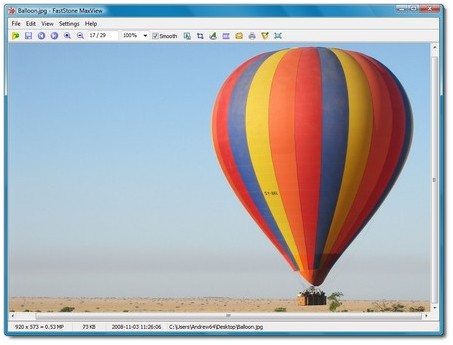 Want a portable and innovative application that allows you view your images just how you want it? Then go get FastStone MaxView. Want a portable and innovative application that allows you view your images just how you want it? Then go get FastStone MaxView.
What is this application all about?
FastStone MaxView is a tiny, very fast and innovative image viewer that supports all major graphic formats. Its intuitive layout allows you to view your images in several ways. It is a handy tool for quickly viewing, rotating, resizing, cropping, annotating and printing images.
Whether you’re a professional or newbie, FastStone MaxView allows you to efficiently and quickly manipulate your images. You can even view images that are saved in password-protected files such as ZIP and RAR archive files. You can rotate, resize, crop, and adjust to lightness, saturation, hue, and RGB levels. The program also allows users to view their photos as a slideshow to which music can be added.
Some of the main features of this program include: Lightweight, fast and intuitive, auto hidden menus and toolbars to make the best use of screen space, full screen with many zooming options, Crystal clear and customizable magnifier, a single click to see image details. Others include lossless JPEG rotation and crop, add texts, arrowed-lines and highlights to images, set image as Windows desktop background (wallpaper), fun and easy and several others more.
FastStone Maxview has a 45-day trial period. It installs desktop icons without asking but uninstalls cleanly. We recommend this program to all users seeking a quick and simple way to edit their photos.
Downsides?
Wished it were a freeware. A nice and portable image viewer.
To learn more about this product, please go to FastStone.org.
Posted in Main | No Comments »
Monday, August 19th, 2013
 If you want a productivity suite that makes you more efficient and makes your work more pleasant, why not try out Kingsoft Office. If you want a productivity suite that makes you more efficient and makes your work more pleasant, why not try out Kingsoft Office.
What is Kingsoft Office Suite?
This freeware comes fitted with 3 different applications with differing functions: Writer – fully equipped modern word processor; Presentation – create effective multimedia presentations; Spreadsheets – handles all your data processing and analysis requirements.
One unique thing about this program is that it is a lot smaller and faster than several other office suites. It also allows you to create a brand-new interface while retaining the classical one. It has a built-in PDF converter & automatic spell check and a smart paragraph adjustment tool which enables you to adjust the indent or line spacing of all paragraphs by dragging and dropping.
Some other interesting functionalities of this application are: a pro PDF converter, Humanized Table Operation enables you to add rows or columns easily by dragging the table frame, multiple tabs interface which allows you to switch easily between workbooks in one window.
Kingsoft software, the author of this application, added the following new features to this version: Switch freely between two interfaces: the newest and classical ones. Two color schemes are available for 2013 interface: elegant black and water blue, Open XML documents, Show Bookmark view in Document Map, Support inserting pictures from scanner. Improve the compatibility with HTML/XML. Support saving as MHT/MHTML. Support customizing shortcut for Macros.
Downsides?
I’m yet to experience any. It’s ultra fast and has all I need. Kudos Kingsoft.
To familiarize yourself with this application, please visit KSOsoft.com.
Posted in Main | 1 Comment »
Sunday, August 18th, 2013
 Are you searching for a program that has all the features you need to find out what’s going on in your system? ESET SysInspector has some advanced and easy to use features to table you do just that. Are you searching for a program that has all the features you need to find out what’s going on in your system? ESET SysInspector has some advanced and easy to use features to table you do just that.
What’s ESET SysInspector?
ESET SysInspector divides various types of information into several basic sections called nodes. If available you may find additional details by expanding each node into its subnodes. Provides important information about your system and its processes, services, registry, drivers and other critical files. ESET SysInspector, and even a newbie who knows almost nothing about using the internet or computer would not find this application difficult to understand.
To open or collapse node just double-click the name of the node or alternatively click or next to the name of the node. As you browse through tree structure of nodes and subnodes in Navigation Window you may find various details for each node shown in the Description Window.
The Description Window contains list of processes and applications communicating over the network using protocol selected in Navigation window (TCP or UDP) along with remote address where the application is connected to. You can check DNS assigning IP addresses.
Want to check it out? CLICK HERE!
Posted in Main | No Comments »
Friday, August 16th, 2013
 Need a professional tool for backing up or restoring drivers? Try Driver genius Professional. Need a professional tool for backing up or restoring drivers? Try Driver genius Professional.
What is the big deal about this program?
This program quickly detects all the devices in computer and backup the drivers and it can make the drivers into the zip-compressed format or self-extractor format files. You can also its restore-drivers function to restore all the drivers when you reinstall the OS.
Driver Genius improves PC performance with the powerful driver manager for Windows that backs up, restores, and updates your device drivers automatically with just a few clicks of your mouse. It updates the drivers of your system can’t find on its own. An interesting feature of this application is that it can analyze your system and recommend suitable drivers for your PC from a database containing over 80,000 plus different drivers.
Some of the main features of this program include: Driver Genius can detect and quickly backup drivers installed in system. It can compress the backup drivers to a zip file, self extracting file or an independent executable auto installer program. Drivers Restore: You need not install drivers one by one after reinstalling Operating System. Just need only one click you can install all your backup drivers automatically. It thus takes less time to reinstall system. Drivers update, Drivers Uinstall which to find out these useless drivers quickly and uninstall them.
Driver-soft.com, the author of this program, has added the following new changes to this version: Added Windows 8.1 Preview support, Optimized download server connection speed, Improved compatibility for Apple computer, Hardware Info: Added ability to detect USB hard drive information.
Downsides?
Pricey (?29.99 for 1 PC, with just a year of free updates) . It finds and installs drivers quite easily and quickly. If you want to find out more about this program, go to Driver-Soft.com.
Posted in Main | No Comments »
|
|
|





