Archive for the 'Main' Category
Saturday, November 18th, 2006
 Microsoft being so generous lately. What do I mean? Well, guys at Neowin.net got an info that everyone who took part in the Windows Vista beta test (and that’s about 20,000) company have provided a complimentary copy of Windows Vista Business or Ultimate. But there’s a little catch – really not all of 20,000 testers got new & hot software but only those who submitted at least 1 bug report. Microsoft being so generous lately. What do I mean? Well, guys at Neowin.net got an info that everyone who took part in the Windows Vista beta test (and that’s about 20,000) company have provided a complimentary copy of Windows Vista Business or Ultimate. But there’s a little catch – really not all of 20,000 testers got new & hot software but only those who submitted at least 1 bug report.
Microsoft sent out a mail to those testers just a few minutes ago which specified that it is being offered as a download only. No media will be mailed, and only currently active, invited members of the Windows Vista technical beta program who filed at least one bug are receiving this offer.
Well, can you say now Long Live Micrisoft or still not?
via Neowin
Posted in Business, Commercial, Main, News, Social Software, Windows | 1 Comment »
Friday, November 17th, 2006
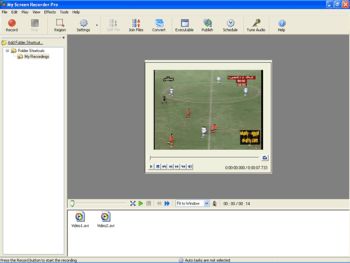 If for any reason at all, you are in need of a good screen recording software that allows you to record your desktop screen activity effectively for later playback, you might want to consider this cool one, My Screen Recorder Pro. If for any reason at all, you are in need of a good screen recording software that allows you to record your desktop screen activity effectively for later playback, you might want to consider this cool one, My Screen Recorder Pro.
This advanced screen-capturing tool can capture anything you see on the computer screen, including the entire desktop, windows, menus, cursors, and even video with sound. You can also use it to record to AVI, Windows Media or Flash files. And if you are thinking about creating demos, I mean developing videos to demonstrate features of a Website, software product, creating movies used in user training or any other task that requires capturing desktop activity, this is the software for you.
One thing I really dig about it is that you can speak into the microphone while recording is in progress to include audio with the recorded video. That means you can create your own audio narration to go with the recording. It’s really cool!
As cool as the software is, I still think it’s kind of expensive but you can check out the free trial version and see if it is exactly what you need.
Posted in Main, Security, Shareware, Utilities, Video | No Comments »
Friday, November 17th, 2006
 This is a really cool program i found that gives you virtual driving lessons, complete with virtual driving instructor! It’s based on driving in Europe, so left side of car and driving on the right! At least that was the case in the version I tried although i think they have other versions, but the site is a little confusingly laid out. Don’t let that put you off though. This is a very good program and you almost feel like you’re really driving,as you have to pay attention or you’ll break the rules of the road or even cause an accident! This is a really cool program i found that gives you virtual driving lessons, complete with virtual driving instructor! It’s based on driving in Europe, so left side of car and driving on the right! At least that was the case in the version I tried although i think they have other versions, but the site is a little confusingly laid out. Don’t let that put you off though. This is a very good program and you almost feel like you’re really driving,as you have to pay attention or you’ll break the rules of the road or even cause an accident!
In the version i played around with, you can choose from 4 driving instructors,
three car cockpits, three motorbike cockpits (Hornet, Scooter and a cool Chopper). It starts at beginner level with basics such as indicating and stopping at traffic lights, giving right of way, etc, all the way up to…well almost real life conditions!
I had the pleasure (and pain) of going on a road trip across Europe not so long ago, so i can say that the scenery and experience is pretty accurate in some ways! I’d recommend this for anyone learning to drive or planning on driving in Europe. It’ll give you a good chance to become familiar with the various rules of the road! All from the safety of your chair! (Seatbelt not included)
You can find out more info here
Posted in Fun, Games, Main | 13 Comments »
Friday, November 17th, 2006
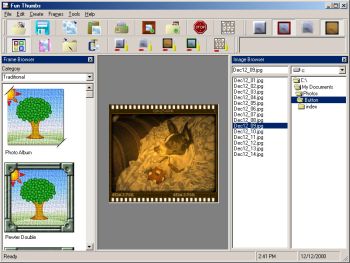 I’ve discovered a software that can come in handy in helping you give your old pictures a new look. It is called Fun thumbs. I’ve discovered a software that can come in handy in helping you give your old pictures a new look. It is called Fun thumbs.
With Fun Thumbs you can create small copies [thumbnails] of your image. And you can either do this individually, or with one button click you can create thumbnails for all the images in a directory as well as an interactive HTML Album (webpage) of your images. You can view your album on your browser, or even get it uploaded to the Internet! One thing I love about this is that The HTML album is fully configurable and even allows you to add in your own custom headers and footers.
One really cool thing about Fun Thumbs is that it allows you to apply various special effects to your thumbnail or original image. These include over 35 frames, which you can dress up your thumbnails with. You can also apply a patterned edge faded into the image, solid colored borders, buttonizer effects, sepia tone effects and more! With features like the ability to easily add the name of the image right onto the thumbnail (or original image) you can easily manage your photos and images.
Do you want to see what it does?
Posted in Design, Fun, Main, Shareware, Shell and Desktop, Themes, Utilities | 1 Comment »
Friday, November 17th, 2006
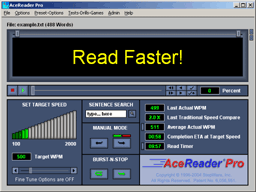 Every once in a while i come across a unique program that promises to teach a useful skill,through the magic of some well thought out yet simple technique. This is one such program. Every once in a while i come across a unique program that promises to teach a useful skill,through the magic of some well thought out yet simple technique. This is one such program.
Speed reading is simply the ability to read very fast by learning to scan the words rather than thinking about them or pronouncing them in your head. I’m not sure how well this works if you have something important to read as scanning things doesn’t really focus your attention on them, but anyway!
Acereader uses two techniques, Rapid Serial Visual Presentation (R.S.V.P.) and Tachistoscopic Scroll Presentation (try saying or even reading that 3 times!!!). It’s pretty easy to use, you can open any text file inside it or copy and paste. It has different grades from beginner to advanced and you’ll be amazed at how naturally you read fast using the method of having the words appear and scroll in front of you. It’s won a bunch of awards as you can see here for being “best educational software”, so it’s not as crazy as it sounds!
Go check out the demo and a lot more detailed info here.
Posted in Developer, Fun, Games, Main, Shareware, Utilities | 1 Comment »
Friday, November 17th, 2006
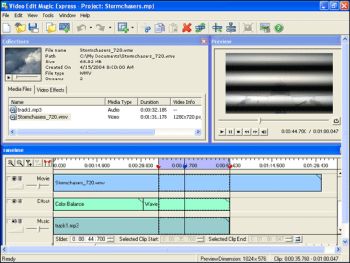 If you are a video enthusiast and you have been searching for a shareware that is fun and easy to use, you may want to check this out. If you are a video enthusiast and you have been searching for a shareware that is fun and easy to use, you may want to check this out.
Departing from the storyboard concept that most video editors use to a more familiar method of select, cut/copy, and paste editing, Video Edit Magic Express makes video editing as simple as possible for the average user. With Video Edit Magic Express, you can easily decorate your videos by dragging and dropping effects, adding background scores and changing the volume of individual tracks for audio mixing. The built-in capture tool enables you to quickly capture video from a camcorder, capture-card, or USB video camera and move it to your hard disk. You can also add captured footage directly to the timeline for further editing. You can combine video, audio and image files on the same timeline for editing operations, making it simple to compose your video masterpiece.
The fact that you don’t need to be a professional to use this software should make it a darling among all video enthusiasts. With little or no experience in video editing you can quickly learn the basics and start making your own video productions. A wizard based help quickly takes you through all necessary steps from importing to editing.
Believe me, this software delivers what it promises, so you might want to try it out. And if you are not satisfied with it; No problem, you don’t have to buy it until you have checked out the trial download which lasts for as long as 30 days, so what’s to lose. Check out the free trial download.
One thing is worthy of note though, you need nothing less than 256 MB RAM and 100MB of hard disk space to be able to download his software and use it effectively. It works on all Windows OS.
Learn More about Video Edit Magic Express.
Posted in Fun, Main, Multimedia, Shareware, Video | 1 Comment »
Friday, November 17th, 2006
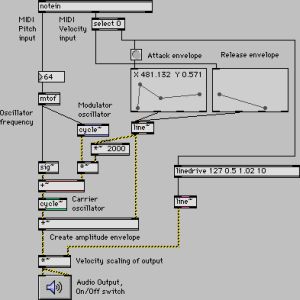 This software has apparently been in use in computer music for over fifteen years, and used by performers, composers, artists, teachers, and students all over the world. As they put it on the web site “Max/MSP is the way to make your computer do things that reflect your individual ideas and dreams”, which is a bit grandiose for my taste. This software has apparently been in use in computer music for over fifteen years, and used by performers, composers, artists, teachers, and students all over the world. As they put it on the web site “Max/MSP is the way to make your computer do things that reflect your individual ideas and dreams”, which is a bit grandiose for my taste.
More simply put, Max/MSP is a “graphical programming environment”, which means you can develop your own music generation and treatment software using a visual representation of the tools, connecting them together with patch cords on screen to make them talk to each other. This is really cool by the way! Not to mention very powerful.
The basic environment includes all the basic MIDI, control, user interface, and timing tools. That is the Max part of the suite. On top of Max you can build hundreds of other objects, including the two powerful collections of objects you can buy with Max, first of which is MSP, a collection of audio objects that facilitate everything from interactive filter design to direct to hard disk recording. The other set of objects is Jitter, a set of objects optimized for manipulating video and 3D graphics.
Yes it’s very geeky and techie, BUT it is VERY powerful. Computer driven music doesn’t get more leading edge than this.
Click here to join the magic.
Posted in Audio, Internet, Main, Multimedia, Shareware, Utilities | No Comments »
Thursday, November 16th, 2006
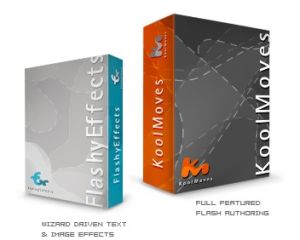 Flash has long established itself as the standard for animation on the Internet. Its everywhere you look, banners, games, flash movies, even entire sites! So, there’s two ways you can go about making flash stuff, one is with the official Flash program from Macromedia, and the other is with programs such as this! The second option is usually a lot easier than learning Flash. Flash has long established itself as the standard for animation on the Internet. Its everywhere you look, banners, games, flash movies, even entire sites! So, there’s two ways you can go about making flash stuff, one is with the official Flash program from Macromedia, and the other is with programs such as this! The second option is usually a lot easier than learning Flash.
This program is great for making some pretty impressive stuff that would take hours to make in Macromedia Flash, you can make some very decent stuff with this thing. When you first use it, it walks you through a tutorial which makes you feel comfortable pretty quick. It has a simple to use interface and for the more experienced users it has a pretty good advanced mode too. They have a lite version of this program too, called ‘Flashy effects’, that mostly focuses on just text effects and banners. You can check them out by going here.
Posted in Main, Multimedia, Shareware, Windows | No Comments »
Thursday, November 16th, 2006
 In design stock photography is something you usually pay through the nose for. A good source of free stock photography is a boon for designers, graphic artists and web creators alike. Which is why it’s so very nice to see so many good quality free stock photo resources on the web. In design stock photography is something you usually pay through the nose for. A good source of free stock photography is a boon for designers, graphic artists and web creators alike. Which is why it’s so very nice to see so many good quality free stock photo resources on the web.
My favourite of all time has to be Stock Exchange, the first and best. The quality of the photos is great and you can contribute too. It’s like Flickr but with higher resolution to the graphics you create using these resources can be printable in magazines.
There are other resources too, all you have to do is search for “free stock photo -royalty”. The last bit is to stop searching for “royalty free” which is not free but something you pay for.
See Stock Exchange, but also these fine resources:
http://www.creatingonline.com/stock_photos/
http://www.free-stockphotos.com/
Posted in Internet, Main, Multimedia, Photo | No Comments »
Thursday, November 16th, 2006
 A new version of ObjectDock, ObjectDock 1.5 has just been released. Just in case you are not familiar with this software, let me tell you what it does. A new version of ObjectDock, ObjectDock 1.5 has just been released. Just in case you are not familiar with this software, let me tell you what it does.
ObjectDock is a program that enables users to organize their programs and running tasks into a dock. ObjectDock enables users to have more control over how they organize their desktop. Rather than have a bunch of icons on the desktop, these icons can be put into docks. ObjectDock can also be used to replace the Start bar entirely freeing up valuable screen real-estate.
Some of its features include:
- Standard docks
- Highly flexible visual appearance
- Mouse-Over Zoom effects
- Easy replacement of icon images
- Optional Start Bar replacement
In case you are wondering “what on earth is a dock?” Don’t sweat it!
A dock is simply a bar that can be set to the edge of your screen with a background and a row of icons. The function of a dock is to bring applications and other various shortcuts to you in an organized fashion relieving your desktop of clutter.
So if you want to give your system a new look you may want to check it out!
You can either go for the free version or the PLUS version. ObjectDock Plus has extra features like Multiple Docks on screen at once, Multi-Monitor Support, system tray support, tabbed docks, hot spot activation etc. but it’s not free.
But if you don’t dig any of the versions for whatsoever reason, you can check out RocketDock, it’s a similar program and it’s free.
Posted in Business, Freeware, Information Management, Main, Shareware, Utilities | No Comments »
|
|
|





