Archive for the 'Shareware' Category
Tuesday, November 13th, 2007
 When you’re viewing the videos in your PC, don’t you often feel like having those on your phone or any other device? Even sometimes it happens that you can want to have a particular music, etc but the problem arises that it is not a single file rather it is a video file. ABest RM RMVB Video Converter 3.74 software is the one that would help you to solve the problem as it has all the required function to perform the work. When you’re viewing the videos in your PC, don’t you often feel like having those on your phone or any other device? Even sometimes it happens that you can want to have a particular music, etc but the problem arises that it is not a single file rather it is a video file. ABest RM RMVB Video Converter 3.74 software is the one that would help you to solve the problem as it has all the required function to perform the work.
For converting the video to various different formats and having the music files extracted you just need to get the software downloaded from the site and get it installed at your system. When you’re done with the installing and the launch the program; a decent deep colored appears in front of the user. The software shows the function that can be operated and understood well by even a normal user. You just need to make the selection of the files that you want to convert to the other format. The program supports the conversion from different formats to various other ones. It supports video conversion from RM, RMVB files to the AVI, Xvid, MPEG, WMV, Flash SWF, MP3, MP2 Audio, ands so many more. Along with all this you can have the audio files extracted from the audio-visual files. Make the selection of format in which you want the file to be converted from the mid bar containing the format labels. You can have the file played for making the confirmation about the selected file. You can get the different details about the files selected like the source video, frame size, status, etc. The ‘Help’ option is there for providing the details relating to the program so that it is easy for you to work on it.
The software with its capability to function at the best has reached the ratings of 4 points. Go get the software and let the music create ripples of enjoyment and fun flow all around you.
{More info and Download}
Posted in Developer, Information Management, Internet, Shareware, Video | 2 Comments »
Monday, November 12th, 2007
 CR8type is a font editor and designer capable of working with OpenType fonts. It’s equally useful to both beginners and professionals alike, as it has some advanced features,(it comes with a 22 page pdf manual) or you can just stick with the basics. CR8type is a font editor and designer capable of working with OpenType fonts. It’s equally useful to both beginners and professionals alike, as it has some advanced features,(it comes with a 22 page pdf manual) or you can just stick with the basics.
Fonts can contain up to 65535 glyphs and it has a full-featured toolbox for glyph design and drawing. You can edit glyphs in True Type points mode, or nodes and control points mode. Transform (rotation, skew and stretch) points, glyphs, and composite glyphs, and map glyphs to any of 65536 unicode characters. A new feature in the latest version is the ability to convert TrueType or OpenType TT fonts to OpenType PS fonts.
It comes with CR8tracer, a free utility for creating fonts from your own handwriting!
This program is worth checking out if your into font design!
More info and the trial here
Posted in Commercial, Design, Developer, Main, Shareware, Utilities, Windows | 3 Comments »
Wednesday, November 7th, 2007
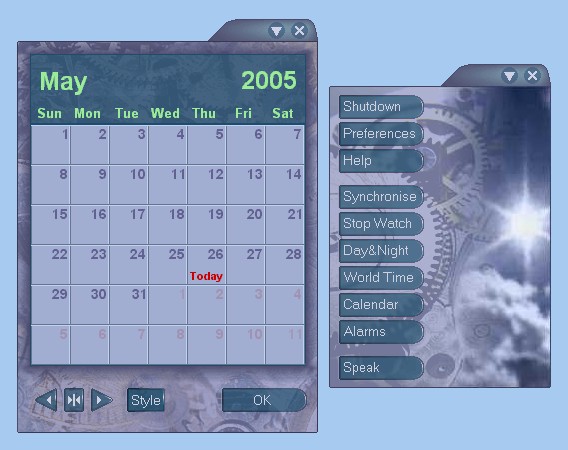 Talking Time Keeper is a program that, as the name implies, tells you the time by talking! But it also has some other potentially useful features. Talking Time Keeper is a program that, as the name implies, tells you the time by talking! But it also has some other potentially useful features.
For example, it has very customizable multiple reminders, alarms and countdown timers.
The time can be announced on the hour/half hour/quarter, or on demand. It can be customized to use different voices, these are actual real voices.(Well,that is to say, they’re recordings of real voices anyway!)
Your own voice can even be recorded to announced the time if you have a microphone! (and some spare uh.. time!) You can also choose what kind of chimes to use including a grandfather clock. In addition it has a calendar, day/night map and world time for as many countries as you want. It’s also skinnable.
All in all if you really love time,and talking, you’ll really love this program! Interested? Take the time to click here for more info!
Posted in Calendar, Developer, Information Management, Main, Reminder, Shareware, Time Managment, Windows | No Comments »
Wednesday, October 31st, 2007
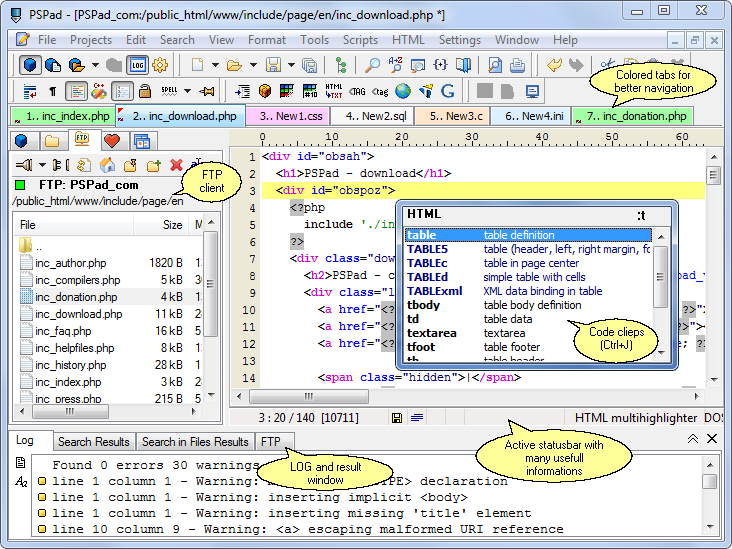
PSPad, in its latest version released a couple of days ago (version 4.5.3.2282), is a freeware text editor that has been put out by a very bright programmer named Jan Fiala. Now, most people will look at that first sentence and shrug their shoulders, thinking that the last thing the world really needs is another freeware text editor. Well, while Jan has certainly chosen to inject his programming prowess into a super-saturated market in today’s world, at the same time the PSPad Editor really has a lot going for it that places it above a number of the text editors that are available today. A lot of these text editors are poorly thought out and even more poorly designed, but as you check out the features of PSPad Editor you will find that it is quite a bit different.
For starters, the layout of PSPad is so good that you can find anything that you would use frequently from the main screen. There is no need to pull down menus and even if you needed one of those menus, there are so many keyboard hotkeys that you can use in order to save tons of time. In addition to that, there is no complex installation process for PSPad; it is good to go right away. Finally, the editor itself not only has the ability to edit text documents, but you can also use it as a HEX editor, an HTML editor, an FTP client as well as an explorer for many other coding languages. It really has a lot compiled into one compact software piece and this is why it is certainly worth a look.
More information can be found at http://www.pspad.com/
Posted in Business, Developer, Files and Folders, Information Management, Main, Programming, Security, Shareware, Utilities, Windows | No Comments »
Monday, October 29th, 2007
 One thing that can be very important to a business, company, software developer etc, is having a logo. It can really add the professional touch to a product or company, as well as helping with brand recognition. One thing that can be very important to a business, company, software developer etc, is having a logo. It can really add the professional touch to a product or company, as well as helping with brand recognition.
Logo Design Studio helps you to easily create a logo, potentially saving you a lot of money that you may otherwise have to pay a professional logo designer. It comes with over 200 industry based logo templates and more than 850 logo design objects, as well as a slogan and tagline resource library. By adjusting the colors, fonts, shapes and effects you can easily make your logo exactly as you want it. You can also import your own graphics or pictures to further give your logo a unique look.
This is a pretty cool program for anyone starting up a company, new product, etc.
Check it out here.
Posted in Design, Developer, Internet, Main, Photo, Shareware, Utilities, Windows | 3 Comments »
Friday, October 26th, 2007
 There are a number of different programs on the internet today responsible for doing a number of different things, but what makes Hamachi such a standout program is that it happens to be a program that a lot of people use to facilitate their day-to-day lives. What I mean by that is that a lot of people want to connect with each other in a way that things like firewalls and internet inconsistencies sometimes prevent, but you can use Hamachi to help remedy those problems and make true peer to peer connection a possibility. There are a number of different programs on the internet today responsible for doing a number of different things, but what makes Hamachi such a standout program is that it happens to be a program that a lot of people use to facilitate their day-to-day lives. What I mean by that is that a lot of people want to connect with each other in a way that things like firewalls and internet inconsistencies sometimes prevent, but you can use Hamachi to help remedy those problems and make true peer to peer connection a possibility.
The thing that makes a lot of people like Hamachi straight out of the box is the fact that Hamachi is a program that is easy to use and easy to set up. There is in fact no configuration required whatsoever; you just put the name of the network in and the password for the network and then you are good to go. The Hamachi program can then be used in order to initiate a direct connection between two computers that are both connected to the internet. The important part, however, is that this connection can be done regardless of any of the other circumstances of either of the two computers. This is important because it is relatively innovative in that sense.
More information can be found at https://secure.logmein.com/products/hamachi/vpn.asp?lang=en
Posted in Beta version, Browsers, Design, Developer, Information Management, Internet, Main, P2P, Programming, Security, Shareware, Utilities, Windows | 1 Comment »
Friday, October 26th, 2007
 From deep within the freeware programs that are available in today’s market, one can quite easily find the use for something like the VMware player. Whether it is something that you need run in a safe virtual machine or whether you would like to emulate what a lot of others have done, what you are going to find is that the VMware Player is the thing that you can use to make that simulation a reality. From deep within the freeware programs that are available in today’s market, one can quite easily find the use for something like the VMware player. Whether it is something that you need run in a safe virtual machine or whether you would like to emulate what a lot of others have done, what you are going to find is that the VMware Player is the thing that you can use to make that simulation a reality.
The VMware player allows users of a PC (regardless of whether they have a Windows or a Linux setup) to run any of the virtual machines that are currently available today. For example, VMware Workstation, GSX Server, ESX Server and Symantec are all examples of different virtual machines that could be run through the use of the VMware player. This is especially useful when you want to take a look at software in an application environment before incorporating that environment into your computer and in addition to that it is also useful for experiencing the full range of benefits inherent to many of the preconfigured products around.
More information is available at http://www.vmware.com/products/player/
Posted in Developer, Information Management, Security, Shareware, Shell and Desktop, Utilities, Windows | 1 Comment »
Thursday, October 25th, 2007
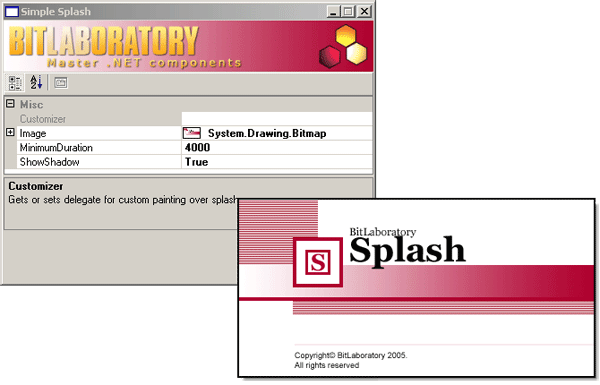
Have you ever loaded a piece of software and seen a sort of title screen for the software while it was loading? This title screen usually has information about the program version, name and release date and might also include a couple of graphics in order to help users identify a specific corporate or proprietary software brand. Did you know that you could make these screens for your own programs too if you wanted to do so? Well, one of the ways that you can do it is through the use of the Splash Screen software being discussed here.
The opening splash screen for the software makes it look like a Microsoft product, but don’t be fooled; this is a freeware product created by the excellent BitLaboratory.com. The product will allow you to use a number of different options such as the image and the transition and then sit back and see what results. The splash screen is quite fun to tinker with and that is perhaps why even this simple program has the ability to enjoy a large amount of popularity. It is still in an early phase of development, but you can expect there to be many new versions to come with new functionality and usage.
More information can be found at http://www.bitlaboratory.com/Default.aspx?tabIndex=1&tabID=10
Posted in Business, Commercial, Design, Developer, Information Management, Internet, Main, Shareware, Utilities, Windows | No Comments »
Thursday, October 25th, 2007
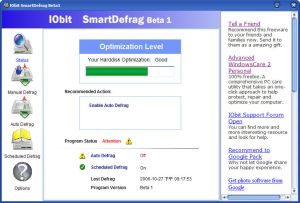 So, most people that have a windows operating system are already well aware of the fact that their operating system has a disk defragmenter option that you can use when times get tough, your hard drive begins to run slow and everything seems like it needs to be fixed. People run the defrag program and it tends to make things better. Therefore, why would you need another defrag program to use instead of the Windows disk defragmentation service? Well, there are a number of reasons that you could require one and the two main ones have to do with the idea of automation and the idea of efficiency. So, most people that have a windows operating system are already well aware of the fact that their operating system has a disk defragmenter option that you can use when times get tough, your hard drive begins to run slow and everything seems like it needs to be fixed. People run the defrag program and it tends to make things better. Therefore, why would you need another defrag program to use instead of the Windows disk defragmentation service? Well, there are a number of reasons that you could require one and the two main ones have to do with the idea of automation and the idea of efficiency.
First and foremost, the program that comes with Windows is not particularly efficient. Not only does it take a lot of resources to use, but at the same time it also doesn’t do the job as efficiently as it could. The IObit program fixes both of these points by being able to run in the background seamlessly with your other programs; something that it could only do through the reduction of system resource usage which in turn can only come from more efficient operation. As to the second aspect, the aspect of automation, the program can be configured to scan for fragmentations automatically and therefore can be used to keep your hard drive running smoothly without you having to constantly check on the progress.
More information is available at http://www.iobit.com/iobitsmartdefrag.html
Posted in Developer, Main, Programming, Security, Shareware, Shell and Desktop, Utilities, Windows | No Comments »
Tuesday, October 23rd, 2007
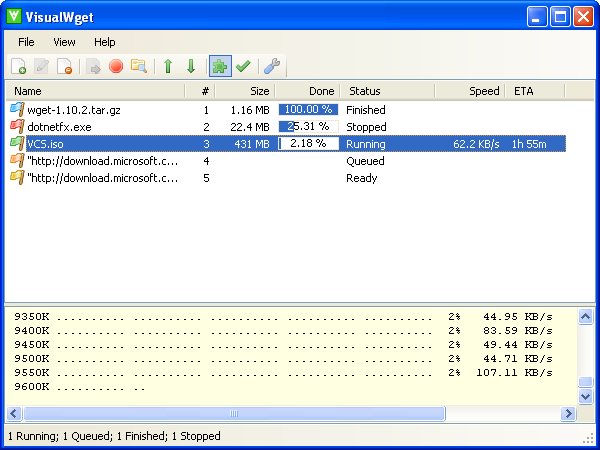 One of the most annoying things about a new Windows operating system is the fact that downloads are sometimes very hard to track. This is especially true with the download windows provided by internet explorer and firefox and therefore in order to make things better the use of a third party freeware software for managing downloads is needed. Now, while there are a number of different pieces of software out there that can do this function, few of them are as good as the newly released Beta 4 Rev 2 version of the Visual Wget software. One of the most annoying things about a new Windows operating system is the fact that downloads are sometimes very hard to track. This is especially true with the download windows provided by internet explorer and firefox and therefore in order to make things better the use of a third party freeware software for managing downloads is needed. Now, while there are a number of different pieces of software out there that can do this function, few of them are as good as the newly released Beta 4 Rev 2 version of the Visual Wget software.
This is a piece of software that is capable of following a large number of downloads as you make them. The software is actually designed to show a list of downloads much in the same way that you would see a list of jobs in other software packages and therefore it allows you to keep track on everything that you download. You can see what it is, the priority it has in your download queue, the status of the download and what the download is doing at that exact moment. If you download a lot, then this is a piece of software that can help you enormously.
More information can be found at http://visualwget.blogspot.com/
Posted in Developer, Download Managers, Internet, Main, Shareware, Utilities, Windows | 1 Comment »
|
|
|




