Archive for the 'Shareware' Category
Tuesday, February 27th, 2007
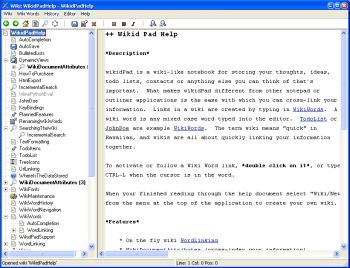 Are you familiar with that popular site, Wikipedia? Well if you are, how about having your own personal wikipedia. That’s what wikidPad aims to do for you. To help structure personal knowledge like Wikipedia helps structure global knowledge. Are you familiar with that popular site, Wikipedia? Well if you are, how about having your own personal wikipedia. That’s what wikidPad aims to do for you. To help structure personal knowledge like Wikipedia helps structure global knowledge.
WikidPad is a wiki-like notebook for storing your thoughts, ideas, to do lists, contacts, or anything else you can think of to write down. The reason why this tool is different from other notepad applications is the ease with which you can cross-link your information.
Yeah it’s so easy to cross link information. Links in a wiki are created by typing in what is called WikiWords. And what is a WikiWord? Any case word (also called CamelCase) typed into the editor e.g. TodoList.
It is worthy of note that wikidPad is not a wikipedia thing; the term wiki means “quick” in Hawaiian. Since wiki means quick, you can rest assured that you are going to enjoy quickly linking your information together.
The latest version, WikidPad 1.9 Beta 2 has these changes:
- Better support for creating new tabs
- Several bug fixes
Want to check it out? CLICK HERE!
Posted in Developer, Information Management, Internet, Main, Shareware, Social Software, Windows | 2 Comments »
Monday, February 26th, 2007
 Here is a useful tool that comes highly recommended, it is called XAMPP. It is an easy-to-install Apache distribution containing MySQL, PHP and Perl. It is really very easy to install and to use: just download, extract and start. This tool is really easy to use. Here is a useful tool that comes highly recommended, it is called XAMPP. It is an easy-to-install Apache distribution containing MySQL, PHP and Perl. It is really very easy to install and to use: just download, extract and start. This tool is really easy to use.
Compared to many other software in its category like Apache2Triad, XAMPP is so much better as it is easier to use, has more features, and also allows you to switch between PHP versions in seconds. It is a complete web, database and FTP server package that’s so easy to install and use. Where does the name XAMPP come from? XAMPP’s name is an acronym for X (any of four different operating systems), Apache, MySQL, PHP and Perl.
One other great thing about this program is that no matter what your system runs on, Windows, Linux or Mac OS X, there is a version available for you.
If you are really serious about improving your web development productivity level, this cool tool is for you. Check it out HERE!
Posted in Business, Developer, Information Management, Internet, Linux, Mac Stuff, Main, Programming, Shareware, Utilities, Windows | 1 Comment »
Monday, February 26th, 2007
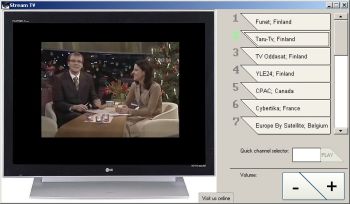 Want to watch hundreds of completely free live and prerecorded TV channels? Then you’ll need to check out Stream TV. With Stream TV, more than 700 completely free live and pre-recorded TV channels are available for fast streaming. The cool thing about this tool is that you don’t need a TV card to enjoy the channels. Want to watch hundreds of completely free live and prerecorded TV channels? Then you’ll need to check out Stream TV. With Stream TV, more than 700 completely free live and pre-recorded TV channels are available for fast streaming. The cool thing about this tool is that you don’t need a TV card to enjoy the channels.
How is that possible? The TV channels are streamed through your Internet connection.
Stream TV gives you an opportunity to enjoy popular TV channels from around the world: from the German 3-Sat to DW-TV and English channels such as BBC News and C-Span.
Want to check it out? Click HERE! or visit http://www.streamtofile.com/
Posted in Business, Commercial, Developer, Internet, Main, Shareware, Video, Windows | No Comments »
Thursday, February 22nd, 2007
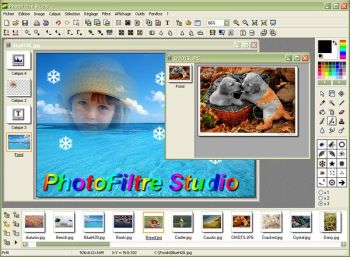 Although there are many image manipulation and photo editing programs out there. Some of us like finding a cheaper alternative that does the job well. Photofiltre Studio is a superb image and photo editor that will enable you to touch up your digital photos, add effects to images, quickly edit and grab sections of photos and it will handle your scanning and other image importing requirements.Best of all, it’s designed and presented in a well designed interface, along with a nice toolbar. As this program is plugin based, you can program and create your own modules or include some of the available modules, such as the red eye corrector and others, it also includes some cool filters. For a full list of its cool features that are too numerous for me to go into detail about here, go check out it out here. Although there are many image manipulation and photo editing programs out there. Some of us like finding a cheaper alternative that does the job well. Photofiltre Studio is a superb image and photo editor that will enable you to touch up your digital photos, add effects to images, quickly edit and grab sections of photos and it will handle your scanning and other image importing requirements.Best of all, it’s designed and presented in a well designed interface, along with a nice toolbar. As this program is plugin based, you can program and create your own modules or include some of the available modules, such as the red eye corrector and others, it also includes some cool filters. For a full list of its cool features that are too numerous for me to go into detail about here, go check out it out here.
Posted in Design, Developer, Main, Photo, Shareware, Utilities, Windows | 6 Comments »
Thursday, February 22nd, 2007
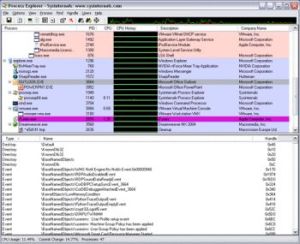 This is a small application to help you find out what those strangely named processes listed in Task Manager are really up to. The usual Windows Task Manager tells you what applications and processes are running, but some process names aren’t very clear to the average computer user. Process Explorer helps you get to the bottom of things by digging down to see which application started a process and which resources that app is currently using. This is a small application to help you find out what those strangely named processes listed in Task Manager are really up to. The usual Windows Task Manager tells you what applications and processes are running, but some process names aren’t very clear to the average computer user. Process Explorer helps you get to the bottom of things by digging down to see which application started a process and which resources that app is currently using.
This can be a big help when you’re trying to figure out which background processes you can safely shut down, it can also help developers sniff out memory leaks. It can even help sniff out spyware, too. Now comes with Vista and 64 bit processor compatibility.
Check it out.
Posted in Developer, Information Management, Main, Shareware, Task Manager, Utilities, Windows | 1 Comment »
Wednesday, February 21st, 2007
 Here is a simple cool free game for your enjoyment; it’s called Crazy Car Gangsters. Here is a simple cool free game for your enjoyment; it’s called Crazy Car Gangsters.
Crazy Car Gangsters is a mixture of arcade races and shooters. The cool thing about the game is it’s a blend of different things, so there is something for everyone in this game: hot rodding in town, breaking rules and scampering away from the police; making the town a battle-field and shooting everything that moves.
In this game, two clans have been long time struggling for the territory. The last town is left – the first to occupy it wins the decade long war. Only one is going to survive.
This is a simple game but it is worth checking out, it’s free and it’s fun.
CLICK HERE for download and more info!
Posted in Developer, Fun, Games, Main, Shareware, Windows | No Comments »
Wednesday, February 21st, 2007
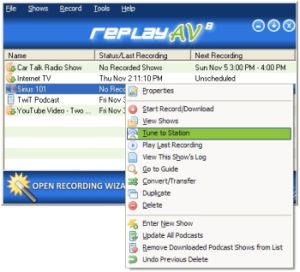 If you’ve been having problems with capturing some kinds of streaming video and audio, you are going to love this shareware. It is called Replay AV. If you’ve been having problems with capturing some kinds of streaming video and audio, you are going to love this shareware. It is called Replay AV.
Replay AV is an easy way to capture all kinds of Streaming Video and Audio, and I mean all kinds, including Radio Shows, Online TV Broadcasts, video clips, audio archives, and Podcasts. With Replay AV, you can enjoy a lot of things as you can record clips instantaneously, or schedule recordings to happen automatically later. Replay AV allows you to automatically convert to 36 different video and audio formats, including iPod Video, iPod Audio and iPod Audiobook.
You will love the fact that Replay AV comes with an integrated Replay Media Guide that lets you pick Radio Shows, Radio Stations, TV Stations and Podcasts to record very easily, with just a single click.
For more info, CLICK HERE or visit http://applian.com/replay-av/
Posted in Audio, Developer, Internet, Main, Multimedia, Radio, Shareware, Utilities, Video, Windows | No Comments »
Wednesday, February 21st, 2007
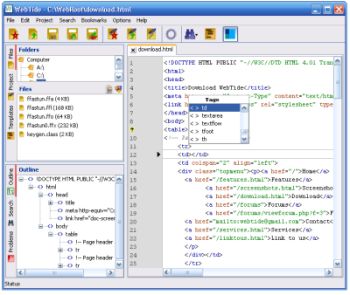 If you are a web developer, you are going to find this particular freeware useful. It’s called WebTide. If you are a web developer, you are going to find this particular freeware useful. It’s called WebTide.
WebTide text editor is a new free HTML editor. This useful tool is designed to help web developers in creating fast and professional websites. WebTide is also a programmer text editor for fast HTML error checks.
WebTide presents you with cool features like:
- The Outline- a code navigation tool
- The Project- a file management tool vital for a HTML editor
- The Search Tools- vital tools when you are handling large projects with a HTML editor
- The Coding Tools- help you increase you development speed
The latest version, WebTide 3.0, has these changes:
- PHP basic function completion
- HTML context completion
- CSS context completion
- XML completion
- CSS validation
- JavaScript validation
- XML validation
- Error underline in the editor
- Quick open project file
- JavaScript formatting
And lots more.
Want to check it out? Click Here
Posted in Business, Design, Developer, Internet, Main, Programming, Shareware | No Comments »
Tuesday, February 20th, 2007
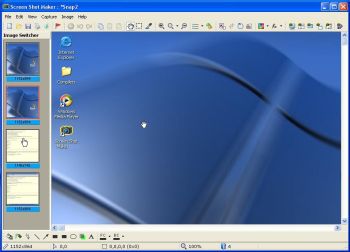 If you’ve been looking for an easy to use software to capture and save anything and everything on your screen, you might want to check out Screen Shot Maker. If you’ve been looking for an easy to use software to capture and save anything and everything on your screen, you might want to check out Screen Shot Maker.
Screen Shot Maker can capture and save everything that you can see on the screen of the computer. One thing you will love about this software is its ease of use; practically anyone can use this program. You will also appreciate the fact that it can help you accomplish a lot of things.
Here are some of its cool features:
- various and powerful modes of capturing: full screen region, any visible control (such button or window), active window, active window without border, repeat last capture
- allows to capture multiple images
- flexible color picker and color conversion tool
- most used graphics formats for saving images – BMP, JPEG, TGA, GIF, PNG, PCX, WMF, EMF and TIFF
- allows editing images: color adjustment, image processing (resize, rotate at any angle, flip, crop, filters),large set of graphics elements (shapes, arrows, free lines, fill, spray, text, highlight etc.)
- allows printing images, to copy to clipboard or save
- automatic mode for saving your time
Want to check it out? CLICK HERE
Posted in Design, Developer, Fun, Main, Shareware, Shell and Desktop, Utilities, Windows | No Comments »
Tuesday, February 20th, 2007
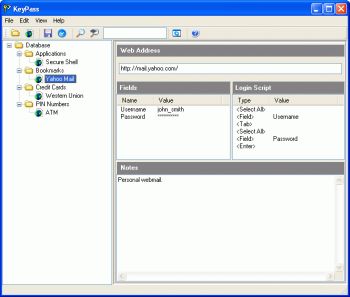 Here is a very useful tool for you to manage your passwords easily. It is called KeyPass. Here is a very useful tool for you to manage your passwords easily. It is called KeyPass.
KeyPass is a program that makes it very convenient for you to store all your passwords in a single database. Your passwords are kept highly secured as they are encrypted using 448-bit blowfish. No matter how many passwords you have or how complex they are, KeyPass makes it really very easy to access them, all you need is a single “master password” to unlock the passwords in the database.
What I really love about this cool tool is the fact that it doesn’t use the usual cut and paste or drag and drop style of some other password mangers. KeyPass types the passwords for you when a user-defined “hot key” is pressed, working with any browser or application, including web browsers, terminal emulators and corporate services easily.
The latest version, KeyPass 4.5.2 which was just released yesterday, has these latest changes:
- The last version introduced a bug where the expiry date is not properly refreshed when navigating from a database entry to a folder. This has been fixed
- KeyPass’ help file cannot be launched under Windows Vista 64. This has been fixed
Want to check it out? Visit http://www.dobysoft.com/products/keypass/
Posted in Backup, Business, Developer, Main, Security, Shareware, Windows | 1 Comment »
|
|
|




