Archive for the 'Shareware' Category
Sunday, December 31st, 2006
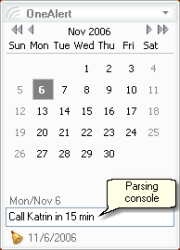 OneAlert is a lightweight and powerful reminder system with a simple calendar. It comes from the same people who make “MyLife Organized” which i recently reviewed. This is one of those really simple programs that’s also really powerful and useful. You simple type in a reminder and time to be reminded. OneAlert is a lightweight and powerful reminder system with a simple calendar. It comes from the same people who make “MyLife Organized” which i recently reviewed. This is one of those really simple programs that’s also really powerful and useful. You simple type in a reminder and time to be reminded.
There are different alerts can be set for a reminder (like play a sound, run application or send e-mail). You can also set reoccurring reminders, for example, the same day and time each week.
You can mark an individual day or number of days with specific color. OneAlert can help you to count the number of selected days and show how many days left to your vacation 🙂
Here is the fast three-step scenario of adding new reminder to OneAlert:
- While working in any application press OneAlert hotkey (Win+Down by default)
- Type in OneAlert parsing console: “Call Katrin in 15 min” and press Ctrl+Enter
- Press OneAlert hotkey again to return to application you worked with.
If you want to customize your reminder then just press Enter instead of Ctrl+Enter in step 2 and add additional parameters for your reminder (note, recurrence, different alert actions like send e-mail or run an application).
You can download this program free, with a reminder limit of a 10 a day (not bad really) or unlimited reminders if you have already bought “mylife Organized”.
Posted in Commercial, Developer, Information Management, Main, Shareware, Utilities | 2 Comments »
Sunday, December 31st, 2006
 MyLife Organized is a lightweight yet powerful tool for organizing your life. Basic use of MLO involves creating tasks, which can be organized as projects, tasks, and subtasks, with due dates, estimated effort levels, and locations. As you enter your goals, projects, and activities, a “to-do” list is created with a list of exactly what needs to be done, where, and when. Some advanced features include exporting to various formats (Microsoft Excel, XML, CSV, and others), saving automatically, and syncing with Microsoft Outlook.You can download a 45-day trial version of the Professional Edition or you can download a free “lite” version which can be used as a simple task/subtask list. MyLife Organized is a lightweight yet powerful tool for organizing your life. Basic use of MLO involves creating tasks, which can be organized as projects, tasks, and subtasks, with due dates, estimated effort levels, and locations. As you enter your goals, projects, and activities, a “to-do” list is created with a list of exactly what needs to be done, where, and when. Some advanced features include exporting to various formats (Microsoft Excel, XML, CSV, and others), saving automatically, and syncing with Microsoft Outlook.You can download a 45-day trial version of the Professional Edition or you can download a free “lite” version which can be used as a simple task/subtask list.
My Life Organized takes your deadlines, recurring appointments, disjointed thoughts about things you’d quite like to do, life goals, etc, and gives you back a series of sequential tasks which really does seem to reflect your most important goals as well as your most urgent ones. The interface is clean and simple, not overloaded.
Definitely worth checking out for anyone who likes to be organised and more productive with their days. A nice thing I like about both the free and pro versions is that they’re both designed to be run from a USB thumb drive. You can view a comparison of both versions here. and the download page is right here.
Posted in Business, Commercial, Developer, Information Management, Internet, Main, Programming, Security, Shareware, Utilities | 2 Comments »
Saturday, December 30th, 2006
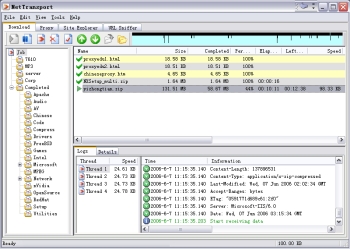 Here is a powerful download tool for you. It is very useful and efficient in downloading files from Internet servers. It is called Net Transport. Here is a powerful download tool for you. It is very useful and efficient in downloading files from Internet servers. It is called Net Transport.
Net Transport now supports HTTP, HTTPS, FTP, MMS (Microsoft Media Services), and RTSP (Real-Time Streaming Protocol) – five protocols used to transfer data.
Its main features include:
- Simple but powerful “File Manager” to categorize and manage downloaded files more efficiently
- Simple multi-user management. You can maintain several databases by logging on Windows with different username
- You can use the inbuilt “Site Explorer” to list the directory structure of the remote server, and easily select the desired files. FTP is the most powerful item in NetXfer
- FTP reuse mechanism allows you to use one connection to get different files from the same site. If you like, you can use accessory FTP client tool called “FTP Transport (FtpXfer)”
- The “Multiple Proxies mode” allows you to assign every working thread a different proxy to break certain site restrictions, like only one connection per IP.
And so much more.
One great thing about it is that it works well with all Windows OS and though it’s a shareware you can check out the trial download for a while before buying the full version, it has a 90 day timeout.
Want to check it out? CLICK HERE!
Posted in Business, Commercial, Developer, Download Managers, Internet, Main, Shareware, Utilities | 2 Comments »
Friday, December 29th, 2006
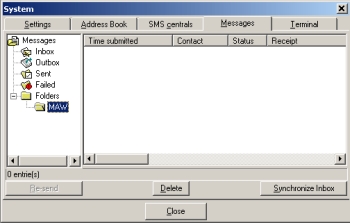 In need of something to help you handle your text messages with ease? Well I have a recommendation for you. It’s SMS-it. In need of something to help you handle your text messages with ease? Well I have a recommendation for you. It’s SMS-it.
SMS-it allows you to send a short message to a mobile phone using your computer. It supports Picture messages: Caller Group Graphic, Operator Logo, Ringtones, and FlashSMS.
It is so easy to send messages with SMS-it. Messages can be sent in different ways:
- Through a modem, using a dial-up SMS center
- Through the internet, using an account with an internet SMS center
- Through a mobile phone attached to the computer (IE attached to the IR port).
One thing worthy of note though is that sending Picture messages, Caller Group Graphics, Operator Logos and Ringtones only work for Nokia phones. Most new phones can however now receive FlashSMS.
Want to give it a shot? CHECK IT OUT HERE!
Posted in Developer, Information Management, Internet, Main, Mobile, Shareware, Social Software | 1 Comment »
Friday, December 29th, 2006
 Here is a useful application to make it easy to watch your favorite DVDs on your mobile equipment. CloneDVD Mobile converts your DVD movies easily into a format that your mobile equipment can play without any difficulty. In case you are wondering what kind of mobile equipment this supports, Sony PSP, Apple iPod Video, iAudio X5, Creative Labs ZEN Vision, etc. Here is a useful application to make it easy to watch your favorite DVDs on your mobile equipment. CloneDVD Mobile converts your DVD movies easily into a format that your mobile equipment can play without any difficulty. In case you are wondering what kind of mobile equipment this supports, Sony PSP, Apple iPod Video, iAudio X5, Creative Labs ZEN Vision, etc.
The fact that you also get to convert your DVDs to other file formats, such as DivX, XviD, AVI, MP4, and so on, makes it a really useful tool.
A new version has just been released with these changes:
- New: added THM-Thumbnail support for Sony PSP
- Added several new profiles: “BlackBerry Pearl”, “SmartDisk FlashTrax”, “Nokia N93/95”
- Fix: Zoom option could result in incorrect vertical offset (video image shifted downwards)
- Fix: still some DVDs resulted in inverted subtitles
- Several small fixes and improvements
- Updated languages
And lots more.
Ready to watch your movies on the go? CLICK HERE!
Posted in Audio, Business, Commercial, Developer, Information Management, Main, Mobile, Movies, Multimedia, Music, Shareware, Utilities, Video, Windows | No Comments »
Wednesday, December 27th, 2006
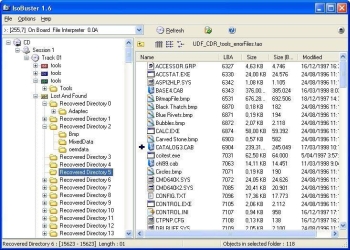 If you’ve had problems in the past rescuing lost files from bad CDs or DVDs, this is going to be a welcome addition to your software collection. If you’ve had problems in the past rescuing lost files from bad CDs or DVDs, this is going to be a welcome addition to your software collection.
IsoBuster can rescue lost files from a bad or trashed CD or DVD or a Blue Ray disc (e.g. BD or HD DVD). Save important documents, precious pictures or video from the family, your only system backup, etc.
A new updated version has just been released, IsoBuster 2.0 with these changes:
- BD (Blu Ray) and HD DVD support
- Implemented the ability to use other system installed code pages, such as MAC, SYMBOL, UTF8 etc., for ISO9660
- Properties for drives show, next to CD and DVD, also BD and HD DVD Read and Write capabilities
- Installation and IsoBuster.exe are now code signed to make Windows (more or less) happy
- VISTA style directory icons when ran on a VISTA system
- Default to SPTI on a VISTA system, even when the app is not running in admin mode
- HTML help would not launch on VISTA due to OS changes. This is now correctly implemented
- On VISTA the Panel with image-file-name was often not properly painted. Changed the Panel with a another Windows component
- HFS(+) Mac File System, with multiple of 512 byte blocks support
and lots more.
CLICK HERE for more info on latest changes and download.
Posted in Business, Commercial, Developer, Main, Multimedia, Shareware, Utilities, Windows | No Comments »
Tuesday, December 26th, 2006
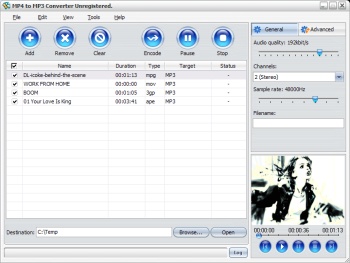 In need of a great software that can help you to meet your MP4 to MP3 conversion needs with ease? Then you need to check out MP4 to MP3 Converter. In need of a great software that can help you to meet your MP4 to MP3 conversion needs with ease? Then you need to check out MP4 to MP3 Converter.
MP4 to MP3 converter enables you to convert MPEG1, MPEG2, MPEG4, WMV, AVI, MP4, 3GPP, 3G2, MOV, RM, RMVB, OGG, DV, H.264 files to the audio files such as MP3, WAV, AC3, WMA, M4A, OGG, AAC etc easily and quickly.
I really love the fact that it works with virtually all MP3 players, portable media or MP4 players quite well. This cool software supports multithreading and batch conversion, so the conversion speed is super fast. The fact that it is easy to handle makes it a must have. You can pause, stop and continue the conversion at any moment.
MP4 to MP3 Converter is a really cool tool that is so powerful and easy-to-use that your desired conversion is achieved with a couple of clicks. Want to try it out?
CLICK HERE To Learn More And Get A Trial Download.
Posted in Audio, Developer, Main, Multimedia, Music, Shareware, Utilities, Video, Voice, Windows | No Comments »
Tuesday, December 26th, 2006
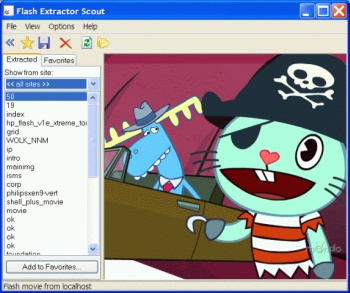 If you are in need of a program that will allow you to save flash movies from the Internet, then you will definitely find this one very useful. I’m talking about Flash Movie Extractor Scout. If you are in need of a program that will allow you to save flash movies from the Internet, then you will definitely find this one very useful. I’m talking about Flash Movie Extractor Scout.
Flash Movie Extractor Scout allows you to save flash movies from Internet Explorer, Mozilla Firefox and Opera browsers. And it’s not just flash movies, it allows you to save flash movies, flash videos and flash games extracted from Internet Explorer, Mozilla Firefox and Opera browsers. With this software you can save and store favorite flash movies easily on your computer using the “Favorites” feature.
So now that you know you can store your flash movie, videos and games easily with this nice software. Won’t you check it out? If you are still wondering what the benefits of this software are. Let me share some with you.
Benefits:
- Save video from YouTube, Google Video and other web-sites;
- Save all flash movies from Internet Explorer, Mozilla Firefox and Opera browsers, save SWF to disk, convert SWF to EXE;
- Extract streaming flash video;
- Capability of extracting and saving text and JPG images from flash movies;
Etc.
CLICK HERE for more info on benefits, features and downloads.
Posted in Business, Commercial, Design, Developer, Information Management, Internet, Main, Shareware, Utilities, Video, Windows | 2 Comments »
Monday, December 25th, 2006
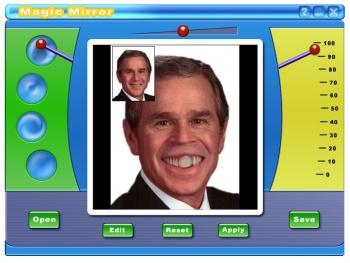 From the stables of ZeallSoft comes this wonderful fun software, Magic Mirror. Magic Mirror is a funny and easy to use photo distorting software. Magic Mirror is a load of fun. Packed with laughter generating tools and necessary features to make an ordinary image extraordinary. From the stables of ZeallSoft comes this wonderful fun software, Magic Mirror. Magic Mirror is a funny and easy to use photo distorting software. Magic Mirror is a load of fun. Packed with laughter generating tools and necessary features to make an ordinary image extraordinary.
These features include:
- Professional image editing tools. Include rotate, adjust, crop, resize, zoom tools.
- 4 image warping tools: pinch, punch, eddy, lens tools
- Easy to use and beautiful interface
- Real-time image process engine
- Support 4 kinds of formats including BMP, JPEG, PNG, GIF.
With this software, you can distort the face of any of your friends or family producing surreal effects. You can opt for warping the face or the whole picture. Ready for some fun? Try it on your image first and then do to others what you’ve done to yourself.
Click Here to try out Magic Mirror.
Posted in Design, Developer, Fun, Main, Photo, Shareware, Windows | No Comments »
Monday, December 25th, 2006
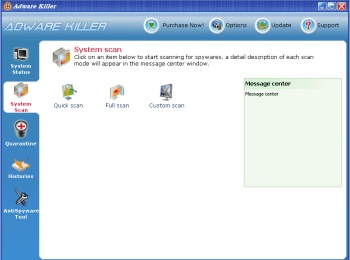 There is this free Spyware and Adware Detection & Removal Software that comes highly recommended. It’s called Adware Killer. Adware Killer detects a multitude of spyware, adware, Trojan horses, keyloggers, and trackware components, sources of irritation that many antivirus products do not deal with. There is this free Spyware and Adware Detection & Removal Software that comes highly recommended. It’s called Adware Killer. Adware Killer detects a multitude of spyware, adware, Trojan horses, keyloggers, and trackware components, sources of irritation that many antivirus products do not deal with.
Adware Killer is a really easy to use software that helps deal with almost all Spyware components out there today! And the user interface is really nice.
The fact that it also features BHO Manager, Startup Manager, and HostsFile Manager makes it a must have. I also love the fact that it can quarantine and restore removed items. In fact it gives you an option to ignore the list of items it displays. One other nice thing about adware killer is that it scans running processes (memory), Registry, Fixed, and removable drives.
Want to check it out? CLICK HERE!
Posted in Commercial, Developer, Information Management, Internet, Main, Security, Shareware, Utilities, Windows | 1 Comment »
|
|
|




